
Introduction
This manual provides comprehensive instructions for the installation, operation, and maintenance of your UJNIKM Tuya Smart 3D Face Door Lock, model 6068-S. Please read this manual thoroughly before installation and use to ensure proper functionality and security.
Product Overview
The UJNIKM Tuya Smart 3D Face Door Lock 6068-S is an advanced security solution offering multiple unlocking methods and smart monitoring capabilities. It integrates seamlessly with the Tuya Smart APP for enhanced control.
Key Features:
- Multiple Unlock Methods: 3D Face Recognition, Fingerprint, Password, IC Card, Mechanical Key, and Tuya APP.
- Integrated Camera Monitor: Provides visual verification and monitoring.
- 3D Structured Light Module: Ensures accurate and secure face recognition.
- Tuya Smart APP Integration: Remote unlock, temporary password generation, user management, and record query.
- Wide Door Compatibility: Suitable for wooden, stainless steel, bronze, double, and old-fashioned anti-theft doors.
- Door Thickness Requirement: 40-150 mm.

Figure 1: Front and rear view of the UJNIKM Tuya Smart 3D Face Door Lock 6068-S.

Figure 2: Visual representation of the various unlock methods available: 3D Face Recognition, Password, Key, Fingerprint, RFID Card, Combination, and Temporary Key.
Setup and Installation
Proper installation is crucial for the security and functionality of the lock. It is recommended to have a qualified professional perform the installation.
Door Preparation:
- Ensure your door thickness is between 40 mm and 150 mm.
- Verify the door frame and existing boreholes align with the lock's dimensions.

Figure 3: Detailed dimensions of the lock body and panel, including measurements for installation compatibility. The image shows measurements such as 90mm, 175mm, 68mm, 225mm, 240mm, 60mm, and 24mm.
General Installation Steps (Consult full installation guide for details):
- Install the mortise lock into the door edge.
- Mount the front and rear panels, ensuring cables are properly connected and routed.
- Secure the panels with screws.
- Install batteries and test basic functionality.
- Pair the lock with the Tuya Smart APP.
Operating Instructions
The UJNIKM Smart Door Lock offers multiple ways to unlock your door.
1. 3D Face Recognition:
- Enrollment: Follow the instructions in the Tuya Smart APP to enroll your face profile. Ensure good lighting conditions during enrollment.
- Unlocking: Approach the door. The lock's 3D structured light module will automatically sense and recognize your face. The door will unlock upon successful recognition.

Figure 4: Illustration of the 3D structured light module in action, projecting coded patterns for accurate face recognition, even in low light conditions.

Figure 5: A user approaching the door lock, demonstrating the auto-sensing feature where face recognition is completed without physical interaction with the lock.
2. Fingerprint Unlock:
- Enrollment: Register your fingerprints via the lock's interface or the Tuya Smart APP.
- Unlocking: Place your registered finger on the fingerprint sensor. The lock will unlock if the fingerprint is recognized.
3. Password Unlock:
- Setting Passwords: Create and manage permanent or temporary passwords through the lock's keypad or the Tuya Smart APP.
- Unlocking: Enter your registered password on the keypad, followed by the '#' key.
4. IC Card Unlock:
- Enrollment: Register compatible IC cards with the lock.
- Unlocking: Present the registered IC card to the card reader area on the lock.
5. Mechanical Key Unlock:
- Usage: In case of emergency or battery depletion, insert the mechanical key into the keyhole and turn to unlock. Keep mechanical keys in a secure location outside the property.
6. Tuya Smart APP Control:
- Remote Unlock: Open the Tuya Smart APP, select your lock, and initiate a remote unlock command. The lock will send a photo to the app for verification before unlocking.
- Temporary Passwords: Generate time-limited or single-use passwords for guests or service providers.
- User Management: Add, modify, or delete user profiles (face, fingerprint, password, IC card).
- Record Query: View a history of unlock events, including method and timestamp.

Figure 6: Demonstration of the Tuya Smart App's remote unlock feature, showing a request for remote unlocking and the option to agree or reject the action.
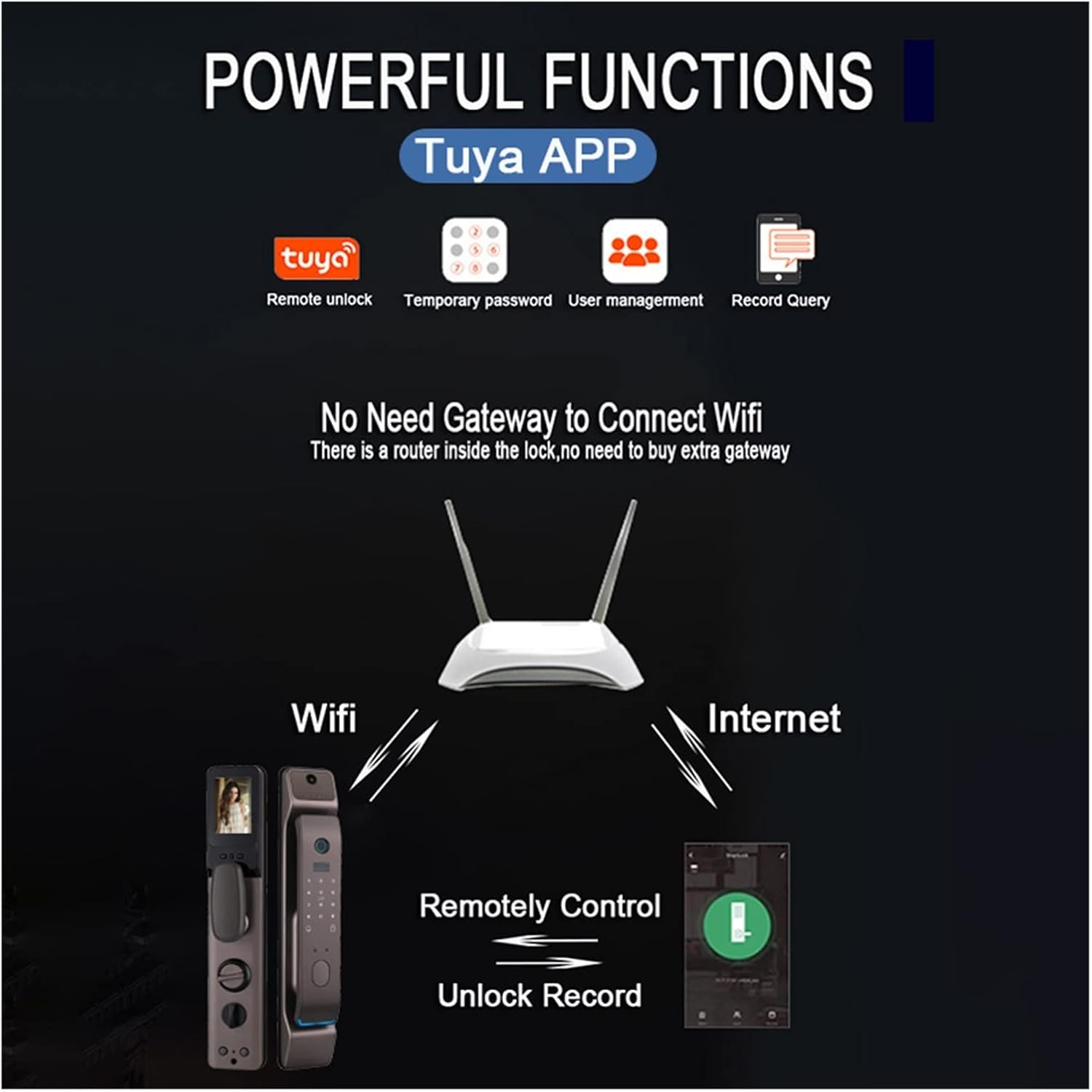
Figure 7: Overview of Tuya APP functions including remote unlock, temporary password management, user management, and record query. It also illustrates the direct Wi-Fi connection without needing an extra gateway.
Maintenance
Regular maintenance ensures the longevity and optimal performance of your smart door lock.
- Cleaning: Wipe the lock's surface with a soft, dry cloth. Avoid abrasive cleaners or solvents that may damage the finish or electronic components.
- Battery Replacement: Replace batteries promptly when the low battery indicator appears. Use high-quality alkaline batteries.
- Sensor Care: Keep the fingerprint sensor and face recognition module clean and free from dust or smudges.
- Software Updates: Periodically check the Tuya Smart APP for firmware updates for your lock to ensure the latest features and security enhancements.
Troubleshooting
If you encounter issues with your UJNIKM Smart Door Lock, refer to the following common solutions:
- Lock Not Responding:
- Check battery levels and replace if necessary.
- Ensure the lock is properly installed and all connections are secure.
- Face Recognition Failure:
- Ensure your face is clearly visible and not obstructed by hats, glasses, or masks.
- Clean the face recognition module.
- Re-enroll your face profile in the Tuya Smart APP.
- Fingerprint Not Recognized:
- Ensure your finger is clean and dry.
- Place your entire finger pad firmly on the sensor.
- Re-enroll your fingerprint if issues persist.
- APP Connectivity Issues:
- Ensure your Wi-Fi network is stable and the lock is within range.
- Restart your router and the lock.
- Verify the Tuya Smart APP is updated to the latest version.
- Mechanical Key Not Working:
- Ensure the key is fully inserted and turned correctly. Do not force the key.
For persistent issues, contact customer support or refer to the official UJNIKM website for further assistance.
Specifications
| Feature | Detail |
|---|---|
| Brand | UJNIKM |
| Model Name | 6068-S |
| Color | Gold (variant) |
| Unlock Methods | 3D Face, Fingerprint, Password, IC Card, Mechanical Key, APP |
| Door Thickness Requirement | 40-150 mm |
| Applicable Door Types | Wooden, Stainless Steel, Bronze, Double, Old-fashioned Anti-theft Doors |
| Item Weight | 50 Grams |
| Number of Pieces | 1 |
Warranty and Support
For warranty information and customer support, please refer to the documentation provided with your purchase or contact the seller directly. Keep your proof of purchase for warranty claims.
For additional resources and frequently asked questions, visit the official UJNIKM product support page (if available).