
Ufesa Nuuk+
Ufesa Air Cooler Nuuk+ Instruction Manual
Model: Nuuk+
Brand: Ufesa
1. Introduction
Thank you for choosing the Ufesa Air Cooler Nuuk+. This manual provides important information for the safe and efficient use of your appliance. Please read it thoroughly before operation and keep it for future reference.
Important Safety Instructions
- Always ensure the appliance is placed on a stable, level surface.
- Do not immerse the appliance, cord, or plug in water or other liquids.
- Unplug the appliance from the power outlet before cleaning, filling, or performing any maintenance.
- Keep out of reach of children and pets.
- Do not block the air inlets or outlets.
- Use only clean tap water in the water tank.
- Do not use the appliance if the power cord or plug is damaged.
- This appliance is for indoor residential use only.
2. Product Overview
The Ufesa Air Cooler Nuuk+ is designed to provide a comfortable environment through cooling, humidification, and air circulation. It features a user-friendly touch control panel and multiple operational modes.
Main Components
- Main Unit with Touch Control Panel
- 7-Liter Water Tank
- Washable Air Filter
- Air Outlet Louvers (with automatic horizontal oscillation)
- Carrying Handle
- Wheels for portability
- 2 Ice Packs (for enhanced cooling)
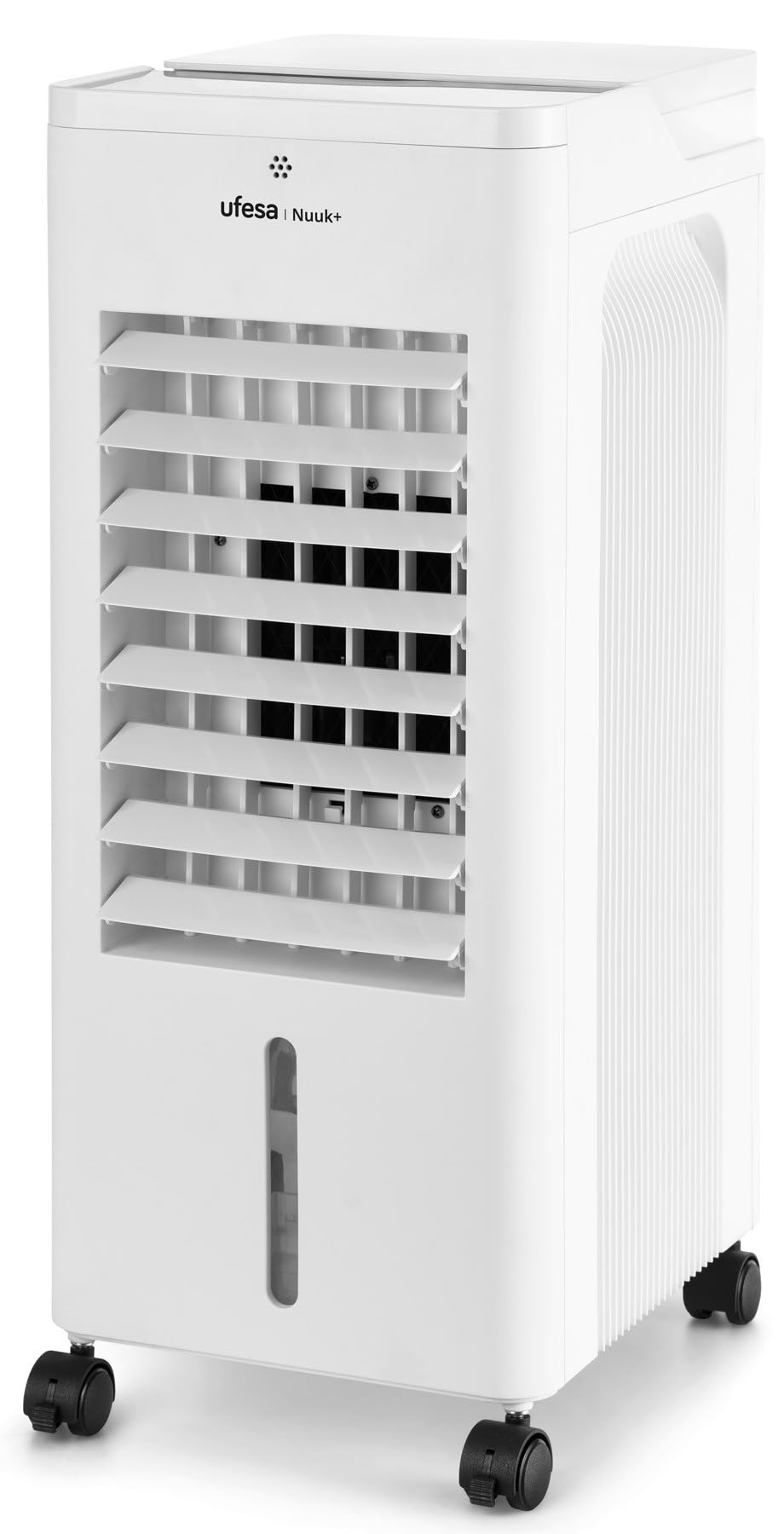
Figure 1: Front view of the Ufesa Air Cooler Nuuk+, showing the touch control panel and air outlet louvers.
3. Setup
3.1 Unpacking and Placement
- Carefully remove the air cooler from its packaging.
- Check for any damage during transit. If damaged, do not operate and contact customer support.
- Place the air cooler on a firm, level surface, ensuring there is at least 20 cm of clear space around the air inlets and outlets for proper airflow.
3.2 Filling the Water Tank
The Nuuk+ Air Cooler offers two convenient ways to fill the 7-liter water tank:
- Top Filling: Open the top cover of the appliance and pour clean tap water directly into the water tank opening.
- Tank Removal: Carefully pull out the water tank from the rear or bottom of the unit (refer to the diagram in the product overview for location). Fill the tank with clean tap water, then slide it back into place until it clicks securely.
Do not exceed the maximum fill line indicated on the water tank. Ensure the water tank is properly seated before operating the unit.
3.3 Using Ice Packs (Optional)
For enhanced cooling performance, you can use the two included ice packs:
- Place the ice packs in a freezer for several hours until completely frozen.
- Once frozen, place the ice packs directly into the water tank along with the water.
- The ice packs will help to lower the water temperature, resulting in cooler air output.
4. Operating Instructions
The Ufesa Air Cooler Nuuk+ features an intuitive touch control panel. Plug the appliance into a suitable power outlet before operation.
4.1 Control Panel Functions
The touch control panel allows you to manage all functions of the air cooler. An ambient temperature display is integrated into the panel.
- Power Button: Press to turn the unit ON or OFF.
- Speed Button: Press repeatedly to cycle through 3 fan speeds: Low, Medium, High.
- Mode Button: Press to select from 3 operating modes:
- Normal: Constant fan speed.
- Natural: Simulates a natural breeze with varying fan speeds.
- Night: Operates at a lower, quieter speed for undisturbed sleep.
- Timer Button: Press to set the operating timer from 1 to 12 hours. The unit will automatically turn off after the set time.
- Oscillation Button: Press to activate or deactivate the automatic horizontal oscillation of the air louvers, distributing air across a wider area.
- Ionization Button: Press to activate or deactivate the ionizer function, which helps to purify the air.
5. Maintenance
Regular maintenance ensures optimal performance and extends the lifespan of your Ufesa Air Cooler. Always unplug the unit before cleaning.
5.1 Cleaning the Air Filter
The air filter should be cleaned regularly, especially if the unit is used frequently or in dusty environments.
- Unplug the air cooler from the power outlet.
- Locate and remove the washable air filter (typically located at the rear of the unit).
- Rinse the filter under running water to remove dust and debris. For stubborn dirt, use a soft brush and mild detergent.
- Allow the filter to air dry completely before reinserting it into the unit. Do not use the unit without a dry filter.
5.2 Cleaning the Water Tank
To prevent mold and mildew growth, clean the water tank regularly.
- Unplug the air cooler.
- Remove the water tank and empty any remaining water.
- Clean the inside of the tank with a soft cloth and a mild detergent solution. Rinse thoroughly with clean water.
- Allow the tank to air dry completely before refilling and reinserting.
5.3 Exterior Cleaning
Wipe the exterior of the unit with a soft, damp cloth. Do not use abrasive cleaners or solvents.
6. Troubleshooting
If you encounter issues with your Ufesa Air Cooler, refer to the following common problems and solutions:
| Problem | Possible Cause | Solution |
|---|---|---|
| Unit does not turn on. | No power supply. Power button not pressed. | Check if the power cord is securely plugged into a working outlet. Press the power button firmly. |
| No cooling effect. | Water tank is empty. Ice packs not used or not frozen. Air filter is dirty. | Fill the water tank to the appropriate level. Freeze and add ice packs to the water tank. Clean the air filter. |
| Weak airflow. | Air filter is dirty. Air inlets/outlets are blocked. | Clean the air filter. Ensure no obstructions are blocking the air vents. |
| Unusual noise. | Unit not on a level surface. Water pump issue (if applicable). | Place the unit on a stable, level surface. If noise persists, contact customer support. |
If the problem persists after trying these solutions, please contact Ufesa customer support.
7. Specifications
| Brand | Ufesa |
| Model Name | Nuuk+ |
| Model Number | 93331 |
| Power | 65 Watts |
| Water Tank Capacity | 7 Liters |
| Number of Speeds | 3 |
| Operating Modes | Normal, Natural, Night |
| Control Type | Touch Panel |
| Dimensions (D x W x H) | 20 cm x 35 cm x 35 cm |
| Material | Plastic and Metal |
| Special Features | Portable, Ionizer, 12-hour Timer, Ambient Temperature Display, Automatic Horizontal Oscillation, Washable Air Filter |
| Included Components | 2 Ice Packs, Carrying Handle, Wheels |
8. Warranty and Support
For detailed warranty information, please refer to the warranty card included with your product or visit the official Ufesa website. For technical support, spare parts, or service inquiries, please contact Ufesa customer service through their official channels.
Website: www.ufesa.es
Related documentsNuuk+


Ask a question about this manual
Ask about setup, troubleshooting, compatibility, parts, safety, or missing instructions. Manuals+ will review the question and use this page’s manual context to help answer it.