Introduction
This manual provides essential information for the safe and efficient operation, assembly, and maintenance of your Voykuy Zero Gravity Power Recliner Chair LVC0001. Please read all instructions carefully before use to ensure proper functionality and longevity of your product.

Image: Voykuy Zero Gravity Power Recliner Chair in a living room setting.
Product Overview
The Voykuy Zero Gravity Power Recliner Chair LVC0001 is designed for ultimate comfort and relaxation. It features a zero-gravity recline function, multiple massage points, lumbar heating, a convenient phone holder, and USB charging ports. Crafted from durable bonded leather, this chair offers a blend of functionality and style for any living space.

Image: The recliner in an upright, non-reclined position, showcasing its design.
Setup and Assembly
Your Voykuy Zero Gravity Power Recliner Chair LVC0001 comes in two packages and requires minimal assembly. Follow the steps below for a quick and easy setup.
Assembly Video Guide
Video: This video provides a visual guide for assembling a lift recliner, demonstrating the process of connecting the chair components and wiring.
Step-by-Step Assembly
- Unpack Components: Carefully remove all parts from the packaging. Ensure all components listed in the packing list are present.
- Attach Backrest: Align the backrest with the base of the chair and slide it down until it locks securely into place.
- Connect Wiring: Locate the power cables and connectors under the chair. Connect all corresponding wires for the power recline, massage, and heating functions. Ensure connections are firm.
- Connect Power Adapter: Plug the power adapter into the designated port on the chair and then into a wall outlet.
- Secure Loose Wires: Use the provided cable ties or clips to secure any loose wiring under the chair to prevent entanglement.
Operating Instructions
Your recliner is equipped with various features for enhanced comfort. Use the remote control to operate these functions.
Operating Features Video Guide
Video: This video demonstrates various operating features of a dual motor recliner, including recline positions, footrest extension, detachable armrests, power lift, cup holder, lumbar support, USB/Type-C charging, vibrating massage, lumbar heating, extra storage, sleep mode, and memory functions.
Recline and Lift Functions
- Power Recline: Use the 'UP' and 'DOWN' buttons on the remote to smoothly adjust the chair to your desired recline position, up to 139 degrees for a zero-gravity sensation.
- Power Lift: For easy standing, press the 'UP' button to gently lift the chair, assisting you to a standing position.
- Extended Footrest: The footrest extends automatically as you recline, providing full leg support.
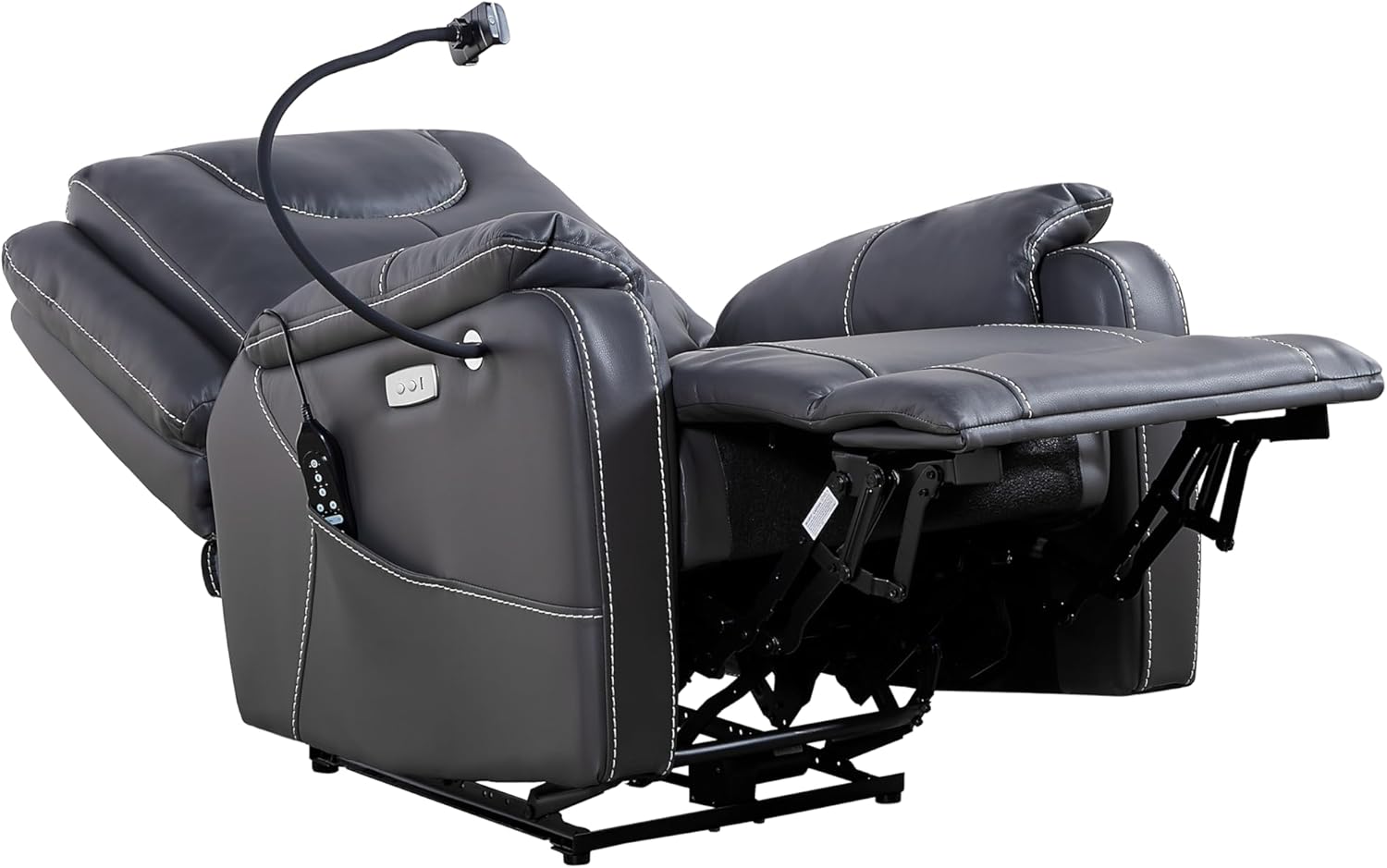
Image: The recliner fully extended in a reclined position, showing the footrest.
Massage and Heating Functions
- Vibrating Massage: The chair features 8 vibrating massage points. Use the remote control to select different massage modes and intensities.
- Lumbar Heating: Activate the lumbar heating function for soothing warmth. The massage and heating functions can be timed to automatically turn off after 15, 30, or 60 minutes.
Video: This video showcases the massage and heating features of a lift recliner, highlighting the ease of use and comfort provided.

Image: The remote control for the recliner's massage and recline functions.

Image: Close-up of the headrest and lumbar support area of the recliner.
Convenience Features
- USB Charging: Use the built-in USB ports to conveniently charge your electronic devices.
- Phone Holder: An adjustable phone holder is included for hands-free entertainment.
- Side Pockets: Store remote controls, magazines, or other essentials in the side pockets.

Image: Close-up of the USB charging ports located on the side of the recliner.

Image: Close-up of the adjustable phone holder attached to the recliner.
Maintenance
To maintain the appearance and functionality of your Voykuy Zero Gravity Power Recliner Chair LVC0001, follow these simple care instructions:
- Cleaning: Wipe clean with a soft, damp cloth. Avoid harsh chemicals or abrasive cleaners.
- Spills: Blot spills immediately with a clean, dry cloth.
- Regular Inspection: Periodically check all connections and moving parts to ensure they are secure and functioning correctly.
Troubleshooting
If you encounter any issues with your recliner, please refer to the following common troubleshooting tips:
- Chair Not Reclining: Ensure the power adapter is securely plugged into both the chair and a working wall outlet. Check that all internal wiring connections are firm.
- Massage/Heat Not Working: Verify that the remote control is properly connected and that the power is on. Check the timer settings for massage and heat functions.
- Unusual Noises: Inspect the mechanism under the chair for any obstructions. Ensure all bolts and screws are tightened.
If the problem persists, please contact customer support for further assistance.
Specifications
| Feature | Detail |
|---|---|
| Brand | Voykuy |
| Model Name | Recliner Chairs (LVC0001) |
| Color | Black |
| Product Dimensions | 30.31"D x 34.25"W x 41.34"H |
| Material | Leather |
| Maximum Weight Recommendation | 330 Pounds |
| Special Feature | Reclining, Swivel, Massage, Lumbar Heating, USB Port, Phone Holder |
| Seat Height | 19.69 Inches |
| Seat Depth | 21.3 inches |
| Item Weight | 97 pounds |

Image: Detailed dimensions of the Voykuy Zero Gravity Power Recliner Chair.
Warranty and Support
For information regarding product warranty, please refer to the documentation included with your purchase or contact Voykuy customer support. Our dedicated customer support team is available to assist with any questions or concerns you may have regarding your recliner.
For assistance, please visit the Voykuy Store on Amazon.