
Product Overview
The ANENG 613 Digital Multimeter is a high-performance, auto-ranging True RMS multimeter designed for accurate measurements across various electrical parameters. Its large LCD display ensures clear readability, and its compact design makes it highly portable. Unique features include a perpetual calendar, alarm clock, and real-time temperature and humidity monitoring, making it a versatile tool for both professional and DIY applications.

Figure 1: ANENG 613 Digital Multimeter and its comprehensive accessory kit.
Setup
Battery Installation
The ANENG 613 multimeter requires two AAA batteries for operation. To install, remove the back battery compartment cover, insert the batteries according to the polarity markings, and replace the cover securely.

Figure 2: Proper battery installation for the multimeter.
Initial Setup (Date, Time, Units)
After battery installation, press the buttons on the back of the device to set the correct date and time. The multimeter also allows for unit adjustments (e.g., Celsius/Fahrenheit for temperature).
Video 1: Demonstrates battery installation and initial date/time setup.
Operating Modes
The ANENG 613 features an auto-ranging mode that automatically selects the correct measurement range for most tasks. You can also manually select specific modes as needed.

Figure 3: Overview of the multimeter's measurement capabilities.
Voltage Measurement (AC/DC)
Connect the test leads to the appropriate input jacks (red to VΩHz, black to COM). The multimeter will automatically detect AC or DC voltage. For household AC voltage, the general reading is around 220V.

Figure 4: Example of AC voltage measurement.
Current Measurement (AC/DC)
To measure current, switch to the corresponding gear and connect the test leads in series with the circuit as shown in the video. Ensure correct polarity for DC current.
Video 2: Detailed demonstration of various measurement functions including current, voltage, resistance, and more.
Resistance Measurement
Switch to the resistance mode. Connect the test leads across the component to measure its resistance. The stylus can contact both ends of the resistance.
Diode and Continuity Test
For diode testing, connect the test leads across the diode. For continuity, a beep indicates a normal and unobstructed circuit, while a silent sound indicates damage or an open circuit.
Capacitance Measurement
Before testing capacitors, ensure they are fully discharged to avoid damage to the multimeter. Connect the test leads across the capacitor terminals.
Frequency Measurement
Switch to the frequency mode and connect the test leads to the circuit where you want to measure frequency.
Additional Features
Perpetual Calendar and Alarm Clock
The multimeter includes a perpetual calendar and an alarm clock function. You can set the alarm time, and a reminder will be issued when the time is up.
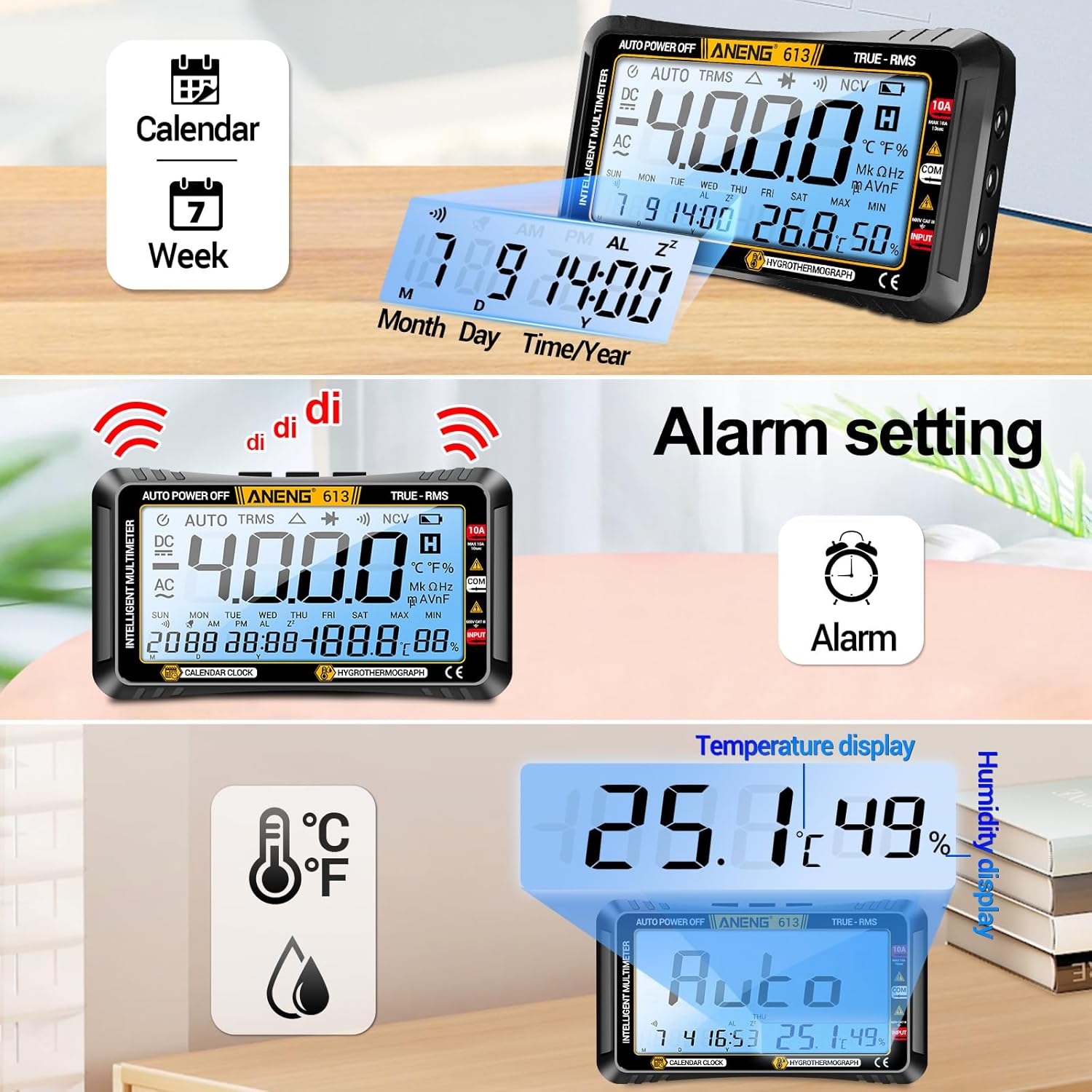
Figure 5: Calendar, alarm, temperature, and humidity display.
Temperature and Humidity Display
The device provides real-time display of temperature and humidity, allowing you to monitor environmental changes. This is particularly useful for sensitive electronic work or maintaining optimal conditions in a workspace.
Maintenance
Battery Replacement
When the low battery indicator appears on the display, replace the AAA batteries promptly to ensure accurate readings and continuous operation.
Cleaning and Storage
Clean the multimeter with a soft, dry cloth. Avoid using abrasive cleaners or solvents. Store the device in its provided storage bag in a cool, dry place away from direct sunlight and extreme temperatures.
Troubleshooting
Power Button Not Responding
If the power button does not respond, first check if the batteries are correctly installed and have sufficient charge. Replace batteries if necessary. If the issue persists, contact customer support.
Inaccurate Readings
Ensure test leads are properly connected and not damaged. Verify that the correct measurement mode is selected. If using auto-ranging, try manually selecting a range. Low battery can also affect accuracy.
Specifications
| Feature | Specification |
|---|---|
| Product Dimensions | 1.97 x 1.97 x 0.79 inches |
| Item Model Number | 613 |
| Weight | 0.02 ounces (0.6 Grams) |
| Brand | ANENG |
| Power Source | Battery Powered (2x AAA) |
| Display Type | Large LCD with Backlight |
| Counts | 4000 |
| True RMS | Yes |
| Special Features | Perpetual Calendar, Alarm Clock, Temperature, Humidity |
What's in the Box?
- 1x ANENG 613 Digital Multimeter Tester
- 1x Electrical Tester Kit (4x connection socket, 2x PVC cable, 2x copper needle, 2x U-shaped insert, 2x meter pen, 2x alligator clips)
- 1x Multimeter Test Lead
- 2x 1.5V AAA Batteries
- 1x Instruction Manual
- 1x Storage Bag
Warranty and Support
ANENG provides service and technical support for this product. For any issues or inquiries, please refer to the contact information provided in the included instruction manual or visit the official ANENG website. The product comes with a standard 30-day refund/replacement return policy.


