
1. Introduction
This manual provides comprehensive instructions for the assembly, operation, and maintenance of your Anman Aluminum Profile Racing Simulator Cockpit with Triple Monitor Mount. Please read this manual thoroughly before assembly and use to ensure proper function and safety.
Product Model: Aluminum Profile Sim Racing Cockpit
Brand: Anman
2. Safety Information
- Ensure all components are securely fastened before use.
- Do not exceed the maximum weight capacity of 500 lbs (200 kg).
- Keep small parts away from children to prevent choking hazards.
- Use appropriate tools for assembly and avoid over-tightening bolts.
- Regularly inspect the cockpit for any loose connections or damage.
3. Package Contents
Verify that all components are present before beginning assembly. Refer to the included parts list for detailed identification.

Image 3.1: Complete Anman Aluminum Profile Racing Simulator Cockpit with Triple Monitor Mount. This image shows the fully assembled cockpit with a racing wheel, pedals, shifter, and three monitors installed.
4. Setup and Assembly
Assembly requires careful attention to detail. It is recommended to have a second person assist with certain steps, especially when handling larger components or monitors.
4.1. Frame Assembly
The cockpit utilizes a 4080 aluminum profile frame for stability. Follow the included hardware instructions to connect the main frame sections. Ensure all bolts are tightened securely but do not overtighten.
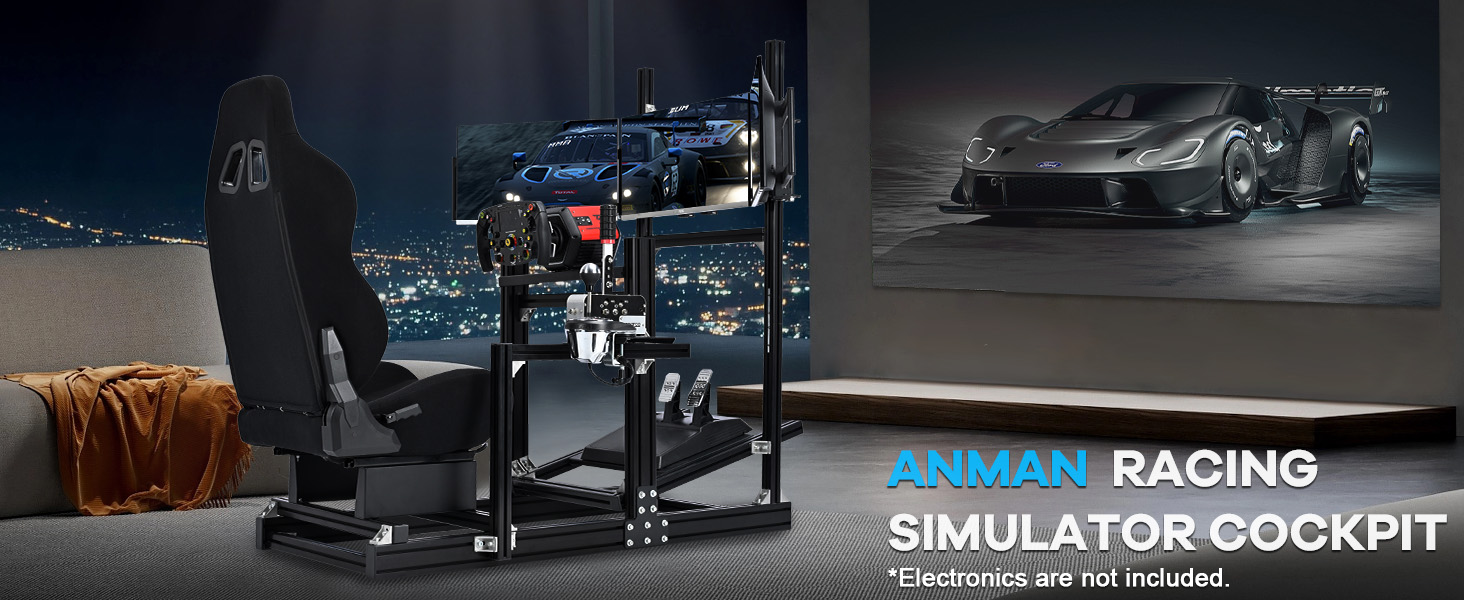
Image 4.1: Illustration of the robust 4080 aluminum profile frame, highlighting its stable construction compared to other designs.
4.2. Seat Installation
Install the ergonomic black seat onto the designated rails. The seat features a double track design for convenient adjustment. Ensure the seat is firmly attached to the frame.

Image 4.2: Close-up of the ergonomic racing seat, showing its design and adjustable backrest.
4.3. Monitor Mount Assembly
The triple monitor stand supports displays from 27 to 32 inches. Attach the monitor arms to the vertical profiles. The VESA patterns supported include 400x200mm, 200x200mm, 200x150mm, 200x100mm, 150x150mm, 100x100mm, and 75x75mm. Adjust the angle and height for optimal viewing.

Image 4.3: The triple monitor mount system, illustrating its adjustability and compatibility with various VESA patterns.
4.4. Peripheral Mounting (Steering Wheel, Pedals, Shifter)
Mount your steering wheel, pedals, and shifter to their respective platforms. The cockpit is compatible with most popular brands, including Logitech Pro Racing Wheel G29 G920 G923, Thrustmaster T500 T818 T80 T128 T300, Fanatec CSL-DD GT-DD-PRO, Moza R5 R9 R12 R16, PXN V9. Ensure all peripherals are securely fastened.

Image 4.4: The racing simulator cockpit with various racing peripherals (steering wheel, pedals, shifter) mounted, demonstrating wide compatibility.
Video 4.1: This video demonstrates the mounting animation for the Racing Simulator Cockpit, showing how various components are assembled.
5. Operating Instructions
Once assembled, the Anman Racing Simulator Cockpit is ready for use with your preferred racing peripherals and gaming system.
5.1. Adjusting the Cockpit
The cockpit offers multiple adjustment points to customize your racing experience:
- Seat Adjustment: The ergonomic seat can be adjusted fore and aft, and the backrest angle can be set between 90° and 180°.
- Steering Wheel Angle: The steering wheel platform's angle can be adjusted up and down.
- Pedal Platform: The pedal platform's angle and position can be adjusted to suit your preference.
- Shifter/Handbrake Mount: The gear selector panel can be adjusted up, down, left, right, forward, and backward.
- Monitor Position: The triple monitor stand allows for angle and height adjustments to optimize your field of view.
Video 5.1: This video demonstrates the various functional adjustments available on the Anman Aluminum Profile Cockpit, including seat, pedal, and steering wheel positions.

Image 5.1: An illustration showing the personalized adjustment capabilities of the cockpit, including U-shaped latch fixing for infinite front and rear distance adjustment for the seat and pedal platform.
Video 5.2: This video provides an overview of the Anman Racing Simulator Cockpit Stand, highlighting its features and stability.
6. Maintenance
- Cleaning: Wipe down aluminum profiles and seat fabric with a damp cloth. Avoid abrasive cleaners.
- Fasteners: Periodically check all bolts and screws for tightness. Re-tighten as necessary to maintain stability.
- Moving Parts: Ensure all adjustable mechanisms move smoothly. Lubricate if needed with a silicone-based spray.
7. Troubleshooting
| Problem | Possible Cause | Solution |
|---|---|---|
| Cockpit feels unstable or wobbly. | Loose bolts or uneven assembly. | Check and tighten all connection bolts. Ensure the cockpit is on a level surface. |
| Peripherals (wheel, pedals) are not secure. | Mounting bolts are loose or incorrect mounting method. | Ensure peripherals are correctly aligned and all mounting hardware is tightened. Refer to peripheral manufacturer's instructions for specific mounting requirements. |
| Monitor arms are not level or monitors sag. | Loose VESA mount screws or incorrect arm adjustment. | Re-tighten VESA mount screws. Adjust the monitor arm angles and height carefully to achieve desired alignment. |
8. Specifications
- Model Number: Aluminum Profile Sim Racing Cockpit
- Material: 4080 Aluminum Profile Frame
- Maximum Weight Capacity: 500 lbs (200 kg)
- Product Dimensions: 60 x 67 x 54.3 inches (Length x Width x Height)
- Item Weight: 39.6 pounds
- Monitor Compatibility: Triple monitors, 27-32 inches each. Single monitor, 24-65 inches.
- VESA Patterns Supported: 400x200mm, 200x200mm, 200x150mm, 200x100mm, 150x150mm, 100x100mm, 75x75mm
- Peripheral Compatibility: Logitech Pro Racing Wheel G29 G920 G923, Thrustmaster T500 T818 T80 T128 T300, Fanatec CSL-DD GT-DD-PRO, Moza R5 R9 R12 R16, PXN V9, and similar.

Image 8.1: Diagram illustrating the overall dimensions of the Anman Racing Sim Cockpit (Length: 53.5in, Width: 22.8in, Height: 53.4in).
9. Warranty and Support
For warranty information, technical support, or replacement parts, please contact Anman customer service through the retailer where the product was purchased or visit the official Anman website.
Manufacturer: Anman
Date First Available: October 30, 2024
Consider purchasing an extended protection plan for additional coverage. Options may include a 3-Year Protection Plan or a Complete Protect plan covering multiple purchases.