
Introduction
This manual provides comprehensive instructions for the assembly, operation, and maintenance of your FL FASHION LEADER ESD Electric Height Adjustable Laptop Desk. Please read this manual thoroughly before assembly and use to ensure safe and efficient operation. Keep this manual for future reference.
Safety Information
- Weight Limit: Do not exceed the maximum weight limit of 176 lbs (80 kg) as this could cause instability or damage to the table.
- Clearance: Ensure there are no obstructions above or below the desk during height adjustment to prevent damage or injury.
- Children and Pets: Keep children and pets away from the desk during operation.
- Power: Use only the provided power adapter. Disconnect power before cleaning or maintenance.
- Stability: Ensure all screws are tightened securely before use. Periodically check for loose connections.
Package Contents
Please verify that all components are present before beginning assembly. If any parts are missing or damaged, please contact customer support.
- Desk Top (MDF with Bamboo finish)
- Desk Legs (Steel frame)
- Control Panel
- Power Adapter
- Assembly Hardware (screws, bolts, washers)
- Assembly Tools (e.g., Allen wrench)
- User Manual (this document)

Image: All components included in the package for the FL FASHION LEADER ESD Electric Height Adjustable Laptop Desk.
Setup and Assembly
Assembly is designed to be straightforward and typically takes 5-10 minutes. Follow these steps carefully:
- Unpack Components: Carefully remove all parts from the packaging and lay them out on a clean, soft surface to prevent scratches.
- Attach Desk Legs: Secure the steel desk legs to the underside of the desk top using the provided hardware. Ensure all screws are finger-tight before fully tightening.
- Connect Control Panel: Mount the control panel to the designated area on the underside of the desk top. Connect the control panel cable to the motor.
- Connect Power Adapter: Plug the power adapter into the desk's control box, then plug the adapter into a wall outlet.
- Final Tightening: Once all components are in place, fully tighten all screws with the provided tools.
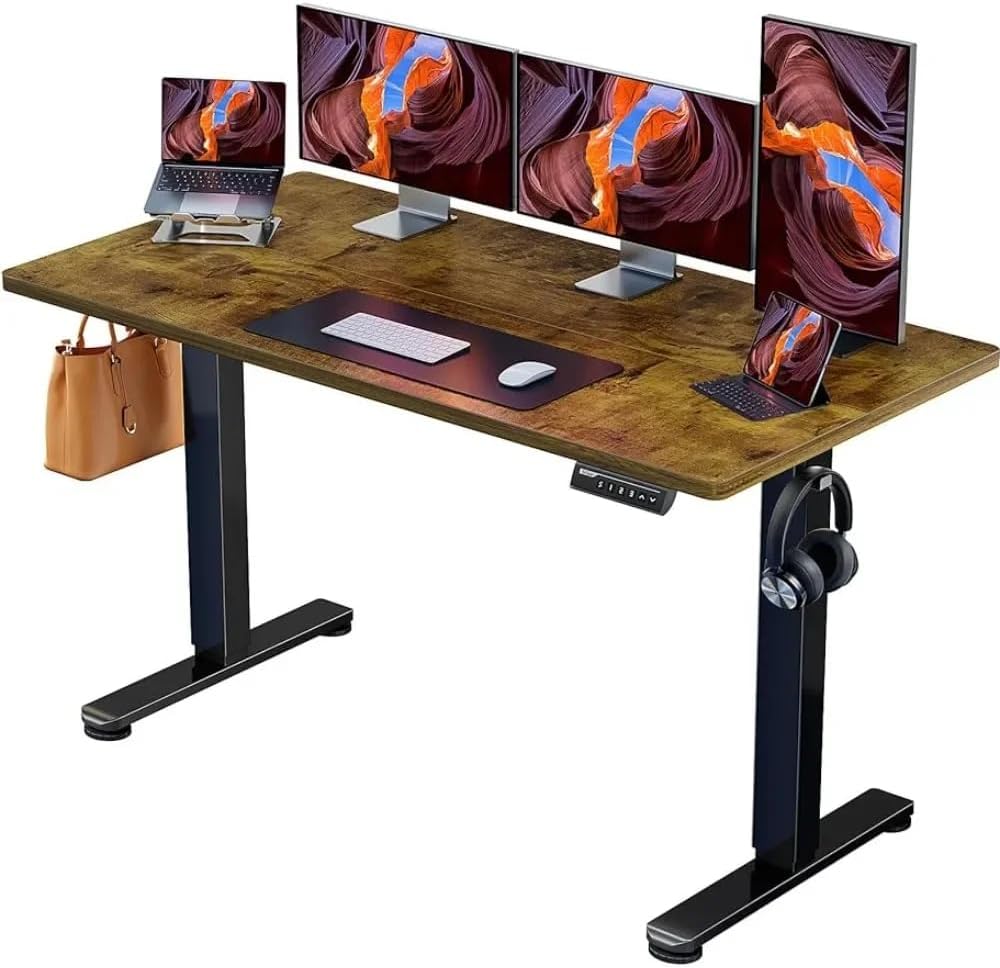
Image: The FL FASHION LEADER ESD Electric Height Adjustable Laptop Desk fully assembled and ready for use.
Image: Diagram showing the dimensions of the desk: 120 cm (width) x 60 cm (depth), with adjustable height from 72 cm to 118 cm.
Operating Instructions
Your electric height adjustable desk allows for smooth transitions between sitting and standing positions.
Height Adjustment
- Raise Desk: Press and hold the UP arrow button on the control panel to raise the desk. Release the button when the desired height is reached.
- Lower Desk: Press and hold the DOWN arrow button on the control panel to lower the desk. Release the button when the desired height is reached.
Memory Presets
The control panel features memory preset buttons (S1, S2, S3). To set a preset:
- Adjust the desk to your desired height.
- Press the "S" button, then press the desired number button (e.g., "1") within a few seconds. The display will confirm the setting.
- To recall a preset height, simply press the corresponding number button.

Image: Close-up of the desk's control panel, showing up/down arrows and memory preset buttons (S1, S2, S3).
Maintenance
- Cleaning: Wipe the desk surface with a soft, damp cloth. Avoid harsh chemicals or abrasive cleaners.
- Inspection: Periodically check all screws and connections to ensure they remain tight.
- Cable Management: Ensure power cables and other cords are neatly managed to prevent interference with the desk's movement.
Troubleshooting
Desk Not Moving or Displaying Error Code (e.g., ASR E-1)
If the desk is not responding or displays an error code, such as "ASR E-1", perform a reset:
- Disconnect the power cable from the wall outlet for at least 30 seconds.
- Reconnect the power cable.
- Press and hold both the UP and DOWN arrow buttons simultaneously. Continue holding until the desk moves to its lowest position, then slightly rises, and the display resets to show the current height. This process recalibrates the desk's height sensors.
If the issue persists after performing the reset, please contact customer support.
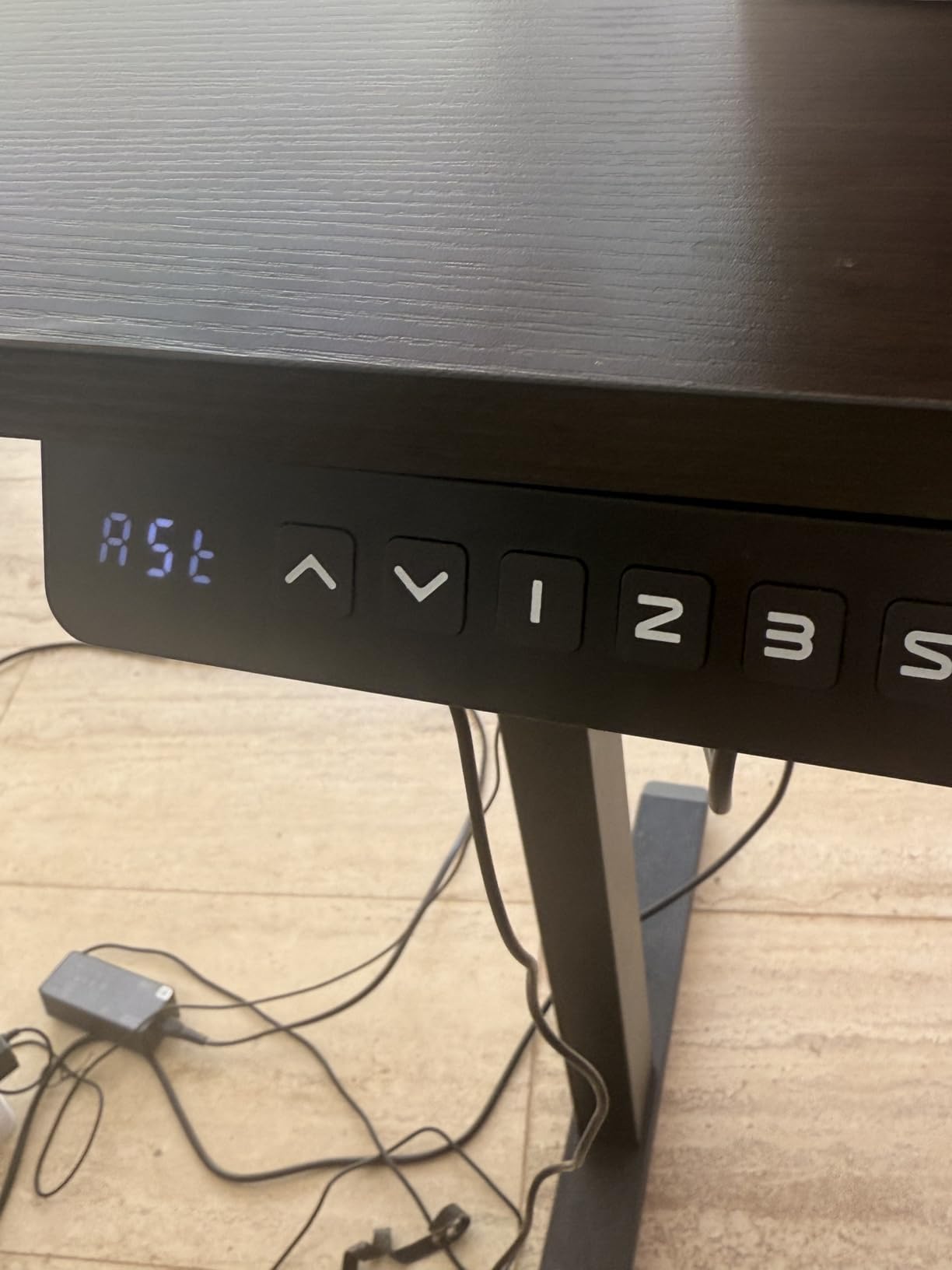
Image: Example of a desk control panel displaying an error code, which can often be resolved by following the reset procedure.
Specifications
| Feature | Detail |
|---|---|
| Brand | FL FASHION LEADER |
| Model Number | ESD |
| Desk Design | Standing Desk |
| Product Dimensions (D x W x H) | 47.24" x 23.62" x 47.24" (120cm x 60cm x 120cm) |
| Minimum Height | 28 Inches (72 cm) |
| Maximum Height | 46.4 Inches (118 cm) |
| Top Material Type | Engineered Wood (MDF with Bamboo finish) |
| Base Material | Steel |
| Lifting Mechanism | Electric |
| Item Weight | 22.85 Kilograms (approx. 50.38 lbs) |
| Maximum Load Capacity | 176 lbs (80 kg) |
| Color | Dark Brown |
Image: Visual representation of the desk's robust design, capable of supporting up to 176 lbs (80 kg).
Image: Illustration highlighting the desk's reliable electric lift mechanism, tested for over 50,000 full-load elevations.
Image: The desk demonstrating maximum stability with its robust, aerospace-grade frame and column connectors.
Warranty Information
This FL FASHION LEADER product comes with a limited warranty. Please refer to your purchase documentation or contact customer support for specific terms and conditions regarding warranty coverage and duration.
Customer Support
For any questions, assistance with assembly, missing parts, or troubleshooting, please contact FL FASHION LEADER customer support through your retailer or the manufacturer's official channels. Please have your model number (ESD) and purchase information ready.
We are committed to providing you with a satisfactory experience.


