
1. Introduction
The SG Pulse is a precision shooting assistant designed to enhance accuracy and training efficiency. It integrates multiple functions into a compact device, providing real-time feedback and data logging capabilities through a dedicated mobile application. This manual provides detailed instructions for the setup, operation, and maintenance of your SG Pulse device.

Figure 1: SG Pulse Precision Shooting Assistant with M-LOK mount.
Key Features:
- Electronic Level: Provides real-time anti-cant feedback to ensure a perfectly level rifle, eliminating horizontal shot drift. A bright LED indicator is visible in your peripheral vision.
- Stability Mode: Indicates your Minute of Angle (MOA) stability, helping you identify the optimal moment to take a shot. MOA data can be monitored on the device or reviewed in the Drills app.
- Barrel Angle Indicator: Displays the vertical angle of your rifle, crucial for calculating the Cosine Factor and making accurate corrections for uphill or downhill shots.
- Transition Time Tracking: Automatically senses and records the time delta between shots, allowing for analysis of movement and improvement of shooting speed within the Drills app.
- Muzzle Path Analysis: Tracks and visualizes the muzzle movement during a shot within the companion app, aiding in the analysis of rifle stability and technique.
- Bluetooth and Companion App ("Drills"): Connects wirelessly to the free "Drills" training app, enabling real-time data overlay on training videos, performance recording, and detailed analysis.
- Durable Construction: Features a water-resistant aluminum housing and offers up to 50 hours of operation on a single charge.

Figure 2: Overview of SG Pulse's 5-in-1 shooting assistant capabilities.
2. Setup
2.1 Mounting the SG Pulse
The SG Pulse is designed for easy attachment to your rifle. Ensure the mounting surface is clean and free of debris before installation.
- Identify the appropriate mounting point on your rifle (e.g., M-LOK slot or Picatinny rail).
- Align the SG Pulse mount with the rail/slot.
- Secure the mount using the provided hardware. Tighten screws firmly but do not overtighten to avoid damage.

Figure 3: SG Pulse mounted on a rifle, showing its compact profile.
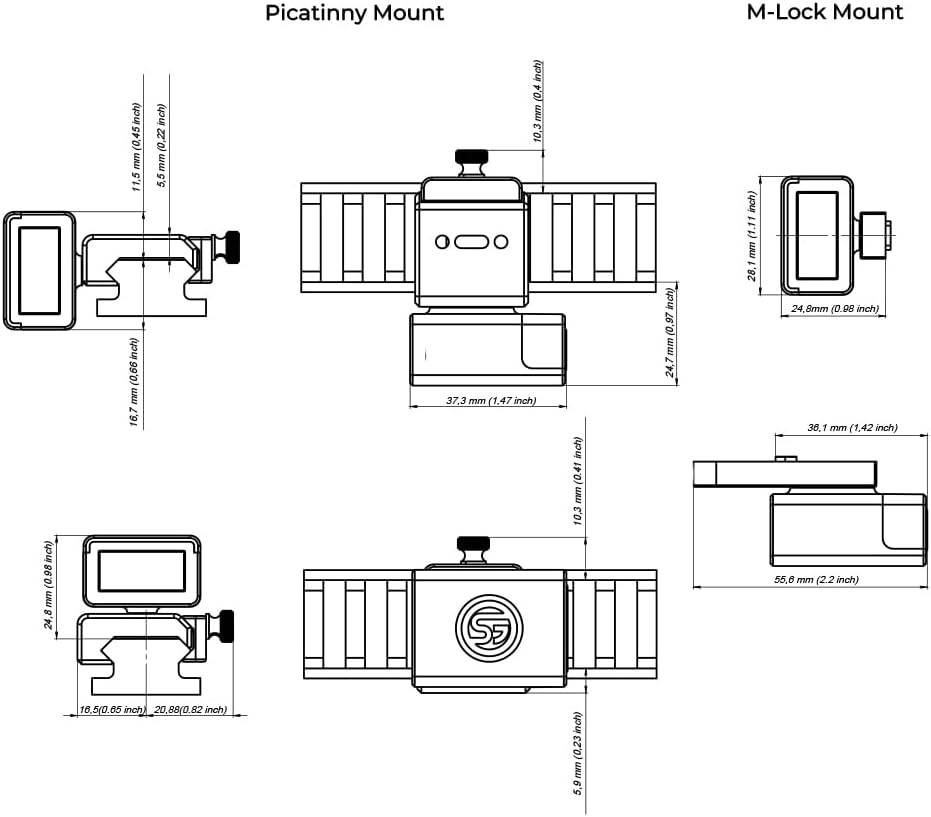
Figure 4: Detailed dimensions for both Picatinny and M-LOK compatible mounts.
2.2 Initial Charging and Power On
Before first use, fully charge your SG Pulse device. The device features a long-lasting battery, providing up to 50 hours of operation on a single charge.
- Connect the charging cable to the SG Pulse and a compatible USB power source.
- The device's LED indicator will show charging status (refer to device manual for specific LED behaviors).
- Once fully charged, disconnect the cable.
- To power on, press and hold the power button until the LED illuminates.
2.3 Connecting to the Drills Mobile App
The SG Pulse integrates seamlessly with the free "Drills" training app, available for iOS and Android devices. This app unlocks advanced features and data analysis.
- Download and install the "Drills" app from your device's app store.
- Ensure Bluetooth is enabled on your mobile device.
- Open the Drills app and follow the on-screen prompts to pair with your SG Pulse device.
- Once connected, the app will display real-time data from your SG Pulse.

Figure 5: The Drills app interface, demonstrating real-time data monitoring and device calibration.
3. Operation
3.1 Electronic Level (Anti-Cant)
The electronic level provides immediate feedback on your rifle's horizontal alignment. This is critical for preventing cant errors that cause shots to drift sideways.
- When the rifle is perfectly level, the LED on the SG Pulse will illuminate green.
- If the rifle is canted, the LED will change color (e.g., red or blue) to indicate the direction and degree of cant. Adjust your rifle until the green light appears.
- The bright LED is designed to be visible in your peripheral vision while looking through your scope, allowing for quick adjustments without breaking your sight picture.

Figure 6: The SG Pulse LED indicator visible in peripheral vision while aiming through a scope.

Figure 7: Visual representation of how improper alignment leads to cant errors and how the digital level ensures a perfectly leveled rifle.
3.2 Stability Mode (MOA Indicator)
Stability Mode helps you determine the steadiest moment to take a shot by indicating your Minute of Angle (MOA) stability. This mode measures minute vibrations in your rifle.
- The device will signal (e.g., change LED color or display a specific pattern) when you have achieved sufficient stability for a shot.
- Monitor your MOA readings directly on the device or within the Drills app for detailed analysis.
- Switch between Level and Stability mode directly on the device with a push of a button.

Figure 8: Stability mode indicating MOA, signaling when the rifle is fully stabilized for a shot.
3.3 Barrel Angle Indicator
The Barrel Angle Indicator displays the vertical angle of your rifle, which is essential for calculating the Cosine Factor. This factor is used to correct for bullet drop when shooting uphill or downhill, ensuring your shots land accurately.
- The current barrel angle is displayed on the device and can be monitored in real-time within the Drills app.
- Use this information in conjunction with your ballistic calculator to make precise elevation adjustments.

Figure 9: Monitoring barrel angle in the Drills app and its application in Cosine Factor calculations for sloped shots.
3.4 Transition Time and Muzzle Path Tracking
The SG Pulse automatically senses and records shot data, including the time between shots (transition time) and the movement of the muzzle during a shot (muzzle path). This data is invaluable for performance analysis.
- Transition Time: Review shot deltas in the Drills app to analyze your movements and identify opportunities to increase shooting speed and efficiency.
- Muzzle Path: The Drills app visualizes the muzzle's movement as a line during a shot. Analyze this to improve rifle stability, shooting accuracy, and overall technique.
- Connect SG Pulse and an SG Timer (if applicable) to the Drills app to store all shot data in one centralized location.

Figure 10: SG Pulse records shot deltas for performance analysis in the Drills app.

Figure 11: Muzzle path tracking provides visual feedback on rifle stability and movement during a shot.
3.5 Calibration and Advanced App Features
For optimal accuracy, manual calibration of the SG Pulse is recommended. The Drills app also offers a comprehensive suite of features for performance tracking and customization.
- Manual Calibration: Perform calibration through the Drills app to ensure correct level indication in all conditions. Electronic sensors allow the SG Pulse to function accurately in any orientation or angle.
- Shoot Smart with Drills App: The Drills Training Mobile app is specifically designed for SG devices. It allows you to log, analyze, and share your progress, providing access to advanced features.
- Advanced Interface: The app provides real-time readouts of rifle angles, MOA, muzzle movement, and split times. Customize SG Pulse settings directly from the app.
- Ultimate Performance Tracking: Capture training videos with all rifle data overlaid in real-time. Generate comprehensive performance reports to identify areas for improvement.
- Training Calendar: All your data is saved in an interactive training calendar, helping you structure and track your progress over time.
- Next Gen PRS Experience: Connect SG Pulse and SG Timer (sold separately) to the Drills app for actual shot times and a complete PRS stage analysis.

Figure 12: Manual calibration ensures accuracy, while bright LEDs provide instant feedback without requiring you to look away from the scope.

Figure 13: The Drills Training Mobile app provides a comprehensive platform for logging, analyzing, and sharing your shooting progress.
4. Maintenance
4.1 Cleaning
To ensure the longevity and proper function of your SG Pulse, regular cleaning is recommended.
- Use a soft, dry cloth to wipe down the exterior of the device.
- For stubborn dirt, a slightly damp cloth with mild soap can be used, followed by a dry wipe.
- Do not use abrasive cleaners, solvents, or harsh chemicals, as these can damage the device's finish or internal components.
- Ensure all ports are dry before charging.
4.2 Charging and Battery Care
The SG Pulse is equipped with a rechargeable battery designed for extended use.
- Charge the device using the provided USB cable and a standard USB power adapter.
- Avoid fully depleting the battery frequently, as this can reduce its overall lifespan.
- If storing the device for an extended period, charge it to approximately 50% capacity and store in a cool, dry place. Recharge every few months to prevent deep discharge.
4.3 Water Resistance
The SG Pulse features a water-resistant aluminum housing. While it can withstand splashes and light rain, it is not designed for submersion.
- Do not submerge the device in water.
- If the device gets wet, wipe it dry immediately.
- Ensure the charging port cover (if applicable) is securely closed when not charging to maintain water resistance.
5. Troubleshooting
This section addresses common issues you might encounter with your SG Pulse. If you experience problems not covered here, please contact customer support.
5.1 Device Not Powering On
- Battery Depleted: Connect the device to a charger and allow it to charge for at least 30 minutes before attempting to power on again.
- Power Button Issue: Ensure you are pressing and holding the power button for the required duration (typically 2-3 seconds).
5.2 Cannot Connect to Drills App
- Bluetooth Off: Verify that Bluetooth is enabled on your mobile device.
- Device Not Discoverable: Ensure your SG Pulse is powered on and in pairing mode (refer to device's LED indicators for pairing status).
- App Permissions: Check if the Drills app has necessary Bluetooth permissions enabled in your phone's settings.
- Interference: Move away from other electronic devices that might cause Bluetooth interference.
- App/Device Restart: Try closing and reopening the Drills app, or power cycling your SG Pulse device.
5.3 Inaccurate Readings / Calibration Issues
- Recalibration Needed: Perform a manual calibration through the Drills app. Ensure the rifle is on a stable, level surface during calibration.
- Mounting Stability: Verify that the SG Pulse is securely mounted to your rifle and there is no wobble.
- Environmental Factors: Extreme temperatures or strong magnetic fields can potentially affect sensor readings.
5.4 LED Indicator Not Functioning
- Battery Level: A very low battery might prevent the LED from illuminating brightly. Charge the device.
- Device Malfunction: If the device is charged and powered on but the LED remains off, there might be a hardware issue. Contact customer support.
6. Specifications
| Feature | Detail |
|---|---|
| Model Name | M-LOK™ compatible |
| Brand Name | Shooters Global |
| Item Package Dimensions (L x W x H) | 3.94 x 2.76 x 2.52 inches |
| Package Weight | 0.11 Kilograms |
| Manufacturer | Shooters Global |
| ASIN | B0D9MR2Q4L |
| Battery Life | Up to 50 hours on a single charge |
| Connectivity | Bluetooth |
| Housing Material | Water-resistant aluminum |
| Compatibility | M-LOK™ compatible (also available for Picatinny) |

Figure 14: Detailed dimensions of the SG Pulse device.
7. Warranty and Support
7.1 Warranty Information
The SG Pulse is manufactured by Shooters Global with a commitment to quality. For specific warranty terms and conditions, please refer to the warranty card included with your product or visit the official Shooters Global website. Standard return policies typically allow for returns or replacements within 30 days of purchase.
7.2 Customer Support
For technical assistance, troubleshooting not covered in this manual, or warranty claims, please contact Shooters Global customer support:
- Manufacturer: Shooters Global
- Website: www.shootersglobal.com (Please check the official website for the most current contact information and support resources.)
- Email/Phone: Refer to the "Contact Us" section on the official Shooters Global website.
When contacting support, please have your product model number (M-LOK™ compatible) and ASIN (B0D9MR2Q4L) ready.