
1. Introduction
This manual provides essential information for the safe and effective operation of the FeelTech FY2300 12Mhz Dual-Channel Function/Arbitrary Waveform Generator. The FY2300 series utilizes Direct Digital Synthesis (DDS) technology to produce stable, precise, and low-distortion signals. This model features independent dual channels, a 2.4-inch TFT color LCD, and a portable design, making it suitable for various industrial and scientific applications.
2. Safety Information
2.1. General Safety Notes
- Before operating the instrument, verify that the power supply meets the specified requirements to ensure safe and proper function.
- The instrument must be used strictly within its technical index range.
- Do not modify the instrument's internal circuitry. Unauthorized alterations can damage the equipment or pose a safety risk.
2.2. Warning and Personal Injury
Do not use this product in safety-critical applications or emergency stop systems where product failure could result in personal injury, unless specifically authorized and with appropriate safeguards. Failure to adhere to this warning absolves the manufacturer and its affiliates from any liability for damages, injuries, or costs incurred.
3. Package Contents
The standard package for the FeelTech FY2300 12Mhz model includes the following items:
| Item | Description | Quantity |
|---|---|---|
| Function Generator | FY2300-12M (12MHz, Dual-channel) | 1 |
| Power Adapter | 5V 1A Power Adapter | 1 |
| Data/Power Cable | USB-B Data/Power Cable | 1 |
| Output Cables | BNC-Clip Cable | 2 |
| Resource CD | Includes User's Manual | 1 |
| Warranty Card | Product Warranty Card | 1 |
Optional Accessories
- BNC-BNC Cable
- FYA2000/FPA1000 Series Amplifier
Note: Optional accessories can be ordered from authorized FeelTech distributors.

Image: The FeelTech FY2300 12Mhz Function Generator displayed with its standard accessories, including power adapter, USB cable, and BNC-clip cables.
4. Product Overview
The FeelTech FY2300 12Mhz is a compact and versatile dual-channel function/arbitrary waveform generator. It features a 2.4-inch TFT color LCD for clear display of waveform parameters and settings. The device is housed in a durable aluminum alloy shell and powered by a DC5V adapter.
4.1. Key Features
- DDS Technology: Generates accurate, stable signals with minimal distortion.
- Dual Independent Channels: Both channels can operate simultaneously with adjustable phase difference.
- High Sampling Rate: 200MSa/s sampling rate for precise waveform generation.
- 12-bit Vertical Resolution: Ensures high fidelity of generated waveforms.
- Wide Frequency Range: Up to 12MHz for sine and square waves (for this model).
- Multiple Waveform Types: Supports sine, square, triangle, sawtooth, pulse, arbitrary, and more.

Image: Front view of the FeelTech FY2300 12Mhz Function Generator, showing the display and control buttons.

Image: Angled view of the FeelTech FY2300 12Mhz Function Generator, highlighting its compact design.
4.2. Controls and Ports
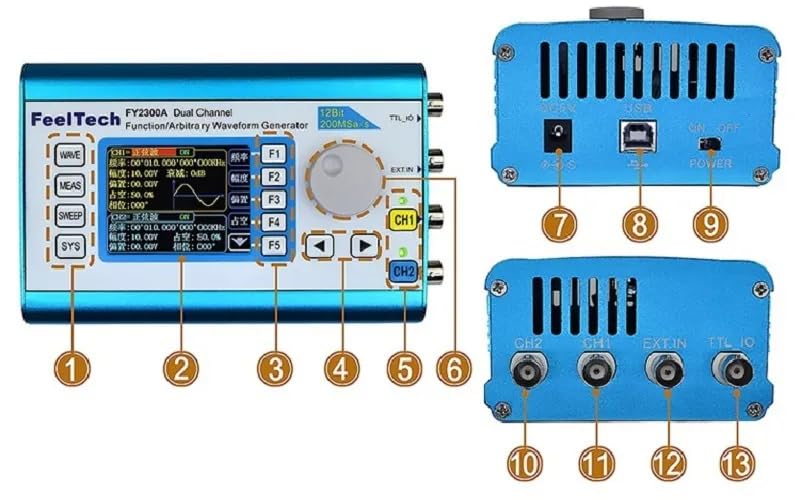
Image: Labeled diagram illustrating the front panel controls and rear/side ports of the FeelTech FY2300 12Mhz Function Generator.
- WAVE Button: Selects waveform type.
- MEAS Button: Accesses measurement functions.
- SWEEP Button: Configures sweep functions.
- SYS Button: Enters system settings.
- F1-F5 Buttons: Function keys for menu navigation and parameter adjustment.
- Rotary Knob: Adjusts parameter values.
- Arrow Keys: Navigates menus and selects parameters.
- CH1/CH2 Buttons: Activates/deactivates and selects channels.
- DC5V Power Input: Connects to the 5V DC power adapter.
- USB Port: For data communication and firmware updates.
- Power Switch: Turns the device on/off.
- CH2 Output: BNC connector for Channel 2 signal output.
- CH1 Output: BNC connector for Channel 1 signal output.
- EXT.IN: External input for modulation or synchronization.
- TTL_IO: TTL input/output port.
5. Setup
- Unpack: Carefully remove the FY2300 generator and all accessories from the packaging.
- Power Connection: Connect the provided 5V 1A power adapter to the DC5V power input port (labeled 7 in the diagram) on the rear of the device. Plug the adapter into a suitable power outlet.
- Power On: Flip the power switch (labeled 9) to the 'ON' position. The LCD screen should illuminate.
- Output Connection: Connect the BNC-Clip cables to the CH1 (labeled 11) and/or CH2 (labeled 10) output ports as needed. Connect the other end of the cables to your test equipment (e.g., oscilloscope, frequency counter).
- USB Connection (Optional): If connecting to a computer for control or firmware updates, use the USB-B data/power cable to connect the USB port (labeled 8) to your computer.
6. Operating Instructions
6.1. Basic Operation
- Select Channel: Press the CH1 or CH2 button to select the desired output channel. The active channel will be indicated on the display.
- Select Waveform: Press the WAVE button to cycle through available waveform types (Sine, Square, Triangle, etc.). Use the rotary knob or arrow keys to select the specific waveform.
- Adjust Frequency: With a waveform selected, use the rotary knob to adjust the frequency. The display will show the current frequency. For fine adjustments, use the arrow keys to select the digit to change.
- Adjust Amplitude: Press the appropriate function key (e.g., F2 for AMPL) to select amplitude adjustment. Use the rotary knob to set the desired amplitude.
- Adjust Offset/Duty Cycle/Phase: Similarly, use the function keys (F3 for OFFS, F4 for DUTY, F5 for PHAS) and the rotary knob to adjust these parameters for the selected waveform.
- Enable Output: Ensure the selected channel's output is enabled. This is typically indicated by an LED next to the CH1/CH2 buttons or on the display.
6.2. Advanced Functions
- Sweep Function: Press the SWEEP button to configure frequency sweep parameters, including start frequency, end frequency, sweep time, and sweep mode.
- Measurement Function: Press the MEAS button to access built-in measurement capabilities, such as frequency counting.
- System Settings: Press the SYS button to access system configurations, including display settings, language, and calibration options.
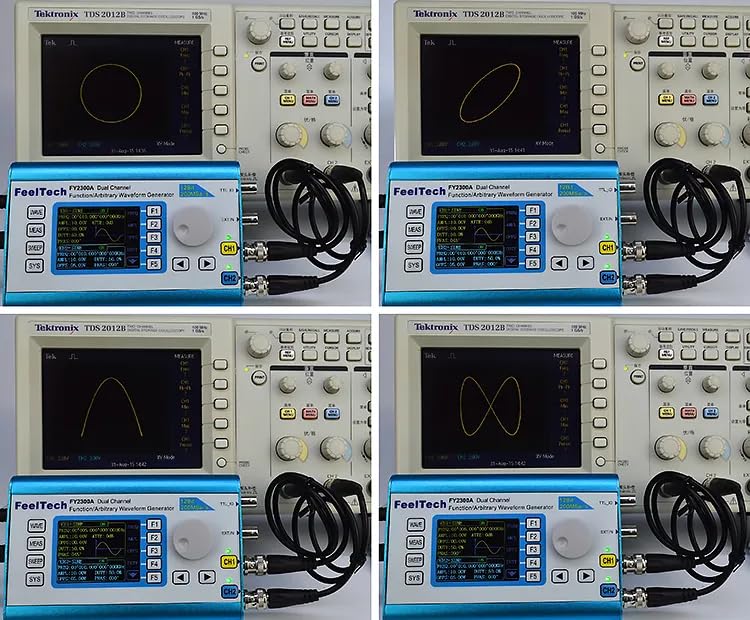
Image: The FeelTech FY2300 12Mhz Function Generator connected to an oscilloscope, demonstrating its ability to generate signals for Lissajous figure analysis.
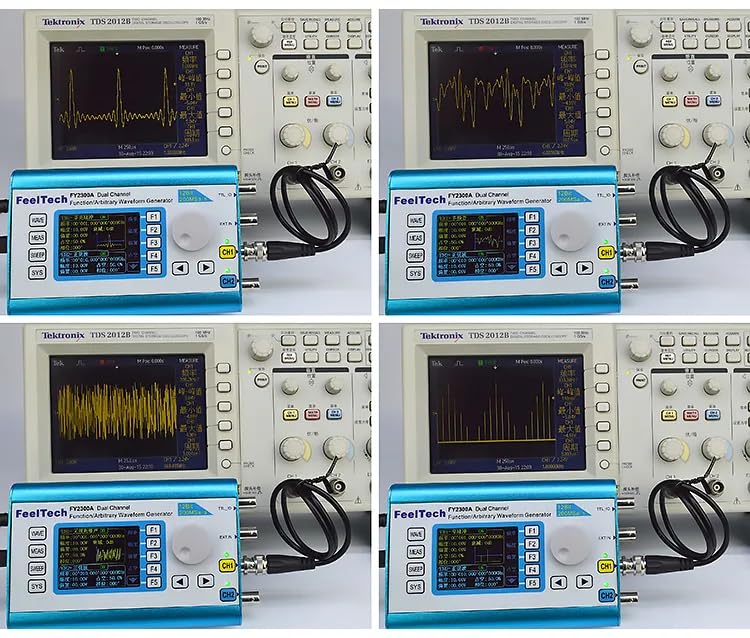
Image: The FeelTech FY2300 12Mhz Function Generator connected to an oscilloscope, showcasing its capability to produce diverse waveform types.
7. Specifications
The following table details the technical specifications for the FeelTech FY2300 12Mhz Dual-Channel Function/Arbitrary Waveform Generator.

Image: Comprehensive table outlining the frequency parameters and waveform characteristics for the FeelTech FY2300 series.
7.1. Frequency Parameters (FY2300-12Mhz Model)
| Parameter | Value |
|---|---|
| Sine Wave Frequency Range | 0 ~ 12MHz |
| Square Wave Frequency Range | 0 ~ 6MHz |
| Triangle Wave Frequency Range | 0 ~ 6MHz |
| Sawtooth Wave Frequency Range | 0 ~ 6MHz |
| Pulse Wave Frequency Range | 0 ~ 6MHz |
| TTL/CMOS Wave Frequency Range | 0 ~ 6MHz |
| Arbitrary Waveform Frequency Range | 0 ~ 6MHz |
| Frequency Resolution | 1µHz (0.000001Hz) |
| Frequency Accuracy | ± 5×10⁻⁶ |
| Frequency Stability | ± 1×10⁻⁶ / 3 Hours |
| Impedance | 50Ω ±10% (Typical) |
| Phase Range | 0 ~ 359° |
| Phase Resolution | 1° |
7.2. Waveform Characteristics
| Parameter | Value |
|---|---|
| Waveform Types | Sine, Square, Triangle, Sawtooth, Pulse, Ramp, TTL, CMOS, Multitone, Noise, Cardiogram, Sinc Pulse, Narrow Pulse, Gauss White Noise, AM, FM, Step, Arbitrary Waveform, etc. |
| Waveform Length | 2048 points |
| Sampling Rate | 200MSa/s |
| Vertical Resolution | 12 Bits |
| Sine Wave Harmonic Suppression | ≥45dBc (<1MHz); ≥40dBc (1MHz~20MHz) |
| Sine Wave Total Harmonic Distortion | ≤0.8% (20Hz~20kHz, 0dBm) |
| Square Wave Rise/Fall Time | ≤20ns |
| Square Wave Overshoot | ≤7.5% |
| Square Wave Duty Cycle | 0.1% ~ 99.9% |
| Sawtooth Wave Linearity | ≥98% (0.01Hz~10kHz) |
7.3. General Specifications
- Item Model Number: EC-FY2300 12M
- Package Dimensions: 7.87 x 5.91 x 3.94 inches
- Weight: 2.2 Pounds
- Batteries: 1 Lithium Metal battery required (included)
- Manufacturer: FeelTech
- Date First Available: July 17, 2024
8. Maintenance
- Cleaning: Use a soft, dry cloth to clean the exterior of the instrument. Do not use abrasive cleaners or solvents.
- Storage: Store the generator in a cool, dry place away from direct sunlight and extreme temperatures.
- Battery: The device includes a Lithium Metal battery. Follow local regulations for battery disposal.
9. Troubleshooting
- No Power: Ensure the power adapter is correctly connected to the device and a working power outlet. Check the power switch position.
- No Signal Output: Verify that the correct channel is selected and enabled. Check cable connections to the test equipment. Ensure waveform parameters are set within the instrument's range.
- Incorrect Waveform: Confirm the selected waveform type and its parameters (frequency, amplitude, offset, duty cycle) are correctly configured on the display.
10. Warranty and Support
The FeelTech FY2300 12Mhz Function Generator comes with a warranty card included in the package. For specific warranty terms and conditions, please refer to the provided warranty card or contact FeelTech customer support. For technical assistance or service, please reach out to your local FeelTech distributor or the manufacturer directly.


