
ErGear EGESD87W
ErGear Electric Standing Desk User Manual
Model: EGESD87W
Introduction
Thank you for choosing the ErGear Electric Standing Desk. This manual provides important information regarding the assembly, operation, and maintenance of your new desk. Please read it thoroughly before use to ensure safe and efficient operation.
Safety Information
For your safety and to prevent damage to the product, please observe the following:
- Do not exceed the maximum weight capacity of 80KG (176 lbs).
- Ensure correct installation of all components as per the assembly instructions.
- Keep the desk and its moving parts away from children and pets during operation.
- Avoid placing liquids directly on the control panel or motor components.
- Do not disassemble or modify the desk's electrical components. Contact customer support for assistance.
Product Overview and Features
The ErGear Electric Standing Desk is designed to provide a versatile and ergonomic workspace. Key features include:
- Tailored Ergonomic Height: Adjustable from 72cm to 118cm (28.3 inches to 46.5 inches) for seamless transitions between sitting and standing.
- Smart Control Panel: User-friendly LED control panel with 4 memory presets for quick height adjustments.
- Enhanced Stability & Safety: Robust design with a wide 65mm alloy lifting frame, supporting up to 80KG (176 lbs). Tested for over 50,000 lifting cycles.
- Spacious & Organized Workspace: Desktop measuring 140cm x 70cm (55.1 inches x 27.6 inches), equipped with 2 cable grommets and 2 hooks for cable management and accessory hanging.
- Premium Silent Motor: Operates with an ultra-quiet noise level of ≤55db, ensuring a distraction-free environment.
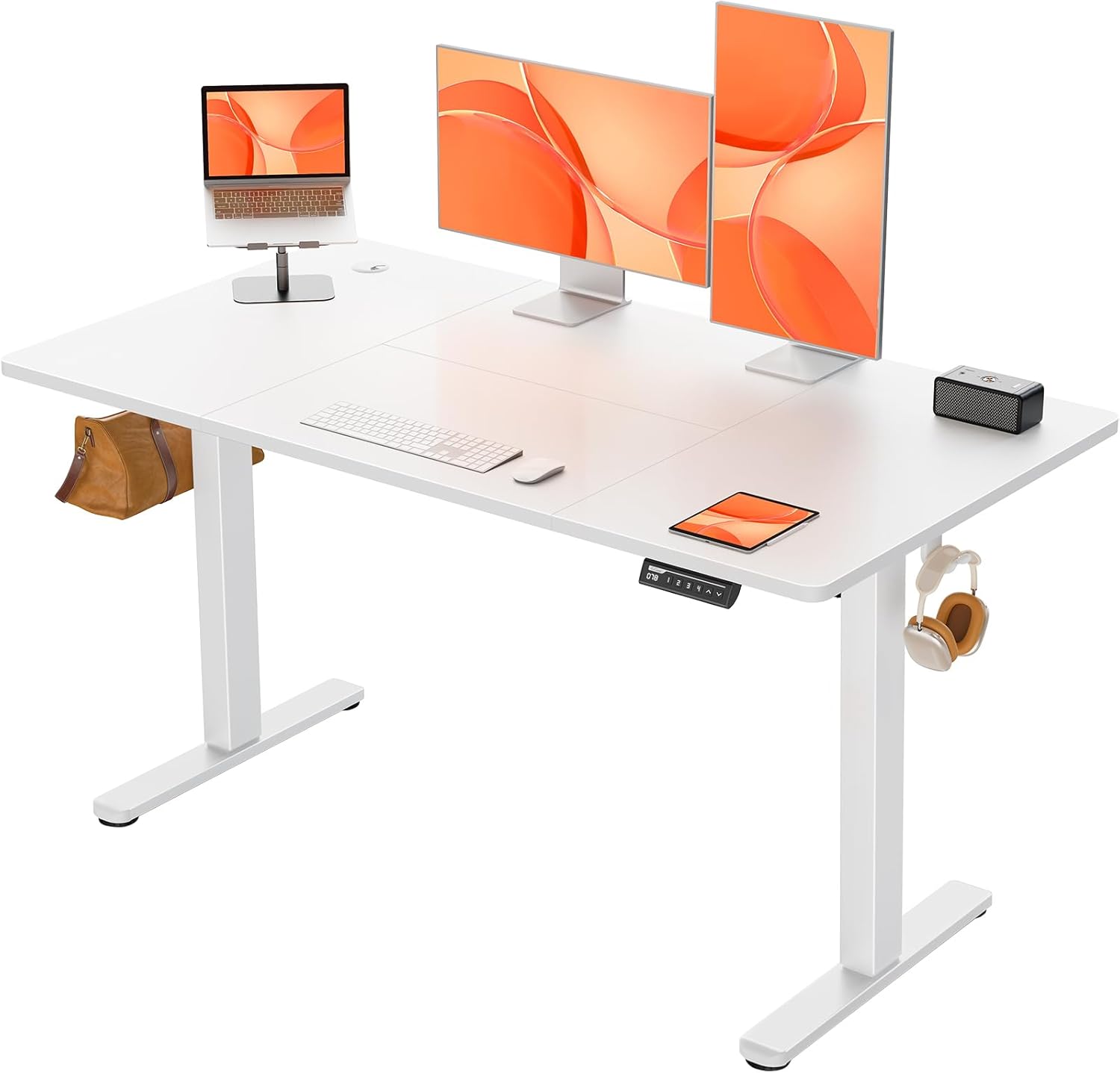
Figure 1: The ErGear Electric Standing Desk, showcasing its spacious white desktop and sturdy frame, equipped with dual monitors, a laptop, and a control panel.

Figure 2: The ErGear Electric Standing Desk integrated into a modern home office, highlighting its aesthetic appeal and functional design next to a window.
Components and Parts List
Before assembly, please ensure all components are present and undamaged. The package includes:
- Desktop (Four-piece wood tabletop)
- Lifting Columns (Legs)
- Feet
- Control Box
- LED Control Panel
- Power Adapter and Cable
- Cable Grommets (2 included)
- Headphone Hooks (2 included)
- Assembly Hardware (screws, bolts, etc.)
- Installation Guide
Setup and Assembly
The ErGear Electric Standing Desk is designed for streamlined assembly. A comprehensive and concise installation guide is included with cleverly numbered accessories to facilitate the process. Assembly can typically be completed by one person.
General Assembly Steps:
- Unpack all components and verify against the parts list.
- Attach the feet to the lifting columns.
- Assemble the frame and attach it to the desktop sections.
- Install the control box and LED control panel.
- Connect all necessary cables (motor to control box, control box to panel, power adapter).
- Install cable grommets and headphone hooks as desired.
- Perform an initial power-up and test the height adjustment.
Refer to the detailed installation guide provided in the packaging for step-by-step instructions and diagrams.

Figure 3: Diagram illustrating the product dimensions: 140cm (length) x 70cm (width), with adjustable height from 72cm to 118cm, and a base width of 58cm.
Operating Instructions
Your ErGear Electric Standing Desk features an intuitive control panel for easy height adjustments.
Height Adjustment
- Use the Up (&) and Down (∨) arrow buttons on the control panel to manually adjust the desk height. The current height in centimeters will be displayed on the LED screen.
- The desk can be adjusted smoothly between 72cm (sitting height) and 118cm (standing height).

Figure 4: Illustration showing the seamless height transition capability of the desk, from a sitting height of 72cm to a standing height of 118cm.
Memory Presets
The control panel features 4 memory buttons (1, 2, 3, 4) to save and recall your preferred heights.
- To Save a Preset: Adjust the desk to your desired height. Press and hold one of the memory buttons (1, 2, 3, or 4) until the LED display flashes or shows "S-" followed by the number, indicating the height has been saved.
- To Recall a Preset: Simply press the corresponding memory button (1, 2, 3, or 4). The desk will automatically move to the saved height.
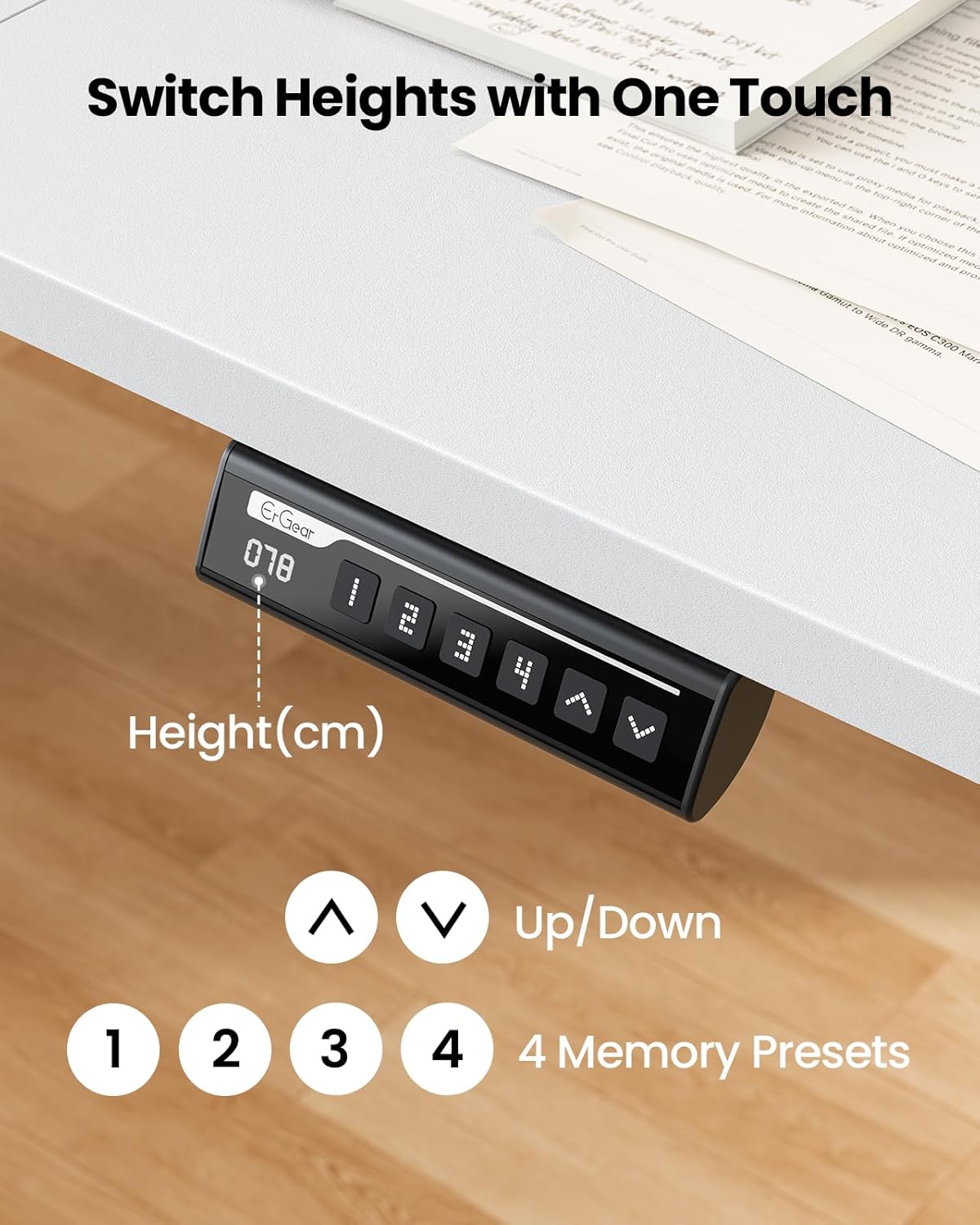
Figure 5: Close-up of the LED control panel, showing the digital height display, up/down arrows, and four memory preset buttons (1, 2, 3, 4).
Weight Capacity and Stability
The desk is designed to support up to 80KG (176 lbs) of equipment. Its robust construction ensures smooth and steady lifting, even under significant load.

Figure 6: Visual representation of the desk's 80KG weight capacity, demonstrating its ability to easily support heavier equipment.

Figure 7: Illustration highlighting the smooth and steady lifting mechanism of the desk, indicating excellent stability during height adjustments.
Maintenance
To ensure the longevity and optimal performance of your ErGear Electric Standing Desk, follow these maintenance guidelines:
- Cleaning: Wipe the desktop and frame with a soft, damp cloth. Avoid abrasive cleaners or harsh chemicals that could damage the finish.
- Cable Management: Periodically check that all cables are securely connected and not pinched or tangled. Utilize the provided cable grommets and hooks to keep the workspace tidy.
- Weight Distribution: Distribute weight evenly across the desktop to prevent undue stress on the lifting mechanism.
- Regular Checks: Occasionally inspect all screws and bolts to ensure they are tight. Retighten if necessary.
Troubleshooting
If you encounter any issues with your ErGear Electric Standing Desk, please refer to the following common troubleshooting tips:
- Desk Not Moving:
- Check if the power cable is securely plugged into both the desk and the wall outlet.
- Ensure there are no obstructions preventing the desk from moving up or down.
- Try resetting the desk by unplugging it for 30 seconds and then plugging it back in.
- Uneven Movement:
- Verify that the desk is placed on a level surface.
- Ensure that the weight on the desk is evenly distributed.
- Error Codes on Display:
- If an error code appears, consult the detailed troubleshooting section in the included installation guide. Often, a simple reset (unplugging and replugging) can resolve minor errors.
If the issue persists after attempting these steps, please contact ErGear customer support for further assistance.
Specifications
| Attribute | Detail |
|---|---|
| Brand | ErGear |
| Model Number | EGESD87W |
| Product Dimensions | 140 x 70 x 72 cm (L x W x Min H) |
| Adjustable Height Range | 72 cm - 118 cm |
| Maximum Weight Capacity | 80 KG (176 lbs) |
| Primary Material | Metal (Frame), Wood (Top) |
| Finish Type | Painted |
| Color | White |
| Motor Noise Level | ≤55db |
| Assembly Required | Yes (Included) |
| Special Features | Adjustable Height, Electric, Ergonomic, 4 Memory Presets, Cable Grommets, Headphone Hooks |
Warranty and Support
ErGear is committed to providing high-quality products. For information regarding warranty coverage, technical support, or replacement parts, please refer to the warranty card included with your product or visit the official ErGear website. Please have your model number (EGESD87W) and purchase details ready when contacting support.
Related documentsEGESD87W


Ask a question about this manual
Ask about setup, troubleshooting, compatibility, parts, safety, or missing instructions. Manuals+ will review the question and use this page’s manual context to help answer it.