
1. Overview
The DOOGEE S cyber is a rugged smartphone designed for durability and high performance. It features a large 10800mAh battery, a 50MP AI main camera, and runs on Android 14. With 20GB of RAM (8GB physical + 12GB virtual) and 256GB of internal storage, it offers smooth operation and ample space for applications and media. The device is built to withstand challenging environments, boasting IP68, IP69K, and MIL-STD-810H certifications for water, dust, and shock resistance.
2. Device Layout and Components
Familiarize yourself with the physical layout of your DOOGEE S cyber smartphone.
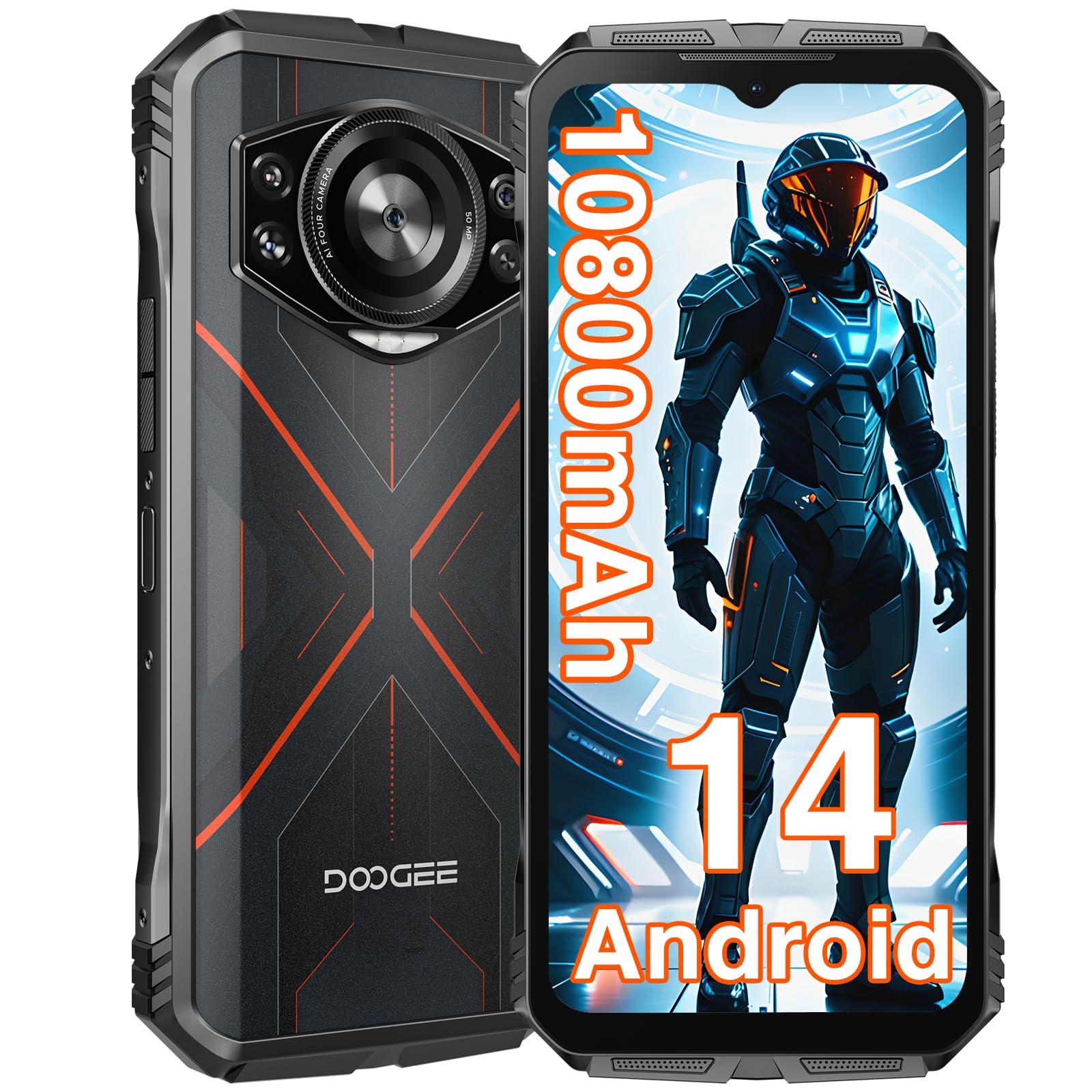
Image: Front and back view of the DOOGEE S cyber Rugged Smartphone, highlighting its robust design and camera module.
- Front Camera: Located at the top of the display.
- Display: 6.58-inch FHD+ IPS Waterdrop screen.
- Volume Buttons: Located on the side for adjusting audio levels.
- Power Button/Fingerprint Sensor: Integrated on the side for power control and secure unlocking.
- Rear Camera Module: Features a 50MP AI main camera and a 5MP wide-angle camera.
- USB-C Port: For charging and data transfer.
- SIM/MicroSD Card Slot: Located on the side, supports Dual SIM and expandable storage up to 1TB.
- 3.5mm Audio Jack: For connecting headphones.
3. Setup
3.1. Inserting SIM Cards and MicroSD Card
- Locate the SIM card tray on the side of the device.
- Use the provided SIM ejector tool to open the tray.
- Carefully place your Nano-SIM cards and/or MicroSD card into the designated slots. Ensure the gold contacts face downwards.
- Gently push the tray back into the device until it clicks into place.
3.2. Initial Charging and Power On
- Connect the USB-C cable to the phone's charging port and the other end to a power adapter.
- Plug the power adapter into a wall outlet. It is recommended to fully charge the device before first use.
- To power on, press and hold the Power button until the DOOGEE logo appears on the screen.
- Follow the on-screen instructions to complete the initial setup, including language selection, Wi-Fi connection, and Google account setup.
4. Operating Your Device
4.1. Screen Lock and Unlock
Your DOOGEE S cyber supports multiple screen unlock methods for convenience and security.
- Fingerprint Unlock: Register your fingerprints in the Security settings. Place your registered finger on the side-mounted fingerprint sensor to unlock the device.
- Face Unlock: Set up face recognition in the Security settings. Look at the front camera to unlock the device.
- Pattern/PIN/Password: Standard Android security options.

Image: Visual representation of Android 14 interface, face unlock, NFC functionality, and fingerprint unlocking on the DOOGEE S cyber.
4.2. Navigation
The device operates on Android 14, offering intuitive navigation through gestures or traditional on-screen buttons, configurable in settings.
5. Key Features
5.1. Performance and Storage
The DOOGEE S cyber is equipped with a powerful Octa-core processor, ensuring smooth multitasking and gaming. It features 20GB of RAM (8GB physical + 12GB virtual) and 256GB of internal storage, expandable up to 1TB with a MicroSD card.

Image: Illustrates the 20GB RAM, 256GB ROM, and Android 14 operating system of the DOOGEE S cyber.

Image: A gaming scene on the DOOGEE S cyber, emphasizing the smooth gaming experience provided by its large memory.
Video: This video demonstrates the performance capabilities of the DOOGEE S cyber rugged phone, including smooth gaming and application usage.
5.2. Display
Experience vibrant visuals on the 6.58-inch FHD+ IPS Waterdrop screen, featuring a 1080*2408 resolution, 60Hz refresh rate, 20:9 aspect ratio, and 400 nits brightness.

Image: Details the 6.58-inch FHD+ IPS Waterdrop screen with its resolution, refresh rate, aspect ratio, and brightness.
5.3. Camera System
Capture high-quality photos and videos with the versatile camera setup. The rear features a 50MP AI main camera and a 5MP wide-angle camera, while the front houses a 16MP camera for clear selfies and video calls.

Image: Showcases the DOOGEE S cyber's camera system, including the 50MP AI main camera, 5MP wide-angle camera, and 16MP front camera.

Image: Highlights the 50MP AI main camera's ability to increase color saturation for clearer and more vibrant photos.

Image: Displays various camera functions available on the DOOGEE S cyber, such as Beauty mode, Panorama, and Night mode.
Video: This video showcases the camera features, ruggedness, and battery life of the DOOGEE S cyber rugged phone.
5.4. Battery Life
The massive 10800mAh battery provides extended usage times, offering up to 1000 hours of standby, 50 hours of music playback, 18 hours of video streaming, or 12 hours of gaming on a single charge.

Image: Highlights the 10800mAh long-lasting battery and its estimated usage times for standby, music, video, and gaming.
5.5. Ruggedness
Built to endure, the DOOGEE S cyber is IP68 and IP69K rated for water and dust resistance, and MIL-STD-810H certified for shock resistance, capable of withstanding drops from up to 1.5 meters.

Image: Illustrates the rugged features of the DOOGEE S cyber, including 1.5m waterproofing, 24-hour dust prevention, and 1.5m seismic resistance.
5.6. Connectivity and Security
The device supports NFC for convenient mobile payments, GPS for accurate navigation (GPS+GLONASS+Galileo+Beidou), and offers secure unlocking options like Face Unlock and a side-mounted Fingerprint Unlock sensor. It also features Dual SIM support.

Image: Highlights the GPS navigation, Face Unlock, NFC payment capabilities, and Fingerprint Unlock security features of the DOOGEE S cyber.
6. Maintenance
6.1. Cleaning Your Device
To maintain the ruggedness and appearance of your DOOGEE S cyber, clean it regularly. Use a soft, damp cloth to wipe the screen and body. Avoid harsh chemicals or abrasive materials that could damage the device's seals or finish. Ensure all ports are dry before charging or connecting accessories.
6.2. Software Updates
Regularly check for and install software updates to ensure optimal performance, security, and access to new features. Navigate to Settings > System > System update to check for available updates.
6.3. Battery Care
To prolong battery life, avoid extreme temperatures. Do not leave the phone fully charged or completely drained for extended periods. Use only approved chargers and cables.
7. Troubleshooting
This section addresses common issues you might encounter with your DOOGEE S cyber.
- Device not powering on: Ensure the battery is charged. Connect the charger and wait a few minutes before attempting to power on again. If unresponsive, try holding the Power button for 10-15 seconds for a forced restart.
- Network connectivity issues: Check if your SIM card is properly inserted. Verify that mobile data is enabled in settings. If issues persist, contact your mobile carrier.
- Camera not working: Ensure no apps are currently using the camera in the background. Restart the device. Clear the camera app's cache and data in Settings > Apps > Camera > Storage.
- Slow performance: Close unnecessary background applications. Clear cache from apps. Consider performing a factory reset if performance issues persist after other troubleshooting steps (Note: A factory reset will erase all data on your device. Back up important information first).
8. Specifications
| Feature | Specification |
|---|---|
| Operating System | Android 14 |
| Display | 6.58 Inches FHD+ IPS (1080*2408) |
| RAM | 20GB (8GB physical + 12GB virtual) |
| Internal Storage | 256GB (Expandable up to 1TB) |
| Main Camera | 50MP AI |
| Wide Angle Camera | 5MP |
| Front Camera | 16MP |
| Battery Capacity | 10800mAh |
| Ruggedness | IP68, IP69K, MIL-STD-810H |
| Biometric Security | Fingerprint Recognition, Face Unlock |
| Connectivity | Cellular, NFC, GPS (GPS+GLONASS+Galileo+Beidou), Dual SIM |
| Audio Jack | 3.5 mm |
| Item Weight | 1.32 pounds |
| Package Dimensions | 7.56 x 4.06 x 2.24 inches |
9. Warranty and Support
Your DOOGEE S cyber Rugged Smartphone comes with a standard manufacturer's warranty. Please refer to the warranty card included in your product packaging for specific terms and conditions. For technical support, service, or further inquiries, please visit the official DOOGEE website or contact their customer service department. Keep your proof of purchase for warranty claims.


