
1. Introduction
The ENDYSHOW 18 LED Par Lights are high-quality stage lighting fixtures designed for various events such as weddings, parties, DJ sets, live shows, and home entertainment. Each light features 18x5W RGBW 4-in-1 LED beads, providing a total power of 90W per unit. These lights offer brilliant color output and a wide range of illumination, enhancing any stage or event atmosphere. The robust aluminum and iron alloy housing ensures durability and resistance to drops and scratches.

Image: Four ENDYSHOW 18 LED Par Lights, each with 18 red LED bulbs illuminated, accompanied by small remote controls. The lights are designed for stage and event use.
2. Safety Information
- Always connect the fixture to a grounded circuit to avoid the risk of electrocution.
- Ensure the power supply voltage matches the voltage specified on the unit.
- Do not operate the fixture if the power cord is damaged.
- Avoid direct eye exposure to the light source.
- Ensure adequate ventilation around the fixture to prevent overheating. Do not block cooling vents.
- Keep the fixture away from flammable materials.
- Disconnect from power before cleaning or servicing.
- This product is designed for indoor use. Avoid exposure to moisture or extreme temperatures.
3. Package Contents
Each package of ENDYSHOW 18 LED Par Lights typically includes the following items:
- 18 LED Par Light Fixture(s) (quantity varies by pack size, e.g., 4-pack includes 4 units)
- Adjustable Mounting Bracket(s) (2 per light)
- Mounting Screws
- Power Cord(s)
- Wireless Remote Control(s)
- User Manual (this document)
4. Product Features
- High Brightness LEDs: Equipped with 18x5W RGBW (Red, Green, Blue, White) 4-in-1 LED beads for vibrant and rich color mixing.
- Durable Construction: Made from aluminum and iron alloy for enhanced durability and heat dissipation.
- Adjustable Brackets: Features 2x360° adjustable brackets for flexible positioning and mounting.
- Integrated Cooling System: Built-in cooling fan to maintain optimal operating temperature and extend lifespan.
- Control Panel: Rear-mounted LED display with Menu, Up, Down, and Enter buttons for direct control.
- DMX Connectivity: Standard 3-pin DMX In and DMX Out ports for professional control.
- Multiple Control Modes: Supports DMX512, Auto, Sound Activated, Color Combination, Color Changing, Strobe, Jump, and Master-Slave modes.
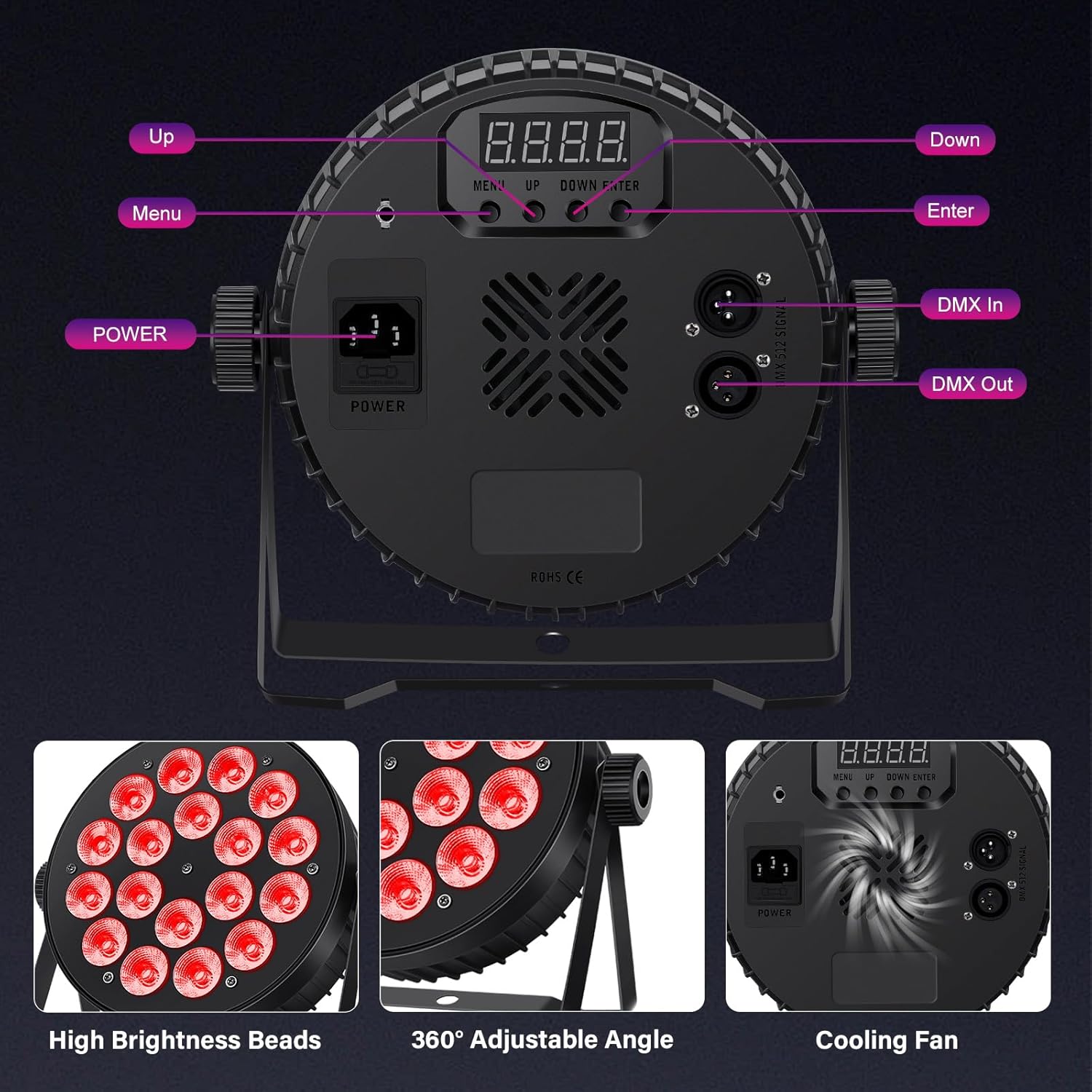
Image: Detailed view of the rear panel of the ENDYSHOW 18 LED Par Light, highlighting the power input, DMX In/Out ports, LED display, and control buttons (Menu, Up, Down, Enter).

Image: A composite image illustrating key features: the high brightness of the LED beads, the 360-degree adjustable bracket, and the internal cooling fan for efficient heat dissipation.
5. Setup and Installation
The ENDYSHOW 18 LED Par Lights are designed for versatile installation. Follow these steps for proper setup:
- Unpacking: Carefully remove all components from the packaging. Inspect for any damage during transit.
- Mounting Options:
- Floor Mount: Use the adjustable brackets as a stable base to place the light directly on the floor.
- Truss/Wall Mount: Secure the adjustable brackets to a truss or wall using appropriate clamps and screws (not included, unless specified). Ensure the mounting surface can support the weight of the fixture.
- Adjusting Angle: Loosen the knobs on the side of the brackets to adjust the light's angle, then tighten them securely once the desired position is achieved.
- Power Connection: Connect the provided power cord to the "POWER" input on the rear of the light fixture. Plug the other end into a standard electrical outlet (AC110-240V, 50/60Hz).
- Initial Power On: Once connected, the light will power on. You can then select your desired operating mode using the control panel or remote.
6. Operating Modes
The ENDYSHOW 18 LED Par Lights offer a variety of operating modes to suit different lighting needs. These modes can be controlled via the onboard LED display or the included wireless remote control.
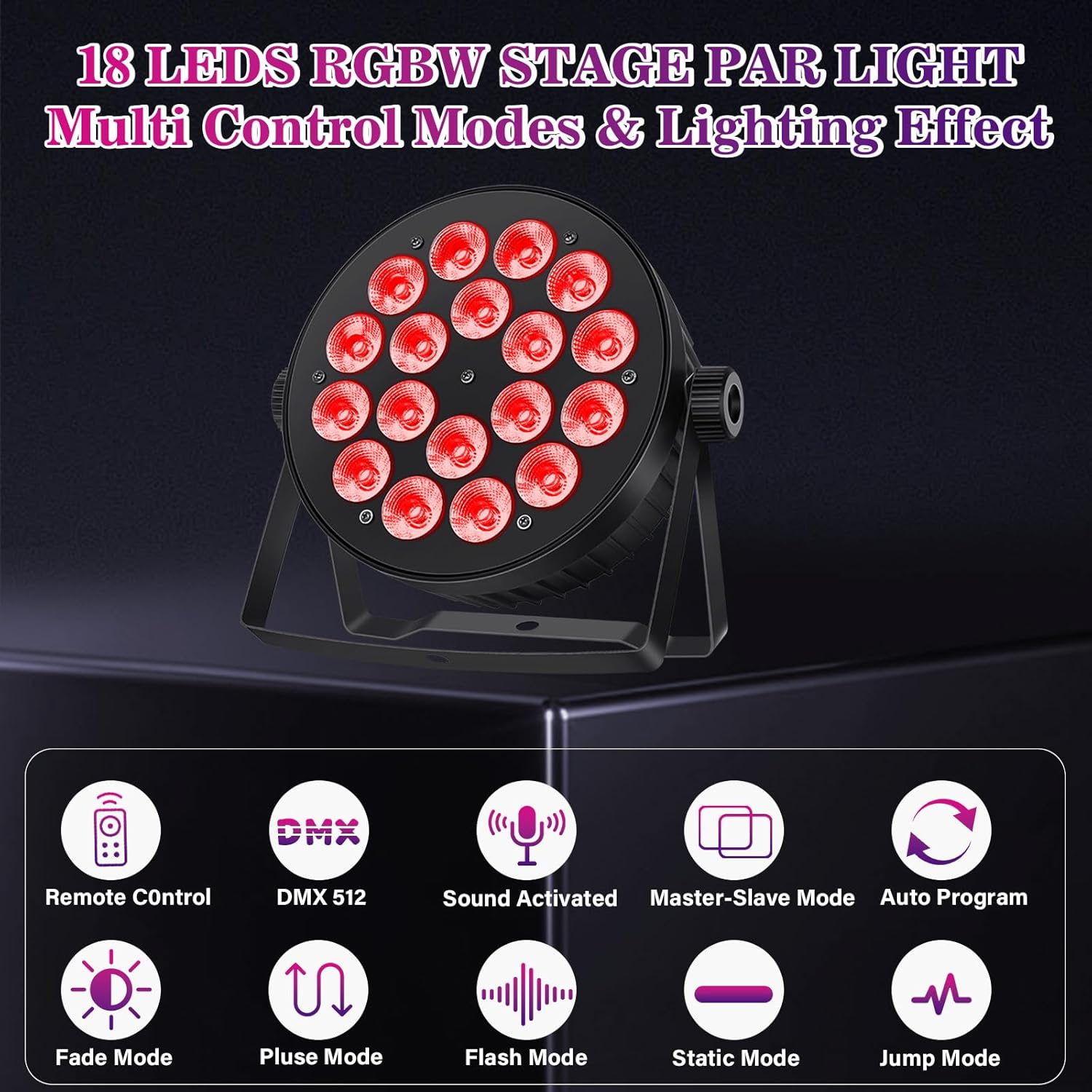
Image: An infographic illustrating the multiple control modes available: Remote Control, DMX512, Sound Activated, Master-Slave Mode, Auto Program, Fade Mode, Pulse Mode, Flash Mode, Static Mode, and Jump Mode.
- DMX512 Mode: For professional control using a DMX controller. Allows precise control over color, dimming, and effects. (See Section 7 for details)
- Auto Mode: The light cycles through pre-programmed lighting sequences automatically.
- Sound Activated Mode: The light reacts to sound and music, changing patterns and colors in sync with the beat. Sensitivity can be adjusted.
- Color Combination Mode: Allows selection of specific color combinations.
- Color Changing Mode: Transitions smoothly or abruptly between different colors.
- Strobe Mode: Produces rapid flashes of light. Strobe speed can be adjusted.
- Jump Mode: Instantly switches between different colors or patterns.
- Master-Slave Mode: Connect multiple lights together. One light acts as the "Master" controlling all connected "Slave" lights, ensuring synchronized effects.
- Static Mode: Displays a single, constant color.

Image: A visual representation of different par light modes: Color Change, Sound Activated, Strobe, Master/Slave, and Color Fade, with examples of the lights displaying various colors.
7. DMX Control
For advanced control and integration into larger lighting setups, the ENDYSHOW 18 LED Par Lights support DMX512 protocol. This allows you to control individual parameters of the light using a DMX controller.
- Connecting DMX: Use a standard 3-pin DMX cable to connect the DMX OUT port of your controller to the DMX IN port of the first light. For multiple lights, daisy-chain them by connecting the DMX OUT of the first light to the DMX IN of the second, and so on.
- DMX Channels: The light typically operates with 2 or 7 DMX channels, allowing control over parameters such as dimmer, red, green, blue, white, strobe, and mode selection. Refer to the specific DMX chart in the full manual (if provided separately) for detailed channel assignments.
- Addressing: Set the DMX address for each light using the onboard LED display. Each light in a DMX chain should have a unique starting address if you wish to control them independently.

Image: A visual demonstrating both remote and DMX control options for the par lights, showing a hand holding the remote and a DMX controller unit.
8. Remote Control Operation
The included wireless remote control provides convenient access to various functions without needing to access the light's control panel directly.

Image: A detailed diagram of the wireless remote control, showing buttons for power, color selection (RGBW and mixed colors), auto mode, strobe, multi-color fading, multi-color hopping, and sound activated modes with adjustable sensitivity.
- Power On/Off: Use the dedicated ON/OFF buttons to turn the light on or off.
- Color Selection: Press the R, G, B, W buttons for primary colors, or other colored buttons for pre-mixed colors.
- Auto Mode (AUTO): Activates automatic program cycling.
- Strobe Mode (STROBE): Engages the strobe effect. Use +/- buttons to adjust speed.
- Fade Mode (FADE): Activates smooth color transitions.
- Jump Mode (JUMP): Activates abrupt color changes.
- Sound Activated (Sound1, Sound2, Sound3): Activates sound-sensitive modes. Different buttons may offer varying sensitivities or patterns.
- Brightness/Speed Adjustment (+/-): Adjusts the brightness of static colors or the speed of dynamic modes (strobe, fade, jump).
Note: If controlling multiple lights with one remote, all lights will respond simultaneously. For independent control, use DMX.
9. Maintenance
Regular maintenance ensures the longevity and optimal performance of your ENDYSHOW LED Par Lights.
- Cleaning: Periodically clean the lens and housing with a soft, lint-free cloth. For stubborn dirt, use a mild, non-abrasive cleaner. Ensure the light is unplugged before cleaning.
- Ventilation: Regularly check that the cooling vents are free from dust and debris to ensure proper airflow. A clogged fan can lead to overheating.
- Cable Inspection: Inspect power and DMX cables for any signs of wear, cuts, or damage. Replace damaged cables immediately.
- Storage: When not in use, store the lights in a dry, cool environment, away from direct sunlight and extreme temperatures.
10. Troubleshooting
If you encounter issues with your ENDYSHOW LED Par Lights, refer to the following common problems and solutions:
| Problem | Possible Cause | Solution |
|---|---|---|
| Light does not power on. | No power supply; faulty power cord; internal issue. | Check power connection and outlet. Ensure power cord is fully inserted and undamaged. Try a different power outlet. |
| No light output. | Light is in standby; mode not selected; DMX issue. | Ensure light is powered on and not in standby. Select an operating mode (Auto, Static, etc.). If using DMX, check DMX signal and address. |
| Remote control not working. | Battery low/dead; remote out of range; IR sensor blocked. | Replace remote battery. Ensure remote is pointed directly at the light's IR sensor. Reduce distance to the light. |
| Lights not synchronized in Master-Slave mode. | Incorrect DMX cabling; incorrect mode setting. | Ensure DMX cables are correctly connected (OUT to IN). Verify that the master light is set to a master mode and slave lights are set to slave mode. |
| Sound Activated mode not responding. | Low sound input; sensitivity too low; microphone blocked. | Increase sound volume. Adjust sound sensitivity via remote or control panel. Ensure the light's microphone (if visible) is not obstructed. |
11. Specifications
Detailed technical specifications for the ENDYSHOW 18 LED Par Light (Model: PL-P18-RGBW).

Image: An illustration detailing the technical parameters of the light, including dimensions, voltage, power, LED source, color, beam angle, operation modes, DMX channels, lifespan, working temperature, and dimmer range.
| Parameter | Value |
|---|---|
| Model Number | PL-P18-RGBW |
| Light Source | 18x5W RGBW 4-in-1 LED Beads |
| Total Power | 90W |
| Voltage | AC110-240V, 50/60Hz |
| Color | RGBW (Red, Green, Blue, White) |
| Material | Aluminum and Iron Alloy |
| Product Dimensions (L x W x H) | 10.4" x 2.95" x 8.7" (26.4cm x 7.5cm x 22.1cm) |
| Item Weight | 11.08 pounds (approx. 5.03 kg) |
| Beam Angle | 25° |
| DMX Channels | 2/7CH |
| Lifespan | More than 5000 hours |
| Working Temperature | -20°C to 40°C |
| Dimmer | 0-100% Linear Dimming |
12. Warranty and Support
ENDYSHOW is committed to providing high-quality products. For any questions, technical assistance, or warranty claims, please contact ENDYSHOW customer support through the retailer where the product was purchased or visit the official ENDYSHOW store page on Amazon.
This product is typically covered by a standard return policy, allowing returns within 30 days of purchase. Extended protection plans may also be available for purchase separately.
Online Support: Visit the ENDYSHOW Store on Amazon


