1. Product Overview
The ACGarden 315MHz Wireless Remote Control Kit (Model TP-05RF) provides a reliable solution for controlling various AC 220V motorized devices. This system is designed for applications such as projector screens, electric curtains, motorized shades, smart gates, garage doors, and lifting systems. It offers stable and secure wireless operation for both home and commercial environments.
Key features include a strong 315MHz signal for stable communication up to 50 meters, even through walls, and high security with 1 million unique ID codes to prevent interference. The kit is constructed from durable ABS material, offering heat resistance and drop protection. It also features low power consumption, using less than 0.1W in standby mode.

Image 1.1: The ACGarden 315MHz Wireless Remote Control Kit, showing the main controller unit, handheld remote, and power plug with connecting cables.
2. Package Contents
Before installation, please verify that all components are present in the package:
- 1 × Controller (with wire)
- 1 × Handheld Remote
- 1 × US Plug
- 2 × Expansion Screws
- 1 × User Manual (this document)
- 1 × Certificate of Qualification
- 1 × Packaging Box
3. Setup and Installation
This kit is designed for easy installation. However, it is recommended that installation be performed by a qualified individual if you are unfamiliar with electrical wiring. Always ensure power is disconnected before beginning installation.
3.1 Wiring the Controller
The controller unit connects to your AC 220V power source and the motorized device. The controller input is AC 220V ±10% (or 110V ±10%). The maximum load supported is ≤500W.
- Identify Wires: Carefully identify the 'Up', 'Down', and 'Common' wires from your motorized device. It is highly recommended to use a multimeter to verify these outputs, as wiring colors may vary and might not always match standard conventions or instructions.
- Connect Power: Connect the US plug to a compatible AC 220V (or 110V) power outlet.
- Connect Motor: Connect the motor wires to the corresponding terminals on the controller. Ensure secure connections.
- Mounting: Use the provided expansion screws to securely mount the controller unit in a suitable location, away from moisture and direct heat. The compact size (Controller: 97×70×25mm) allows for flexible placement.
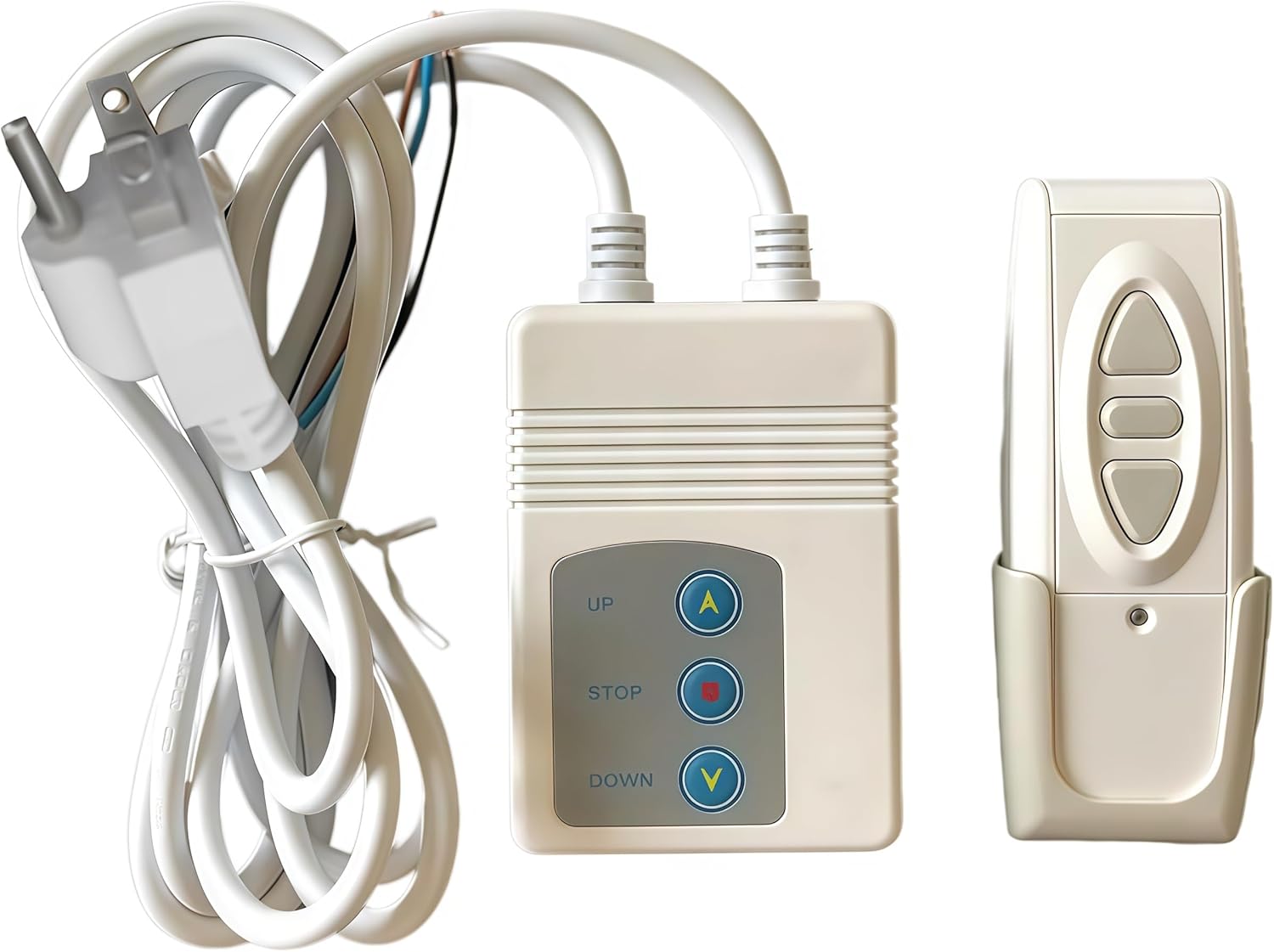
Image 3.1: A close-up of the controller and remote, showing the input and output wiring connections on the controller.
3.2 Linking Devices
The kit supports various linked control scenarios, allowing integration with different motorized devices.

Image 3.2: Examples of linked control scenarios, including projector screens, electric curtains, lighting fixtures, and remote control doors.
4. Operating Instructions
The handheld remote control features three intuitive buttons for easy operation:
- ▵ (Up): Press this button to move the motorized device upwards (e.g., raise a projector screen, open curtains).
- ∇ (Down): Press this button to move the motorized device downwards (e.g., lower a projector screen, close curtains).
- = (Stop/Power Reset): Press this button to stop the device's movement or to reset its power state.
The ergonomic design of the remote ensures a comfortable grip and responsive silicone keypad for smooth control.

Image 4.1: A user demonstrating the use of the handheld remote control to operate a projector screen from a distance.

Image 4.2: Various usage scenarios for the remote control kit, including an electric screen, electric curtain, electric sunshade, and an electric remote control door.
4.1 Product Demonstration Video
Video 4.1: An overview video demonstrating the features and basic operation of the ACGarden 315MHz Wireless Remote Control Kit.
5. Maintenance
To ensure the longevity and optimal performance of your wireless remote control kit, follow these maintenance guidelines:
- Cleaning: Wipe the controller and remote with a soft, dry cloth. Avoid using abrasive cleaners or solvents.
- Battery Replacement: The handheld remote requires a DC 12V battery (not included). Replace the battery when the remote's range decreases or it becomes unresponsive. Refer to the remote's battery compartment for specific instructions on replacement.
- Environmental Conditions: Keep the unit away from extreme temperatures, high humidity, and direct sunlight. The operating temperature range is -20°C to 70°C.
- Cable Inspection: Periodically check all cables for any signs of wear, damage, or loose connections.
6. Troubleshooting
If you encounter issues with your wireless remote control kit, refer to the following troubleshooting steps:
- Device Not Responding:
- Check if the controller is properly powered and the US plug is securely connected to a working outlet.
- Ensure the remote control's battery is not depleted. Replace if necessary.
- Verify that the remote is within the operating range (≥50 meters in open space). Obstacles like thick walls can reduce range.
- Incorrect Movement (Up/Down Reversed):
- This can occur if the 'Up' and 'Down' motor wires are reversed during installation. Disconnect power and re-verify the wiring connections using a multimeter as described in the Setup section.
- Interference:
- While the 315MHz frequency offers strong anti-interference performance, ensure there are no other strong radio frequency devices operating very close to the controller or remote that might cause disruption.
- Motor Stall/Overload:
- The system has built-in protection. If the motor stalls or is overloaded, the controller may temporarily cease operation. Check the motorized device for any obstructions or mechanical issues.
7. Specifications

Image 7.1: Detailed technical indicators for the wireless remote control kit.
| Controller Input | AC 220V ±10% (or 110V ±10%) |
| Max Load | ≤500W |
| Frequency | 50Hz/60Hz |
| Operating Temperature | -20°C to 70°C |
| Remote Battery | DC 12V (Not included) |
| Encoding Type | Fixed 1527 Code |
| Material | ABS + Silicone Keys |
| Product Dimensions (Controller) | 97 × 70 × 25mm (3.82 x 2.76 x 0.98 inches) |
| Product Dimensions (Remote) | 120 × 45 × 30mm |
| Item Weight | 12.3 ounces |
| Remote Control Distance | ≥50 meters (open space) |
| Compatible Devices | Projector screens, electric curtains, motorized shades, smart gates, garage doors, lifting systems |
8. Warranty Information
Specific warranty details for the ACGarden 315MHz Wireless Remote Control Kit (Model TP-05RF) are typically provided with the product packaging or by the retailer at the time of purchase. Please refer to any included warranty cards or contact your point of purchase for detailed information regarding warranty coverage and terms.
9. Customer Support
For technical assistance, troubleshooting beyond the scope of this manual, or inquiries regarding your ACGarden 315MHz Wireless Remote Control Kit, please contact the seller or manufacturer directly. Refer to your purchase documentation for contact information.


