
1. Introduction
The ELEKTROBOCK SN130 humidity sensor is designed for automatic control of ventilation systems, particularly in environments prone to high humidity. It effectively detects excessive moisture and activates a connected fan to maintain optimal air quality, preventing condensation and mold growth.
This manual provides essential information for the safe and efficient installation, operation, and maintenance of your SN130 humidity sensor. Please read it thoroughly before use and retain it for future reference.
2. Safety Information
WARNING: Risk of electric shock. Installation must be performed by a qualified electrician in accordance with local wiring regulations.
- Always disconnect power before installation, maintenance, or troubleshooting.
- Do not expose the device to water splashes or extreme temperatures outside its operating range.
- Ensure all connections are secure and properly insulated.
- This device is designed for indoor use only.
- Do not attempt to repair or modify the device yourself. Contact qualified personnel for service.
3. Product Overview
The ELEKTROBOCK SN130 is an intelligent humidity sensor that automatically manages ventilation based on ambient humidity levels. It is ideal for bathrooms, laundry rooms, cellars, and other areas where excess moisture is a concern.
Key Features:
- Automatic humidity detection and fan activation.
- Adjustable humidity threshold (20% to 95% RH).
- Manual override button for 10-minute fan operation.
- Prevents mold and condensation damage.
- Compatible with devices up to 10 A.

Image 3.1: The ELEKTROBOCK SN130 Humidity Sensor in a bathroom setting, illustrating its function to detect excessive humidity and automatically activate a fan.
4. Setup and Installation
The SN130 humidity sensor is designed for wall mounting. Ensure the installation location is free from direct water spray and within the operating temperature and humidity ranges.
Components Included:
- SN130 Humidity Sensor unit
- Wall mounting plate
- Screws for mounting
Installation Steps:
- Power Disconnection: Before starting, ensure the main power supply to the installation area is turned off at the circuit breaker.
- Mounting:
- Select a suitable wall location, away from direct heat sources or drafts that could affect humidity readings.
- Use the provided mounting plate as a template to mark drilling points on the wall.
- Drill holes and secure the mounting plate to the wall using the supplied screws.
- Wiring:
Refer to the connection diagram below for proper wiring. The SN130 requires a 230V power supply and provides a potential-free contact output to control the fan.

Image 4.1: Detailed wiring diagram for the SN130 sensor. Connect the 230V power supply (Live and Neutral) to the 'LN' terminals and the 230V fan to the 'OUT' terminals using appropriate connectors.
- Connect the 230V power supply (Live and Neutral) to the terminals marked LN.
- Connect the 230V fan to the output terminals marked OUT. Ensure correct polarity if specified by the fan manufacturer.
- Ensure all connections are tight and secure.
- Attach Sensor Unit: Carefully attach the SN130 sensor unit to the mounted plate, ensuring it clicks securely into place.
- Restore Power: Once installation is complete and all connections are verified, restore power at the circuit breaker.
5. Operating Instructions
The SN130 operates automatically once installed and configured. It features an adjustable humidity setting and a manual override function.

Image 5.1: Front view of the SN130 showing the humidity setting dial, LED status indicator, and manual ON button.
Humidity Setting:
- The large central dial allows you to set the desired humidity threshold (RH%).
- Turn the dial to adjust the humidity level between 20% and 95% RH.
- When the ambient humidity exceeds this set value, the sensor will activate the connected fan.
- The fan will turn off automatically when the humidity drops below the set value, accounting for the 5% hysteresis.
LED Status Indicator:
- A small LED indicator (usually red) is located on the top left of the unit.
- This LED illuminates when the fan is active, indicating that the humidity threshold has been exceeded or the manual override is engaged.
Manual Override (ON Button):
- Press the "ON" button (located on the bottom right) to manually activate the fan.
- This will run the fan for a fixed duration of 10 minutes, regardless of the current humidity level.
- This feature is useful for immediate ventilation needs, such as after a shower.
6. Maintenance
The ELEKTROBOCK SN130 humidity sensor requires minimal maintenance to ensure optimal performance.
- Cleaning: Periodically wipe the sensor's exterior with a soft, dry cloth. Do not use abrasive cleaners, solvents, or excessive moisture.
- Sensor Area: Ensure the sensor's ventilation openings are not obstructed by dust or debris. Gently clean if necessary.
- No User-Serviceable Parts: The internal components are not user-serviceable. Do not open the casing.
7. Troubleshooting
If you experience issues with your SN130 humidity sensor, refer to the following common problems and solutions:
| Problem | Possible Cause | Solution |
|---|---|---|
| Fan does not turn on automatically. |
|
|
| Fan runs continuously. |
|
|
| Manual ON button does not work. |
|
|
8. Technical Specifications
Below are the detailed technical specifications for the ELEKTROBOCK SN130 Humidity Sensor:
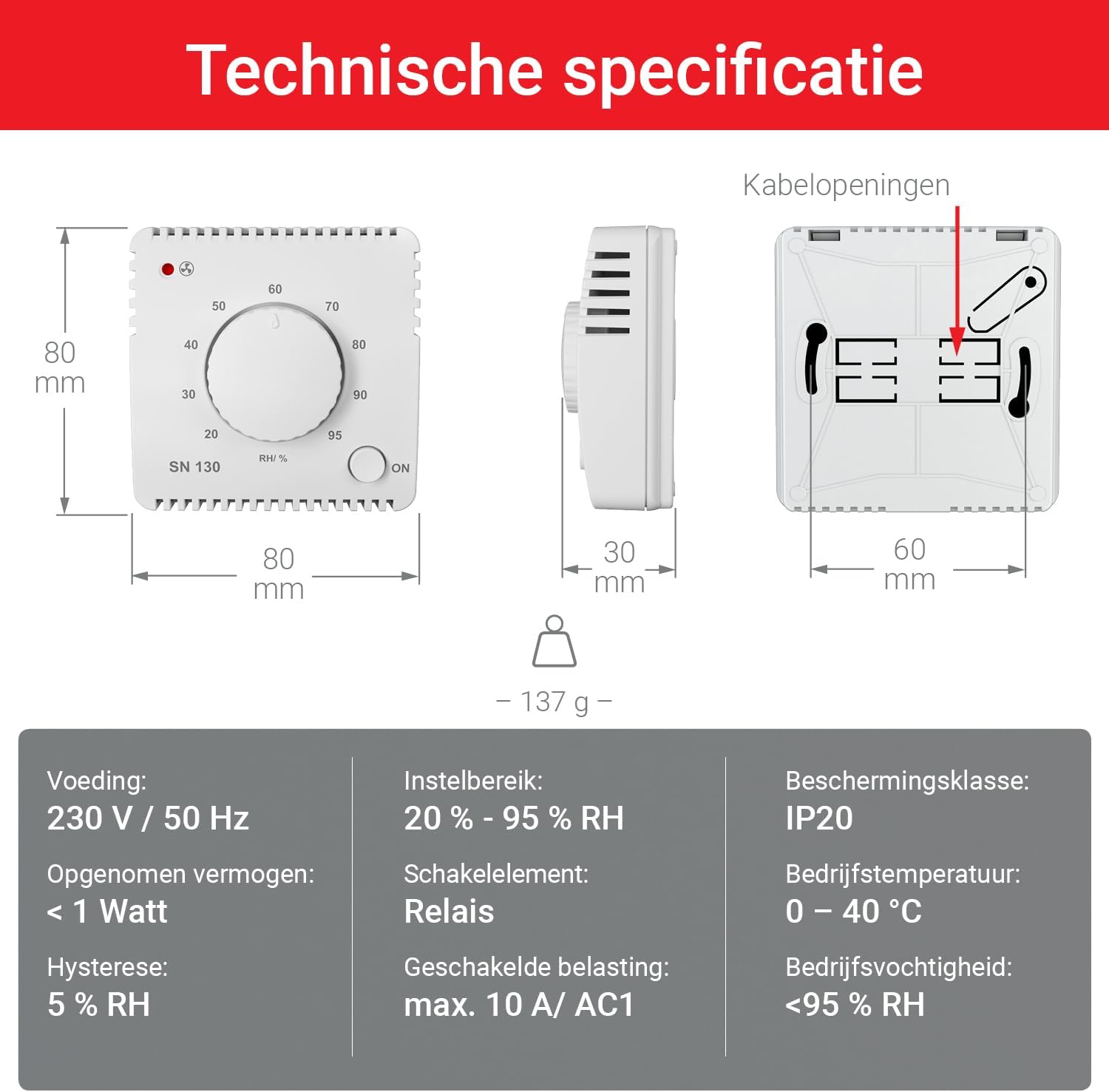
Image 8.1: Diagram illustrating the physical dimensions and key technical specifications of the SN130 sensor.
| Parameter | Value |
|---|---|
| Model Number | SN130 |
| Manufacturer | Elektrobock |
| Power Supply | 230 V / 50 Hz (AC) |
| Power Consumption | < 1 Watt |
| Humidity Setting Range | 20% - 95% RH |
| Hysteresis | 5% RH |
| Switching Element | Relay |
| Max Switched Load | 10 A / AC1 |
| Protection Class | IP20 |
| Operating Temperature | 0 - 40 °C |
| Operating Humidity | < 95% RH (non-condensing) |
| Dimensions (L x W x H) | 80 x 30 x 80 mm (approx. 8 x 3 x 8 cm) |
| Weight | 137 grams |
| Material | Plastic |
| Color | White |
| Country of Origin | Czech Republic |
9. Warranty and Support
Elektrobock products are manufactured to high-quality standards. For warranty information, please refer to the terms and conditions provided at the point of purchase or visit the official Elektrobock website.
If you encounter any issues not covered in the troubleshooting section or require further assistance, please contact Elektrobock customer support or your local distributor. Have your product model (SN130) and purchase details ready when contacting support.
Online Resources: For additional information, FAQs, or updated manuals, please visit the official Elektrobock website.
