
1. Introduction
Thank you for choosing the BENFEI 2-in-1 SD Card Reader. This device is designed to provide high-speed data transfer between various memory cards and your compatible devices, utilizing both USB 3.0 (Type-A) and USB Type-C connectors. Please read this manual carefully to ensure proper use and optimal performance.
2. Product Overview
The BENFEI 2-in-1 SD Card Reader features a compact design with dual connectors and card slots for versatile use.
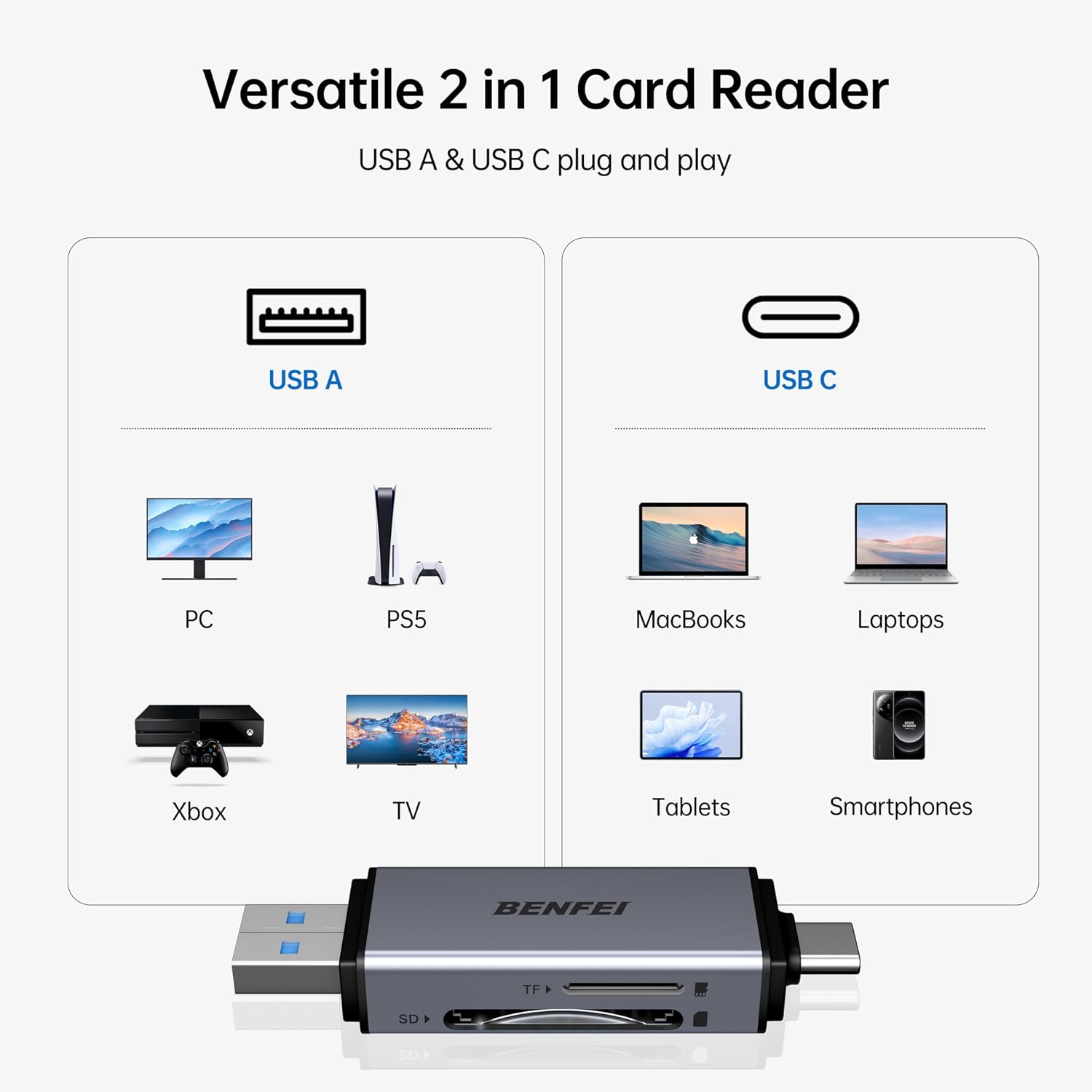
Image 2.1: The BENFEI 2-in-1 Card Reader features both USB-A and USB-C connectors, making it compatible with a wide range of devices including PCs, gaming consoles (PS5, Xbox), TVs, MacBooks, laptops, tablets, and smartphones.
Key Features:
- Dual Connectors: USB 3.0 (Type-A) and USB Type-C (Thunderbolt 3 compatible).
- Dual Card Slots: Dedicated slots for SD and Micro SD (TF) cards.
- High-Speed Transfer: Supports UHS-I speeds up to 104 MB/s.
- Wide Compatibility: Works with various operating systems and devices.
- Compact Design: Ultra-compact and portable with aluminum alloy housing.

Image 2.2: The card reader is equipped with two separate slots, one for TF (Micro SD) cards and another for standard SD cards, supporting various formats including SD, SDHC, SDXC, Micro SD, Micro SDHC, and Micro SDXC.
3. Setup Instructions
The BENFEI 2-in-1 SD Card Reader is a plug-and-play device, requiring no driver installation for most operating systems.
- Insert Memory Card: Gently insert your SD or Micro SD (TF) card into the corresponding slot on the card reader. Ensure the card is inserted correctly with the contacts facing down. Do not force the card.
- Connect to Device:
- For devices with a standard USB-A port (e.g., PC, laptop, PS5, Xbox, TV), use the USB 3.0 connector.
- For devices with a USB Type-C port (e.g., MacBook, laptop, tablet, smartphone), use the USB Type-C connector.
- Access Data: Once connected, your device should automatically detect the card reader and the inserted memory card. You can then access the card's contents through your device's file explorer or photo application.
4. Operating Instructions
Using the BENFEI card reader for data transfer is straightforward.
- Insert Card: Ensure your memory card is securely inserted into the correct slot (SD or TF).
- Connect Reader: Plug the appropriate connector (USB-A or USB-C) into your host device.
- Transfer Files:
- Open the file management application on your device (e.g., File Explorer on Windows, Finder on macOS, Files app on Android/iOS).
- Locate the drive representing your memory card.
- Drag and drop files between your device's storage and the memory card, or use copy/paste functions.
- Eject Safely: Before disconnecting the card reader, always safely eject the memory card from your operating system to prevent data corruption.

Image 4.1: The card reader supports high-speed data transfer, allowing for quick movement of large files, such as 1GB in seconds, when connected to a compatible USB 3.0 or USB-C port.
Note: The actual data transfer speed is dependent on the memory card's speed class and the USB port type (USB 3.0/USB-C offers higher speeds than USB 2.0).
5. Compatibility
The BENFEI 2-in-1 SD Card Reader offers broad compatibility with various devices and memory card types.
Compatible Memory Card Types:
- SD (Secure Digital)
- SDHC (Secure Digital High Capacity)
- SDXC (Secure Digital eXtended Capacity)
- Micro SD (TF)
- Micro SDHC
- Micro SDXC
- MMC (MultiMediaCard) - Note: Some MMC variants may require an adapter.
Compatible Devices & Operating Systems:
- USB-A Devices: PCs, Laptops, PS5, Xbox, Smart TVs with USB 3.0/2.0 ports.
- USB-C Devices: iPhone 15 Pro/Pro Max, MacBook Pro (2016-2023), MacBook (2015-2022), iMac Pro, Acer Aspire Switch 12S/R13, Predator 15/17X, Dell XPS 13/15/17, Alienware 13/15/17, HP Spectre x360, Microsoft Surface Pro/Book 2, Razer Blade 15/Stealth 13/Pro 17, Samsung Galaxy Tab Pro, S23/S22 Ultra/S21/S20, and most other USB-C enabled laptops, tablets, and smartphones.
- Operating Systems: Android, Windows, macOS, Linux, iOS (for compatible devices).

Image 5.1: The BENFEI card reader is compatible with modern USB-C smartphones, such as the iPhone 15, allowing direct access to memory card content.
6. Specifications
| Feature | Detail |
|---|---|
| Model Number | BNF-USBC-0381G (000381grey) |
| Connectors | USB 3.0 (Type-A), USB Type-C |
| Card Slots | SD, Micro SD (TF) |
| Compatible Media Types | SD, MicroSD, SDHC, SDXC, microSDHC |
| Data Transfer Rate | Up to 104 MB/s (UHS-I mode) / 5 Gbps (USB 3.0/USB-C interface) |
| Housing Material | Aluminum Alloy |
| Color | Grey |
| Operating System Support | All major operating systems (Windows, macOS, Linux, Android, iOS) |

Image 6.1: The ultra-compact design of the card reader makes it highly portable and space-saving, with dimensions of approximately 3.03 x 0.78 x 0.45 inches.

Image 6.2: The device features an anti-lost design, possibly with a loop for a keychain, and is constructed with a robust aluminum alloy housing for durability.
7. Maintenance
To ensure the longevity and optimal performance of your BENFEI SD Card Reader, follow these maintenance guidelines:
- Keep Clean: Regularly clean the connectors and card slots with a soft, dry, lint-free cloth. Avoid using liquids or abrasive cleaners.
- Protect from Elements: Keep the device away from extreme temperatures, direct sunlight, moisture, and dust.
- Handle Gently: Avoid dropping the device or subjecting it to strong impacts. When inserting or removing cards, do so gently to prevent damage to the slots.
- Store Properly: When not in use, store the card reader in a protective case or a safe place to prevent physical damage.
8. Troubleshooting
If you encounter issues with your BENFEI SD Card Reader, please refer to the following common troubleshooting steps:
- Device Not Recognized:
- Ensure the card reader is fully inserted into the USB port.
- Try a different USB port on your device.
- Test the card reader on another computer or compatible device to rule out a port issue.
- Restart your computer or device.
- Memory Card Not Detected:
- Ensure the memory card is correctly and fully inserted into its slot.
- Check if the memory card is damaged or corrupted by testing it in another card reader or device.
- Verify that the memory card type is supported by the reader (SD, Micro SD, SDHC, SDXC, etc.).
- Slow Transfer Speeds:
- Ensure you are using a USB 3.0 or USB Type-C port on your host device for optimal speeds. Connecting to a USB 2.0 port will result in lower speeds.
- The speed of the memory card itself affects transfer rates. Use high-speed cards (e.g., UHS-I or faster) for better performance.
- Avoid transferring many small files simultaneously, as this can reduce overall transfer speed compared to large files.
- Data Corruption:
- Always safely eject the memory card from your operating system before physically removing the card reader or the card.
- Ensure the memory card is not faulty.
9. Warranty and Support
BENFEI provides an 18-month warranty for this product, ensuring long-term satisfaction with your purchase. This warranty covers manufacturing defects and issues arising from normal use.
For Technical Support and Warranty Claims:
- Please contact BENFEI customer service directly. Refer to the contact information provided with your product packaging or visit the official BENFEI website.
- When contacting support, please have your product model number (BNF-USBC-0381G) and purchase details ready.
Note: The warranty does not cover damage caused by misuse, accidents, unauthorized modifications, or natural disasters.