
BODIOO PJ490
Contents
BODIOO Exercise Bike User Manual
Model: PJ490
1. Introduction
Thank you for choosing the BODIOO Exercise Bike. This stationary bike is designed for home cycling, offering a comfortable and effective workout experience. It features a comfortable seat cushion, an LCD monitor for tracking progress, a silent belt drive, and a heavy flywheel for smooth operation. This manual provides essential information for safe assembly, operation, and maintenance of your exercise bike.
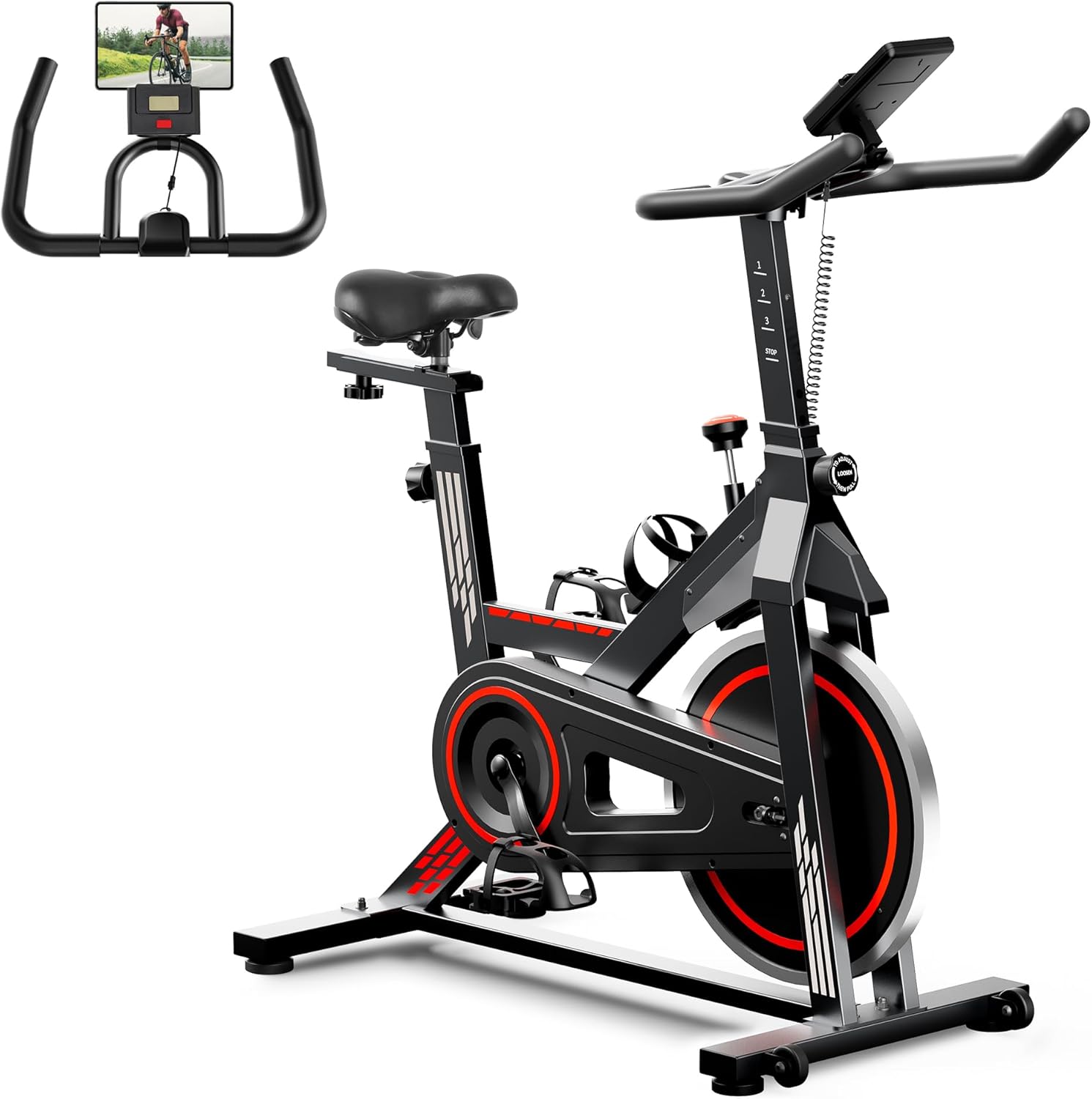
Image: The BODIOO Exercise Bike, a black and red stationary bike with an LCD monitor and tablet holder, designed for home use.
2. Important Safety Information
Please read all instructions carefully before using this exercise bike. Keep this manual for future reference.
- Consult your physician before starting any exercise program.
- Ensure all bolts and nuts are securely tightened before each use.
- Keep children and pets away from the equipment during operation.
- Place the bike on a flat, stable surface. Use a mat to protect your floor.
- Wear appropriate exercise attire and footwear.
- Do not exceed the maximum weight capacity of 300 lbs.
- Use the emergency stop knob to quickly halt the flywheel if needed.
- Do not place hands or feet near moving parts.
- Perform regular maintenance as described in this manual.
3. Product Overview
The BODIOO Exercise Bike is engineered for durability and user comfort. Key components include:
- Heavy-Duty Steel Frame: Provides stability and supports up to 300 lbs.
- Adjustable Handlebar: Non-slip design for various grip positions.
- Comfortable Seat Cushion: Padded and adjustable for optimal comfort.
- LCD Monitor: Tracks time, speed, distance, calories burned, and odometer.
- Tablet Holder: Conveniently holds your device for entertainment or virtual classes.
- Silent Belt Drive: Ensures a smooth and quiet workout.
- Resistance Knob: Allows for continuous adjustment of resistance levels and serves as an emergency stop.
- Caged Pedals: Securely hold your feet during intense workouts, with adjustable straps.
- Transport Wheels: For easy relocation of the bike.
- Water Bottle Holder: Keeps hydration within reach.

Image: Close-up view of the exercise bike's features, including the emergency stop knob, water bottle holder, removable transport wheels, and adjustable leg straps on the pedals.
4. Setup and Assembly
The BODIOO Exercise Bike is designed for quick and simple assembly. Most users can assemble it in under 30 minutes. Follow the included assembly guide for detailed, step-by-step instructions. Ensure all parts are present and undamaged before beginning assembly.
- Unpack all components and lay them out.
- Attach the front and rear stabilizers to the main frame.
- Install the pedals, ensuring they are tightened correctly (left and right pedals are distinct).
- Mount the seat post and seat.
- Attach the handlebar post and handlebars.
- Connect the LCD monitor cable.
- Verify all connections are secure and stable.
5. Operating Instructions
5.1. Adjusting for Comfort and Fit
Proper adjustment is key for an effective and comfortable workout. The bike offers multiple adjustment points:
- Seat Adjustment:
- Height: Loosen the knob on the seat post, adjust to your desired height (34"-42"), and tighten securely.
- Forward/Backward: Loosen the knob under the seat, slide the seat forward or backward (4" adjustment) to find your optimal position, and tighten.
- Handlebar Adjustment: Loosen the knob on the handlebar post, adjust the height (37"-41") to a comfortable level, and tighten firmly.
- Pedal Straps: The pedals feature 4-step adjustable leg straps to secure your feet. Ensure your feet are comfortably and securely placed before riding.

Image: Diagram illustrating the two adjustable ways for personalized fit: seat height and forward/backward adjustment, and handlebar height adjustment.
5.2. Using the LCD Monitor
The LCD monitor tracks your workout data. It automatically scans through various metrics or can be set to display a single metric.
- Time: Duration of your workout.
- Speed: Current cycling speed.
- Distance: Total distance covered during the current session.
- Calories Burned: Estimated calories expended.
- Odometer: Total accumulated distance.
- Scan Mode: Cycles through all metrics automatically.
- Mode Button: Press to switch between metrics or to exit scan mode and hold on a specific metric.
- Reset Button: Press and hold to clear all current workout data.

Image: The backlit LCD monitor displaying various metrics like Time, Cal (calories), Distance, Odometer, and Speed, with a tablet mounted above it.
5.3. Adjusting Resistance and Emergency Stop
The red dial tension knob in the middle of the bike controls the resistance and acts as an emergency stop.
- Increase Resistance: Turn the knob clockwise.
- Decrease Resistance: Turn the knob counter-clockwise.
- Emergency Stop: Press down firmly on the red knob to immediately stop the flywheel.

Image: A close-up of the resistance adjustment knob, showing the "PUSH TO STOP" function and indicating resistance levels for different workout intensities (warming up, body shaping, fat burning, strengthening muscle).
6. Maintenance
Regular maintenance ensures the longevity and safe operation of your BODIOO Exercise Bike.
- Cleaning: Wipe down the bike with a damp cloth after each use to remove sweat and dust. Avoid abrasive cleaners.
- Inspection: Periodically check all bolts, nuts, and moving parts for tightness and wear. Tighten any loose components.
- Lubrication: The belt drive system is designed for low maintenance. Refer to the full assembly guide for any specific lubrication requirements.
- Storage: Store the bike in a dry, cool place away from direct sunlight and extreme temperatures. Use the transport wheels for easy movement.

Image: A person demonstrating how to easily move the exercise bike using its front transport wheels by tilting it forward.
7. Troubleshooting
| Problem | Possible Cause | Solution |
|---|---|---|
| Bike is unstable or wobbles. | Uneven surface; loose bolts. | Ensure bike is on a flat surface. Check and tighten all assembly bolts. |
| Resistance is too loose or too tight. | Resistance knob not adjusted correctly. | Rotate the red resistance knob clockwise to increase resistance, counter-clockwise to decrease. |
| LCD monitor not displaying data. | Battery low or connection issue. | Check and replace batteries in the monitor. Ensure the sensor cable is securely connected. |
| Squeaking or unusual noises. | Loose parts; lack of lubrication (rare for belt drive). | Inspect all connections and tighten. If noise persists, consult customer support. |
8. Specifications
| Feature | Detail |
|---|---|
| Brand | BODIOO |
| Model Number | PJ490 |
| Color | Black |
| Material | Metal |
| Item Weight | 55 Pounds |
| Product Dimensions | 41.7"D x 42.3"W x 19.6"H |
| Maximum Weight Recommendation | 300 Pounds |
| Resistance Mechanism | Friction |
| Drive System | Belt |
| Power Source | Battery Powered (for LCD monitor) |
| Recommended Uses | Indoor |

Image: The BODIOO Exercise Bike with key dimensions highlighted, showing its compact size suitable for home workouts.
9. Warranty and Support
For warranty information, product support, or to purchase replacement parts, please contact BODIOO customer service. Refer to the contact information provided with your product packaging or visit the official BODIOO website.
You can also visit the BODIOO Store on Amazon for more information and support resources.
Ask a question about this manual
Ask about setup, troubleshooting, compatibility, parts, safety, or missing instructions. Manuals+ will review the question and use this page’s manual context to help answer it.