
1. Introduction
This manual provides comprehensive instructions for the HUAWEI WATCH GT 5 46mm Smartwatch. It covers setup, operation, maintenance, troubleshooting, and detailed specifications to ensure optimal use of your device. Please read this manual carefully before using your smartwatch.

Figure 1: HUAWEI WATCH GT 5 46mm Smartwatch displaying various health and environmental metrics.
Package Contents
- Watch × 1
- Charging base (including cable) × 1
- Quick Start Guide & Safety Information & Warranty Card × 1
2. Setup
Follow these steps to set up your HUAWEI WATCH GT 5 46mm Smartwatch and connect it to your smartphone.
2.1 Initial Charging
Before first use, fully charge your smartwatch using the provided charging base and cable. Align the charging contacts on the watch with those on the base. The watch screen will indicate charging status.
2.2 HUAWEI Health App Installation and Pairing
The HUAWEI Health app is essential for managing your smartwatch, tracking health data, and accessing advanced features. The watch is compatible with both iOS and Android devices.

Figure 2: HUAWEI WATCH GT 5 Smartwatch compatible with iOS and Android via the HUAWEI Health app.
- Step 1: Download
Download the HUAWEI Health app from your smartphone's app store (App Store for iOS, Google Play Store or HUAWEI AppGallery for Android).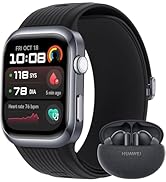
Figure 3: HUAWEI Health app download instructions.
- Step 2: Pair
Open the HUAWEI Health app, navigate to Devices > Add > Smartwatch, and select your device from the list to initiate pairing. - Step 3: Update
Once paired, open the HUAWEI Health app, go to Me > Check for updates to ensure your smartwatch has the latest firmware.
3. Operating Your Smartwatch
The HUAWEI WATCH GT 5 offers a range of features for daily use, fitness tracking, and health monitoring.
3.1 Basic Navigation
- Touchscreen: Swipe up, down, left, or right to navigate through menus and notifications. Tap to select items.
- Side Buttons: Use the physical buttons on the side for quick access to functions like the app list, workout modes, or to return to the home screen.
3.2 Health Monitoring (HUAWEI TruSense)
The HUAWEI WATCH GT 5 features advanced HUAWEI TruSense technology for rapid, accurate, and comprehensive health monitoring. It tracks six main systems, including respiratory, nervous, and motor systems.

Figure 4: HUAWEI TruSense sensor for comprehensive health monitoring.
- Heart Rate Monitoring: Continuous heart rate tracking.
- SpO2 Monitoring: Measures blood oxygen saturation levels.
- Sleep Management: Tracks sleep stages and provides insights for better sleep quality.
- Women's Cycle Calendar: Helps track menstrual cycles.
3.3 Sports and Activity Tracking
The smartwatch supports over 100 workout modes, including new running and cycling modes with real-time map-based navigation and RouteDraw functionality.

Figure 5: Smartwatch displaying navigation during a cycling activity.
- Running & Cycling Modes: Offers fluid navigation directly from the wrist with real-time map routes and data to prevent injuries.
- RouteDraw: Create creative routes for your workouts.
- GPS: Integrated GPS for accurate outdoor activity tracking.
3.4 Smart Features
Enhance your daily life with smart functionalities directly from your wrist.
- Bluetooth Calling: Make and receive calls directly from your watch when connected to your smartphone.

Figure 6: Smart experiences including Bluetooth calling and integrated keyboard.
- Integrated Keyboard: Respond to messages or input text directly on the watch.
- Notifications: Receive alerts for calls, messages, and app notifications.
4. Maintenance
Proper care and maintenance will extend the lifespan of your HUAWEI WATCH GT 5 46mm Smartwatch.
4.1 Cleaning
- Regularly clean the watch body and strap with a soft, damp cloth.
- Ensure the charging contacts are clean and dry before charging to prevent corrosion.
- Avoid using harsh chemicals or abrasive materials, as these can damage the watch's finish.
4.2 Water Resistance
The watch features a uniform nano-film waterproof finish, providing robust protection against water and corrosion. While it is water-resistant, avoid prolonged submersion in saltwater or exposure to high-pressure water jets.
4.3 Battery Care
- Charge the watch regularly, avoiding complete discharge for extended periods.
- Use only the original charging base and cable provided with the device.
5. Troubleshooting
If you encounter issues with your HUAWEI WATCH GT 5, refer to the following common solutions.
5.1 Watch Not Turning On
- Ensure the watch is fully charged. Connect it to the charger for at least 10 minutes.
- Press and hold the power button for an extended period (approx. 15 seconds) to force a restart.
5.2 Pairing Issues
- Ensure Bluetooth is enabled on your smartphone.
- Make sure the watch is within range of your smartphone.
- Restart both your smartphone and the smartwatch.
- Clear the Bluetooth cache on your smartphone (Android) or forget the device and try pairing again.
- Ensure the HUAWEI Health app is updated to the latest version.
5.3 Inaccurate Health Data
- Ensure the watch is worn snugly on your wrist, not too tight or too loose.
- Keep the sensor area on the back of the watch clean and free from debris.
- Update the watch firmware via the HUAWEI Health app.
5.4 Short Battery Life
- Reduce screen brightness and screen-on time.
- Disable continuous heart rate monitoring or other intensive features if not needed.
- Limit the number of apps running in the background.
- Ensure the watch firmware is up to date.
6. Specifications
Detailed technical specifications for the HUAWEI WATCH GT 5 46mm Smartwatch.
| Feature | Specification |
|---|---|
| Model Number | HUAWEI WATCH GT 5 |
| Dimensions | 12.6 x 12 x 7 cm (packaging); 48 grams (watch weight) |
| Display Size | 1.43 Inches |
| Display Type | AMOLED HD color screen |
| Operating System | LiteOS (HUAWEI) |
| Memory Capacity | 16 GB |
| Connectivity Technology | Bluetooth |
| Wireless Communication Standard | Bluetooth |
| GPS | Integrated GPS |
| Battery Type | Lithium Polymer (1 required, included) |
| Maximum Battery Life | Up to 14 days |
| Typical Battery Life | 9 days |
| Special Features | Voice Call, GPS, Touchscreen, Cycle Tracking, Time Display |
| Durability | Ultra-resistant coatings, nano-film waterproof finish, double scratch resistance |

Figure 7: Battery life comparison for HUAWEI WATCH GT 5 models.
7. Warranty
The HUAWEI WATCH GT 5 46mm Smartwatch comes with a standard manufacturer's warranty. Additionally, users may benefit from an extended 6-month warranty.

Figure 8: Information regarding the extended 6-month warranty.
For specific details regarding warranty coverage and claims, please refer to the warranty card included in your product package or visit the official HUAWEI support website.
8. Support
For further assistance, product updates, or to explore other HUAWEI products, please use the following resources:
- HUAWEI Official Store: Visit the HUAWEI Store on Amazon for product information and accessories.
- HUAWEI Health+ Subscription: Users of the HUAWEI WATCH GT 5 series can benefit from a free 3-month subscription to HUAWEI Health+, offering exclusive access to workouts, guided meditations, and fitness plans.
- Online Support: Refer to the official HUAWEI website for FAQs, user guides, and contact information for customer service.


