
1. Introduction
This manual provides instructions for the DEWENWILS Low Voltage Landscape Transformer. This device converts standard 120V AC household voltage to a safe 12V DC output, suitable for landscape lighting. It features a built-in photocell sensor for automatic dusk-to-dawn operation and a programmable timer function.

Figure 1: The landscape power unit converting 120V AC input to 12V DC output, with indicator lights for status and timer settings.
The transformer is designed for outdoor use and includes various protection features to ensure safe and reliable operation.
2. Safety Information
- This transformer provides a 12V DC safety voltage, reducing electrical hazards.
- The unit is equipped with overload and short circuit protection. In case of an overload, the circuit breaker will trip.
- Important: This transformer is NOT FOR USE WITH DIMMERS.
- Mount the transformer at least 1 foot (30cm) above ground level.
3. Setup and Installation
Follow these steps for proper installation of your landscape transformer:
- Mounting: Utilize the built-in hanging hole to mount the transformer securely on an outdoor wall. Ensure it is mounted at least 1 foot (30cm) above ground.
- Power Connection: Plug the 3.3ft power cable into a standard 120V AC outdoor outlet.
- Connecting Lights: Connect your low voltage landscape lights to the 12V DC output terminals. The transformer features two terminal output ends. Ensure the total wattage of connected lights does not exceed 60W.

Figure 2: Illustration of the transformer's terminal block for connecting landscape lights and the circuit breaker for protection.
The circuit breaker provides short circuit protection. If it trips due to an overload, troubleshoot the connected lights, then press the circuit breaker button to reset.
4. Operating Instructions
The transformer offers multiple operating modes for flexible control of your landscape lighting.
4.1. Photocell Sensor (Dusk to Dawn)
The built-in photocell sensor automatically detects ambient light levels. In appropriate modes, it will turn your landscape lights ON at dusk and OFF at dawn, providing energy efficiency and convenience.
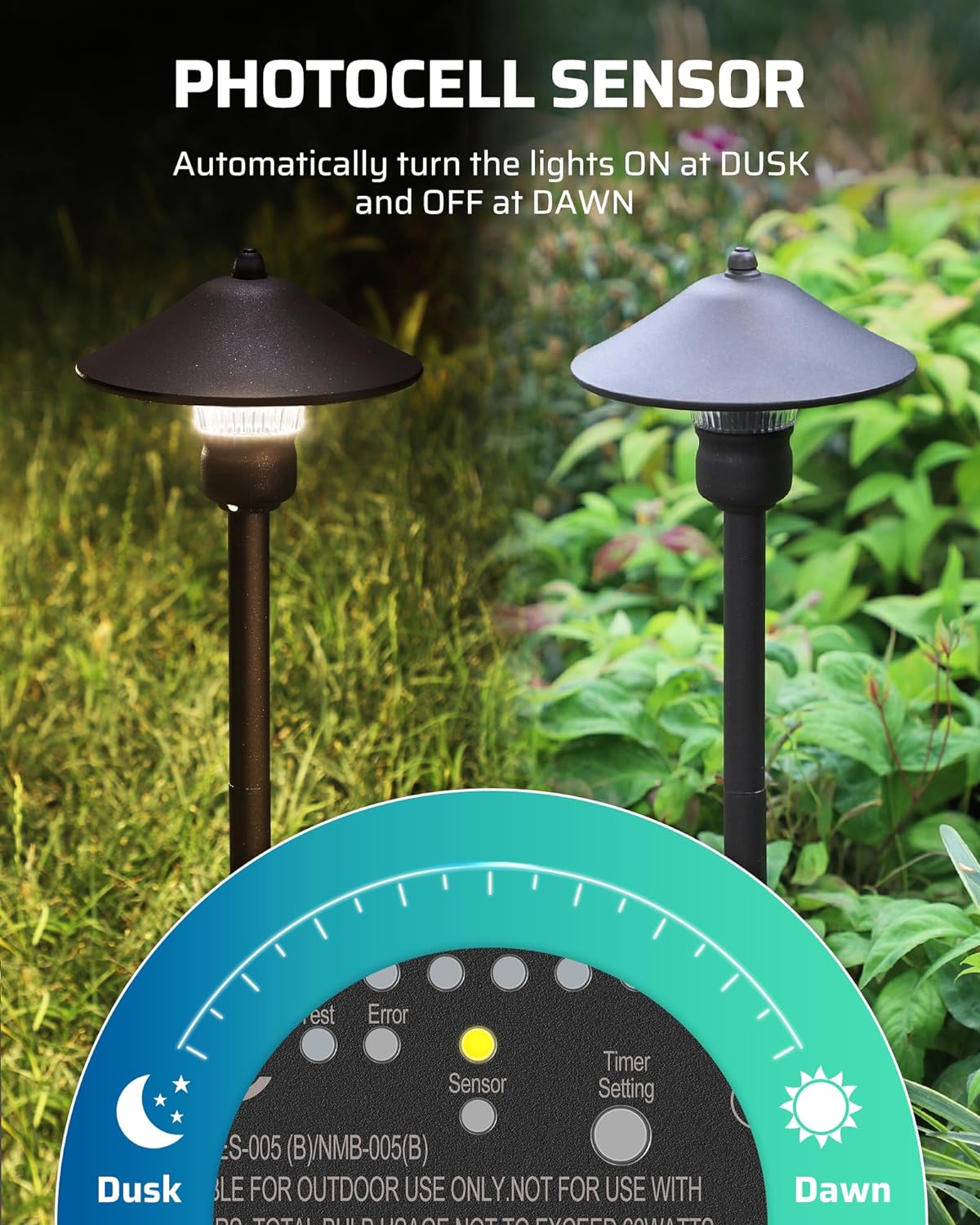
Figure 3: Visual representation of the photocell sensor's function, activating lights at dusk and deactivating them at dawn.

Figure 4: Example of landscape lighting operation controlled by the photocell sensor, showing lights on during dusk and off during dawn.
4.2. Timer Function
The integrated timer allows you to set a countdown for your lights to turn off after a specified duration. Available countdown options are 2, 4, 6, or 8 hours.

Figure 5: Depiction of the single button used to cycle through timer settings (2H, 4H, 6H, 8H) and other modes.
4.3. Memory Function
The transformer includes a memory function. In the event of a power outage, the device will retain the last selected timer mode and resume operation accordingly once power is restored.
4.4. Setting Modes
Press the "MENU" button to cycle through the 5 available operating modes:
- Manual ON/OFF: Allows you to manually turn the lights on or off.
- Auto ON/OFF: Lights turn on at dusk and off at dawn automatically via the photocell sensor.
- Photo ON Timer OFF: Lights turn on at dusk and turn off after the set timer duration (2/4/6/8 hours).
- Timer ON/OFF: Lights turn on and off based on a set schedule (not detailed in provided data, typically implies a specific time setting).
- Test: Enables verification of the light sensor's functionality.

Figure 6: The control panel interface displaying the five selectable operating modes and navigation buttons.
5. Maintenance
The DEWENWILS Low Voltage Landscape Transformer is designed for durability and minimal maintenance.
- Weatherproof Design: The molded body protects the transformer from rain, snow, dust, and abrasion, ensuring years of outdoor use.
- Corrosion Resistance: Constructed with materials resistant to corrosion for extended lifespan in outdoor environments.
- Cleaning: Periodically wipe the exterior with a damp cloth to remove dirt and debris. Do not use harsh chemicals or abrasive cleaners.

Figure 7: The transformer's robust design, emphasizing its weatherproof, corrosion-resistant, and protective qualities for outdoor use.
6. Troubleshooting
- Lights Not Turning On:
- Check if the transformer is properly plugged into a working outlet.
- Verify the selected operating mode. Ensure it is not in Manual OFF or a timer mode that has already expired.
- Inspect the photocell sensor for any obstructions if using dusk-to-dawn modes.
- Check the circuit breaker. If it has tripped, press it to reset after inspecting for overloads or short circuits in the connected lights.
- Circuit Breaker Trips Repeatedly:
- The total wattage of connected lights may exceed the transformer's 60W capacity. Reduce the number of lights.
- There may be a short circuit in the landscape wiring or one of the light fixtures. Inspect all connections and fixtures for damage.
- Timer Not Functioning Correctly:
- Ensure the correct timer duration (2/4/6/8 hours) is selected in the Photo ON Timer OFF mode.
- Verify that the memory function is retaining settings after power cycles.
7. Specifications
| Brand | DEWENWILS |
| Model Number | 8865cdc7-793c-4367-826c-695cfcde37ad |
| Input Voltage | 120V AC, 60Hz |
| Output Voltage | 12V DC |
| Max Wattage | 60W |
| Power Source | Corded Electric |
| Mounting Type | Wall Mount |
| Certifications | ETL Listed, FC, Intertek |


