
1. Introduction
This manual provides detailed instructions for the assembly, operation, and maintenance of your Anman 8040 Aluminum Profile Racing Simulator Cockpit with Triple Monitor Mount. Please read this manual thoroughly before assembly and use to ensure proper setup and safe operation. This product is designed to provide a stable and adjustable platform for racing simulation, excluding electronic devices such as steering wheels, pedals, shifters, and monitors.

Image 1.1: Fully assembled Anman Racing Simulator Cockpit with triple monitors, steering wheel, shifter, and pedals (electronic devices not included).
2. Safety Information
- Ensure all components are securely fastened before use. Loose connections can lead to instability and potential injury.
- The cockpit contains heavy components. Exercise caution during assembly and consider assistance to prevent injury.
- Keep small parts and packaging materials away from children to prevent choking hazards.
- Do not exceed the maximum weight capacity of the cockpit (500 lbs) or the monitor mount.
- Place the cockpit on a flat, stable surface to prevent tipping.
- Regularly inspect the cockpit for any signs of wear, damage, or loose fasteners. Address any issues immediately.
3. Package Contents
Your Anman Racing Simulator Cockpit is delivered in multiple packages. Please verify that all listed components are present before beginning assembly.

Image 3.1: Overview of the multi-parcel delivery, indicating main component categories.
- Box A: Profile Racing Frame components (8040 Aluminum Profile)
- Box B: Racing Control Stand components (for steering wheel, pedals, shifter)
- Box C: Racing Monitor Stand components (for triple monitor setup)
- Box D: Racing Seat and associated mounting hardware
- Assorted fasteners, tools, and instruction manual.
4. Assembly Instructions
Assembly requires careful attention to detail. It is recommended to assemble the cockpit on a clean, open surface. Refer to the included hardware diagrams for specific fastener types and locations.
4.1. Frame Assembly
Begin by assembling the main 8040 aluminum profile frame. Connect the base profiles, then attach the vertical supports. Ensure all T-nuts and bolts are correctly inserted and tightened to create a rigid structure. The robust 8040 aluminum profile frame provides enhanced stability.

Image 4.1: The cockpit utilizes a 4080 aluminum profile frame for rugged structure and stability.
4.2. Seat Installation
Mount the racing seat onto the double slide rails provided. Secure the rails to the main frame using the designated hardware. The seat features an ergonomic design with neck and lumbar pillows, and supports 90-180 degree recline adjustment.

Image 4.2: Details of the ergonomic racing seat, highlighting its adjustable features and construction.
4.3. Steering Wheel and Pedal Platform Assembly
Attach the steering wheel platform and pedal platform to the main frame. These platforms are designed for adjustability to accommodate various user preferences and equipment. The shifter mount is reinforced for stability.

Image 4.3: The upgraded shift lever mount features two 40mm x 40mm aluminum profiles for increased stability.
4.4. Triple Monitor Mount Installation
Assemble the triple monitor stand and attach it to the cockpit frame. Ensure the VESA mounting plates are correctly oriented for your monitors. The monitor stand supports three screens for an immersive experience.

Image 4.4: VESA patterns and compatible display sizes for the monitor mount.
4.5. Assembly Demonstration Video
For a visual guide on the assembly process, please refer to the following video:
Video 4.5: Anman Racing Simulator Cockpit Mounting Animation Demonstration. This video illustrates the general assembly steps for the cockpit frame and components.
5. Adjustments
The Anman Racing Simulator Cockpit offers extensive adjustability to optimize your racing position.

Image 5.1: Illustration of personalized adjustment options for the shift lever and pedal platform.
- Seat Adjustment: The racing seat can be reclined from 90 to 180 degrees and moved forward/backward on its double slide rails.
- Steering Wheel Platform: The height and angle of the steering wheel platform can be adjusted to suit your preference.
- Pedal Platform: The pedal platform's angle and distance from the seat are adjustable to ensure comfortable and effective pedal control.
- Shifter Mount: The gear shifter mount can be positioned for optimal reach and comfort.
- Monitor Mount: The triple monitor mount allows for individual monitor angle adjustments to create a seamless panoramic view.
6. Compatibility
This racing simulator cockpit is designed for wide compatibility with various racing peripherals and display types.

Image 6.1: Examples of compatible steering wheel brands.
- Steering Wheels: Compatible with popular brands including Logitech Pro Racing Wheel G29, G920, G923; Thrustmaster T598, T818, T248, T128, T300; Fanatec CSL-DD, GT-DD-PRO; Moza R5, R9, R12, R16; PXN V9, and other direct drive steering wheels.
- Pedals & Shifters: Designed to accommodate most standard racing pedal sets and gear shifters.
- Monitors: The triple monitor stand is adapted for 27-32 inch displays. For single screen installations, it can support 24-65 inch monitors.
6.1. Product Overview Video
For a general overview of the Anman Racing Simulator Cockpit Stand and its features, please watch the following video:
Video 6.2: Anman Racing Simulator Cockpit Stand. This video provides a comprehensive look at the cockpit's design and functionality.
7. Maintenance
Regular maintenance will prolong the life and performance of your racing simulator cockpit.
- Cleaning: Wipe down aluminum profiles and seat with a soft, damp cloth. Avoid abrasive cleaners or solvents that may damage the finish or artificial leather.
- Fastener Check: Periodically check all bolts and screws for tightness. Re-tighten as necessary to maintain structural integrity.
- Inspection: Inspect the aluminum profiles and mounting plates for any signs of damage, cracks, or deformation. If damage is found, discontinue use and contact support.
8. Troubleshooting
This section addresses common issues you might encounter during setup or use.
| Problem | Possible Cause | Solution |
|---|---|---|
| Cockpit feels unstable or wobbly. | Loose fasteners; uneven floor surface. | Ensure all bolts and screws are fully tightened. Verify the cockpit is on a level surface. |
| Difficulty adjusting components (seat, wheel, pedals). | Adjustment knobs/levers are too tight; debris in tracks. | Loosen adjustment mechanisms before attempting to move components. Clean any debris from slide rails or adjustment tracks. |
| Monitors do not align correctly on the triple mount. | Incorrect VESA plate orientation; individual monitor adjustments needed. | Review monitor mount assembly instructions. Adjust individual monitor angles and positions using the mount's articulation points. |
| Missing parts during unboxing. | Multi-parcel delivery; oversight during packing. | Check all boxes thoroughly. If parts are still missing, contact Anman customer support with your purchase details. |
9. Specifications
| Feature | Detail |
|---|---|
| Model Number | Racing Sim Cockpit 85 |
| Frame Material | 8040 Aluminum Profile |
| Seat Material | Artificial PU Leather |
| Product Dimensions (L x W x H) | 61 x 67 x 54.3 inches (approximate assembled size) |
| Item Weight | 39.6 pounds |
| Maximum Weight Capacity | 500 lbs |
| Monitor Compatibility | Triple: 27-32 inches; Single: 24-65 inches |
| Seat Adjustment | 90-180 degree recline, forward/backward slide |
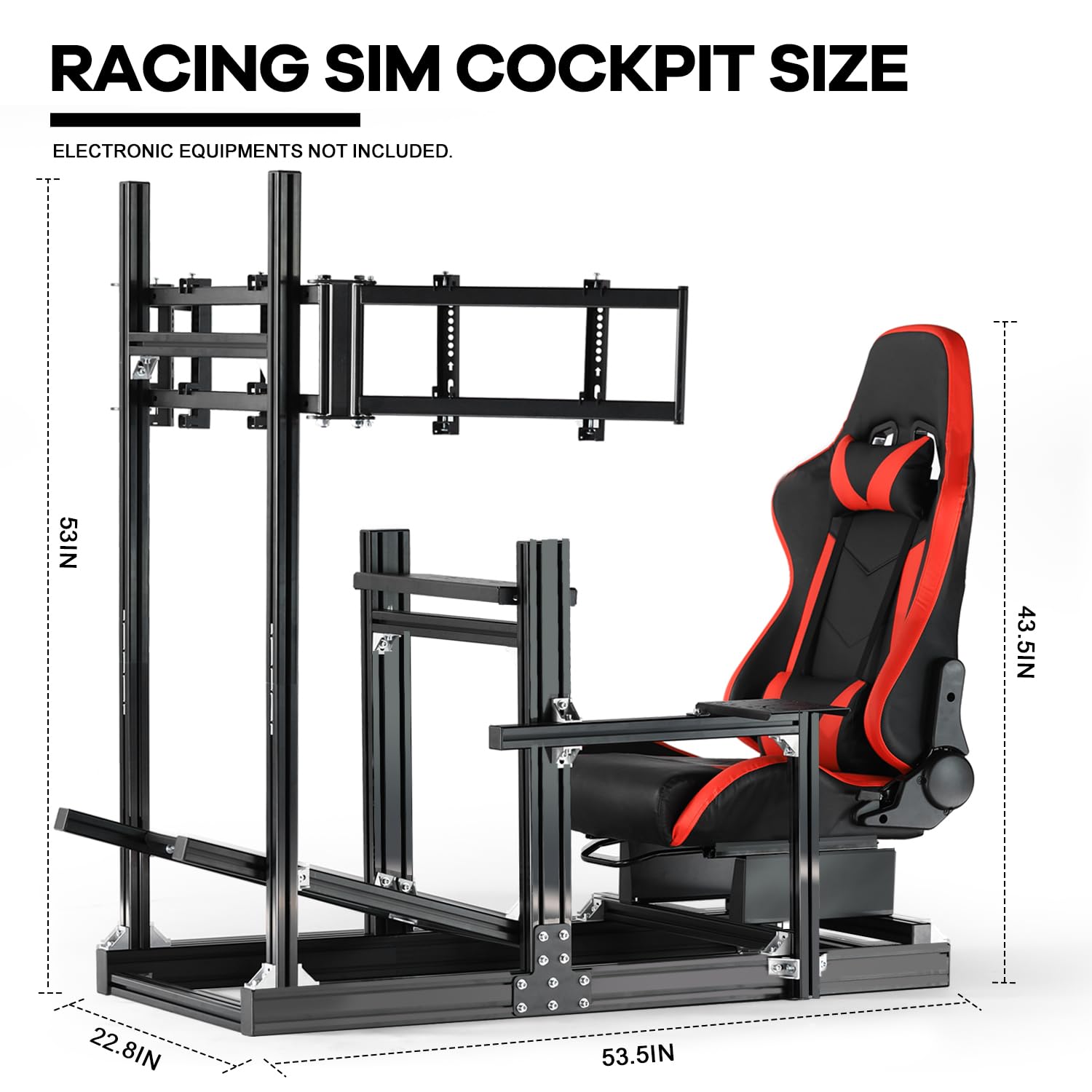
Image 9.1: Key dimensions of the Anman Racing Simulator Cockpit.
10. Warranty and Support
For warranty information, technical support, or to inquire about replacement parts, please contact Anman customer service through the retailer where the product was purchased. Please have your purchase receipt and product model number (Racing Sim Cockpit 85) available when contacting support.