
1. Introduction
This manual provides comprehensive instructions for the assembly, operation, maintenance, and troubleshooting of your Anman F1 Racing Simulator Cockpit Stand. Please read this manual carefully before beginning assembly or use to ensure proper setup and to maximize your racing simulation experience. Keep this manual for future reference.
2. Key Features
- Enhanced Stability and Professional Design: Constructed with a robust 40x80mm solid aluminum profile frame, featuring an added support bar at the joystick position for increased stability. This design supports stronger force feedback from your racing peripherals, providing a more immersive gaming experience.
- Versatile Driving Experience: The cockpit stand supports three distinct driving modes: F1 racing mode, truck driving mode, and off-road driving mode, offering a realistic and adaptable game driving experience.
- Infinite Adjustability: The entire racing simulator cockpit stand is fully adjustable. This includes the main stand structure, as well as mounting points for the steering wheel, pedals, and seat, allowing for personalized configuration to suit all professional and casual users.
- Ergonomic Racing Seat: Features an ergonomic black racing seat made from breathable material, designed for comfort during extended use. The seat includes an adjustable backrest (90-180 degrees) and a double track design for convenient adjustment and strong support.
- Wide Compatibility: This sim racing cockpit is compatible with a broad range of popular racing wheels and pedals, including Logitech G29, G920, G923 Pro Racing Wheel; Thrustmaster T500, T818, T80, T128, T300; Fanatec CSL-DD, GT-DD-PRO; Moza R5, R9, R12, R16; and PXN V9.
3. Setup and Assembly
Assembly of the Anman F1 Racing Simulator Cockpit Stand is required. The process typically takes between 1.5 to 4 hours, depending on individual experience. All necessary components and tools are included. Please follow the detailed instructions provided in the packaging. For a visual guide, refer to the assembly video below.
Video: An animated demonstration of the assembly process for the Anman Racing Simulator Cockpit. This video provides a step-by-step visual guide to help users understand how to mount and configure the various parts of the cockpit, including the seat, steering wheel, and pedal platforms.
3.1 Initial Component Overview

Image: An overview of the Anman F1 Racing Simulator Cockpit Stand, showcasing its robust aluminum profile frame and comfortable racing seat. The frame is constructed from 40x80mm aluminum profiles, designed for stability and supporting up to 500 lbs (200 kg).
Before starting assembly, ensure all parts are present and undamaged. The cockpit features a 40x80mm aluminum profile frame, designed for high stability and supporting up to 500 lbs (200 kg).
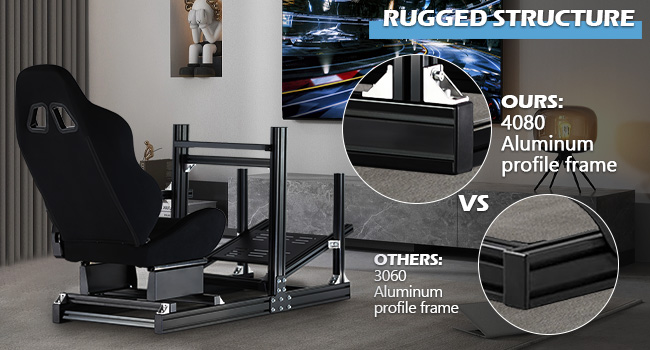
Image: This image compares the rugged structure of the Anman Racing Simulator Cockpit, highlighting its use of 40x80mm aluminum profile frame for superior stability and durability, as opposed to the smaller 30x60mm frames found in some other cockpits.
3.2 Attaching Peripherals
The cockpit is designed for wide compatibility with various racing peripherals. Ensure your steering wheel, pedals, and shifter are securely mounted to their respective platforms using the provided hardware.

Image: The Anman Racing Simulator Cockpit Stand is designed for wide compatibility, as illustrated by this image. It supports popular racing wheels and pedals from brands such as Logitech, Thrustmaster, and Moza, allowing users to integrate their preferred gaming hardware. Electronic equipment is not included.
Optional accessories, such as monitor brackets, can be installed to further enhance your setup. These are typically sold separately.

Image: This image illustrates how the Anman Racing Simulator Cockpit can be upgraded with an additional monitor bracket (sold separately) to enhance the driving environment. It shows the cockpit with a single monitor setup and a potential triple monitor configuration, providing a more immersive experience. Electronic equipment is not included.
4. Operating and Adjustments
The Anman F1 Racing Simulator Cockpit Stand offers extensive adjustability to cater to various user heights and driving preferences. Take time to fine-tune each component for optimal comfort and performance.
Video: This video demonstrates the Anman Racing Simulator Cockpit Stand in action, showcasing its adjustability for the seat, pedals, and steering wheel. It provides a visual guide to how different components can be positioned to optimize the racing experience.
4.1 Seat Adjustment
The ergonomic racing seat can be adjusted for both recline angle and fore/aft position. The backrest can be reclined from 90 to 180 degrees. Use the double track design for smooth and precise horizontal adjustments.

Image: This image details the ergonomic design of the racing seat included with the Anman Simulator Cockpit. It features a breathable fabric, one-piece molding sponge for comfort, and supports a 90-180 degree backrest adjustment. The double track design allows for convenient and strong support.
4.2 Steering Wheel and Pedal Adjustment
The steering wheel platform allows for angle and height adjustments to accommodate various driving habits. The pedal platform can also be adjusted for height and angle, ensuring comfortable and responsive control during gameplay.

Image: This image highlights the multi-directional adjustment capabilities of the Anman Racing Simulator Cockpit Stand. It shows how various components, including the steering wheel, pedals, and seat, can be adjusted to suit different user preferences and driving styles. Electronic equipment is not included.
The control remote lever position can be adjusted for fore and backward movement, as well as left and right switching, to meet different driving habits and ensure double stability.

Image: This image demonstrates the personalized adjustment features of the Anman Racing Simulator Cockpit. It shows the U-shaped latch fixing for infinite front and rear distance adjustment of the seat, as well as the adjustable shift lever and pedal platform positions. Electronic equipment is not included.
5. Maintenance
Regular maintenance ensures the longevity and optimal performance of your Anman F1 Racing Simulator Cockpit Stand.
- Cleaning: Wipe down the aluminum frame and seat with a soft, damp cloth. Avoid abrasive cleaners or solvents that could damage the finish or fabric.
- Fastener Checks: Periodically inspect all bolts, screws, and connection points to ensure they are tight. Loose fasteners can affect stability and performance.
- Moving Parts: Ensure that all adjustable mechanisms for the seat, steering wheel, and pedals move smoothly. Lubricate if necessary with a silicone-based spray, avoiding contact with electronic components.
6. Troubleshooting
If you encounter any issues with your Anman F1 Racing Simulator Cockpit Stand, refer to the following common troubleshooting tips:
- Instability/Wobbling: Check all frame connections and ensure bolts are securely tightened. Verify that the cockpit is placed on a flat, stable surface.
- Difficulty Adjusting Components: Ensure that adjustment levers or knobs are fully loosened before attempting to move parts. If movement is stiff, check for obstructions or debris in the tracks.
- Peripherals Not Mounting Securely: Confirm that you are using the correct mounting hardware for your specific racing wheel, pedals, or shifter. Ensure all screws are tightened firmly.
- Seat Movement Issues: If the seat is not sliding smoothly, check the double tracks for any debris and ensure the locking mechanism is fully disengaged.
For persistent issues not resolved by these steps, please contact Anman customer support.
7. Specifications
| Feature | Detail |
|---|---|
| Brand Name | Anman |
| Model Name | Simulator Cockpit 85 |
| Compatible Devices | Fanatec, Logitech, Thrustmaster, Moza, PXN |
| Controller Type | Steering wheel, pedals |
| Connectivity Technology | Manual |
| Additional Features | Motion Sensing, Racing Simulator Cockpit with black Seat |
| Hardware Platform | PC, PlayStation 4, PlayStation 5, Xbox One |
| Item Dimensions (L x W x H) | 60 x 31.5 x 43.6 inches |
| Power Source | No (Passive Stand) |
| Package Quantity | 1 |
| Color | Black |
8. Warranty and Support
The Anman F1 Racing Simulator Cockpit Stand comes with a 3-month warranty. Anman also provides permanent online technical support for this product. For any warranty claims, technical assistance, or support inquiries, please contact Anman customer service through the retailer where the product was purchased or visit the official Anman website for contact information.