
1. Product Overview
The LG LW8024R is an 8,000 BTU window air conditioner designed to cool medium-sized rooms up to 350 sq. ft. (approximately 14' x 25'). This unit offers multiple operating modes, fan speeds, and convenient features for enhanced comfort and ease of use.
Key Features:
- 8,000 BTU Cooling Capacity: Ideal for rooms up to 350 sq. ft.
- Quiet Operation: Operates at sound levels as low as 52dB in low mode.
- 3-in-1 Operation: Offers Cooling, Fan-Only, and Dehumidification modes.
- Multiple Fan Speeds: 3 cooling and fan speeds (Low, Mid, High, Auto).
- Auto Restart: Automatically resumes operation after a power outage.
- 24-Hour Timer: Allows for pre-setting operation times.
- 4-Way Air Deflection: Directs airflow for optimal circulation.
- Remote Control: Convenient operation from a distance.
- Washable Filter: Removable and washable for easy maintenance, with a filter light reminder.
2. Safety Information
Please read all safety instructions before installing and using the air conditioner to prevent personal injury or property damage. Keep this manual for future reference.
General Safety Precautions:
- Ensure the unit is properly grounded.
- Do not operate the unit with a damaged power cord or plug.
- Do not insert fingers or foreign objects into the air inlet or outlet.
- Keep flammable materials away from the unit.
- Always disconnect power before cleaning or servicing.
- Do not attempt to repair or modify the unit yourself. Contact qualified service personnel.
- Ensure proper drainage of condensate to prevent water damage.
3. Package Contents
Verify that all components are present before beginning installation.
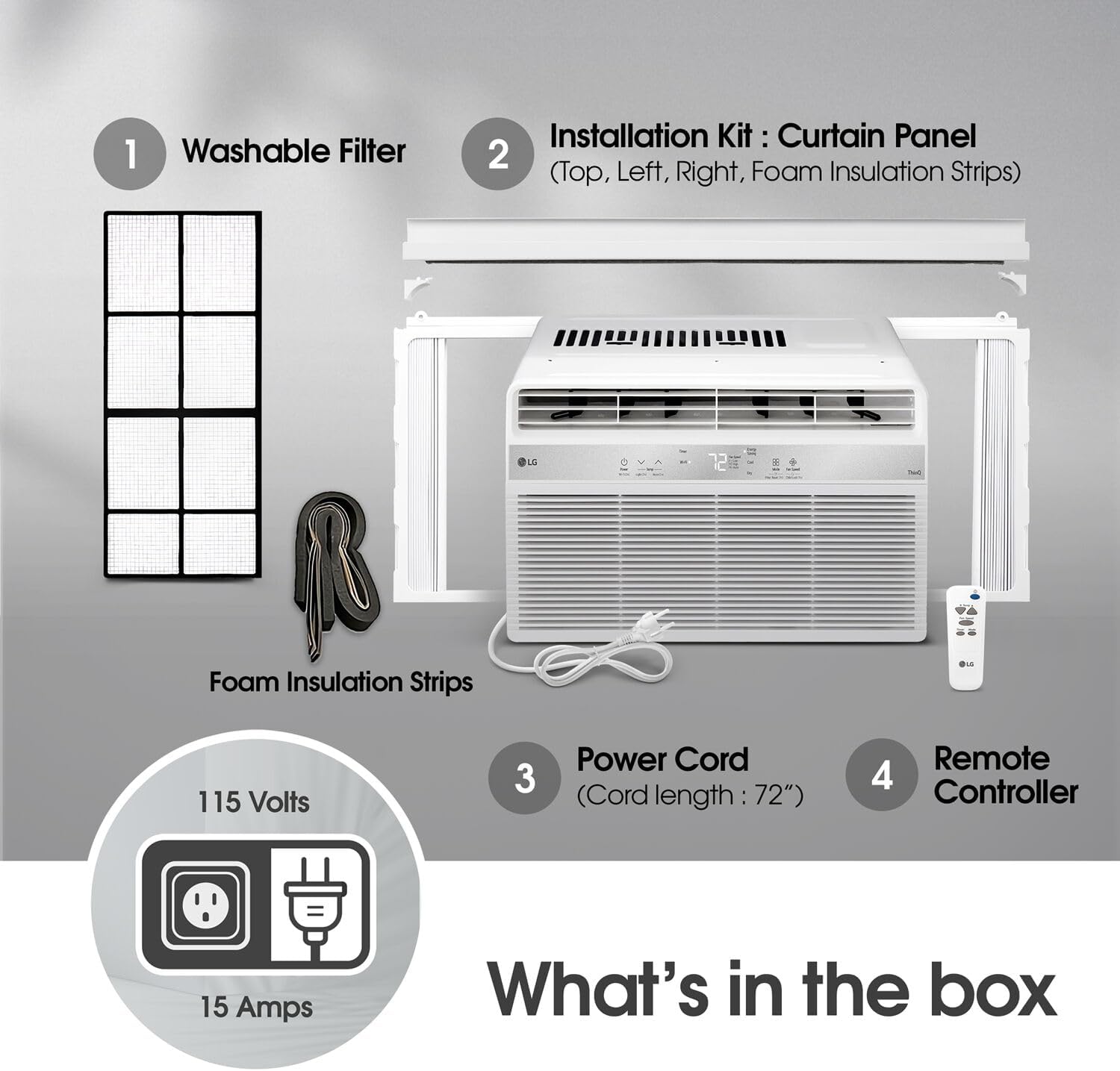
Figure 1: What's in the box. Includes the air conditioner, washable filter, installation kit (curtain panels, foam insulation strips), power cord, and remote controller.
Included Items:
- LG LW8024R Window Air Conditioner Unit
- Washable Filter
- Window Installation Kit (Curtain Panels, Foam Insulation Strips)
- Power Cord (72" length, 115 Volts, 15 Amps)
- Remote Controller
4. Installation
Proper installation is crucial for optimal performance and safety. Ensure your window meets the required dimensions.
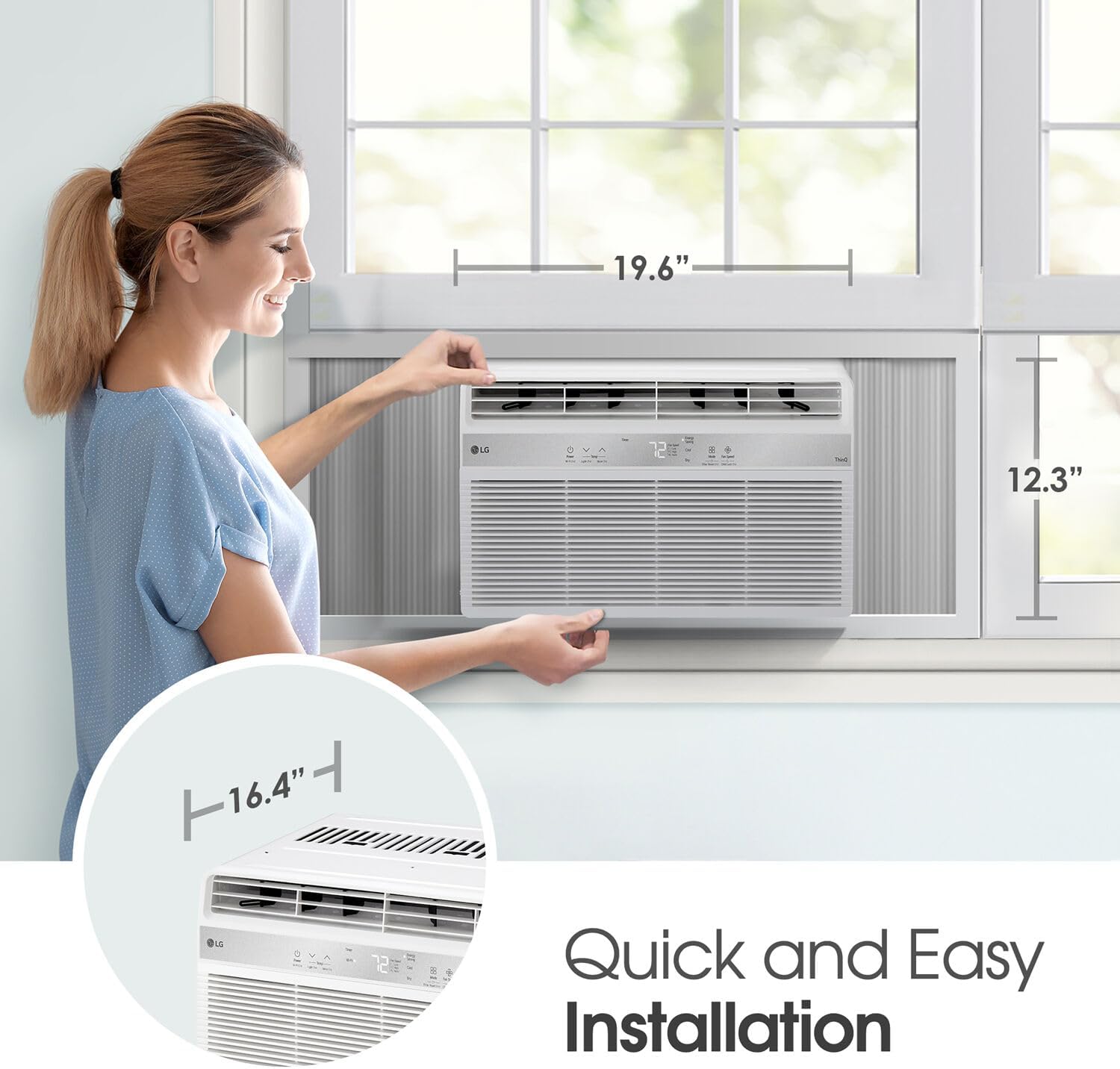
Figure 2: Quick and Easy Installation. Unit dimensions are approximately 16.4 inches deep, 19.6 inches wide, and 12.3 inches high.
Window Requirements:
- Minimum Window Opening Height: 12.3 inches
- Minimum Window Opening Width: 19.6 inches
- Ensure the window sill is sturdy enough to support the unit's weight (44 pounds).
Installation Steps:
- Prepare the Window: Clean the window sill and frame.
- Attach Top Rail: Secure the top rail to the air conditioner unit using the provided screws.
- Install Side Panels: Slide the accordion side panels into the grooves on the unit. Ensure they can be adjusted freely.
- Place Unit in Window: Carefully lift the air conditioner and place it into the window opening.
- Secure the Unit: Close the window sash down firmly behind the top rail of the unit. Extend the accordion side panels to fill the window opening and secure them with screws.
- Seal Gaps: Apply the foam insulation strips to seal any remaining gaps around the unit and side panels to prevent air leakage.
- Test Operation: Plug in the unit and test its functions.
5. Operating Instructions
The LG LW8024R offers various settings to customize your comfort. All functions can be controlled via the digital control panel or the included remote control.

Figure 3: Digital Control Panel. Features include Power, Mode, Timer, Fan Speed, and Temperature controls.
Operating Modes:
- Cool Mode: Provides cooling to the room. Adjust temperature using the Up/Down arrows.
- Fan Mode: Circulates air without cooling. Choose from Low, Mid, High, or Auto fan speeds.
- Dry (Dehumidifier) Mode: Reduces humidity in the room.
Fan Speeds:
- Select from Low, Mid, High, or Auto fan speeds to control airflow.
Timer Function:
- Set the unit to turn on or off automatically within a 24-hour period.
Auto Restart:
- In the event of a power outage, the unit will automatically resume its previous settings once power is restored.

Figure 4: Versatile 3-in-1 Operation. Choose between Cool, Fan, or Dry modes.

Figure 5: Quiet Operation. The unit operates at a low noise level of 52dB.
6. Maintenance
Regular maintenance ensures efficient operation and extends the lifespan of your air conditioner.
Cleaning the Air Filter:

Figure 6: Tilt-Out Washable Filter. Easily accessible for cleaning.
- The unit features a removable, washable filter.
- A 'Check Filter' alert will illuminate on the control panel to remind you when to clean the filter.
- To clean, gently pull out the filter from the front of the unit.
- Wash the filter with warm, soapy water. Rinse thoroughly and allow it to air dry completely before reinserting.
- Regular cleaning (every 2 weeks or as needed) helps maintain cooling efficiency.
Cleaning the Unit:
- Wipe the exterior of the unit with a soft, damp cloth.
- Do not use harsh chemicals or abrasive cleaners.
7. Troubleshooting
If you experience issues with your air conditioner, refer to the following common troubleshooting steps:
- Unit does not turn on: Check if the power cord is securely plugged in. Ensure the circuit breaker has not tripped.
- Unit is not cooling: Verify the temperature setting is lower than the room temperature. Clean the air filter if it is dirty. Ensure there are no obstructions to airflow.
- Water dripping outside: This is normal during high humidity as the unit removes moisture from the air. Ensure the unit is slightly tilted outwards for proper drainage.
- Water dripping inside: Check if the unit is properly leveled or slightly tilted outwards. Ensure the drain pan is not clogged.
- Noisy operation: Some noise is normal during operation. Ensure the unit is securely installed and not vibrating against the window frame.
If problems persist after attempting these steps, contact LG customer support.
8. Specifications
| Feature | Specification |
|---|---|
| Model Number | LW8024R |
| Cooling Power | 8,000 BTU |
| Voltage | 115 Volts |
| Floor Area Coverage | Up to 350 Square Feet |
| Noise Level | 52 Decibels (Low Mode) |
| Product Dimensions (D x W x H) | 16.43" x 19.57" x 12.33" |
| Item Weight | 44 pounds |
| Dehumidifier Capacity | 1.8 Pints |
| Seasonal Energy Efficiency Ratio (SEER) | 11.4 |
9. Warranty & Support
Your LG LW8024R Window Air Conditioner comes with a 1-year limited warranty from the manufacturer.
For warranty claims, technical support, or service inquiries, please contact LG customer support directly. Refer to the contact information provided in your product registration or on the official LG website.
Online resources and FAQs may also be available on the LG support portal.