
1. Introduction
This manual provides essential information for the safe and effective operation, maintenance, and care of your Pride Mobility Jazzy Select Power Chair. Please read this manual thoroughly before using your power chair. Proper understanding and adherence to these instructions will ensure optimal performance and longevity of your device.
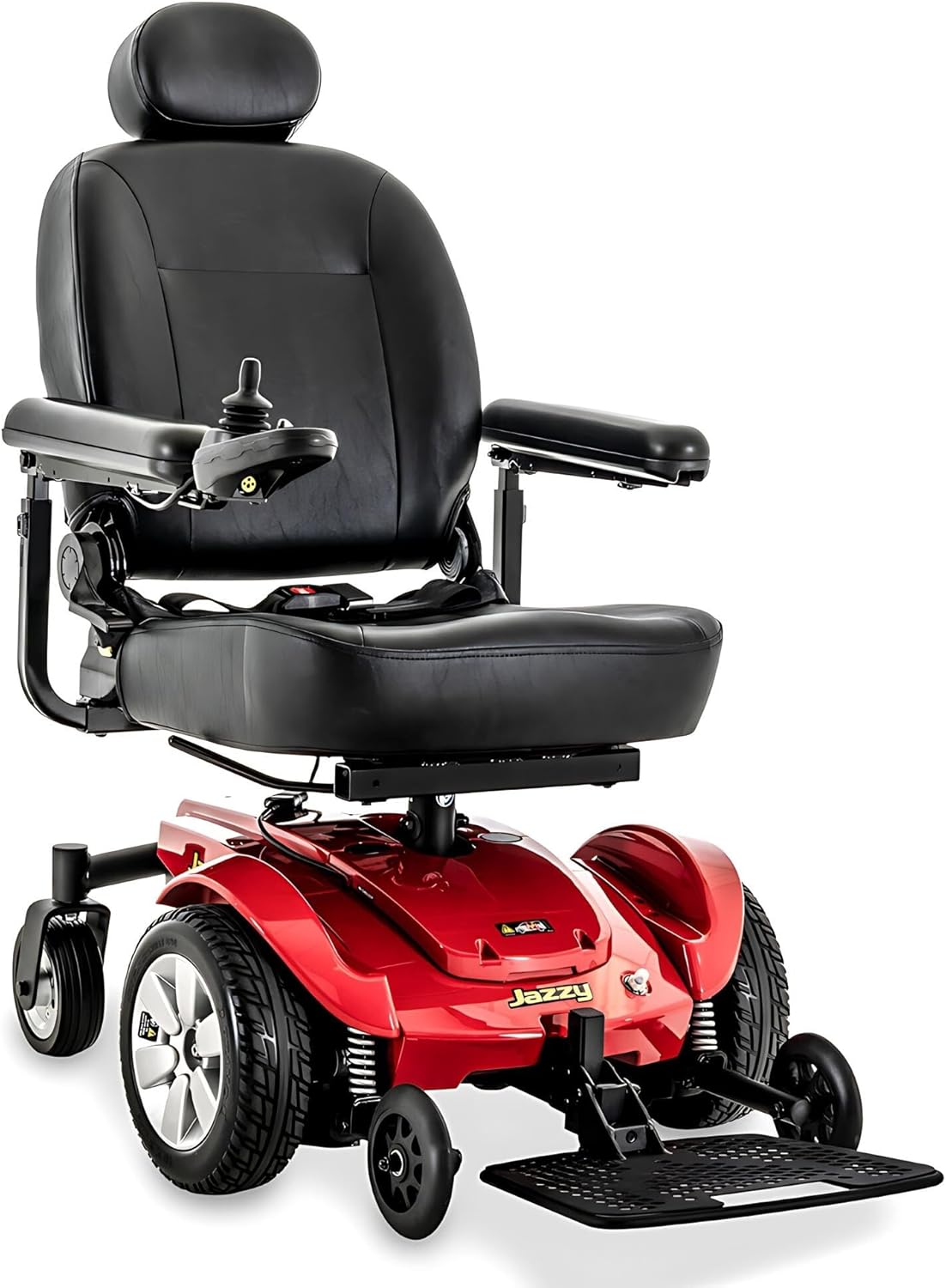
Figure 1: Front view of the Pride Mobility Jazzy Select Power Chair. This image displays the chair's overall design, including the seat, armrests, joystick control, foot platform, and mid-wheel drive system.
2. Safety Guidelines
Your safety is paramount. Always observe the following guidelines:
- Weight Capacity: Do not exceed the maximum weight capacity of 300 lbs.
- Battery Safety: Use only approved U-1 batteries. Ensure proper installation and charging procedures are followed to prevent hazards.
- Operating Environment: Avoid operating the power chair on steep inclines, uneven surfaces, or in adverse weather conditions (rain, snow, ice).
- Transfers: Always turn off the power chair before transferring in or out of the seat.
- Maintenance: Regularly inspect tires, brakes, and electrical connections. Do not attempt repairs beyond your capability; contact qualified service personnel.
- FDA Class II Medical Device: This device is designed to aid individuals with mobility impairments. Consult a healthcare professional for appropriate use.
3. Setup and Initial Assembly
Upon receiving your Jazzy Select Power Chair, some assembly and initial setup are required before first use.
3.1 Unpacking
Carefully remove all components from the packaging. Inspect for any shipping damage. Retain packaging for future transport or returns.
3.2 Battery Installation and Initial Charge
The Jazzy Select requires two 12V U-1 batteries. Ensure they are fully charged before first use. Refer to the battery charger manual for specific charging instructions.
- Locate the battery compartment, typically under the seat or base.
- Carefully place the batteries into their designated slots.
- Connect the battery terminals according to the markings (positive to positive, negative to negative). Ensure connections are secure.
- Close the battery compartment securely.
- Connect the charger to the charging port on the power chair and then to a standard wall outlet. Allow for a full initial charge, typically 8-14 hours.

Figure 2: A hand demonstrating the installation of a U-1 battery into the power chair's battery compartment. This illustrates the process of placing the battery and connecting its terminals.
3.3 Seat and Foot Platform Adjustment
The high-back seat is depth adjustable, and the flip-up foot platform is height and depth adjustable for personalized comfort.
- Adjust seat depth by loosening the appropriate fasteners under the seat, sliding the seat to the desired position, and re-tightening.
- Adjust foot platform height and depth by manipulating the adjustment levers or pins located on the foot platform assembly.

Figure 3: Side profile of the Jazzy Select Power Chair, highlighting the adjustable high-back seat and the flip-up foot platform. This view helps in understanding the chair's ergonomic features.
4. Operating Your Power Chair
The Jazzy Select features user-friendly controls for intuitive operation.
4.1 Control Panel and Joystick
The control panel typically includes a power button, speed control, and a joystick for steering. Familiarize yourself with these components before driving.
- Power On/Off: Press the power button to turn the chair on or off.
- Speed Adjustment: Use the speed control buttons or dial to set your desired speed. Start at the lowest setting until comfortable.
- Steering: Gently push the joystick in the desired direction (forward, backward, left, right). The chair's mid-wheel drive provides a tight turning radius for superior maneuverability.
- Braking: Releasing the joystick will automatically engage the electromagnetic brakes, bringing the chair to a smooth stop.
4.2 Driving Tips
- Practice in an open, safe area before navigating confined spaces.
- Maintain a safe distance from obstacles and other people.
- Be aware of your surroundings, especially when turning or reversing.
- The Active-Trac Suspension system helps maintain stability over varied terrain, but exercise caution on uneven surfaces.
5. Maintenance
Regular maintenance ensures the longevity and safe operation of your power chair.
- Battery Care:
- Charge batteries daily, even if only used for a short period.
- Avoid completely draining the batteries.
- Keep battery terminals clean and free of corrosion.
- Cleaning: Wipe down the chair with a damp cloth. Avoid using abrasive cleaners or excessive water directly on electrical components.
- Tire Pressure: Check tire pressure regularly and inflate to the recommended PSI (if pneumatic tires).
- General Inspection: Periodically check all fasteners, connections, and moving parts for wear or damage.
- Professional Service: Schedule annual professional inspections and service to ensure all components are functioning correctly.
6. Troubleshooting
This section addresses common issues you might encounter. For problems not listed here, contact customer support.
| Problem | Possible Cause | Solution |
|---|---|---|
| Chair does not power on. | Battery not charged, loose battery connection, power button not pressed. | Ensure batteries are fully charged. Check battery connections. Press power button firmly. |
| Chair moves slowly or intermittently. | Low battery charge, speed setting too low, motor issue. | Charge batteries. Increase speed setting. If problem persists, contact service. |
| Unusual noises during operation. | Loose components, motor wear, debris in wheels. | Inspect for loose parts. Clean wheels. Contact service if noise continues. |
7. Specifications
Key technical specifications for the Pride Mobility Jazzy Select Power Chair (18"x18-20" seat size variant):
- Model: Jazzy Select
- Weight Capacity: 300 lbs
- Seat Size: 18"x18-20" (depth adjustable)
- Batteries: Two 12V U-1 batteries (included)
- Product Dimensions: 33"D x 23.75"W x 26"H
- Item Weight: 194.6 lbs
- Drive System: Mid-wheel drive with Active-Trac Suspension
- Motors: Dual, in-line motors
8. Warranty and Support
Pride Mobility provides comprehensive warranty coverage for your Jazzy Select Power Chair:
- Frame: 5-year Limited Warranty
- Electronics: 13-month Limited Warranty
- Drive Motors: 13-month Limited Warranty
Additionally, a 1-Year In-Home Service is offered. If you experience issues within the first twelve months, contact HV Supply to arrange for a technician visit for diagnosis and repair.
Return and Replacement Policy:
- If the item is received damaged, notify HV Supply within 3 business days for a free replacement.
- For order refusals or returns unrelated to damage, a 25% restocking fee of the original item price plus a $115.00 back freight charge applies.
For further assistance or to contact support, please refer to the contact information provided with your purchase documentation or visit the official Pride Mobility website.


