
1. Introduction
The AJAZZ M259 Magnesium Aluminum Alloy Mouse is designed for precision and speed, featuring an ultra-lightweight construction and versatile connectivity options. This manual provides essential information for setting up, operating, and maintaining your mouse to ensure optimal performance.
2. Package Contents
Verify that all items are present in your package:
- AJAZZ M259 Magnesium Aluminum Alloy Mouse
- USB-C Charging/Data Cable
- 2.4G Wireless Receiver
- User Manual (this document)
3. Setup
3.1. Charging the Mouse
Before first use, fully charge the mouse using the provided USB-C cable. Connect the USB-C end to the mouse and the USB-A end to a power source (e.g., computer USB port, USB wall adapter). The mouse features a 350mAh battery.
3.2. Connecting via 2.4G Wireless
- Locate the 2.4G wireless receiver.
- Plug the receiver into an available USB port on your computer.
- Switch the mouse to 2.4G mode using the mode switch located on the bottom of the mouse.
- The mouse should automatically connect.

Image: Bottom view of the AJAZZ M259 mouse, highlighting the tri-mode connection switch and DPI adjustment key.
3.3. Connecting via Bluetooth
- Switch the mouse to Bluetooth (BT) mode using the mode switch on the bottom of the mouse.
- On your computer or device, navigate to Bluetooth settings and enable Bluetooth.
- Search for new devices and select "AJAZZ M259" (or similar) from the list to pair.
3.4. Connecting via USB-C Wired
Connect the provided USB-C cable to the mouse and the USB-A end to your computer. The mouse will automatically switch to wired mode and begin charging.
4. Operating Instructions
4.1. DPI Adjustment
The mouse is equipped with a PixArt PAW3395 sensor, offering up to 30,000 programmable DPI. Use the DPI adjustment key on the bottom of the mouse to cycle through different DPI settings. The all-in-one driver software allows for further customization.

Image: Technical specifications including the PixArt PAW3395 sensor, 1000Hz return rate, 350mAh battery capacity, and switch durability.
4.2. Button Functions
The M259 mouse features 5 programmable buttons plus a power switch and DPI toggle key. Default functions include:
- Left Click: Primary action.
- Right Click: Secondary action/context menu.
- Scroll Wheel: Scroll up/down, middle click.
- Side Buttons: Forward/Backward in web browsers or customizable via software.
- DPI Toggle Key: Cycles through preset DPI levels.
4.3. All-in-one Driver Software
The innovative all-in-one driver automatically recognizes your computer system. It allows for advanced customization including DPI adjustment, return rate, competition mode, custom button assignments, macro recording, and personalized key mapping. Refer to the manufacturer's website for driver download and detailed instructions.
5. Features Overview
- Ultra-lightweight Design: Weighs only 64g, achieved through low-density magnesium and an integrated design for speed and precision.
- Magnesium-Aluminum Alloy Construction: Utilizes advanced metal CNC one-piece molding for durability and a premium feel.
- High-Performance Sensor: Equipped with PixArt PAW3395 sensor, offering up to 30,000 programmable DPI, 650 IPS speed, and 50g acceleration for best-in-class accuracy.
- Smooth Glide: Features 100% Pure Grade PTFE foot pads for consistent glide and improved braking force.
- Tri-mode Connectivity: Supports ultra-fast 2.4G wireless, agile Bluetooth, and stable wired USB-C connections.
- Long Battery Life: Up to 200 hours of battery life ensures extended usage.
- Innovative Driver: All-in-one intelligent driver for comprehensive customization without traditional software installations.

Image: The AJAZZ M259 mouse positioned next to an egg, visually representing its ultra-lightweight design of approximately 64 grams, emphasizing ease of movement.

Image: An internal view of the AJAZZ M259 mouse, revealing the intricate magnesium-aluminum alloy structure and transparent components, demonstrating the fusion of aesthetics and functionality.
6. Maintenance
- Cleaning: Use a soft, dry cloth to clean the mouse. For stubborn dirt, a slightly damp cloth can be used, ensuring no moisture enters the internal components.
- Storage: Store the mouse in a cool, dry place away from direct sunlight and extreme temperatures.
- Battery Care: Avoid fully discharging the battery frequently. Charge the mouse regularly to prolong battery life.
7. Troubleshooting
7.1. Mouse Not Responding
- Ensure the mouse is charged.
- Check the connection mode (2.4G, Bluetooth, Wired) and ensure it matches your setup.
- For 2.4G, ensure the USB receiver is properly plugged in.
- For Bluetooth, ensure Bluetooth is enabled on your device and the mouse is paired.
- Try connecting the mouse via USB-C cable to see if it functions in wired mode.
7.2. Intermittent Connection
- Move the mouse closer to the 2.4G receiver or Bluetooth device to reduce interference.
- Avoid placing the receiver near other wireless devices or large metal objects.
- Ensure the mouse battery is sufficiently charged.
7.3. Tracking Issues
- Clean the optical sensor on the bottom of the mouse.
- Ensure you are using the mouse on a suitable surface. Some surfaces (e.g., glass, highly reflective surfaces) may cause tracking problems.
- Adjust the DPI settings using the DPI button or driver software.
8. Specifications
| Feature | Detail |
|---|---|
| Model | M259 |
| Brand | AJAZZ |
| Connectivity Technology | 2.4GHZ Wireless, Bluetooth, USB-C Wired (Tri-mode) |
| Movement Detection Technology | Optical (PixArt PAW3395 Sensor) |
| DPI | Up to 30,000 programmable DPI |
| IPS Speed | 650 IPS |
| Acceleration | 50g |
| Weight | 64g (Ultra-light) |
| Material | Magnesium Aluminum Alloy |
| Battery | 350mAh Lithium Ion (included) |
| Battery Life | Up to 200 hours |
| Product Dimensions | 4.8 x 2.6 x 1.5 inches |
| Special Features | Ergonomic Design, Lightweight, Rechargeable, All-in-one Driver |
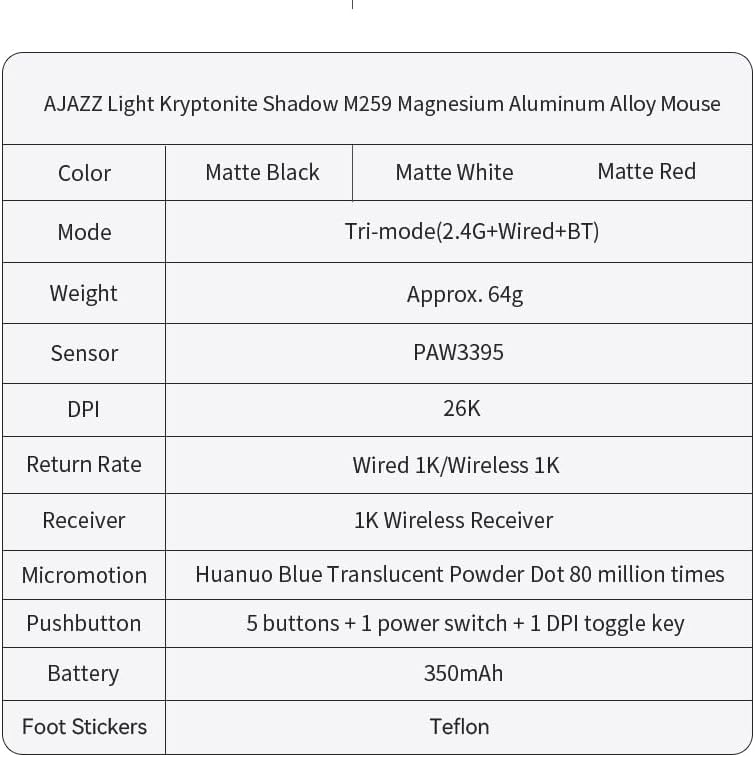
Image: A detailed table outlining the specifications of the AJAZZ M259 mouse, covering various technical aspects.
9. Warranty and Support
For warranty information and technical support, please refer to the documentation included with your product or visit the official AJAZZ website. Keep your proof of purchase for warranty claims.