
ECONTROLLY RCEC-RH18A
User Manual for ECONTROLLY RH18A Replacement Remote Control
Model: RCEC-RH18A
Introduction
This manual provides detailed instructions for the ECONTROLLY RH18A replacement remote control, designed for use with specific Mitsubishi AIR-Conditioning units. Please read this manual thoroughly before using the remote control to ensure proper operation and longevity.

Figure 1: Front view of the ECONTROLLY RH18A remote control, showing the display screen and all control buttons.
Setup
Battery Installation
The remote control requires two AAA batteries (not included). Follow these steps to install them:
- Locate the battery compartment cover on the back of the remote control.
- Slide the cover downwards to open the compartment.
- Insert two AAA batteries, ensuring the positive (+) and negative (-) terminals align correctly with the markings inside the compartment.
- Slide the cover back into place until it clicks securely.

Figure 2: Back view of the remote control with the battery compartment open, showing the slots for two AAA batteries.
Initial Use
This replacement remote control is designed to work out of the box with compatible Mitsubishi AIR-Conditioning units. No programming or pairing is required. Simply install the batteries and point the remote towards your air conditioning unit to begin operation.
Operating Instructions
Familiarize yourself with the buttons and their functions:
| Button | Function |
|---|---|
| OFF/ON | Powers the air conditioning unit on or off. |
| TOO WARM / TOO COOL | Adjusts the temperature setting up or down. |
| MODE | Cycles through operating modes: Cool, Dry, Fan, Heat. |
| FAN | Adjusts the fan speed. |
| VANE | Controls the direction of the air vanes. |
| ECONO COOL | Activates the energy-saving Econo Cool mode. |
| SELECT | Used for selecting options within certain settings. |
| TIME (Up/Down) | Adjusts timer settings (e.g., On/Off timer). |
| RESET | Resets the remote control settings. |

Figure 3: Angled view of the remote control, highlighting the ergonomic design and button layout.
Maintenance
Battery Replacement
Replace batteries when the remote control's display becomes dim or its response time slows. Always replace both batteries at the same time with new AAA batteries. Do not mix old and new batteries, or different types of batteries.
Cleaning
Wipe the remote control with a soft, dry cloth. Do not use liquid cleaners, sprays, or abrasive materials, as these can damage the remote's surface or internal components.
Storage
If the remote control will not be used for an extended period, remove the batteries to prevent leakage and potential damage to the remote.
Troubleshooting
- Remote not responding:
- Check if batteries are installed correctly with correct polarity.
- Replace old batteries with new ones.
- Ensure there are no obstructions between the remote control and the air conditioning unit's receiver.
- Confirm the remote is within the effective operating range.
- Display is dim or blank:
- Batteries are low. Replace them.
- Unit not responding to specific commands:
- Ensure the remote control is pointed directly at the air conditioning unit.
- Press the RESET button on the remote control (if applicable) to restore default settings.
Specifications
| Feature | Detail |
|---|---|
| Model Number | RCEC-RH18A |
| Product Dimensions | 5 x 1 x 0.25 inches (12.7 x 2.54 x 0.635 cm) |
| Item Weight | 2.3 ounces (65 grams) |
| Power Source | 2 x AAA Batteries (not included) |
| Color | Black |
| Special Feature | No programming required |
| Manufacturer | ECONTROLLY |
| Country of Origin | China |
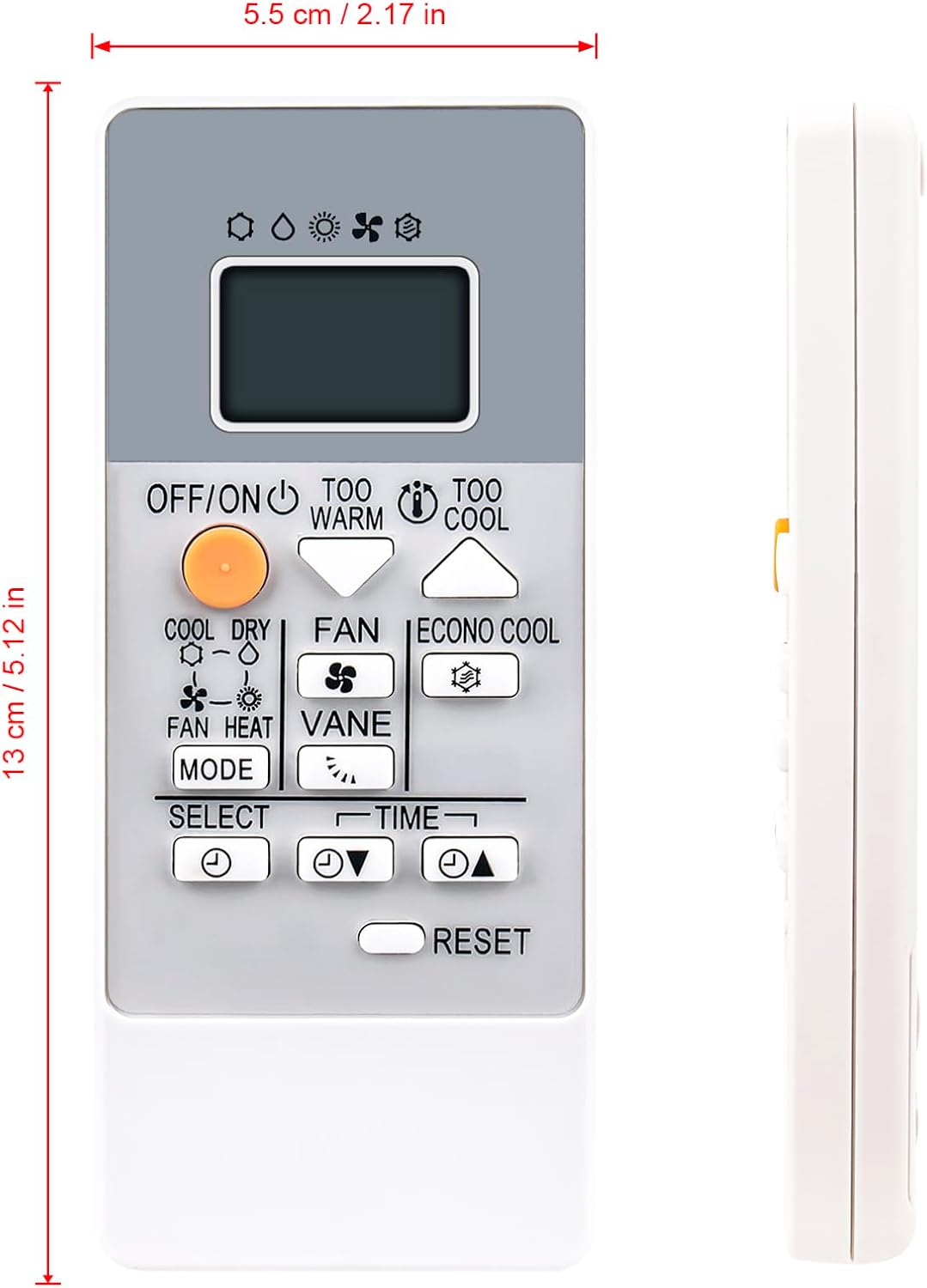
Figure 4: Remote control showing approximate dimensions: 5.5 cm (2.17 in) width and 13 cm (5.12 in) length.
Compatibility
This remote control is compatible with the following Mitsubishi AIR-Conditioning models:
- RH18A / RH-18A
- MSZ-HR25VF Series: MSZ-HR25VF-E1, MSZ-HR25VF-E2, MSZ-HR25VF-E6, MSZ-HR25VF-E7, MSZ-HR25VF-ER1, MSZ-HR25VF-ET1
- MSZ-HR35VF Series: MSZ-HR35VF-E1, MSZ-HR35VF-E2, MSZ-HR35VF-E6, MSZ-HR35VF-E7, MSZ-HR35VF-ER1, MSZ-HR35VF-ET1
- MSZ-HR42VF Series: MSZ-HR42VF-E1, MSZ-HR42VF-E2, MSZ-HR42VF-E6, MSZ-HR42VF-E7, MSZ-HR42VF-ER1, MSZ-HR42VF-ET1
- MSZ-HR50VF Series: MSZ-HR50VF-E1, MSZ-HR50VF-E2, MSZ-HR50VF-E6, MSZ-HR50VF-E7, MSZ-HR50VF-ER1, MSZ-HR50VF-ET1
Ask a question about this manual
Ask about setup, troubleshooting, compatibility, parts, safety, or missing instructions. Manuals+ will review the question and use this page’s manual context to help answer it.