
1. Introduction
The NETUM Q700 is a versatile and robust handheld mobile computer designed for efficient data collection and management in various industrial and commercial environments. Running on Android 11, this device combines the functionality of a smartphone with advanced 1D and 2D barcode scanning capabilities, NFC reading, and comprehensive connectivity options including Wi-Fi and 4G LTE. Its durable design ensures reliable performance in demanding conditions, making it an ideal tool for retail, warehouse, logistics, and asset management applications.

Figure 1: Front and rear view of the NETUM Q700 Handheld Barcode Scanner Mobile Computer, showcasing its sleek design and integrated scanner.
2. Product Overview and Components
Familiarize yourself with the key components and features of your NETUM Q700 device.

Figure 2: Diagram illustrating the efficient core and universal communication capabilities of the NETUM Q700, including Octa-core processor, 3GB RAM + 32GB ROM, Bluetooth 5.0, GNSS, GPS, GLONASS, BeiDou, NFC, 2.4GHz/5GHz Wi-Fi, and 5G support.
2.1 Package Contents
Upon unboxing, ensure all items are present:
- NETUM Q700 Handheld Barcode Scanner Mobile Computer
- USB Cable
- User Manual
- Power Adapter (with multiple regional plugs)
- Lanyard

Figure 3: Contents of the NETUM Q700 product packaging, including the device, USB cable, user manual, and various power adapters.
2.2 Device Layout
The Q700 features a user-friendly layout for intuitive operation.
- Front: 5.5-inch Full Touchscreen, 5MP Front Camera.
- Side: SIM Slot, Volume Up/Down buttons, Scan Button.
- Rear: 13MP Rear Camera, NFC Reading Area (13.56MHz).
- Bottom: Type-C / Charging Port.
Video 1: An overview of the NETUM Q700 PDA Enterprise Mobile Computer, highlighting its physical features, internal components, and various functionalities such as barcode scanning and NFC reading. This video demonstrates the device's structural showcase, system overview, market adaptability, barcode decoding, NFC integration, industrial design, and application scenarios.
3. Setup and Initial Use
3.1 Charging the Device
Before first use, fully charge the device using the provided USB cable and power adapter. The device features a 5000mAh non-removable battery for extended operation.

Figure 4: Illustration of the NETUM Q700's 5000mAh battery, emphasizing its superior endurance with over 400 hours of standby time and more than 12 hours of continuous working time.
3.2 Inserting SIM Card (Optional)
If 4G LTE connectivity is required, insert a Nano-SIM card into the designated SIM slot on the side of the device. Refer to the device layout for the exact location.
3.3 Powering On and Initial Android Setup
Press and hold the Power Button until the screen illuminates. Follow the on-screen prompts to complete the initial Android 11 setup, including language selection, Wi-Fi connection, and Google account sign-in.
4. Operating Instructions
4.1 Navigating the Touchscreen
The 5.5-inch capacitive touchscreen supports multi-touch gestures and can be operated with gloves or wet hands, enhancing usability in various work environments.

Figure 5: The 5.5-inch IPS HD touchscreen of the NETUM Q700, demonstrating its responsiveness to both gloved and wet-hand operation, along with device dimensions.
4.2 Barcode Scanning
The Q700 integrates a Newland scanning engine, capable of fast and accurate decoding of most 1D and 2D barcodes. To scan, point the scanner at the barcode and press one of the dedicated Scan Buttons located on the side of the device.
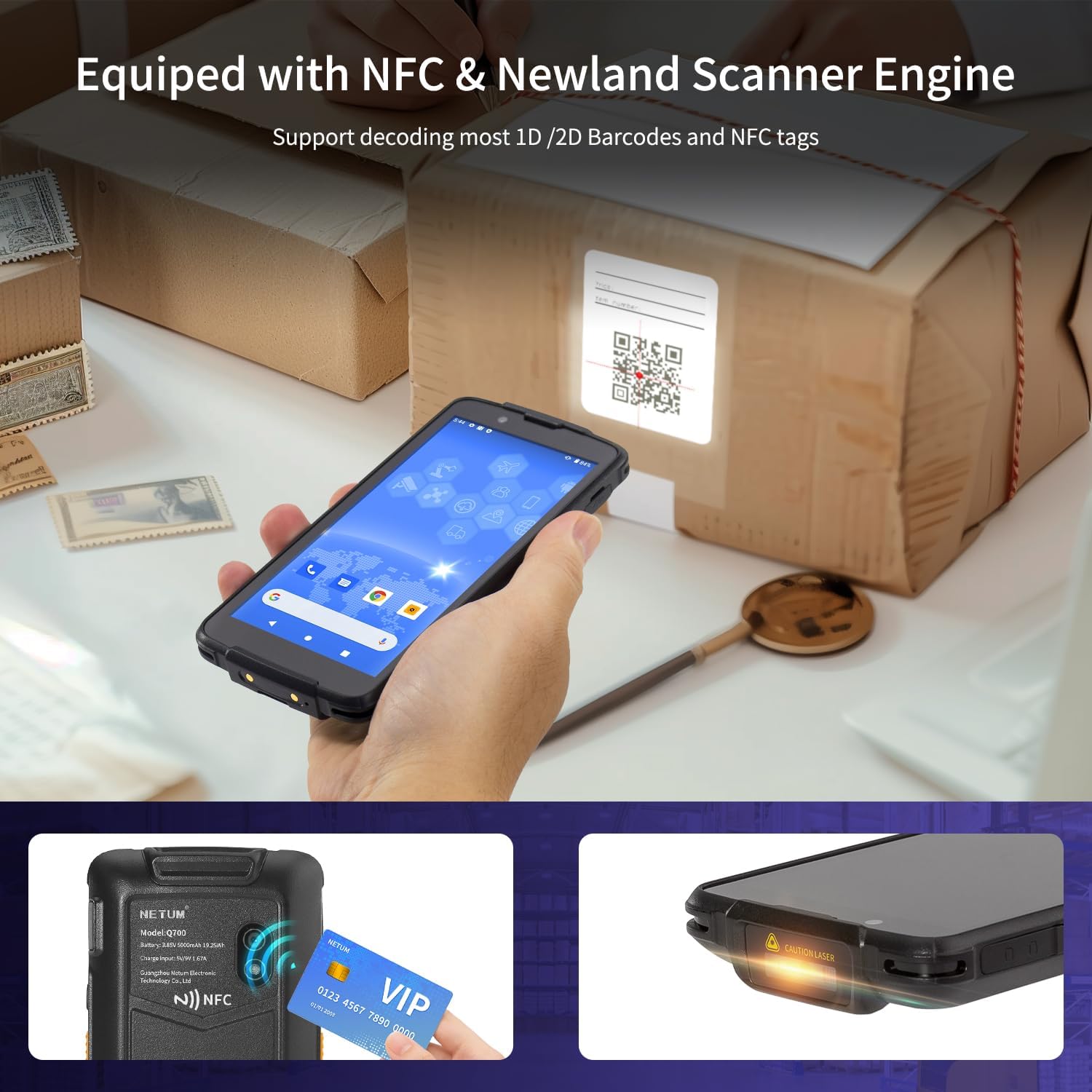
Figure 6: The NETUM Q700 equipped with NFC and a Newland Scanner Engine, illustrating its capability to decode 1D/2D barcodes and read NFC tags.
4.3 NFC Functionality
The rear-mounted NFC induction zone allows for efficient electronic tag reading. Simply tap an NFC-enabled card or tag to the back of the device to read its information.
4.4 Connectivity
The device supports Wi-Fi 6, Bluetooth 5.0, and 4G LTE for seamless data transfer and communication. Configure network settings via the Android settings menu.
4.5 Installing Applications
As an Android 11 device, the Q700 allows installation of various applications from the Google Play Store or other trusted sources, enabling customization for specific business needs.
5. Maintenance
5.1 Cleaning the Device
Regularly clean the screen and scanner window with a soft, lint-free cloth. For stubborn marks, a slightly damp cloth with mild, non-abrasive cleaner can be used. Avoid excessive moisture.
5.2 Battery Care
To maximize battery lifespan, avoid extreme temperatures and do not allow the battery to fully discharge frequently. Charge the device regularly using the original charger.
5.3 Durability and Protection
The NETUM Q700 is designed for industrial applications with an IP67 rating, making it waterproof and dustproof. It also offers drop protection from up to 1.8 meters (5.9 feet) onto concrete.

Figure 7: The NETUM Q700's rugged industrial design, highlighting its IP67 rating for dust and water resistance, and 1.8M anti-drop capability.
6. Troubleshooting
This section addresses common issues you might encounter with your NETUM Q700.
| Problem | Possible Cause | Solution |
|---|---|---|
| Device does not power on. | Low or depleted battery. | Connect to charger and allow to charge for at least 30 minutes before attempting to power on. |
| Barcode not scanning. | Incorrect scanning angle, dirty scanner window, or unsupported barcode type. | Ensure proper alignment, clean the scanner window, and verify the barcode type is supported (1D/2D). |
| Wi-Fi/4G LTE connectivity issues. | Out of range, incorrect password, or network problem. | Move closer to the access point, re-enter password, or restart router/modem. Check SIM card insertion for 4G LTE. |
| Device is slow or unresponsive. | Too many apps running, low storage, or software glitch. | Close unnecessary applications, clear cache, free up storage, or restart the device. |
7. Specifications
Detailed technical specifications for the NETUM Q700 Handheld Barcode Scanner Mobile Computer.
| Feature | Detail |
|---|---|
| Operating System | Android 11 |
| Processor | Octa-core 2.0GHz |
| Memory (RAM + ROM) | 3GB RAM + 32GB ROM |
| Display | 5.5-inch Full Touchscreen (capacitive, supports wet/glove operation) |
| Barcode Scanner | Built-in Newland Scan Engine (supports 1D & 2D barcodes) |
| NFC | 13.56MHz NFC Reading Area |
| Connectivity | Wi-Fi 6, Bluetooth 5.0, 4G LTE |
| Battery | 5000mAh Lithium Polymer (non-removable) |
| Cameras | 5MP Front, 13MP Rear (autofocus) |
| Durability Rating | IP67 (Waterproof, Dustproof) |
| Drop Protection | 1.8m (5.9ft) onto concrete |
| Dimensions | 0.59 x 2.95 x 6.1 inches |
| Item Weight | 9.5 ounces |
8. Warranty and Support
For warranty information and technical support, please refer to the official NETUM website or contact their customer service directly. Details regarding product registration and warranty claims can typically be found on the manufacturer's official channels or within the product packaging.
Manufacturer: NETUM
For additional protection plans, please consult your retailer or the product listing page where the device was purchased.


