
1. Introduction
The TechRise Door Window Alarm is a wireless home security device designed to provide immediate alerts upon unauthorized entry through doors or windows. It features adjustable volume levels and multiple operating modes to suit various security needs, offering reliable protection for homes, hotels, apartments, and garages.

Image: Overview of the TechRise Door Window Alarm units.
2. Product Features
- Instant Intrusion Protection: The alarm activates immediately if the distance between the main sensor unit and the magnetic sensor exceeds 2 cm. It provides a loud siren to deter intruders.
- Adjustable Volume: Features three volume settings: High (>98 dB), Medium (>93 dB), and Low (>88 dB), allowing you to choose the appropriate alert level for your environment.
- Three Operating Modes: Easily switch between Instant Alarm mode for security, Soft Chime mode for a gentle notification when a door/window opens, and Silent mode.
- Tool-Free Installation: Designed for quick and easy installation using provided adhesive pads, eliminating the need for tools.
- Portable and Compact: Lightweight and small, making it ideal for use in various locations, including when traveling.
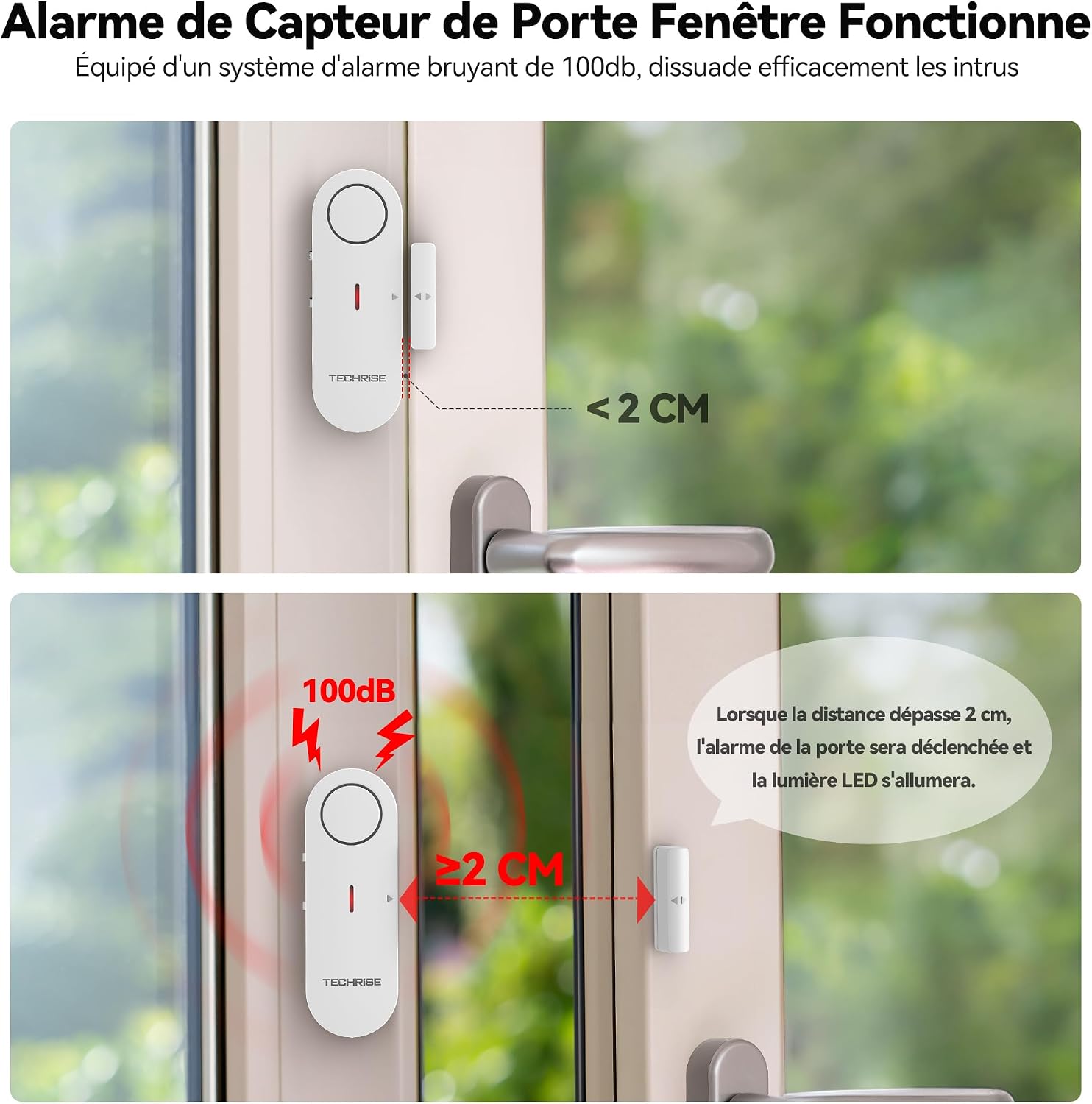
Image: The alarm triggers when the gap between the main unit and the magnetic sensor exceeds 2 cm.

Image: The alarm offers 3 volume levels for easy adjustment based on needs.
3. Package Contents
The TechRise Door Window Alarm package typically includes:
- 3 x TechRise Door Window Alarm Units
- 3 x Magnetic Sensor Units
- Adhesive Pads (pre-applied or included for installation)
Note: Batteries are required but not included in the package. Please refer to the 'Specifications' section for battery type.
4. Setup and Installation
Follow these steps for quick and effective installation:
- Clean the Surface: Ensure the surface where the alarm will be mounted (door, window frame) is clean and dry.
- Insert Batteries: Open the battery compartment on the main alarm unit. Insert the required batteries (Alkaline, not included) ensuring correct polarity. Remove any battery insulation tab if present.
- Apply Adhesive: Peel off the protective film from the adhesive pads on the back of both the main alarm unit and the magnetic sensor unit.
- Mount the Units: Attach the main alarm unit to the door or window frame. Mount the magnetic sensor unit directly adjacent to the main alarm unit on the moving part of the door or window. Ensure the alignment marks on both units face each other and the distance between them is less than 2 cm when the door/window is closed.
- Activate: Slide the power switch on the side of the main alarm unit to the 'On' position to begin operation.

Image: Step-by-step guide for installing the alarm unit.

Image: Battery installation process, including removing the insulation tab.
5. Operating Instructions
The TechRise Door Window Alarm offers flexible operation through its mode and volume controls:
- Mode Selection: Use the side switch to select one of the three operating modes:
- Alarm Mode: Activates a loud siren when the door/window is opened.
- Chime Mode: Produces a soft chime sound when the door/window is opened, suitable for notifications.
- Off Mode: Disables the alarm and chime functions.
- Volume Adjustment: Use the volume switch to cycle through the three available volume levels (High, Medium, Low) to set the desired loudness for the alarm or chime.

Image: Toggle freely between Chime and Alarm modes for enhanced home security.

Image: Volume adjustable in 3 levels, allowing you to adjust according to your needs.
6. Maintenance
To ensure optimal performance and longevity of your TechRise Door Window Alarm, consider the following maintenance tips:
- Battery Replacement: When the alarm's sound becomes weak or it stops functioning, it is likely time to replace the batteries. Refer to the 'Setup and Installation' section for battery replacement steps.
- Cleaning: Periodically wipe the alarm units with a soft, dry cloth to remove dust and debris. Do not use abrasive cleaners or immerse the units in water.
- Sensor Alignment Check: Regularly verify that the main alarm unit and the magnetic sensor unit remain properly aligned and within the 2 cm activation distance when the door/window is closed. Re-adjust if necessary.
7. Troubleshooting
If you encounter issues with your TechRise Door Window Alarm, try the following troubleshooting steps:
| Problem | Possible Cause | Solution |
|---|---|---|
| Alarm does not sound or is very faint. | 1. Alarm is in 'Off' or 'Chime' mode. 2. Batteries are low or depleted. 3. Sensor and main unit are too far apart. | 1. Slide the mode switch to 'Alarm' mode. 2. Replace the batteries with new Alkaline batteries. 3. Ensure the distance between the main unit and magnetic sensor is less than 2 cm when closed. |
| Alarm triggers unexpectedly. | 1. Sensor and main unit are misaligned or too far apart when closed. 2. Vibration or movement causing slight separation. | 1. Re-align the units, ensuring they are firmly attached and within 2 cm when the door/window is closed. 2. Ensure the mounting surface is stable. |
8. Specifications
| Feature | Detail |
|---|---|
| Brand | TechRise |
| Model | 3PC White |
| Product Dimensions (L x W x H) | 4 x 2 x 8 cm |
| Weight | 110 grams (per unit) |
| Sensor Technology | Contact Sensor |
| Installation Method | Self-adhesive |
| Power Source | Battery Powered |
| Battery Type | Alkaline (not included) |
| Volume Levels | High (>98 dB), Medium (>93 dB), Low (>88 dB) |
| Activation Distance | Less than 2 cm between units |

Image: Detailed dimensions and components of the alarm unit and magnetic sensor.
9. Warranty and Support
TechRise offers a 36-month warranty for registered users. If you encounter any issues with your product or require assistance, please do not hesitate to contact TechRise customer service. Ensure you have your product model and purchase details ready for faster support.
For warranty claims or technical support, please refer to the contact information provided on the TechRise official website or your purchase documentation.