
Introduction
The TechRise Window/Door Alarm is a versatile security device designed to enhance the safety of your home or property. It features both alarm and chime modes, allowing you to customize its function based on your needs. With three adjustable volume levels, it provides flexible alert options for various environments. This easy-to-install sensor is ideal for monitoring windows, doors, cabinets, and garages, offering peace of mind by alerting you to unauthorized entry or exits.

Image: TechRise Window/Door Alarm 3-Pack
Important Safety Instructions
- Keep the device away from water and excessive moisture.
- Do not attempt to disassemble or repair the device yourself. Refer to qualified personnel for service.
- Ensure proper battery installation to avoid malfunction or damage.
- Keep batteries out of reach of children.
- Avoid placing the alarm near strong magnetic fields, which may interfere with its operation.
What's Included
- TechRise Window/Door Alarm Unit (quantity as per pack)
- Magnetic Sensor (quantity as per pack)
- Double-sided Adhesive Tape
- User Manual
Product Overview
The TechRise Window/Door Alarm consists of two main parts: the alarm unit and the magnetic sensor. The alarm unit houses the speaker, LED indicator, and control switches. The magnetic sensor is a smaller component that, when separated from the alarm unit, triggers the alert.

Image: Detailed view of the alarm unit's controls and components.
Key Components:
- Alarm Unit: Main body with speaker and controls.
- Magnetic Sensor: Smaller piece that activates the alarm when separated.
- Volume Switch: Adjusts alarm/chime volume (Low, Medium, High).
- Mode Switch: Selects between Alarm, Chime, or Off modes.
- LED Sensor Light: Illuminates when the alarm is triggered.
Setup and Installation
Follow these steps for proper installation of your TechRise Window/Door Alarm:
- Clean the Surface: Ensure the installation surface (door, window frame) is clean and dry for optimal adhesive performance.
- Remove Battery Insulation Sheet: Locate the battery compartment on the alarm unit and remove any insulating tabs to activate the batteries.
- Apply Adhesive Tape: Attach the double-sided adhesive tape to the back of both the alarm unit and the magnetic sensor.
- Position the Units: Align the alarm unit and the magnetic sensor on the desired surface (e.g., door and door frame, window and window frame). Ensure the arrow on the alarm unit points towards the magnetic sensor. The gap between the two parts should be no more than 0.5 inches (approximately 1.27 cm) when the door/window is closed.
- Turn On: Switch the alarm to either 'Alarm' or 'Chime' mode to begin operation.
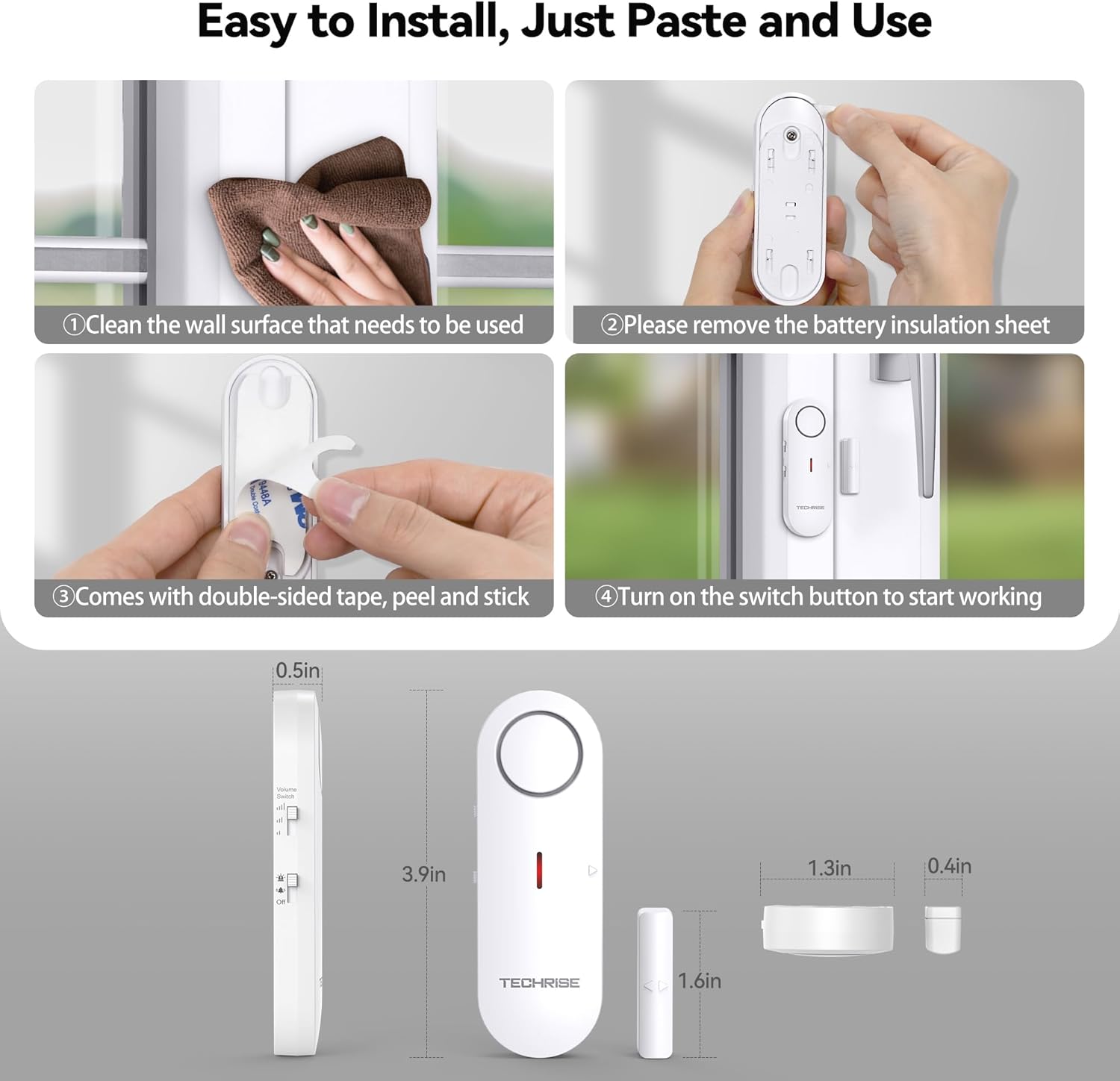
Image: Step-by-step installation guide and product dimensions.
Operating Instructions
Modes and Volume Adjustment:
The TechRise alarm offers two operational modes and three volume levels:
- Alarm Mode: When the magnetic sensor is separated from the main unit, a loud 100 dB alarm will sound continuously until the sensor is reconnected or the unit is switched off. This mode is designed for security alerts.
- Chime Mode: When the magnetic sensor is separated, a pleasant chime sound will play once. This mode is suitable for entry alerts, such as knowing when a door opens.
- Off Mode: Disables all alarm and chime functions.

Image: Switching between Chime and Alarm modes.
Use the volume switch on the side of the alarm unit to select your preferred sound level: Low, Medium, or High. The alarm sound can reach up to 100 dB.

Image: Illustration of sound coverage with 3 volume levels.
How the Alarm Works:
The alarm system is triggered when the main alarm unit and its magnetic sensor are separated by more than 0.78 inches (approximately 2 cm). Upon separation, the alarm will sound, and the LED light on the unit will illuminate, providing both audible and visual alerts.
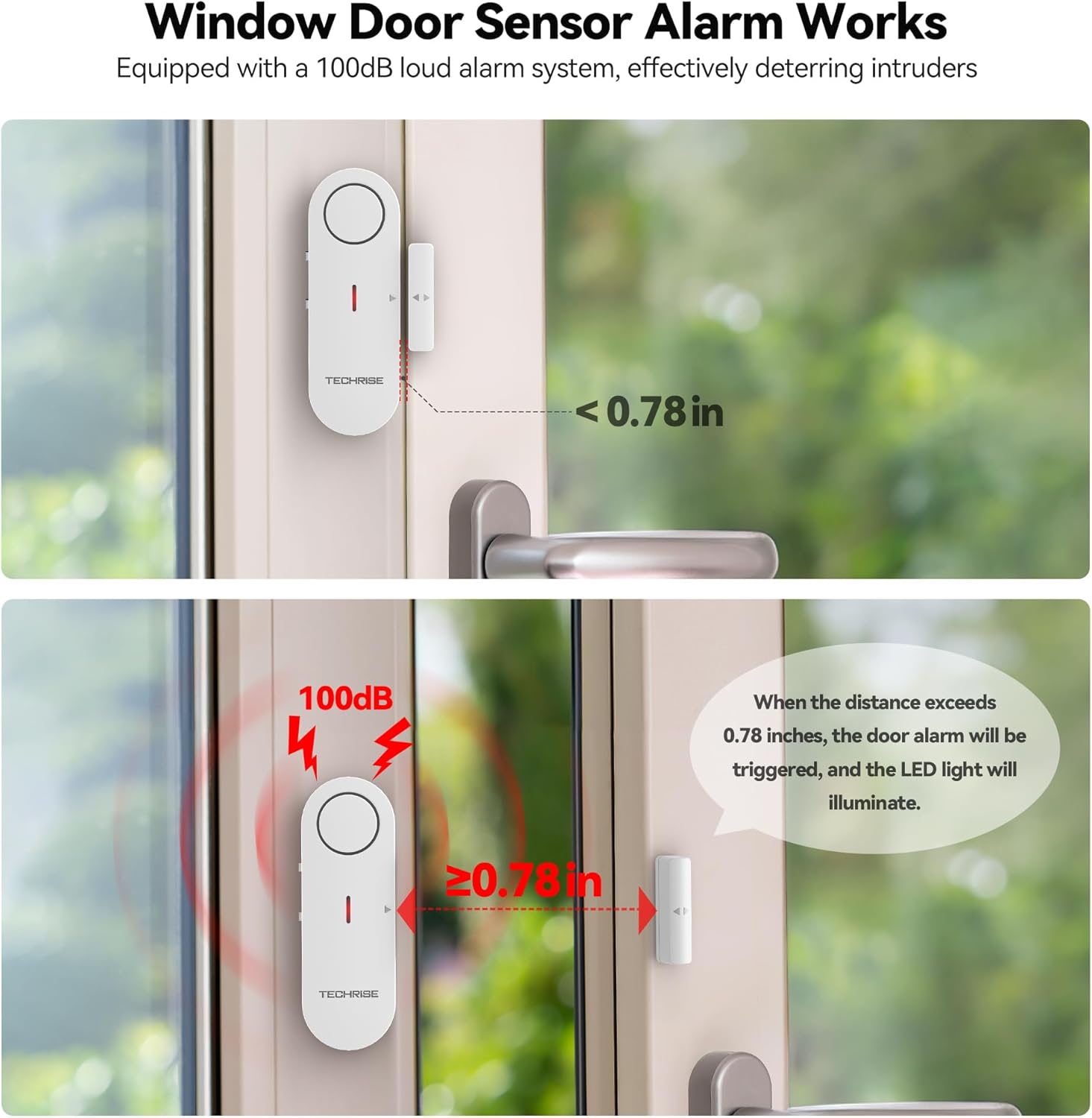
Image: Visual explanation of how the window/door sensor alarm works based on separation distance.
Maintenance
Battery Replacement:
The TechRise Window/Door Alarm is powered by LR44 button cell batteries (not included, but typically pre-installed with an insulation tab). If the alarm is not functioning or the sound becomes weak, it may be time to replace the batteries. Carefully open the battery compartment, remove the old batteries, and insert new LR44 alkaline batteries, ensuring correct polarity. Dispose of old batteries responsibly.
Cleaning:
To clean the alarm unit and magnetic sensor, use a soft, dry cloth. Do not use abrasive cleaners or immerse the device in water.
Troubleshooting
| Issue | Possible Cause | Solution |
|---|---|---|
| Alarm not sounding | Unit is in 'Off' mode. Batteries are low or dead. Sensor gap is too wide. | Switch to 'Alarm' or 'Chime' mode. Replace batteries. Re-position units to ensure gap is within 0.5 inches. |
| Alarm sounds intermittently | Loose installation. Surface is not flat. | Re-secure the units with stronger adhesive if necessary. Install on a flat, stable surface. |
| Adhesive failing | Surface not clean/dry. Insufficient surface area. | Clean and dry surface thoroughly before application. Consider using stronger adhesive or alternative mounting methods if needed. |
Specifications
| Feature | Detail |
|---|---|
| Model Number | TR-WA901 |
| Mounting Type | Tabletop Mount (Adhesive) |
| Maximum Sensor Gap | 0.78 Inches (approx. 2 cm) |
| Sensor Technology | Contact Sensor |
| Alarm Volume | Up to 100 dB |
| Volume Levels | 3 (Low, Medium, High) |
| Modes | Alarm, Chime, Off |
| Power Source | Battery Powered |
| Battery Type | LR44 Alkaline (not included) |
| Product Dimensions | 5.91 x 5.51 x 0.71 inches |
| Item Weight | 5.6 ounces |
Versatile Applications
The compact and convenient design of the TechRise Window/Door Alarm makes it suitable for a wide range of applications, providing enhanced security and awareness in various settings:
- Home Security: Ideal for main entry doors, back doors, and windows to deter intruders.
- Kids Safety: Place on doors leading to unsafe areas like pools or garages to prevent unsupervised access by children.
- Cabinet/Drawer Monitoring: Use on cabinets or drawers containing valuables or hazardous materials.
- Apartments & Mobile Homes: Provides an easy-to-install security solution for rental properties.
- Offices & Hotels: Offers a portable entry alert for temporary or private spaces.

Image: Examples of suitable usage occasions for the alarm.
Warranty and Customer Support
Warranty Information:
TechRise offers a 36-month warranty period for registered users of this product. Please ensure you register your product to benefit from the full warranty coverage.
Customer Support:
If you encounter any issues or have questions regarding your TechRise Window/Door Alarm, please do not hesitate to contact our professional customer service team. We are committed to providing prompt and helpful assistance.
For support, please visit the official TechRise website or refer to the contact information provided on your product packaging.