
Bloomfold BF100
Bloomfold Weather Station User Manual
Model: BF100
Introduction
The Bloomfold Weather Station is designed to provide accurate and reliable information about the weather conditions in your home. This powerful weather station offers a wide range of functions and high accuracy, ensuring you always have the most up-to-date environmental data.
It measures both temperature and humidity, provides weather forecasts, and atmospheric pressure readings. Its user-friendly design, clear display, and additional features like a perpetual calendar, alarm, and timer make it a versatile and practical tool for any household.

Figure 1: Bloomfold Weather Station main unit and outdoor sensor. The main unit features a large, clear display showing various weather parameters, while the compact outdoor sensor wirelessly transmits data.
Setup
1. Unpacking and Battery Installation
Carefully remove all components from the packaging. The package includes the main weather station unit, an outdoor sensor, and 2 product-specific batteries.
- Locate the battery compartments on both the main unit and the outdoor sensor.
- Insert the included batteries into both devices, ensuring correct polarity (+/-).
- Close the battery compartments securely.
2. Placement
For optimal performance, consider the following placement guidelines:
- Main Unit: Place the main unit indoors in a central location, away from direct sunlight, heat sources, or drafts that could affect temperature and humidity readings. It can be placed on a flat surface using its integrated stand or mounted on a wall using the hanging loop.
- Outdoor Sensor: Place the outdoor sensor in a shaded, dry location outdoors, protected from direct rain and sunlight. Ensure it is within the wireless transmission range of up to 60 meters from the main unit.

Figure 2: The Bloomfold Weather Station main unit can be placed on a desk using its stand or mounted on a wall using the integrated hanging loop for flexible placement.
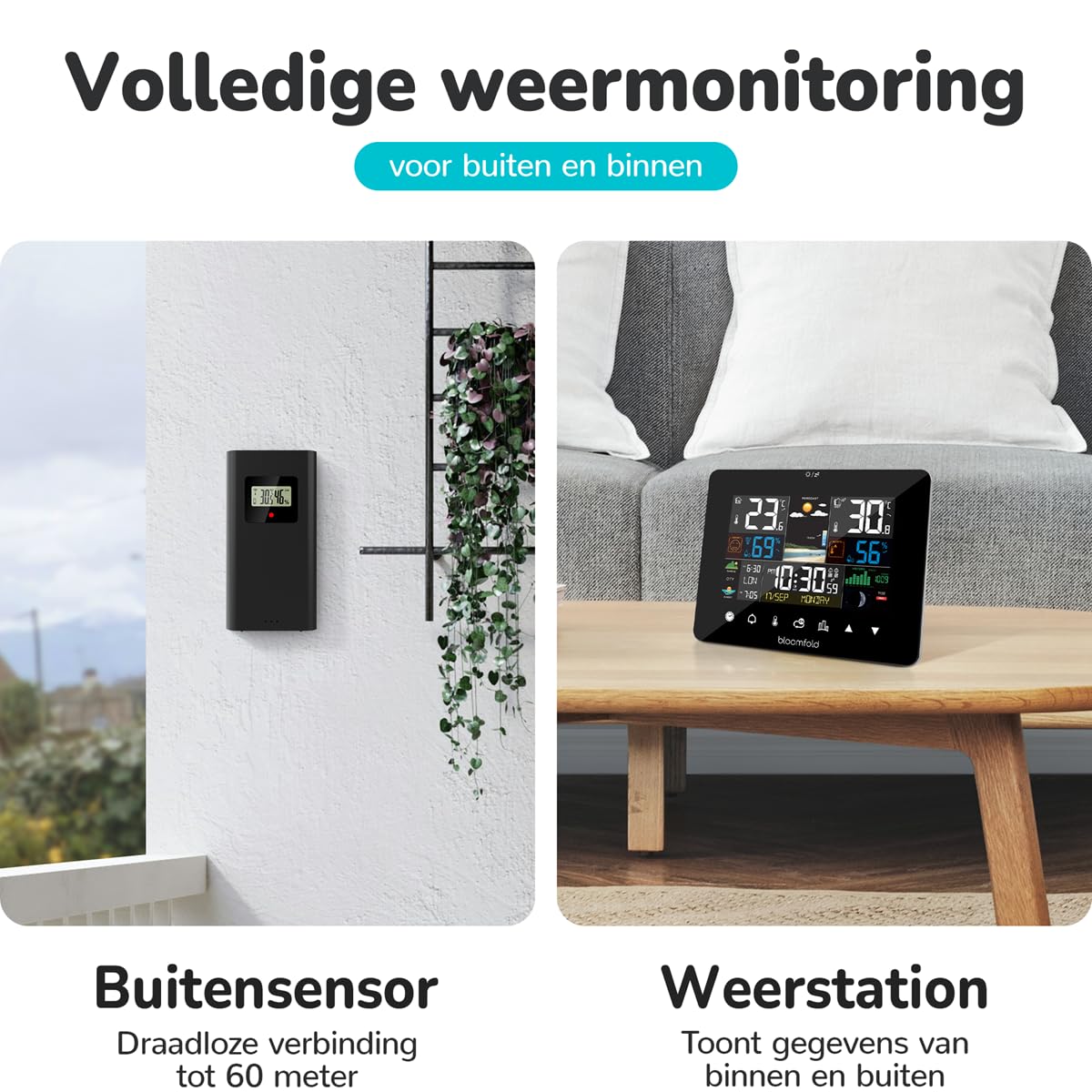
Figure 3: The outdoor sensor should be placed in a sheltered outdoor location, such as under an awning or porch, to protect it from direct weather elements while maintaining wireless connectivity with the main unit.
Operating Instructions
Display Overview and Basic Functions
The Bloomfold Weather Station features a clear and user-friendly display that presents various environmental data and time information. The device is equipped with touch controls for easy navigation and setting adjustments.

Figure 4: The weather station's display is designed for easy readability, showing indoor/outdoor temperature, humidity, weather forecast, and time at a glance.

Figure 5: The weather station features a bright screen for clear visibility and intuitive touch controls for simple operation and setting adjustments.
Key Features and Their Use:
- Temperature and Humidity: The station displays indoor and outdoor temperature (range: -20°C to 50°C, accuracy: ±1°C) and humidity (range: 20% to 95%, accuracy: ±4-5%). These readings are continuously updated.
- Weather Forecast: Based on atmospheric pressure changes, the station provides a reliable weather forecast for the next 12-24 hours.
- Atmospheric Pressure: Displays current atmospheric pressure, which is crucial for weather prediction.
- Perpetual Calendar: Automatically displays the correct date, day of the week, and month.
- Alarm and Timer Function: Set alarms for daily reminders or use the timer for specific durations. Refer to the on-screen menu for setting these functions.
- Date and Time: The station displays the current date and time. Adjust time settings via the touch controls if necessary.
- Moon Phase: The display includes an indicator for the current moon phase.
For detailed instructions on setting specific functions (e.g., time, alarm, units of measurement), please refer to the on-screen prompts and the intuitive touch interface.
Maintenance
Cleaning
To maintain the appearance and functionality of your Bloomfold Weather Station:
- Wipe the main unit and outdoor sensor with a soft, damp cloth.
- Do not use abrasive cleaners, solvents, or chemical agents, as these may damage the surfaces or electronic components.
- Ensure no liquid enters the device openings.
Battery Replacement
When the battery indicator appears on the display, it is time to replace the batteries in both the main unit and the outdoor sensor. Use 2 product-specific batteries (same type as included). Ensure correct polarity during installation.
Troubleshooting
If you encounter issues with your Bloomfold Weather Station, please refer to the following common problems and solutions:
| Problem | Possible Cause | Solution |
|---|---|---|
| No display or blank screen. | Batteries are dead or incorrectly inserted. | Check battery polarity and replace batteries if necessary. |
| Outdoor temperature/humidity not displayed or inaccurate. | Outdoor sensor out of range, low battery, or interference. | Move sensor closer to the main unit. Replace sensor batteries. Reduce sources of interference (e.g., large metal objects, other wireless devices). |
| Inaccurate indoor readings. | Main unit placed near heat sources, direct sunlight, or drafts. | Relocate the main unit to a more stable environment. |
| Weather forecast seems incorrect. | The station needs time to calibrate atmospheric pressure changes. | Allow 24-48 hours for the station to learn local atmospheric pressure patterns. Ensure the unit is not exposed to rapid temperature changes. |
If the problem persists after trying these solutions, please contact customer support.
Specifications
| Feature | Detail |
|---|---|
| Model Number | BF100 |
| Brand | Bloomfold |
| Temperature Measurement Range | -20°C to 50°C |
| Temperature Accuracy | ±1°C |
| Humidity Measurement Range | 20% to 95% |
| Humidity Accuracy | ±4-5% |
| Power Source | Battery (2 product-specific batteries required, included) |
| Product Dimensions (Main Unit) | 12.8 x 16.7 x 3 cm (H x W x D) |
| Product Weight | 420 g |
| Color | Black |
| Material | Glass |
| Special Features | Portable, Large screen, Adjustable brightness, Clock, Pre-calibrated |
| Specific Product Use | Date, Air pressure, Humidity, Moon phase, Temperature |
| Included Components | Weather Station Main Unit, Outdoor Sensor, Batteries, Instruction Manual |
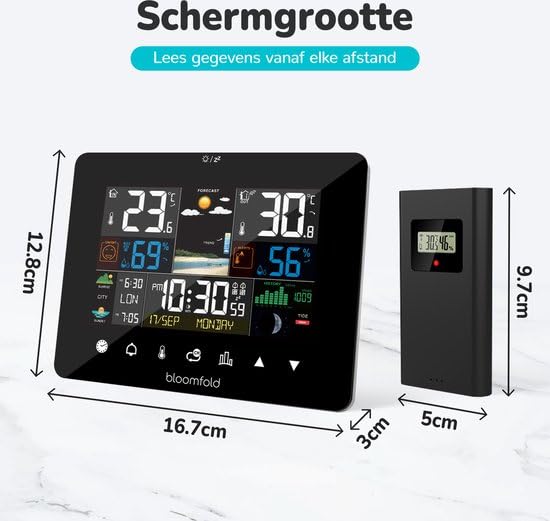
Figure 6: Detailed dimensions of the Bloomfold Weather Station main unit and its outdoor sensor, illustrating their compact size.
Warranty and Support
Warranty Information
Specific warranty details for the Bloomfold Weather Station may vary by region and retailer. Please retain your proof of purchase. For comprehensive warranty information, refer to the documentation provided with your product or contact the retailer from whom you purchased the device.
Customer Support
Should you require further assistance, have questions not covered in this manual, or experience issues with your Bloomfold Weather Station, please contact the retailer or the manufacturer's customer support. Contact details are typically available on the product packaging or the manufacturer's official website.
Related documentsBF100


Ask a question about this manual
Ask about setup, troubleshooting, compatibility, parts, safety, or missing instructions. Manuals+ will review the question and use this page’s manual context to help answer it.