
HomeTro B0CY1X65MF
Contents
HomeTro Foldable Treadmill User Manual
Model: B0CY1X65MF
Brand: HomeTro
1. Introduction
Welcome to the HomeTro Foldable Treadmill user manual. This guide provides comprehensive instructions for setting up, operating, maintaining, and troubleshooting your new fitness equipment. Designed for versatility, this treadmill offers both fast running and under-desk walking options, making it ideal for home and office use. Its compact, foldable design ensures easy storage, while features like adjustable incline and app integration enhance your workout experience.

Figure 1: HomeTro Foldable Treadmill in running and under-desk walking configurations, highlighting remote control and app connectivity.
2. Setup
2.1 Unpacking and Initial Placement
The HomeTro treadmill requires no assembly. Simply unpack the unit from its packaging. It is recommended to place the treadmill on a hard, flat floor to ensure normal heat dissipation and avoid abnormal noise during operation. Avoid using it on soft carpets.

Figure 2: Included components: User Manual, Security Lock, Rotary Knob (x2), Power Cord, Remote Control, L-type Wrench (6#), Pad Holder.
2.2 Adjusting the Running Belt (First Time Use)
For your safety and optimal performance, it is crucial to adjust the running belt appropriately before first use. Use the included L-type wrench to rotate the bolt at the end of the treadmill to achieve appropriate belt tension. After adjustment, observe if the belt runs smoothly without load. This step helps prevent slipping during exercise.
2.3 Power Connection and Safety Key
Connect the power cord to a suitable electrical outlet. For added safety, attach the safety key to the designated slot on the treadmill's console. The safety key is designed to instantly shut down the treadmill in an emergency, ensuring user protection.
3. Operating Instructions
3.1 Dual-Purpose Design and Speed Modes
The HomeTro treadmill offers two primary modes: a running mode and an under-desk walking mode. The speed ranges from 0.6 to 7.5 mph, allowing for varied workout intensities. You can also select from 12 preset programs designed to simulate different sporting scenarios.

Figure 3: The 2-in-1 foldable treadmill supports both running (0.6-7.5 MPH) and walking (0.6-5.0 MPH) modes.
3.2 Adjustable Incline
This treadmill supports manual adjustment of the slope up to a maximum of 7%. Adjusting the incline simulates a more realistic climbing experience, which can help consume more calories and enhance fat burning. To adjust, use the provided tools to change the position of the support legs at the rear of the treadmill.
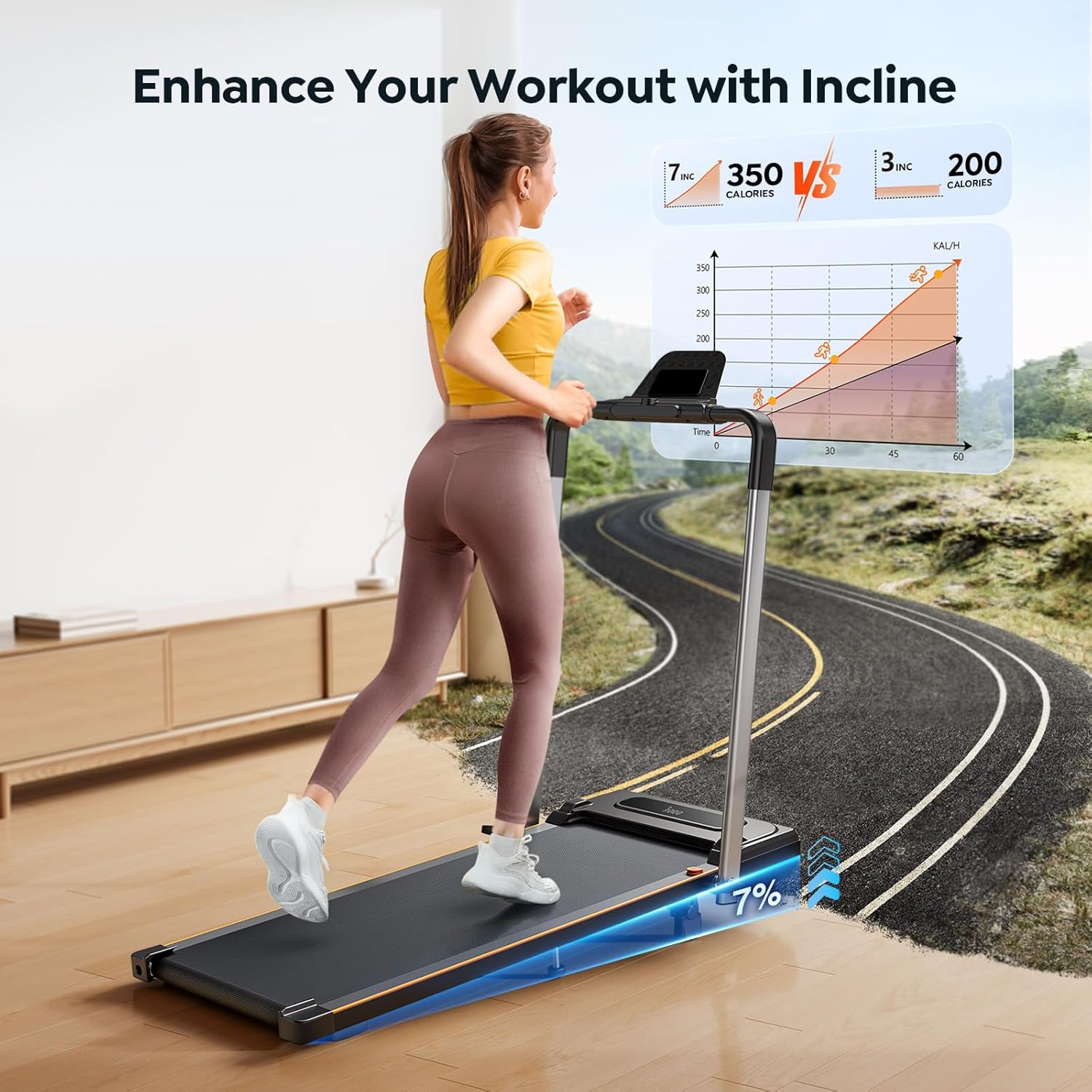
Figure 4: Manual incline adjustment up to 7% helps boost calorie burn and simulate varied terrain.
3.3 Control Options and Display
Control your workout using the included remote control or the buttons located on the handle. The LED display provides real-time data including speed, calories burned, time, and distance. A convenient pause function allows you to temporarily stop your workout without losing your data.

Figure 5: The pause function allows you to retain your workout statistics even when taking a break.
3.4 Smart APP Integration
Enhance your fitness journey by integrating with the smart APP. This allows you to control your treadmill, record workout data, and even participate in group running events with other users.

Figure 6: Connect your treadmill to the smart APP for enhanced control and workout tracking.
3.5 Official Product Video
Video 1: Official HomeTro video demonstrating the features and usage of the Foldable Treadmill with 7% Incline.
4. Safety Features
Your HomeTro treadmill is equipped with several features to ensure a safe and comfortable workout:
- 5-Layer Anti-Slip Shock-Absorbing Running Belt: Provides effective cushioning for your joints and muscles, reducing impact during exercise.
- Upright Pole: Helps maintain balance, especially useful during higher speeds or for users needing extra support.
- Safety Key: A magnetic safety key that, when detached, instantly shuts down the treadmill in case of an emergency. Always attach the safety key to your clothing during use.

Figure 7: The treadmill's multi-layer running belt and shock-absorbing cushions provide enhanced safety and comfort.
5. Maintenance
Regular maintenance ensures the longevity and optimal performance of your treadmill:
- Running Belt Centering: Under normal circumstances, the treadmill belt should return to the center position after running without load for 1-2 minutes. If it consistently shifts, refer to the belt adjustment instructions in Section 2.2.
- Lubrication: The treadmill belt requires periodic lubrication. While lubricant is not included, silicone treadmill oil can be purchased separately. For daily use, it is best to lubricate the belt monthly. Refer to the user manual for specific lubrication points and frequency.
- Cleaning: Regularly wipe down the treadmill with a damp cloth to remove dust and sweat. Avoid using abrasive cleaners.
6. Troubleshooting
If you encounter any issues with your HomeTro treadmill, please refer to the following general troubleshooting tips. For persistent problems, contact customer support.
- Abnormal Noise: Ensure the treadmill is placed on a hard, flat floor. Soft carpets can hinder heat dissipation and cause unusual sounds. Check for any loose parts or debris under the belt.
- Belt Slipping/Shifting: Re-adjust the running belt tension as described in Section 2.2. Ensure the belt is centered and has appropriate tension.
- Display Not Working: Check if the power cord is securely plugged in and the power switch is turned on. Ensure the safety key is properly inserted.
7. Specifications
| Feature | Specification |
|---|---|
| Brand | HomeTro |
| Model | B0CY1X65MF |
| Product Dimensions | 53"D x 22.4"W x 5"H |
| Item Weight | 48 Pounds |
| Maximum Speed | 7.5 Miles per Hour |
| Minimum Speed | 0.6 Miles per Hour |
| Maximum Horsepower | 2.5 Horsepower |
| Maximum Incline Percentage | 7% (Manual Adjustment) |
| Maximum Weight Recommendation | 265 Pounds |
| Noise Level | <45dB |
| Assembly Required | No |
| Connectivity Technology | Bluetooth |
| Included Components | User Manual, Safety Key, Power Cord, Remote Control, Tool Kit |

Figure 8: The 2.5 HP motor provides strong, stable power with low noise (<45dB).
8. Storage
The HomeTro treadmill features a compact, foldable design and built-in transport wheels for easy movement and storage, saving valuable space in your home.

Figure 9: The treadmill folds in 3 seconds for convenient storage, ideal for small spaces.
9. Warranty and Support
HomeTro is committed to providing high-quality products and outstanding customer service. We offer a 12-month warranty for this product. For any questions or support, our 24-hour customer service team is available to assist you.
Contact Us:
- Log in to your Amazon account.
- Select "Your Orders".
- Find the Order ID for your treadmill.
- Click "Contact Seller".
Documents and downloads
Ask a question about this manual
Ask about setup, troubleshooting, compatibility, parts, safety, or missing instructions. Manuals+ will review the question and use this page’s manual context to help answer it.