
K&F CONCEPT P15-SKU.2280
Contents
K&F Concept UV ND CPL Filter Set for DJI Mini 4 Pro Instruction Manual
Introduction
This instruction manual provides essential information for the proper use and maintenance of your K&F Concept UV ND CPL Filter Set, specifically designed for the DJI Mini 4 Pro drone. This set includes UV, CPL, ND16, ND64, and ND256 filters, engineered to enhance your aerial photography and videography by controlling light, reducing glare, and protecting your drone's lens.
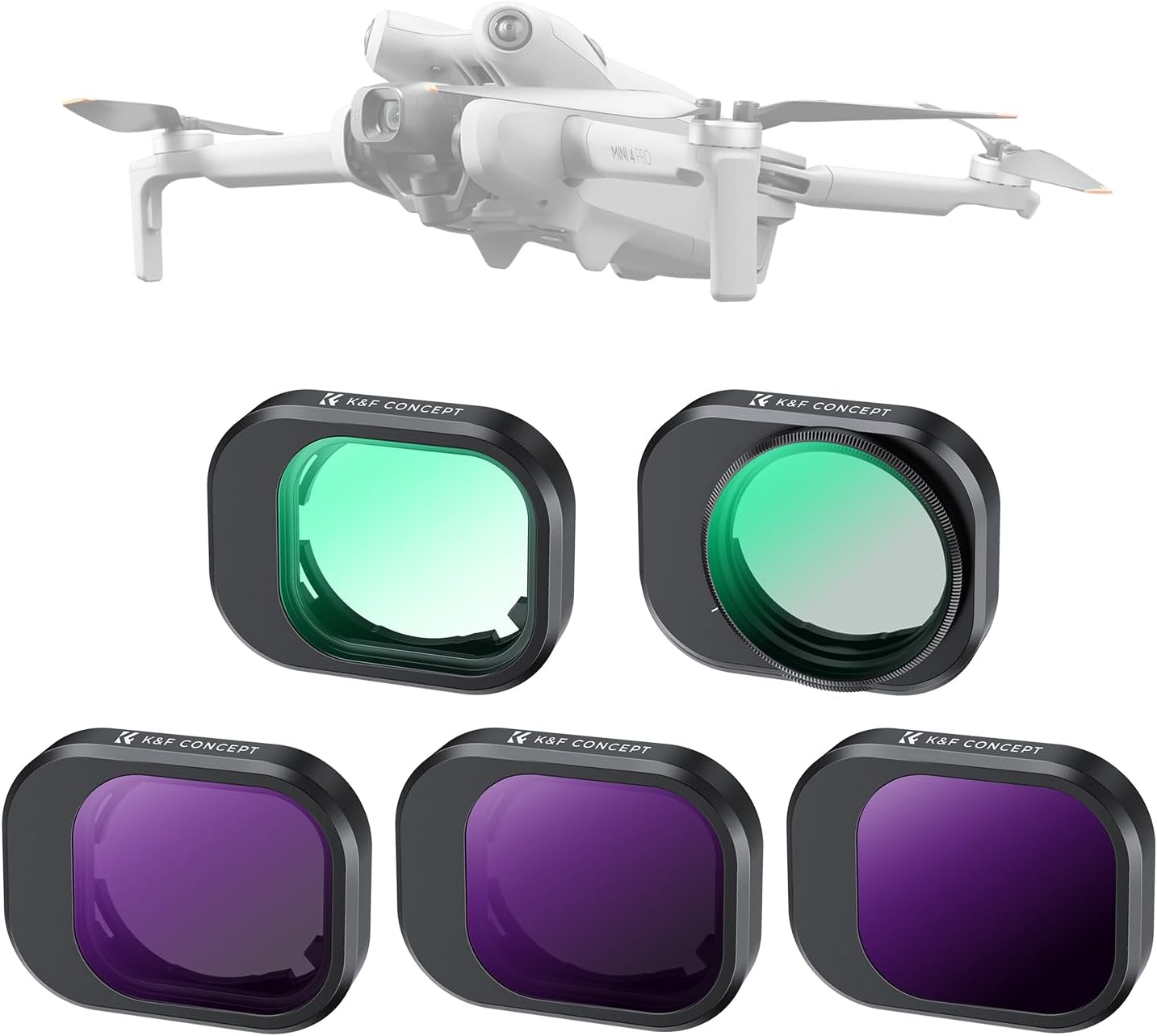
Image: K&F Concept UV ND CPL Filter Set for DJI Mini 4 Pro, displaying the drone and the five included filters.
Product Components
The K&F Concept Filter Set for DJI Mini 4 Pro includes the following high-quality optical filters:
- UV Filter: Provides daily lens protection and reduces ultraviolet light effects.
- CPL Filter (Circular Polarizer): Eliminates reflections and enhances color saturation and contrast.
- ND16 Filter (Neutral Density 16): Reduces light by 4 stops, suitable for moderately bright conditions.
- ND64 Filter (Neutral Density 64): Reduces light by 6 stops, ideal for bright conditions.
- ND256 Filter (Neutral Density 256): Reduces light by 8 stops, for extremely bright environments or long exposure effects.

Image: DJI Mini 4 Pro drone with an ND filter installed, demonstrating secure attachment and gimbal compatibility.
Setup: Filter Installation Guide
Follow these steps to correctly install or replace a filter on your DJI Mini 4 Pro drone:
- Hold the Gimbal: Gently hold the drone's gimbal to stabilize it and prevent damage during filter manipulation.
- Remove Original Lens Cap: Carefully twist the original lens cap or previously installed filter counter-clockwise to remove it.
- Align and Rotate Filter: Align the desired K&F Concept filter with the drone's camera lens. Gently push it into place and rotate clockwise until it is securely fastened. Ensure the filter is flush and stable.
- Verify Installation: Confirm the filter is firmly attached and does not obstruct the gimbal's movement.

Image: A visual guide illustrating the four steps for filter installation on the DJI Mini 4 Pro.
Operating Instructions
UV Filter Usage
The UV filter is primarily used for two purposes: reducing the effects of ultraviolet light and providing physical protection for your drone's lens. It helps to minimize atmospheric haze and improve contrast, especially in sunny, high-altitude, or marine environments. It also acts as a protective barrier against dust, dirt, fingerprints, and scratches.

Image: Example of improved image quality and reduced haze when using a UV filter in an aerial landscape shot.
CPL Filter Usage (Circular Polarizer)
The CPL filter is designed to reduce reflections from non-metallic surfaces such as water, glass, and wet foliage. By rotating the outer ring of the CPL filter, you can adjust the polarization effect to achieve desired results, enhancing color saturation and contrast. This is particularly useful for capturing vibrant skies, clear water, and rich landscapes.

Image: Comparison showing the effect of a CPL filter in reducing reflections and enhancing color saturation over water.
ND Filter Usage (Neutral Density: ND16, ND64, ND256)
Neutral Density (ND) filters reduce the amount of light entering the camera sensor without affecting color balance. This allows for the use of slower shutter speeds or wider apertures in bright conditions, which is crucial for achieving cinematic motion blur in videos and creative long-exposure effects in photography. The set includes:
- ND16: Reduces light by 4 stops. Use in bright daylight.
- ND64: Reduces light by 6 stops. Use in very bright daylight.
- ND256: Reduces light by 8 stops. Use in extremely bright conditions or for significant motion blur.

Image: Visual comparison of ND16, ND64, and ND256 filters demonstrating varying levels of light reduction on a bright beach scene.
Maintenance
To ensure the longevity and optimal performance of your K&F Concept filters, follow these maintenance guidelines:
- Cleaning: Use a soft, lint-free microfiber cloth specifically designed for optical lenses. For stubborn smudges, a small amount of lens cleaning solution can be applied to the cloth (not directly to the filter).
- Handling: Always handle filters by their edges to avoid touching the glass surface.
- Storage: Store filters in their protective case when not in use to prevent scratches, dust accumulation, and damage.
- Protection: The filters feature 28 layers of nano-coatings for protection against scratches, dust, soil, water, and oil. While durable, proper care is still recommended.

Image: Diagram detailing the 28-layer nanometer coatings, including waterproof, oilproof, and anti-reflective layers, ensuring durability and optical clarity.
Troubleshooting
Filter Not Attaching Securely
- Ensure the filter is correctly aligned with the lens mount.
- Rotate clockwise until a gentle click or firm resistance indicates it is locked into place. Do not overtighten.
- Check for any debris on the lens mount or filter threads that might prevent a secure fit.
Gimbal Interference
- K&F Concept filters are designed to be lightweight and gimbal-safe. If you experience gimbal errors or unusual movement, ensure the filter is correctly installed and not loose.
- Verify that no other accessories are interfering with the gimbal's range of motion.
- Restart the drone after filter installation to allow the gimbal to recalibrate.

Image: The DJI Mini 4 Pro drone in flight with a filter, confirming no adverse effect on gimbal performance.
Specifications
| Feature | Detail |
|---|---|
| Brand | K&F CONCEPT |
| Model Number | P15-SKU.2280 |
| Compatibility | DJI Mini 4 Pro |
| Material | Optical Glass |
| Coating Description | 28-layer Multi-Coating (Water Resistant, Scratch Resistant, Dust Proof) |
| Filter Types Included | UV, CPL, ND16, ND64, ND256 |
| Item Weight (Set) | Approximately 2.39 ounces (67.7 grams) |
| Gimbal Safety | Designed to be gimbal safe and lightweight |
Warranty and Support
For warranty information, technical support, or any inquiries regarding your K&F Concept filter set, please refer to the official K&F Concept website or contact their customer service directly. Keep your purchase receipt for warranty claims.
You can visit the K&F Concept Store for more information: K&F Concept Official Store
Ask a question about this manual
Ask about setup, troubleshooting, compatibility, parts, safety, or missing instructions. Manuals+ will review the question and use this page’s manual context to help answer it.