
Olakids 10312
Contents
Olakids Licensed Ford Ranger 12V Electric Ride-on Car Instruction Manual
Model: 10312
Product Overview
The Olakids Licensed Ford Ranger 12V Electric Ride-on Car offers a realistic driving experience for children aged 3-6 years. This vehicle features double openable doors, bright LED headlights, and a foot pedal for child operation. It also includes a 2.4GHz parental remote control for added supervision. Designed for safety and comfort, it has a slow start function, seat safety belt, and a durable PP cover. The car is equipped with built-in music, story functions, a USB port, and Bluetooth connectivity for personalized entertainment.

Image: The Olakids Licensed Ford Ranger 12V Electric Ride-on Car in black, showcasing its realistic design and features.
Safety Information
This product is certified by ASTM, ensuring safety during use. Please adhere to the following safety guidelines:
- Always supervise children during operation.
- Ensure the seat safety belt is securely fastened before each use.
- Do not exceed the maximum weight capacity of 66 lbs.
- Operate the vehicle on flat, stable surfaces, avoiding slopes or uneven terrain.
- Keep hands, hair, and loose clothing away from moving parts.
- The product is made of safe materials, FREE from BPA, PVC, Phthalates, Lead, Latex, and Formaldehyde. It has passed tests for stability, asphyxiation, load, and shear.
Assembly Instructions
Follow these steps carefully to assemble your Olakids Licensed Ford Ranger ride-on car. For a visual guide, please refer to the assembly video below.
Video: Detailed assembly guide for the Olakids Licensed Ford Ranger 12V Electric Ride-on Car.
Step-by-Step Assembly Guide:
- Prepare the Chassis: Place the car body upside down on a soft surface.
- Install Front Axle: Attach the front axle assembly to the designated slots on the underside of the car. Secure it firmly.
- Install Rear Axle: Insert the rear axle into its housing.
- Attach Rear Wheels: Slide the rear wheels onto the axle, securing them with the provided fasteners. Ensure they rotate freely.
- Attach Front Wheels: Slide the front wheels onto the axle, securing them with the provided fasteners. Ensure they rotate freely.
- Connect Battery: Locate the battery compartment and connect the battery terminals.
- Install Windshield: Carefully align and snap the windshield into place at the front of the car.
- Install Steering Wheel: Connect the steering wheel wiring and attach the steering wheel to the steering column.
- Install Seat: Place the seat into the car body and secure it with the screws.
- Attach Side Mirrors: Snap the side mirrors into their respective slots on the car doors.
- Install Roll Bar/Rear Lights: Attach the rear roll bar assembly with the integrated lights to the back of the car.
- Final Checks: Ensure all connections are secure and all parts are properly installed before first use.
Operating Instructions
Your Olakids Ford Ranger offers two primary control modes:
- Kids Manual Operate: The child can drive the car using the foot pedal and steering wheel.
- 2.4GHz Remote Control: Parents can control the car's movement, speed, and direction using the included remote control. This mode is ideal for younger children or for safety supervision. (Note: 2 AAA batteries for the remote are not included).
Key Functions:
- Start/Stop: Use the power button on the dashboard to turn the car on or off.
- Speed Control: The car has adjustable speeds ranging from 1.9 to 3.1 mph. Use the speed change switch on the dashboard to select the desired speed.
- Multimedia Panel: The dashboard features built-in music and stories. You can also connect your own music devices via the USB port or Bluetooth.
- Horn: Press the horn button on the steering wheel for sound effects.
- Power Display: Monitor the battery level via the power display on the dashboard.
- Soft Start Function: This feature ensures a gradual acceleration, preventing sudden jolts for a smoother and safer ride.

Image: Illustration of the two driving modes available for the ride-on car, highlighting the remote control option.

Image: Close-up of the car's dashboard, showing the power display, USB port, music controls, and Bluetooth functionality.
Care and Maintenance
Proper care and maintenance will extend the life of your ride-on car:
- Cleaning: Wipe the car with a damp cloth. Do not use abrasive cleaners or solvents.
- Battery Care: Charge the 12V battery fully before first use (typically 8-12 hours). Do not overcharge. Recharge after each use, even if only for a short period, to maintain battery health. If storing for extended periods, charge monthly.
- Storage: Store the car in a dry, cool place away from direct sunlight and moisture.
- Tires: Regularly check the wheels for debris or damage.
- Electrical Components: Keep all electrical components dry. Avoid exposing the car to rain or excessive moisture.
Troubleshooting
| Problem | Possible Cause | Solution |
|---|---|---|
| Car does not move | Low battery; Loose battery connection; Blown fuse; Motor issue. | Charge battery; Check battery terminals; Replace fuse; Contact customer support. |
| Car moves slowly | Low battery; Overload; Rough terrain. | Charge battery; Reduce weight; Move to smoother surface. |
| Remote control not working | Remote batteries dead/incorrectly installed; Remote not paired. | Replace AAA batteries; Refer to remote pairing instructions in the full manual. |
| No sound from multimedia | Volume too low; Connection issue with external device. | Increase volume; Check USB/Bluetooth connection. |
Specifications
- Battery: 12V 7AH (included)
- Main Material: PP + Iron
- Net Weight: 32.5 lbs
- Max Weight Capacity: 66 lbs
- Recommended for Ages: 3-6 Years
- Overall Dimensions: 41.5’’ x 25’’ x 23.5’’ (L x W x H)
- Speed Range: 1.9 - 3.1 mph
- Motors: 2x30W
- Playtime: 40-50 minutes (fully charged)
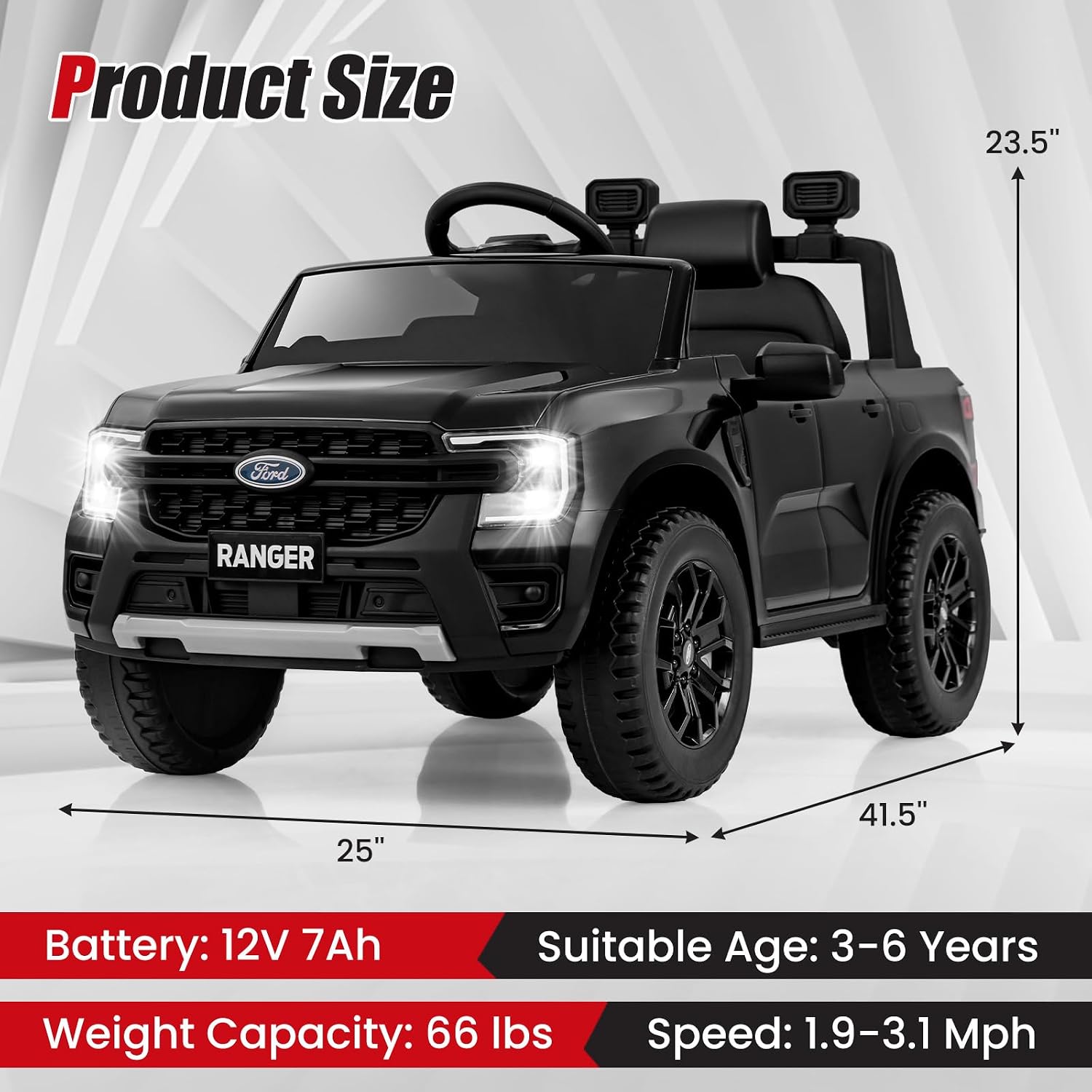
Image: Visual representation of the product's dimensions and key specifications.
Warranty and Support
Olakids provides a warranty for this product against defects in materials and workmanship under normal use. For specific warranty terms, conditions, and duration, please refer to the documentation included with your purchase or visit the official Olakids website.
If you encounter any issues or require assistance, please contact Olakids customer support. Have your product model number (10312) and purchase details ready for faster service.
Contact Information: Please refer to the contact details provided in your product packaging or on the official Olakids website.
Ask a question about this manual
Ask about setup, troubleshooting, compatibility, parts, safety, or missing instructions. Manuals+ will review the question and use this page’s manual context to help answer it.