
1. Introduction
Thank you for choosing the XQDKoon C001 Automatic Self-Cleaning Cat Litter Box. This manual provides essential information for the safe and efficient operation, setup, and maintenance of your device. Please read this manual thoroughly before use and retain it for future reference.
2. Product Overview
The XQDKoon C001 is an automatic self-cleaning cat litter box designed to provide a clean environment for your cats and convenience for pet owners. It features a spacious interior, odor removal systems, and smart app control.
Key Features:
- Double Deodorization: Utilizes a high-performance mat to reduce litter sticking and a plant-based deodorizing box to eliminate odors.
- Internal Atmosphere Light: Adjustable color mood light for night monitoring and enhanced cat comfort.
- Multi-Cat Compatibility: 80L interior capacity and 20L waste bin, suitable for multiple cats (2.2-22lb).
- Advanced Safety Protection: Equipped with infrared detection and high-precision gravity sensors to prevent harm to pets.
- Intelligent App Control: Remotely monitor cat weight, toilet frequency, and cleaning status via a mobile application.
- Quiet Operation: Operates at a minimum noise level of ≤35dB.
- Easy Litter Addition: Top-loading design for convenient litter replenishment.
Package Contents:
- 1 x XQDKoon Self-Cleaning Cat Litter Box
- 1 x Cat Litter Mat
- 1 x Cleaning Brush
- 40 x Garbage Bags
- 1 x Instruction Manual (this document)
- 1 x Power Adapter

Figure 2.1: XQDKoon C001 Automatic Self-Cleaning Cat Litter Box with included accessories (litter mat, brush, liner bags) and a cat.

Figure 2.2: The litter box showcasing its built-in adjustable color LED mood light, providing illumination for night use.
3. Safety Instructions
To ensure safe operation and prevent injury or damage, please adhere to the following safety guidelines:
- Do not allow children or individuals unfamiliar with the device to operate it without supervision.
- Ensure the litter box is placed on a stable, level surface.
- Keep the power adapter and cord away from water and moisture.
- Do not clean the base of the unit with water. Only wipe with a damp cloth.
- The litter box is equipped with infrared detection and high-precision gravity sensors to stop operation if a cat is detected inside or nearby. Do not attempt to bypass or disable these safety features.
- Only use clumping cat litter. Non-clumping litter or litter longer than 11mm is not recommended as it may interfere with the cleaning mechanism.
- Unplug the device before performing any maintenance or cleaning.

Figure 3.1: Illustration of the litter box's advanced safety protection, including infrared and weight sensors to detect cat presence and prevent operation.
4. Setup Guide
Follow these steps to set up your XQDKoon C001 Automatic Self-Cleaning Cat Litter Box:
- Unpack: Carefully remove all components from the packaging.
- Placement: Place the litter box on a firm, level surface in a suitable location, away from direct sunlight or heat sources. Ensure adequate space around the unit for access and ventilation.
- Install Waste Bin: Slide the waste collection bin into the designated slot at the bottom front of the unit. Line the bin with one of the provided garbage bags.
- Add Litter: Open the top cover and pour clumping cat litter into the drum. Ensure the litter level is between the minimum and maximum fill lines.
- Connect Power: Plug the power adapter into the litter box and then into a wall outlet. The unit will power on and perform an initial calibration.
- App Connection (Optional): Download the companion mobile application (refer to the app store for 'XQDKoon' or similar). Follow the in-app instructions to connect the litter box to your 2.4GHz Wi-Fi network. You may need to press the Wi-Fi button on the litter box manually during the pairing process.
5. Operating Instructions
The XQDKoon C001 offers both automatic and manual operation modes, along with smart control via a mobile application.
Automatic Cleaning Mode:
Once powered on and litter is added, the device will automatically detect when your cat uses the litter box. After a preset delay (typically a few minutes after the cat exits), the drum will rotate to sift the litter, depositing waste into the collection bin below. This mode ensures continuous cleanliness.
Manual Cleaning Mode:
You can initiate a cleaning cycle manually at any time using the control panel on the unit or through the mobile application. This is useful for immediate cleaning or after adding fresh litter.
App Control:
The mobile application provides enhanced control and monitoring capabilities:
- Remote Cleaning: Start a cleaning cycle from anywhere.
- Usage Tracking: Monitor your cat's weight, frequency, and duration of litter box usage.
- Status Alerts: Receive notifications for waste bin full, litter level low, or other operational issues.
- Settings Adjustment: Customize cleaning delays, mood light colors, and other preferences.

Figure 5.1: The XQDKoon C001 litter box demonstrating its smart pet care capabilities with real-time tracking and insights available through the mobile application.
Litter Type Compatibility:
This litter box is designed for use with various clumping cat litters, including Tofu litter, Mixed litter, Bentonite, and Mineral litter. It is not recommended to use non-clumping litters or clumping litters with granules longer than 11mm, as these may hinder the sifting mechanism.

Figure 5.2: Visual representation of various clumping cat litter types (Tofu, Mixed, Bentonite, Mineral) that are compatible with the automatic cleaning mechanism.
6. Maintenance and Cleaning
Regular cleaning and maintenance are crucial for the longevity and hygienic operation of your litter box.
Emptying the Waste Bin:
The 20L waste collection bin can hold waste for up to 15 days for a single cat. When the bin is full (indicated by the app or control panel), simply slide it out, tie the garbage bag, and dispose of it. Replace with a new bag.
Deep Cleaning:
For thorough cleaning, the top cover, drum, and feces collection bin can be easily removed. Wash these components with mild soap and water, then rinse thoroughly and dry completely before reassembly. Important: Do not clean the main base unit with water. Wipe it with a damp cloth only.
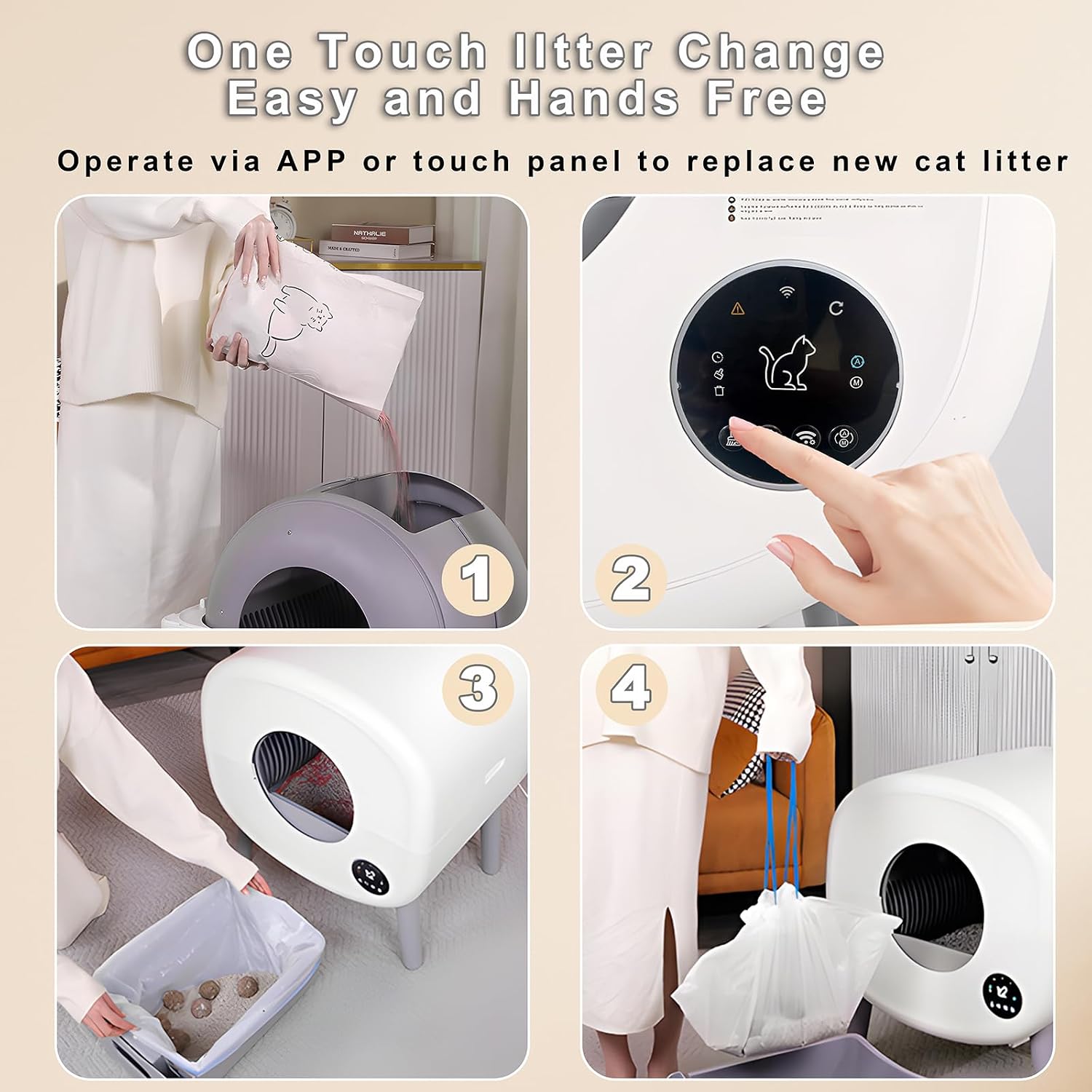
Figure 6.1: A step-by-step guide illustrating the process of changing cat litter and emptying the waste collection bin, emphasizing ease of use.
7. Troubleshooting
If you encounter issues with your XQDKoon C001, refer to the following common problems and solutions:
| Problem | Possible Cause | Solution |
|---|---|---|
| Unit does not power on. | Power adapter not connected; power outlet issue. | Ensure power adapter is securely plugged into the unit and a working wall outlet. |
| Cleaning cycle does not start automatically. | Cat still inside or near the unit; sensors obstructed; manual mode active. | Ensure no cat is detected by sensors. Check for obstructions. Verify automatic mode is enabled via control panel or app. |
| Litter is not sifting properly. | Incorrect litter type; litter level too high/low; drum obstruction. | Use recommended clumping litter. Adjust litter level. Check drum for foreign objects or excessive clumping. |
| Cannot connect to Wi-Fi/App. | Incorrect Wi-Fi password; 5GHz network; signal interference. | Ensure correct 2.4GHz Wi-Fi network and password. Move unit closer to router. Try manual Wi-Fi button press during pairing. |
| Odor persists. | Waste bin full; deodorizing box needs replacement; insufficient cleaning. | Empty waste bin regularly. Replace deodorizing box as needed. Perform deep cleaning of removable parts. |
8. Specifications
| Feature | Detail |
|---|---|
| Model | C001 |
| Material | PP+ABS+POM (Polypropylene, Acrylonitrile Butadiene Styrene, Polyoxymethylene) |
| Color | White |
| Product Dimensions (L x W x H) | 57.5 x 53.2 x 52 cm (22.6 x 20.9 x 20.5 in) |
| Internal Space Capacity | 80L |
| Waste Collection Bin Capacity | 20L |
| Product Weight | 14 kg (30.8 lb) |
| Applicable Cat Weight | 1 kg - 10 kg (2.2 lb - 22 lb) |
| Connection Method | 2.4GHz Wi-Fi |
| Noise Level | ≤35dB |

Figure 8.1: Detailed dimensions of the litter box and its internal capacity, along with recommended cat weight ranges.
9. Warranty and Support
XQDKoon is committed to product quality and customer satisfaction.
Warranty:
We offer a warranty that includes the replacement of any damaged parts free of charge to ensure the quality and reliability of our products.
Customer Support:
If you encounter any quality problems with your purchased product or have questions regarding its operation, please do not hesitate to contact our customer support team. We are dedicated to providing active and patient assistance to resolve any issues you may have.
Please refer to your purchase documentation or the XQDKoon official website for contact information.
