
1. Product Overview
The CG Mobile Guess TWS Bluetooth Earbuds with Charging Dock offer a high-quality wireless audio experience. Designed for convenience and performance, these earbuds feature Bluetooth 5.3 for stable connectivity, IPX5 water resistance for durability during activities, and intuitive touch controls for easy management of audio and calls. The included charging case extends the earbuds' battery life, ensuring your music is always ready when you are.
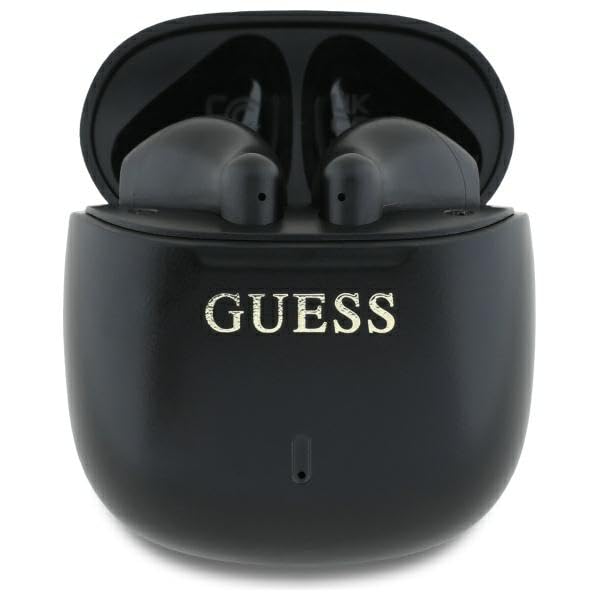
Image: The CG Mobile Guess TWS Bluetooth Earbuds alongside their charging case, showcasing the overall product design.
2. What's in the Box
Please check the package contents to ensure all items are present:
- CG Mobile Guess TWS Bluetooth Earbuds (Left and Right)
- Charging Case
- USB-C to USB-A Charging Cable
- User Manual

Image: The retail packaging for the CG Mobile Guess TWS Bluetooth Earbuds, showing the contents and branding.
3. Setup and Initial Use
3.1. Charging the Earbuds and Case
Before first use, fully charge both the earbuds and the charging case.
- Charge the Charging Case: Connect the provided USB-C cable to the charging port on the case and the other end to a USB power source (e.g., wall adapter, computer USB port). The charging indicator lights (if present) will show the charging status.
- Charge the Earbuds: Place the earbuds into their respective slots in the charging case. Ensure they are correctly seated. The earbuds will begin charging automatically. The case will indicate when the earbuds are charging and fully charged.
A full charge for the earbuds takes approximately 1.5 hours.
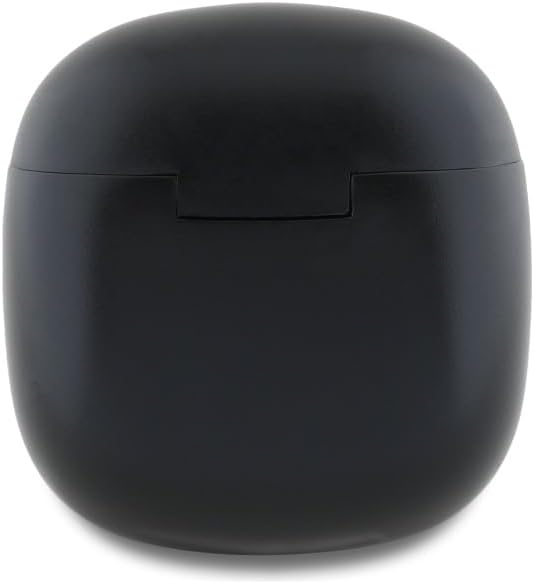
Image: The CG Mobile Guess TWS Bluetooth Earbuds charging case, closed, showing its compact design.
3.2. Pairing with Your Device
Follow these steps to pair your earbuds with a Bluetooth-enabled device:
- Activate Earbuds: Open the charging case. The earbuds will automatically enter pairing mode, indicated by a flashing light (if present).
- Enable Bluetooth: On your smartphone, tablet, or other device, go to the Bluetooth settings and ensure Bluetooth is turned on.
- Select Device: In the list of available Bluetooth devices, select "GUTWSJ14ESGK" (or a similar name like "Guess TWS").
- Confirm Pairing: Once selected, your device should confirm that the earbuds are connected.
The earbuds will automatically reconnect to the last paired device when removed from the case, provided Bluetooth is active on the device.

Image: A close-up of the CG Mobile Guess TWS Bluetooth Earbuds, highlighting their in-ear design and the Guess logo.
4. Operating the Earbuds
The earbuds feature intuitive touch controls for managing various functions. Specific gestures are typically detailed in the full user manual included with your product. Common functions include:
- Play/Pause Music: Tap once on either earbud.
- Next Track: Double-tap the right earbud.
- Previous Track: Double-tap the left earbud.
- Answer/End Call: Tap once on either earbud during an incoming call or active call.
- Reject Call: Press and hold either earbud for 2 seconds during an incoming call.
- Activate Voice Assistant: Triple-tap either earbud.
5. Maintenance and Care
To ensure the longevity and optimal performance of your earbuds, follow these care guidelines:
- Cleaning: Regularly clean the earbuds and charging case with a soft, dry, lint-free cloth. Do not use harsh chemicals or abrasive materials.
- Water Resistance: The earbuds are IPX5 water-resistant, meaning they can withstand sweat and light splashes. Do not submerge them in water or expose them to heavy rain. Ensure they are dry before placing them back in the charging case.
- Storage: When not in use, store the earbuds in their charging case to protect them from dust and damage. Avoid extreme temperatures.
- Charging: Use only the provided USB-C cable or a certified equivalent for charging.
6. Troubleshooting
If you encounter issues with your earbuds, try the following solutions:
- Earbuds Not Pairing:
- Ensure both earbuds are charged.
- Turn off and on Bluetooth on your device.
- Forget the earbuds from your device's Bluetooth list and attempt to re-pair.
- Place earbuds back in the case, close it, wait a few seconds, then open it again to reset.
- No Sound from One Earbud:
- Ensure both earbuds are charged.
- Clean the charging contacts on both the earbuds and the case.
- Try resetting the earbuds by placing them in the case and then re-pairing.
- Charging Issues:
- Check the USB-C cable and power adapter for damage.
- Ensure the charging port on the case is clean and free of debris.
- Verify that the earbuds are correctly seated in the charging case.
- Poor Audio Quality:
- Ensure the earbuds are within range of your device.
- Check for interference from other wireless devices.
- Clean any debris from the earbud speakers.
7. Specifications
| Model Number | GUTWSJ14ESGK |
| Bluetooth Version | 5.3 |
| Earbud Battery Capacity | 2 x 30 mAh |
| Charging Case Capacity | 300 mAh |
| Earbud Charging Time | 1.5 hours |
| Music Playback Time (Earbuds) | Up to 5 hours |
| Total Playback Time (with Case) | Up to 24 hours |
| Standby Time | Up to 300 hours |
| Charging Port | USB-C |
| Water Resistance Rating | IPX5 |
| Impedance | 32 Ohms |
| Frequency Range | 2402-2480 MHz |
| Microphone | Integrated |
| Control Method | Touch |
| Form Factor | In-Ear |
8. Warranty and Support
Warranty information for your CG Mobile Guess TWS Bluetooth Earbuds is typically provided with the product packaging or on the official CG Mobile website. Please refer to these resources for details regarding warranty coverage and terms.
For technical support or further assistance, please contact CG Mobile customer service. Contact details can usually be found on the product packaging or the brand's official website.


