
1. Introduction
Thank you for choosing the AQQA LED Aquarium Light. This manual provides detailed instructions for the safe and efficient operation of your new aquarium light. Designed for optimal plant growth and vibrant aquatic environments, this light offers advanced features including 24/7 natural light simulation, DIY customization, and a convenient memory function. Please read this manual thoroughly before installation and use.

Figure 1.1: Overview of the AQQA LED Aquarium Light and its components.
2. Safety Instructions
To ensure safe operation and prevent damage, please observe the following precautions:
- Always disconnect the power supply before performing any maintenance or installation.
- This product is designed for indoor use with aquariums only. Do not use it for purposes other than its intended use.
- Ensure your hands are dry when handling the power plug or controller.
- Do not immerse the controller or power adapter in water. The light fixture itself is IP68 waterproof.
- Keep out of reach of children.
- Do not operate if any part of the light or power cord is damaged. Contact customer support for assistance.
- Ensure the light is securely clipped to the aquarium before powering on.
3. Package Contents
Verify that all items are present in the package:
- 1 x AQQA Aquarium Light
- 1 x Controller
4. Product Features
The AQQA LED Aquarium Light is equipped with advanced features to enhance your aquatic environment:
- High Quality Construction: Features a widened and thickened aluminum shell for durability and efficient heat dissipation. Utilizes premium 5050 and 2835 LEDs for optimal plant growth.
- DIY Mode: Allows simultaneous adjustment of brightness, color, and timing. Offers 5 levels of brightness (10%-100%), 3 timer settings (6H/10H/12H), and 7 light colors plus full spectrum and auto color cycle.
- 24/7 Default Mode: Simulates natural light cycles, transitioning from warm orange at sunrise to bright full-spectrum at noon, and starry blue at night. Default on/off times are 6 AM and 10:58 PM, which can be adjusted.
- Flexible Adjustable Design: A 7-inch 360° flexible gooseneck tube allows for easy angle and direction adjustment. The aluminum alloy clip with tightening screws ensures secure mounting on framed or frameless aquariums up to 0.9 inches thick.
- Memory Function: Retains previous settings (color, brightness, timing) after a power outage, eliminating the need for re-setup.
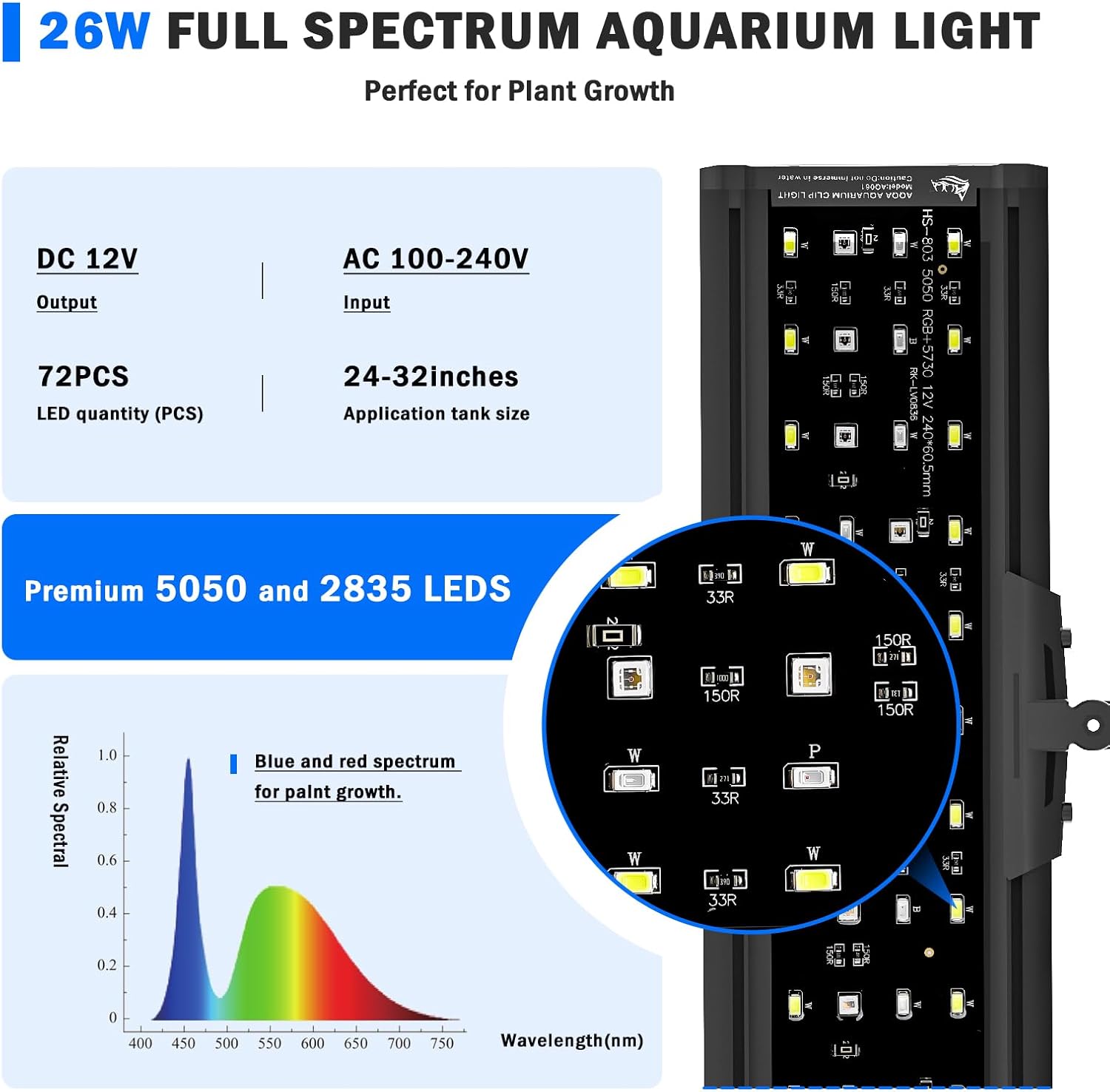
Figure 4.1: Detailed view of the full spectrum LED array, optimized for plant growth.
5. Setup Guide
Follow these steps to install your AQQA LED Aquarium Light:
- Attach the Clip: Secure the aluminum alloy clip to the edge of your aquarium. Ensure the clip is firmly tightened using the screws provided, suitable for tank thickness up to 0.9 inches.
- Position the Light: Insert the flexible gooseneck tube into the clip. Adjust the gooseneck to position the light fixture directly over your aquarium. The 360° flexibility allows for precise placement.
- Connect Power: Plug the light's power cord into the controller, and then plug the controller's power adapter into a suitable electrical outlet.
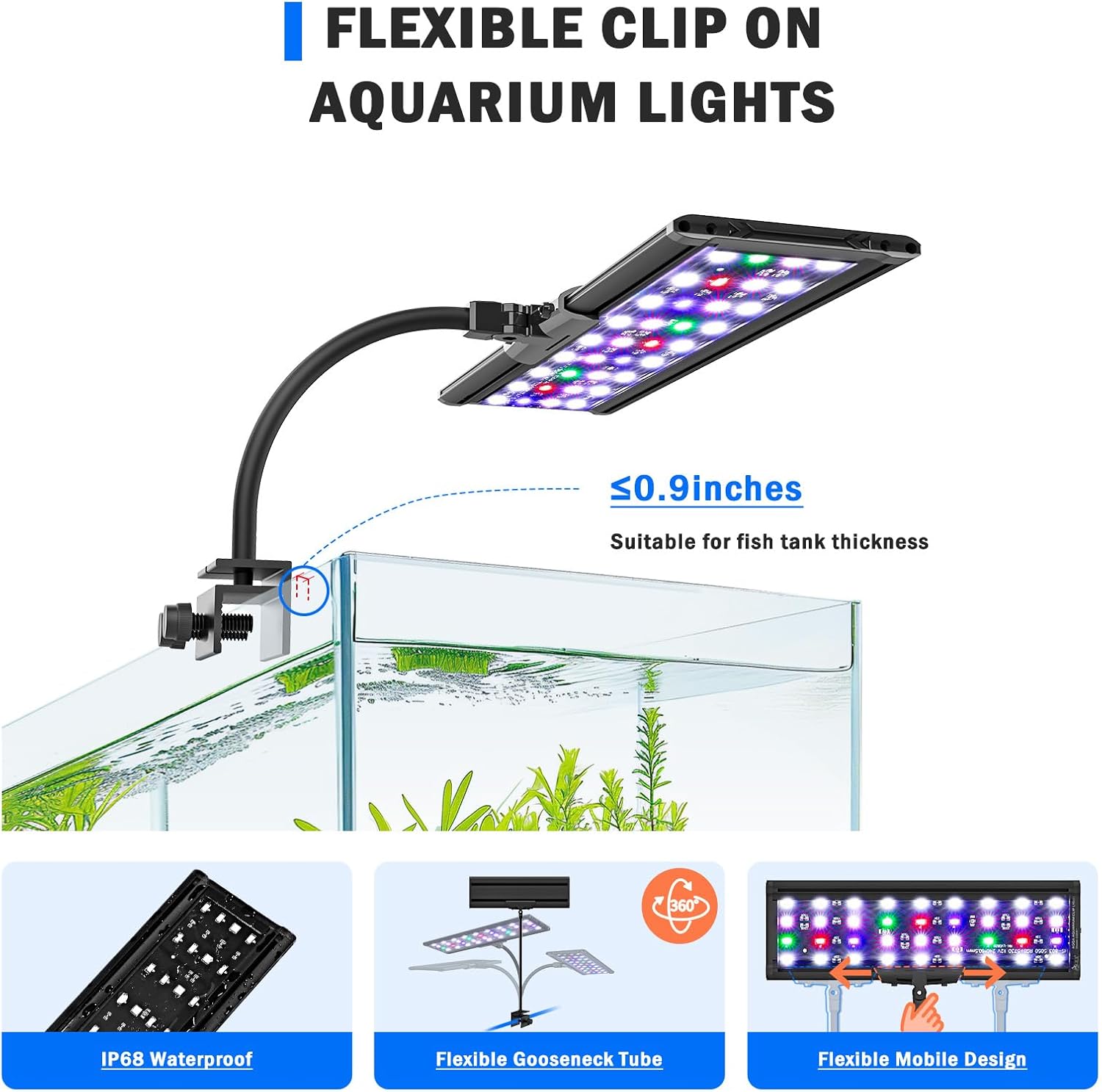
Figure 5.1: Illustration of the flexible clip-on installation method.
6. Operating Modes
Your AQQA LED Aquarium Light offers two primary operating modes: DIY Mode for custom settings and 24/7 Default Mode for automated light cycles.
6.1. DIY Mode
The DIY mode allows you to manually set the timer, color, and brightness. Use the inline controller to navigate these settings.
- Timer Setting: Press the 'TIMER' button to cycle through 6H, 10H, or 12H lighting durations.
- Color Adjustment: Press the 'C/M' button to change between 7 individual colors (Red, Green, Blue, Orange, Yellow, Cyan Blue, Purple), full spectrum white, or an auto color cycle. Press and hold for 3 seconds to exit color mode.
- Brightness Control: Press the '%' button to adjust brightness levels (10%, 25%, 50%, 75%, 100%). Note: Brightness cannot be adjusted in 24/7 mode.
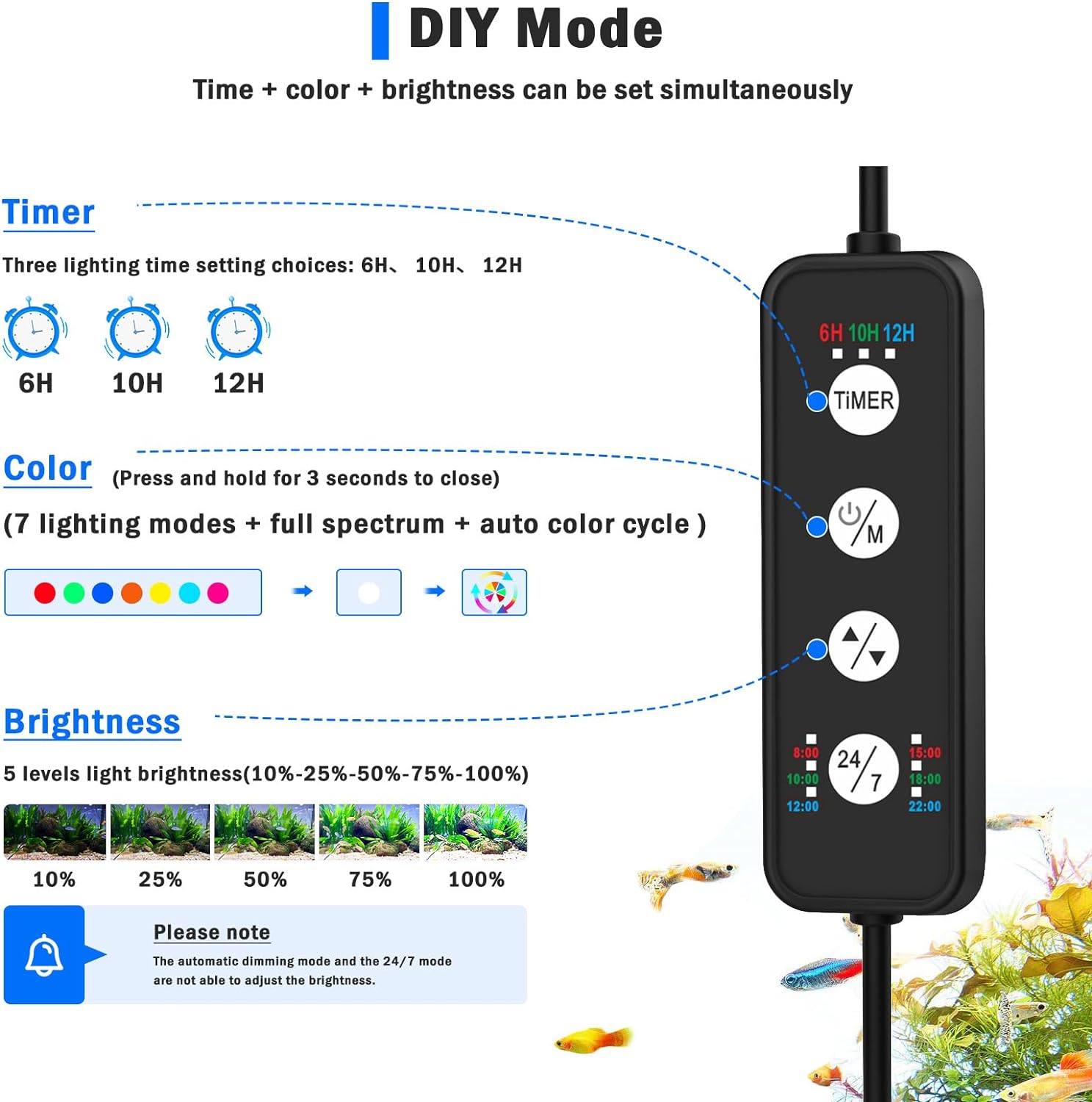
Figure 6.1: The inline controller for DIY mode settings.
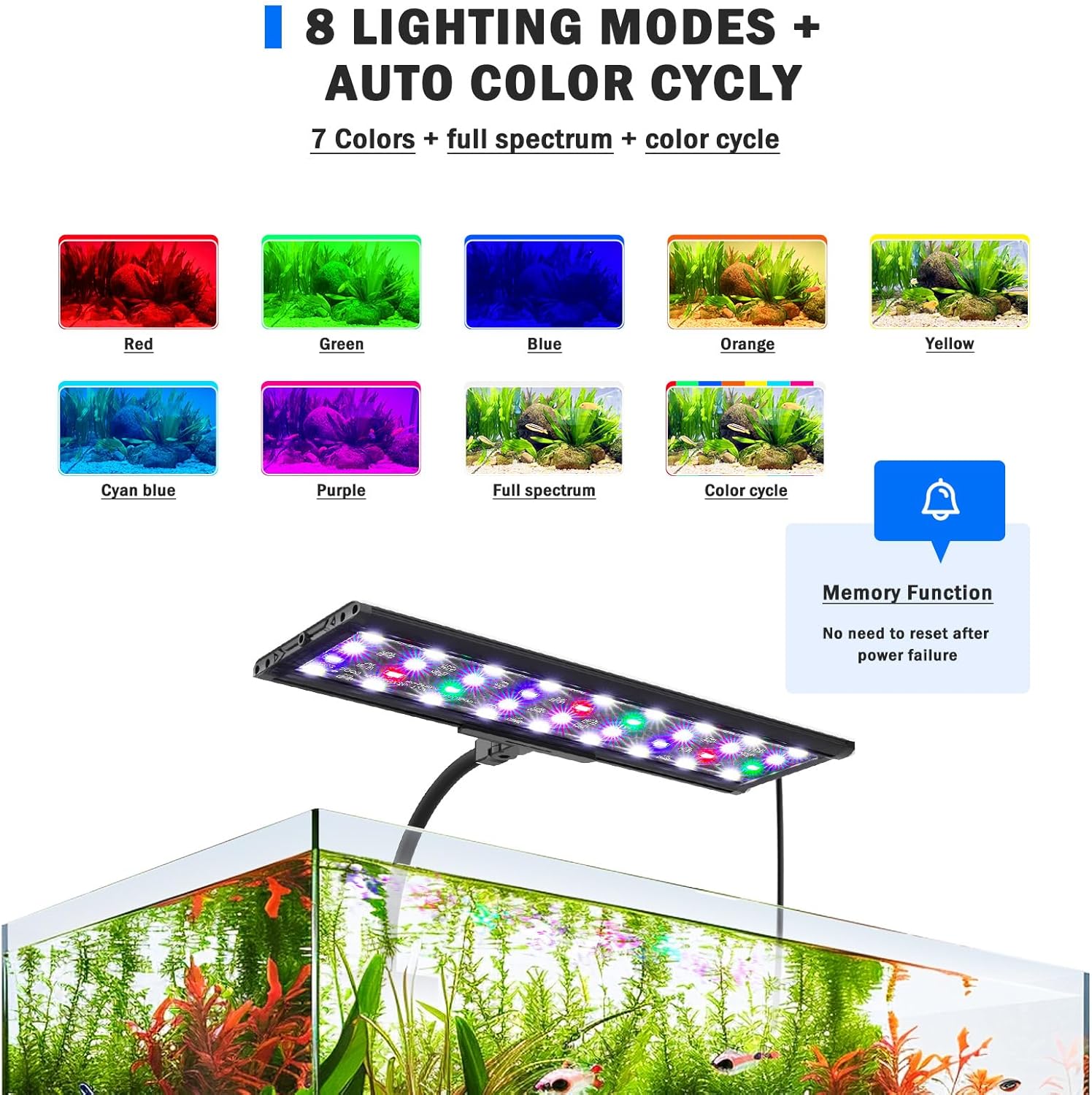
Figure 6.2: Visual representation of the 8 available lighting modes.
6.2. 24/7 Default Mode
This mode simulates a natural 24-hour light cycle, automatically adjusting light intensity and color throughout the day. The default cycle starts at 6 AM and ends at 10:58 PM.
- Activation: Press the '24/7' button on the controller to activate this mode.
- Light Cycle: The light will gradually transition from warm orange (sunrise) to bright full-spectrum (noon), then to a dimmer blue light (moonlight) before turning off.
- Time Adjustment: The overall default time period can be postponed or advanced to better suit your schedule.
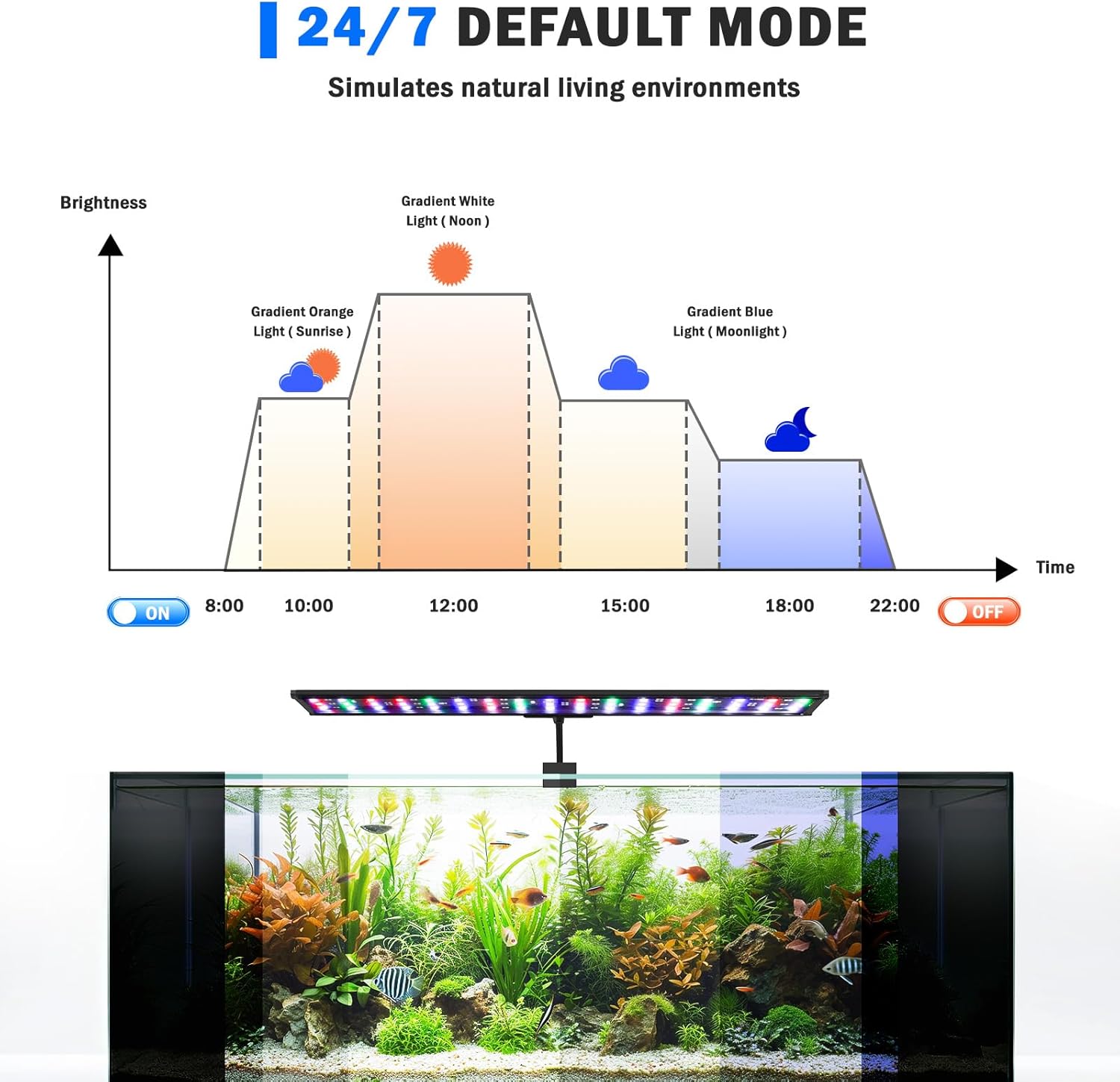
Figure 6.3: The 24/7 default mode light cycle simulation.
7. Maintenance
Regular maintenance ensures the longevity and optimal performance of your aquarium light:
- Cleaning: Periodically wipe the light fixture with a soft, damp cloth to remove water spots, dust, and algae buildup. Ensure the light is unplugged before cleaning.
- Inspect Cables: Regularly check the power cord and controller for any signs of damage, fraying, or kinks.
- LED Surface: Avoid scratching the LED surface. Do not use abrasive cleaners.
8. Troubleshooting
If you encounter issues with your AQQA LED Aquarium Light, refer to the following common problems and solutions:
| Problem | Possible Cause | Solution |
|---|---|---|
| Light does not turn on. | No power supply; loose connection; damaged power adapter/controller. | Check power outlet; ensure all connections are secure; test with another outlet; if still not working, contact support. |
| Light flickers or dims unexpectedly. | Unstable power supply; loose connection; internal fault. | Ensure stable power; check connections; if problem persists, discontinue use and contact support. |
| Controller buttons are unresponsive. | Controller malfunction; temporary software glitch. | Unplug the light for 30 seconds and plug it back in to reset. If unresponsive, contact support. |
| Light does not retain settings after power cycle. | Memory function error (rare). | Ensure the light was powered off correctly (not just unplugged). If the issue persists, contact support. |
9. Technical Specifications
| Specification | Detail |
|---|---|
| Model Number | AQ061 |
| Wattage | 26 Watts |
| Input Voltage | AC 100-240V |
| Output Voltage | DC 12V |
| LED Quantity | 72 PCS |
| Material | Aluminum, Stainless Steel |
| Finish Type | Brushed |
| Light Source Type | Light Emitting Diode (LED) |
| Mounting Type | Clip Mount |
| IP Rating | IP68 (Light fixture only) |
| Product Dimensions | 1"L x 1"W x 1"H (Approximate, as per product data) |
| Item Weight | 2.25 pounds |
| Compatible Tank Size | 24-32 inches |
| Max Tank Thickness for Clip | 0.9 inches |
10. Warranty and Support
AQQA products are manufactured to high-quality standards. For warranty information, technical support, or any inquiries regarding your AQQA LED Aquarium Light, please refer to the contact information provided with your purchase or visit the official AQQA brand store on Amazon.
Online Support: Visit the AQQA Store on Amazon


