
1. Product Overview
The ESP32-S3-Touch-LCD-2.8 is a versatile microcontroller development board designed by XYGStudy. It integrates a 2.8-inch IPS capacitive touch display with a resolution of 240x320 pixels, offering 5-point touch control. Powered by a high-performance Xtensa 32-bit LX7 dual-core processor operating up to 240MHz, this board supports 2.4GHz Wi-Fi (802.11 b/g/n) and Bluetooth 5 (LE) with an onboard antenna. It is equipped with 512KB SRAM, 384KB ROM, 16MB Flash, and 8MB PSRAM, making it suitable for a wide range of applications, particularly Human-Machine Interface (HMI) development and projects requiring graphical user interfaces like LVGL.

Figure 1: The ESP32-S3-Touch-LCD-2.8 Development Board.
2. Key Features
- Processor: High-performance Xtensa 32-bit LX7 dual-core processor, up to 240MHz main frequency.
- Connectivity: Supports 2.4GHz Wi-Fi (802.11 b/g/n) and Bluetooth 5 (LE) with onboard antenna.
- Memory: Built-in 512KB SRAM and 384KB ROM, with onboard 16MB Flash and 8MB PSRAM.
- Display: 2.8-inch IPS capacitive touch display, 240x320 resolution, 262K color.
- Touch Control: 5-point capacitive touch via I2C interface with interrupt support.
- Application: Ideal for HMI development and running GUI programs such as LVGL.
3. Package Contents
Verify that all items listed below are included in your package:
- ESP32-S3-Touch-LCD-2.8 Development Board x1
- SH1.0 12PIN cable 100mm x1
- SH1.0 4PIN cable 100mm (2pcs) x1
- 2030 speaker x1

Figure 2: Package contents including the development board, cables, and speaker.
4. Setup Guide
Follow these general steps to set up your ESP32-S3-Touch-LCD-2.8 development board:
- Power Connection: Connect the board to a power source using the USB Type-C port. Ensure the power supply meets the board's requirements.
- Software Environment: Install the necessary development tools and drivers on your computer. This typically includes the ESP-IDF (Espressif IoT Development Framework) or Arduino IDE with ESP32 board support.
- Connect Peripherals: If using the included cables and speaker, connect them to the appropriate headers on the board as needed for your project.
- First Program: Load a basic example program (e.g., a 'Hello World' for the display or a Wi-Fi scan) to verify the board's functionality.
5. Operating Instructions
The ESP32-S3-Touch-LCD-2.8 is designed for flexible operation, supporting various programming paradigms and applications.
5.1. Display and Touch Operation
The 2.8-inch IPS display provides clear visuals with wide viewing angles. The 5-point capacitive touch screen allows for intuitive user interaction. You can develop custom graphical user interfaces (GUIs) using libraries such as LVGL, which is well-supported on ESP32-S3 platforms.

Figure 3: Example of a graphical user interface running on the display.
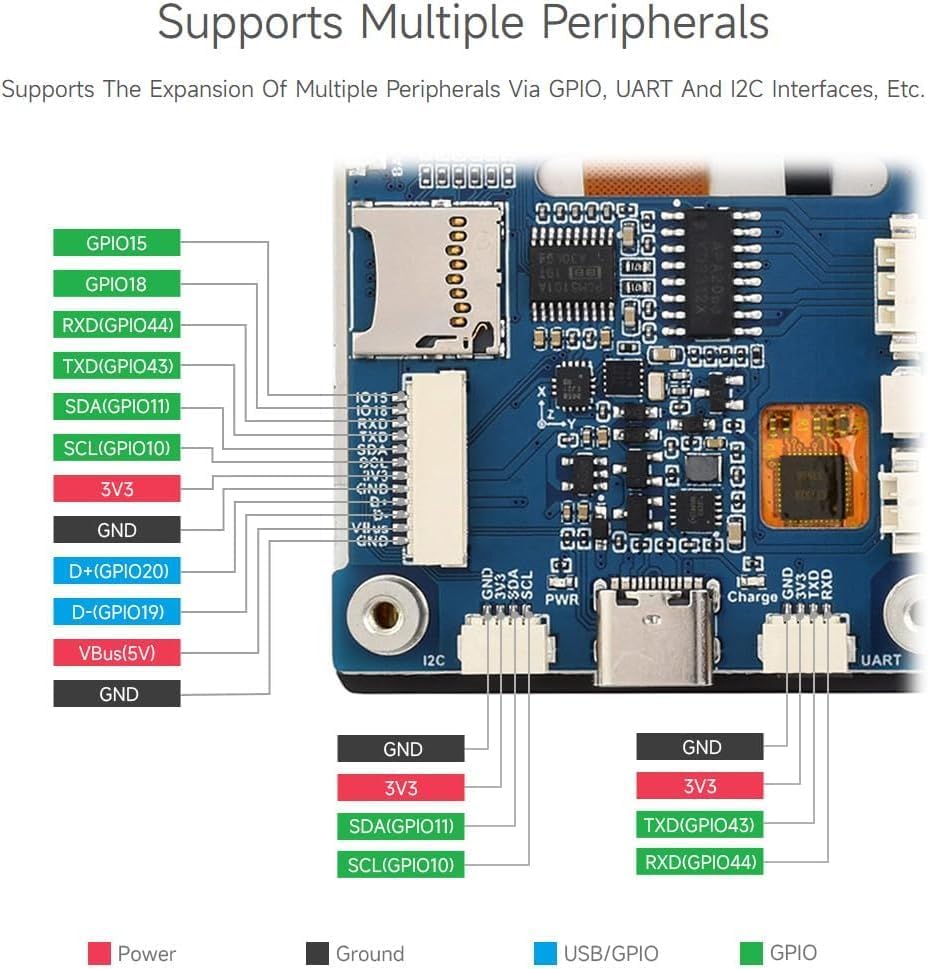
Figure 4: The IPS display offers excellent viewing angles, and the capacitive touch supports flexible multi-point interaction.
5.2. Application Scenarios
This board is highly versatile for various applications:
- Human-Machine Interface (HMI): Develop interactive control panels and user interfaces for smart home devices, industrial equipment, or custom projects.
- Image and Audio Outputs: Utilize the display for visual feedback and the speaker for audio outputs, creating comprehensive information interaction units.
- IoT Devices: Leverage Wi-Fi and Bluetooth connectivity for smart devices requiring local control and data visualization.

Figure 5: Common application scenarios for the development board.
6. Connectivity and Pinout
The ESP32-S3-Touch-LCD-2.8 offers multiple peripheral interfaces for expansion and integration with other components.
6.1. Peripheral Expansion
The board supports expansion via GPIO, UART, and I2C interfaces, allowing connection to various sensors, actuators, and other modules.

Figure 6: The board supports expansion of multiple peripherals.
6.2. Onboard Components and Pin Functions
Refer to the diagram below for a detailed layout of the onboard components and their respective functions and pin assignments.

Figure 7: Detailed view of onboard components and pinout.
7. Technical Specifications
| Feature | Specification |
|---|---|
| Model Number | ESP32-S3-Touch-LCD-2.8 |
| Processor | Xtensa 32-bit LX7 Dual-core |
| Processor Frequency | Up to 240MHz |
| Wireless Connectivity | 2.4GHz Wi-Fi (802.11 b/g/n), Bluetooth 5 (LE) |
| SRAM | 512KB |
| ROM | 384KB |
| Flash Memory | 16MB |
| PSRAM | 8MB |
| Display Type | IPS Capacitive Touch Display |
| Display Size | 2.8 inch |
| Resolution | 240x320 pixels |
| Color Depth | 262K colors |
| Touch Points | 5-point touch |
| Interfaces | USB Type-C, I2C, GPIO, UART |
| Country of Origin | China |
8. Physical Dimensions
The physical dimensions of the ESP32-S3-Touch-LCD-2.8 board are provided below for integration into your projects.

Figure 8: Dimensions of the ESP32-S3-Touch-LCD-2.8 board in millimeters.
9. Maintenance and Care
To ensure the longevity and optimal performance of your ESP32-S3-Touch-LCD-2.8 development board, please observe the following guidelines:
- Handle with Care: Electronic components are sensitive. Avoid dropping the board or subjecting it to physical shocks.
- Keep Dry: Protect the board from moisture and liquids. Water damage can lead to short circuits and permanent malfunction.
- Temperature Control: Operate the board within its specified temperature range. Avoid extreme hot or cold environments.
- Cleanliness: Keep the board free from dust and debris. Use a soft, dry brush or compressed air for cleaning. Do not use liquid cleaners.
- Power Off Before Connecting/Disconnecting: Always disconnect power before connecting or disconnecting any peripherals or cables to prevent damage to the board or connected devices.
10. Troubleshooting
If you encounter issues with your ESP32-S3-Touch-LCD-2.8 board, consider the following common troubleshooting steps:
- No Power: Ensure the USB Type-C cable is securely connected to both the board and a reliable power source. Check if the power indicator LED on the board is lit.
- Display Not Working: Verify that the display ribbon cable is correctly seated in its connector. Ensure your code properly initializes the display and sends data to it.
- Touch Not Responding: Check the I2C connections for the touch controller. Confirm that your software includes the correct drivers and initialization for the capacitive touch functionality.
- Wi-Fi/Bluetooth Issues: Ensure your antenna is properly connected (if external) and that your code correctly configures and initializes the Wi-Fi or Bluetooth module. Check for interference from other wireless devices.
- Upload Errors: Confirm that the correct COM port is selected in your IDE and that the board is in bootloader mode if required for flashing. Check USB cable integrity.
- Software Crashes: Review your code for potential memory leaks, unhandled exceptions, or incorrect pin assignments. Use debugging tools provided by your development environment.
For more complex issues, consult online forums, the Espressif documentation, or contact technical support.
11. Support and Resources
For additional user guides, technical documentation, and programming examples, please contact the seller, XYGStudy, via message. They can provide further resources and assistance.
You can also visit the XYGStudy store on Amazon for more products and information.
12. Warranty Information
Specific warranty terms and conditions for the ESP32-S3-Touch-LCD-2.8 development board are provided by the seller, XYGStudy. Please refer to the product packaging or contact the seller directly for detailed warranty information, including coverage period and claims process.