1. Introduction
This manual provides essential information for the safe and effective operation of your YIHUA 939-VI Dual Wood Burning Pyrography Station. Please read all instructions carefully before use to ensure proper setup, operation, and maintenance. This kit is designed for pyrography artworks on various materials such as wood, leather, cork, pumpkin, gourd, or plastic.
2. Safety Information
WARNING: This product operates at high temperatures. Failure to follow safety instructions may result in burns, fire, or other injuries.
- Always operate the unit in a well-ventilated area to avoid inhaling fumes from burning materials.
- Ensure the work surface is heat-resistant and non-flammable.
- Keep flammable materials away from the heated pen and work area.
- Do not touch the hot nibs or metal parts of the pen. Always allow nibs to cool completely before changing or handling.
- Use the integrated pen holders to safely rest the pens when not in use.
- Keep out of reach of children and pets.
- Always unplug the unit when not in use or before cleaning and maintenance.
- Do not immerse the unit or pens in water or any other liquid.
- This model is designed to operate on 110-127V 60Hz with a US-standard power plug. Ensure your power supply matches these requirements.
3. Package Contents
Verify that all items listed below are present in your YIHUA 939-VI kit:
- 1 x Woodburning Station (Main Unit)
- 2 x Woodburning Pens
- 23 x Wire Nib Pyrography Tips (varied shapes)
- 6 x Wood Pieces
- 6 x Pyrography Stencils
- 1 x Pair of Tweezers
- 1 x Screwdriver

Figure 3.1: Complete contents of the YIHUA 939-VI kit.
4. Product Overview
The YIHUA 939-VI Pyrography Station features a compact design with an integrated holder for convenience. It supports two pens, allowing for quick switching between different techniques or nibs. The temperature is precisely adjustable for various burning effects.

Figure 4.1: Labeled components of the YIHUA 939-VI main unit.

Figure 4.2: Integrated pen holders for space-saving and secure storage.
5. Setup Instructions
Follow these steps to set up your YIHUA 939-VI Pyrography Station:
- Connect the Pens: Insert the connectors of the wood burning pens into the designated ports (Tool A and Tool B) on the main unit. Secure them by twisting the threaded collars.
- Install a Wire Nib: Using the provided screwdriver, loosen the two screws on the pen's tip holder. Carefully insert your desired wire nib into the terminals and tighten the screws to secure it. Ensure the nib is firmly seated.
- Place Pens in Holders: Rest the pens in the integrated holders on top of the main unit when not actively burning.
- Power Connection: Plug the power cord into a compatible 110-127V 60Hz power outlet.
Video 5.1: This video demonstrates the installation of the wood burning pens, how to adjust temperature, switch between pens, and basic wood burning techniques like long strokes and shading using the YIHUA 939-VI Pyrography Station.

Figure 5.2: The YIHUA 939-VI Pyrography Station fully assembled and ready for use.
6. Operating Instructions
Once the unit is set up, follow these steps for operation:
- Power On: Flip the main power switch located on the front of the unit. The indicator lights for Tool A and Tool B will illuminate.
- Select Tool: Use the A/B toggle switch to select which pen you intend to use. The corresponding indicator light will show which tool is active.
- Adjust Temperature: Rotate the temperature adjustment dial to set the desired heat level. The temperature range is 482 to 1382°F (250 to 750°C). Start with lower temperatures and gradually increase as needed for your material and desired effect.
- Begin Burning: Once the nib reaches the set temperature (indicated by the nib glowing red at higher settings), you can begin your pyrography work.
6.1. Burning Techniques
- Long Strokes: For consistent lines and darker tones, draw slowly and steadily. Drawing too fast may result in faded lines.
- Shading: Use broader nibs or adjust temperature for lighter or darker shading effects. Experiment on scrap material first.
- Stippling: Use a fine-point nib to create dots for texture and shading.

Figure 6.1: Adjusting the temperature for optimal burning results.
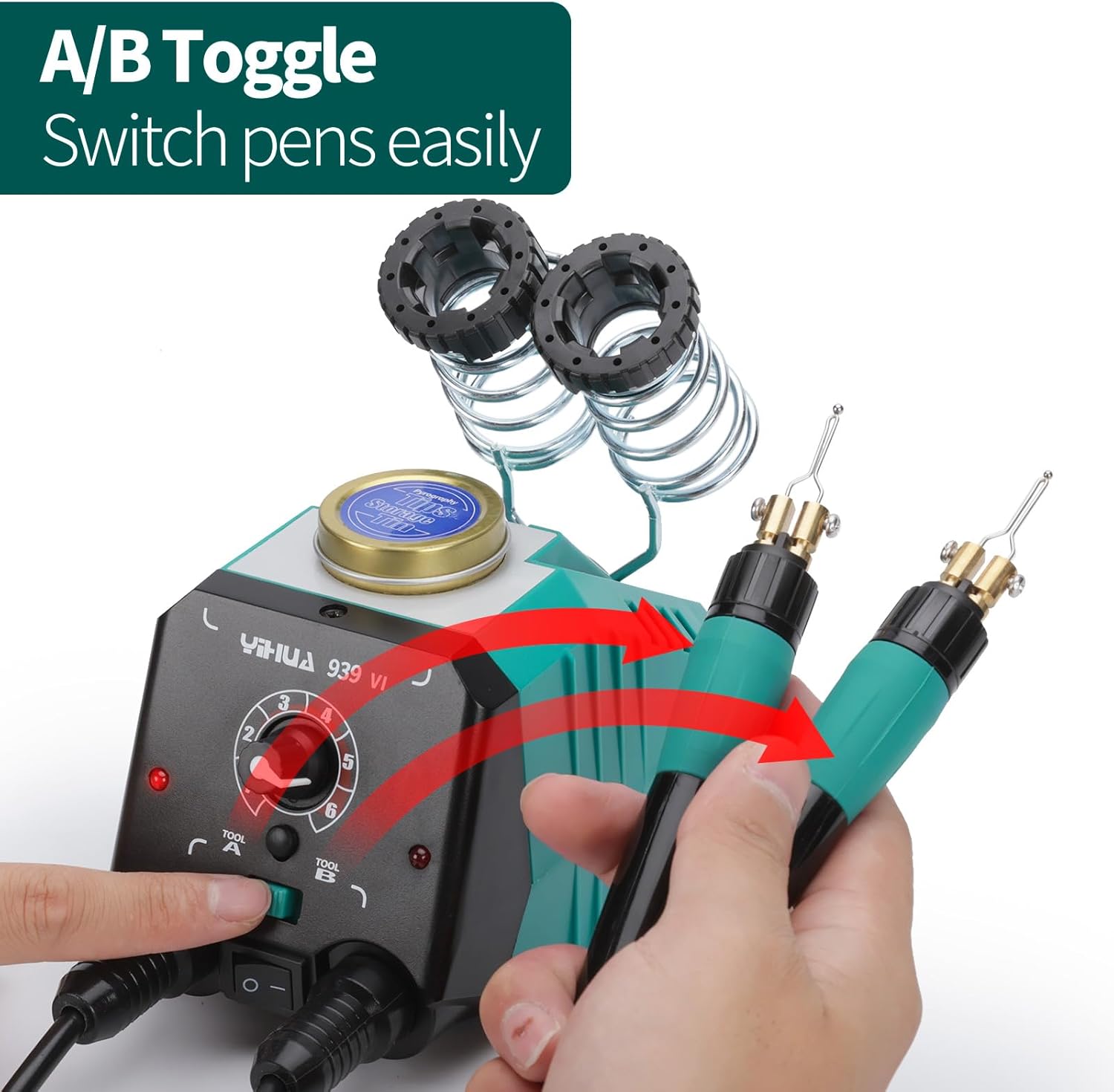
Figure 6.2: Using the A/B toggle switch to select the active pen.

Figure 6.3: Example of wood burning in progress.
7. Maintenance
7.1. Changing Nibs
To change a wire nib:
- Power Off and Cool Down: Turn off the unit and allow the active nib to cool completely. This is crucial for safety.
- Unscrew: Use the provided screwdriver to loosen the two screws holding the nib in place.
- Remove and Replace: Carefully remove the old nib using tweezers if necessary. Insert the new nib into the terminals and tighten the screws firmly.

Figure 7.1: Variety of wire nibs available for different effects.
7.2. Cleaning and Storage
- Clean Nibs: After use, gently clean cooled nibs with a fine-grit sandpaper or a specialized cleaning pad to remove carbon buildup.
- Clean Unit: Wipe the main unit with a dry, soft cloth. Do not use abrasive cleaners or solvents.
- Storage: Store the unit and accessories in a dry, safe place away from dust and moisture. Use the provided tin for nib storage.
8. Troubleshooting
If you encounter issues with your YIHUA 939-VI Pyrography Station, refer to the following common problems and solutions:
| Problem | Possible Cause | Solution |
|---|---|---|
| Pen not heating up | Power switch off, pen not selected, loose connection, faulty nib, power issue. | Ensure power switch is ON. Select the correct tool (A or B). Check pen connection. Replace nib. Verify power outlet. |
| Inconsistent burning / Faded lines | Temperature too low, drawing too fast, dirty nib, material type. | Increase temperature. Slow down drawing speed. Clean the nib. Test on different material. |
| Nib glowing excessively / Burning too dark | Temperature too high, pressing too hard. | Decrease temperature. Use lighter pressure. |
| Nibs difficult to change | Screws too tight, nib stuck, nib still hot. | Ensure nib is completely cool. Loosen screws sufficiently. Use tweezers for removal. |
9. Specifications
| Feature | Detail |
|---|---|
| Model Number | YIHUA 939-VI |
| Manufacturer | Guangzhou Yihua Electronic Equipement Co.,Ltd. |
| Voltage | 110 Volts |
| Wattage | 30 watts |
| Temperature Range | 482 - 1382°F (250 - 750°C) |
| Temperature Stability | 1382 degrees_fahrenheit (Max) |
| Product Dimensions | 5.12 x 3.39 x 3.74 inches |
| Item Weight | 3.8 pounds (1.73 Kilograms) |
| Color | Green |
| Display Type | LCD or LED |
10. Warranty and Support
YIHUA provides comprehensive support for your product:
- Warranty: Enjoy 12-month US-exclusive manufacturer technical coverage.
- Technical Support: 24/7 professional assistance is available on Amazon for any technical inquiries or issues.


