
Introduction
This manual provides essential information for the safe and efficient operation, installation, and maintenance of your ARGO FCW 02 Wall-Mounted Fan Coil Unit. Please read these instructions carefully before installation and use, and keep them for future reference.
The ARGO FCW 02 is designed for both cooling and heating applications, featuring an LCD display, automatic air distribution, and a high-efficiency heat exchanger for optimal comfort and low noise operation.
Safety Information
Always follow basic safety precautions when using electrical appliances to reduce the risk of fire, electric shock, and injury to persons.
- Ensure the unit is properly grounded.
- Do not operate the unit with wet hands.
- Keep children away from the unit.
- Do not insert objects into the air outlet.
- Disconnect power before cleaning or maintenance.
- Installation and repairs should only be performed by qualified personnel.
What's in the Box
Upon unpacking, please verify that all components are present and undamaged:
- ARGO FCW 02 Fan Coil Unit
- Remote Control
- Instruction Manual (this document)

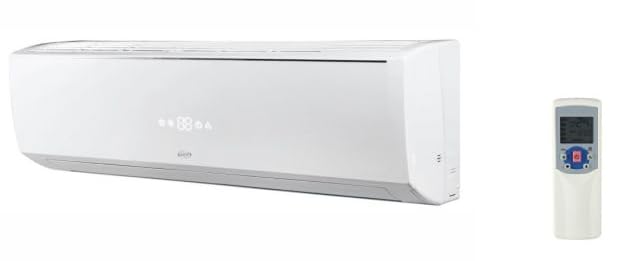
Image showing the ARGO FCW 02 fan coil unit and its accompanying remote control, highlighting the main components included in the package.
Product Features
- Modern Design: Attractive casing with an integrated LCD display.
- Automatic Air Distribution: Optimized for both cooling and heating to maximize comfort.
- Quiet and Efficient Fan: Designed for low noise and high airflow efficiency.
- High-Efficiency Heat Exchanger: Copper tubes and aluminum fins, mechanically expanded. Suitable for high-temperature water (boiler), low-temperature water (condensing boiler, heat pump), cold water (chiller), and water with glycol.
- Remote Control: Standard infrared remote control for convenient operation.
- Wired Control (Optional): Available with ON/OFF contact and MODBUS protocol for Building Management System (BMS) communication. Can manage up to 10 units.
- Programmable: Schedule unit power-on and power-off times.
- High Energy Efficiency: Designed for reduced power consumption.
Setup and Installation
Installation of the ARGO FCW 02 unit requires professional expertise. It involves electrical connections, water piping, and secure wall mounting. Refer to the detailed installation diagrams and instructions provided in the separate installation guide (if applicable) or consult a qualified technician.
Mounting the Unit
The unit is designed for high wall mounting. Ensure the mounting surface is strong enough to support the unit's weight. Maintain adequate clearance around the unit for proper airflow and maintenance access.
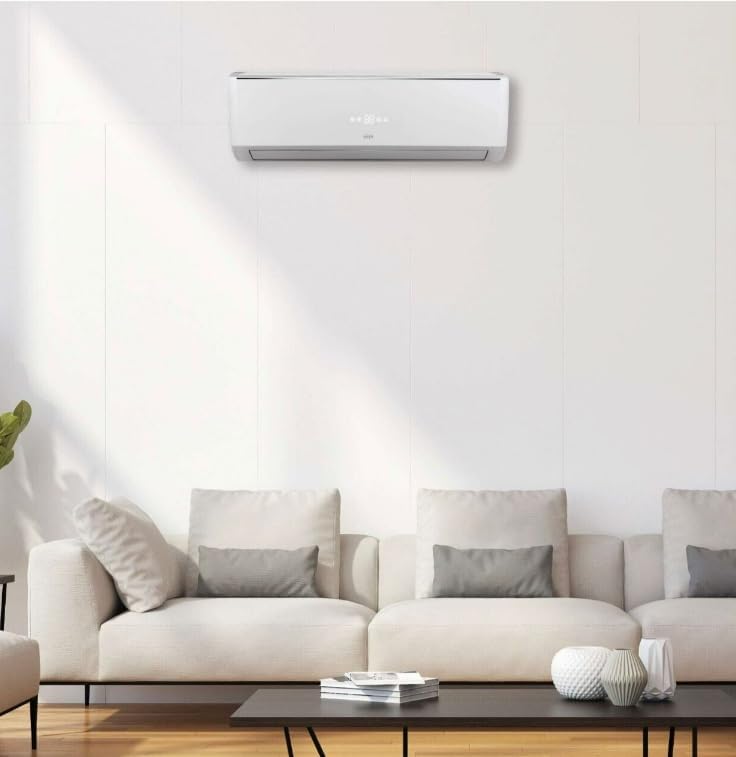
An example of the ARGO FCW 02 unit mounted on a wall, illustrating its typical installation position in a room.
Electrical Connections
Connect the unit to a dedicated power supply circuit as per local electrical codes. Ensure the voltage and frequency match the unit's specifications (230 Vac - 1 Ph - 50 Hz). A qualified electrician must perform all electrical wiring.
Water Connections
Connect the water inlet and outlet pipes to the unit's heat exchanger. Ensure all connections are watertight. The unit is designed for a 2-pipe system. Optional two-way and three-way valves are available as accessories but are not installable directly on the unit.
Operating Instructions
The ARGO FCW 02 can be operated using the supplied infrared remote control or an optional wired control.
Remote Control Operation
The remote control allows you to:
- Power ON/OFF: Press the power button to turn the unit on or off.
- Mode Selection: Choose between cooling, heating, fan-only, or automatic modes.
- Temperature Adjustment: Set your desired room temperature.
- Fan Speed: Adjust the fan speed (low, medium, high, auto).
- Swing Function: Activate or deactivate the automatic louver swing for air distribution.
- Timer Function: Program the unit to turn on or off at specific times.
Detailed view of the ARGO FCW 02 remote control, showing various buttons and their functions for operating the unit.
LCD Display
The unit's LCD display shows the current operating mode, set temperature, fan speed, and any active timer settings. Refer to the remote control manual for specific icon meanings.
Maintenance
Regular maintenance ensures optimal performance and extends the lifespan of your ARGO FCW 02 unit. Always disconnect power before performing any maintenance.
Cleaning the Air Filter
The air filter should be cleaned every two weeks or more frequently depending on usage and air quality. A dirty filter can reduce efficiency and airflow.
- Turn off the unit and disconnect power.
- Open the front panel of the unit.
- Carefully remove the air filters.
- Wash the filters with lukewarm water and a mild detergent. Rinse thoroughly.
- Allow the filters to dry completely in a shaded area before reinstalling.
- Reinstall the filters and close the front panel.
Cleaning the Unit Casing
Wipe the exterior casing with a soft, damp cloth. Do not use abrasive cleaners, solvents, or harsh chemicals, as these can damage the surface.
Professional Maintenance
It is recommended to have the unit inspected and serviced by a qualified technician annually. This includes checking the heat exchanger, fan motor, electrical connections, and water system.
Troubleshooting
Before contacting customer support, please refer to the following common issues and solutions:
| Problem | Possible Cause | Solution |
|---|---|---|
| Unit does not turn on | No power supply; Remote control batteries dead; Unit in standby mode. | Check power connection and circuit breaker; Replace remote control batteries; Press power button on remote or wired control. |
| Insufficient cooling/heating | Dirty air filter; Blocked air inlet/outlet; Incorrect temperature setting; Windows/doors open. | Clean air filter; Remove obstructions; Adjust temperature setting; Close windows and doors. |
| Unusual noise | Loose parts; Obstruction in fan; Unit not level. | Check for loose screws; Inspect fan for foreign objects (disconnect power first); Ensure unit is securely mounted and level. |
| Water leakage | Clogged drain pipe; Improper installation. | Clear drain pipe obstruction; Contact a qualified technician for inspection and repair. |
If the problem persists after attempting these solutions, please contact ARGO customer support.
Specifications
The following table outlines the technical specifications for the ARGO FCW 02 unit:
| Feature | Specification |
|---|---|
| Model Name | FCW 02 |
| Brand | ARGO |
| Cooling Capacity (Total) | 2000 W |
| Cooling Capacity (Sensible) | 1600 W |
| Heating Capacity (70/60 °C water) | 5914 W |
| Heating Capacity (45/40 °C water) | 3903 W |
| Nominal Airflow | 510 m³/h |
| Water Flow Rate (Cooling) | 360 l/h |
| Water Flow Rate (Heating) | 504 l/h |
| Water Pressure Drop (Cooling) | 26.0 kPa |
| Water Pressure Drop (Heating) | 9.0 kPa |
| Sound Pressure Level (min-med-high) | 21-28-35-36 dB(A) |
| Fan Motor Power | 20 W |
| Nominal Electrical Current | 0.078 A |
| Electrical Power Supply | 230 Vac - 1 Ph - 50 Hz |
| Heat Exchanger Coils (Hot/Cold) | 2 |
| Hydraulic Connections | 1/2" DN |
| Condensate Drain | 15.6 mm |
| Dimensions (L x H x D) | 855 x 289 x 209 mm |
| Control Method | Remote |
| Inverter Type | Features inverter |
| External Unit Required | No |
| Included Components | Fan Coil Unit, Remote Control |
Note: The specification "Power Source: A batteria" (Battery) found in some product listings refers to the remote control. The main unit requires a wired electrical connection as detailed above.

A table detailing the technical specifications and performance data for the ARGO FCW 02 fan coil unit, including capacities and dimensions.
Warranty and Support
Warranty Information
This product comes with a Limited Warranty. Please refer to the warranty card included with your purchase or visit the official ARGO website for detailed terms and conditions regarding warranty coverage, duration, and claims process.
Customer Support
For technical assistance, troubleshooting beyond this manual, or warranty claims, please contact ARGO customer support. Have your model number (FCW 02) and purchase date ready when contacting support.
ARGO Official Website: www.argoclima.com
Note: Specific contact details may vary by region. Please check the ARGO website for local support information.