
1. Introduction
This manual provides comprehensive instructions for the installation, operation, and maintenance of the XINJE DS2-22P3-AS Servo Driver. Designed for precision control in industrial automation, this servo driver offers reliable performance and advanced features. Please read this manual thoroughly before using the product to ensure safe and efficient operation.
2. Safety Information
Always observe the following safety precautions to prevent personal injury or damage to the equipment:
- Ensure all power is disconnected before performing any installation, wiring, or maintenance.
- Only qualified personnel should install, operate, and maintain this equipment.
- Verify correct voltage and current ratings before connecting power.
- Ground the equipment properly to prevent electrical shock.
- Do not operate the driver in environments exceeding its specified temperature, humidity, or vibration limits.
- Protect the driver from dust, moisture, and corrosive gases.
3. Product Overview
The XINJE DS2-22P3-AS is a high-performance AC servo driver designed to work seamlessly with compatible servo motors. It provides precise speed, position, and torque control for various industrial applications.
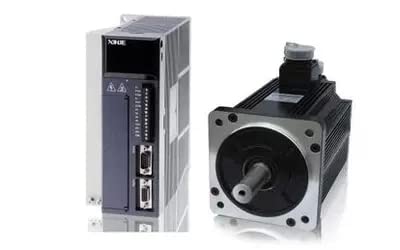
Figure 3.1: The XINJE DS2-22P3-AS Servo Driver (left) shown alongside a compatible XINJE AC Servo Motor (right). The driver features multiple ports for connectivity and heat dissipation fins.
Key features include advanced control algorithms, robust protection functions, and flexible communication interfaces for integration into complex automation systems.
4. Installation and Wiring
4.1 Mechanical Installation
Mount the servo driver vertically in a control cabinet to ensure proper heat dissipation. Allow sufficient space around the unit for airflow. Use appropriate screws to secure the driver to a stable surface.
4.2 Electrical Wiring
Refer to the wiring diagrams provided in the full technical manual for detailed connections. Below are general guidelines:
- Power Supply: Connect the 220V AC power supply to the designated terminals. Ensure proper grounding.
- Motor Connection: Connect the servo motor power cables (U, V, W) and encoder feedback cables to the corresponding terminals on the driver.
- Control Signals: Connect control signals (e.g., pulse, direction, enable) from your PLC or control system to the driver's input terminals.
- Communication: If using communication protocols (e.g., Modbus), connect the communication cables to the appropriate ports.
Important: Double-check all wiring connections before applying power to prevent damage to the driver or motor.
5. Operation
5.1 Powering On
- Ensure all wiring is correct and secure.
- Apply main power to the servo driver. The status indicator should illuminate.
- Observe the driver's display (if available) for any error codes or status messages.
5.2 Basic Control
The DS2-22P3-AS driver can be controlled via various methods, including pulse/direction, analog input, or fieldbus communication. Refer to the programming guide for detailed parameter settings and control modes specific to your application.
- Parameter Setting: Use the driver's keypad/display or software interface to configure operational parameters such as gain, acceleration/deceleration times, and protection limits.
- Test Run: Perform a low-speed test run after initial setup to verify motor rotation and response.
6. Maintenance
Regular maintenance ensures the longevity and optimal performance of your servo driver.
- Cleaning: Periodically clean the driver's exterior and ventilation openings to prevent dust accumulation, which can impede heat dissipation. Use a soft, dry cloth.
- Connection Check: Routinely inspect all wiring connections for looseness or signs of wear. Tighten any loose terminals.
- Environmental Check: Ensure the operating environment remains within specified temperature and humidity ranges.
- Firmware Updates: Check the manufacturer's website for any recommended firmware updates.
7. Troubleshooting
This section provides solutions to common issues you might encounter.
| Problem | Possible Cause | Solution |
|---|---|---|
| Driver does not power on. | No power supply; incorrect wiring; blown fuse. | Check power connections; verify wiring; replace fuse if necessary. |
| Motor does not move. | Enable signal not active; incorrect control mode; motor wiring issue. | Activate enable signal; check parameter settings; verify motor wiring. |
| Overcurrent error. | Motor overload; short circuit in motor wiring; incorrect motor parameters. | Reduce load; inspect motor wiring; verify motor parameters. |
| Overvoltage error. | Input voltage too high; regenerative energy issue. | Check input voltage; consider adding a braking resistor if regenerative energy is high. |
8. Technical Specifications
The following table outlines the key technical specifications for the XINJE DS2-22P3-AS Servo Driver:
| Specification | Value |
|---|---|
| Model Number | DS2-22P3-AS |
| Manufacturer | XINJE |
| Input Voltage | 220V AC |
| Rated Power | 2.3KW |
| Package Dimensions | 1 x 1 x 1 inches |
| Package Weight | 1 Pound |
| Date First Available | July 12, 2024 |
9. Warranty and Support
For specific warranty information, please refer to the terms and conditions provided at the time of purchase or contact your distributor. XINJE provides technical support for its products. If you encounter issues not covered in this manual, please contact XINJE customer service or your local authorized service center for assistance.
For further information, you may visit the Official XINJE Website (Note: This is a placeholder link as no official link was provided in the input).

