Introduction
The LIWAN 4G LTE Cellular Security Camera is a wireless, solar-powered outdoor surveillance solution designed for locations without Wi-Fi or electrical power. Featuring 2K resolution, 360° pan and 100° tilt, color night vision, PIR motion detection, and two-way audio, this camera provides comprehensive monitoring capabilities. It operates on 4G LTE networks with a built-in SIM card, offering flexible storage options via local memory card or cloud service.
What's in the Box
- Cellular Security Camera
- 4G SIM Card (pre-installed)
- Solar Panel
- Instruction Manual
- Mounting Screws
Setup
1. Camera Installation
- Mount the Camera Base: Align the camera base with the desired installation location on a wall or sturdy surface. Use the provided positioning sticker as a guide. Secure the base using the mounting screws.
- Attach the Camera: Mount the camera unit onto the fixed base. Ensure it clicks securely into place. Use the small screws to lock the camera to the base for added stability.
Video: Installation guide for the LIWAN 4G LTE Cellular Security Camera. This video demonstrates the steps for mounting the camera base and attaching the camera unit securely.
2. Solar Panel Installation
- Install the Bracket: Attach the solar panel bracket to a location that receives maximum direct sunlight throughout the day. Fix the bracket to the wall with screws.
- Mount Solar Panel: Secure the solar panel to the bracket.
- Adjust Angle: Adjust the solar panel to the optimal angle to capture sunlight. Tighten the screws to fix its position.
- Connect Power Cable: Insert the power cable from the solar panel into the designated port on the camera.

Image: Visual guide showing various installation scenarios for the camera and solar panel, highlighting ease of setup.
3. App Setup and SIM Card Activation
- Download Ubox App: Download and install the Ubox App on your smartphone.
- Scan QR Code: Open the Ubox App and follow the on-screen instructions to scan the QR code on your camera to pair it.
- SIM Card: The camera comes with a pre-installed 4G SIM card with 300MB trial data. This trial data activates once the camera connects to the 4G network and is available for the first month.
- Data Plan: A subscription is required for continued unlimited 4G data usage. Private SIM cards are not supported. Data plans are available through the Ubox app.
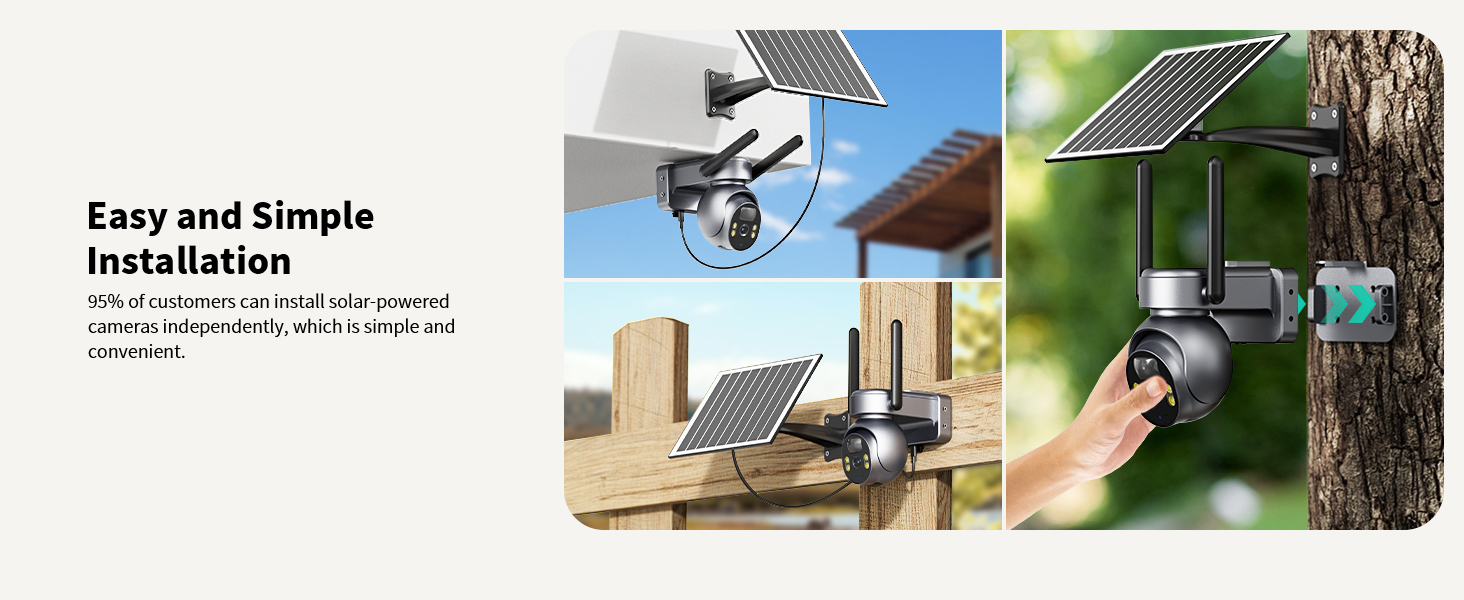
Image: Diagram illustrating the built-in SIM card slot and available 4G data plan options, emphasizing that private SIM cards are not compatible.
Operating Instructions
1. Live View and Recording
- Access 2K live video feed through the Ubox App.
- Utilize 355° pan and 100° tilt functions to adjust the camera's viewing angle remotely.
- Use 4x digital zoom for closer inspection of details.
2. Night Vision
- The camera features 2K color night vision, enabled by a built-in spotlight and advanced image sensor.
- Infrared night vision is also available for discreet monitoring in low-light conditions.

Image: Comparison showing the difference between infrared night vision and full-color night vision with the spotlight activated.
3. Motion Detection and Alerts
- PIR (Passive Infrared) motion detection triggers recording and sends real-time alerts to your smartphone via the Ubox App.
- Alerts can include light activation, siren, and app push notifications.

Image: Depiction of the camera's smart PIR detection feature, showing a person being detected and an app notification for activity.
4. Two-Way Audio
- The built-in microphone and speaker enable real-time, two-way audio communication through the Ubox App.
5. Storage Options
- Local Storage: Supports up to 128GB memory card (not included) for storing motion detection video clips.
- Cloud Storage: A 30-day free trial is available, with subscription options for continued cloud backup.

Image: Illustration of the two available storage methods: cloud storage (with a 30-day free trial) and local memory card storage (up to 128GB, card not included).
Maintenance
1. Power Management
- The camera is equipped with a high-capacity rechargeable battery, continuously charged by the solar panel.
- Ensure the solar panel is positioned to receive adequate sunlight for optimal charging.
2. Weather Resistance
- The camera has an IP66 waterproof rating, designed to withstand various outdoor weather conditions including sun, rain, and snow.

Image: The camera installed outdoors, demonstrating its IP66 waterproof capability in various weather conditions.
Troubleshooting
- Camera Not Connecting to 4G: Ensure the built-in SIM card is properly activated and a data plan subscription is active. Verify 4G LTE coverage in the installation area. Note that private SIM cards are not supported.
- No Power/Low Battery: Check that the solar panel is clean and positioned to receive direct sunlight. Ensure the power cable connection between the solar panel and camera is secure.
- Motion Detection Not Triggering: Adjust PIR sensitivity settings in the Ubox App. Ensure there are no obstructions blocking the camera's view.
- Poor Video Quality: Verify the camera lens is clean. Check 4G signal strength in the Ubox App; a weak signal can affect streaming quality.
- Two-Way Audio Issues: Ensure microphone and speaker permissions are granted to the Ubox App on your smartphone. Check volume settings on both the app and your phone.
Specifications
| Feature | Specification |
|---|---|
| Model Name | 4G LTE Cellular Security Camera |
| Model Number | ZC-YT10 |
| Brand | LIWAN |
| Indoor/Outdoor Usage | Outdoor |
| Power Source | Solar Powered |
| Connectivity Protocol | Cellular |
| Wireless Communication Technology | Cellular |
| Video Capture Resolution | 2K |
| Viewing Angle | 360 Degrees (Pan), 100 Degrees (Tilt) |
| Night Vision Range | 65 Feet |
| Water Resistance Level | Waterproof (IP66) |
| Battery Power | 7800 Milliampere Hour (mAh) |
| Zoom Ratio | 4x Digital Zoom |
| Alert Type | Audio and Motion |
| Control Method | App (Ubox) |
| Storage | Micro SD Card (up to 128GB, not included), Cloud Storage |
| Dimensions (L x W x H) | 5.8 x 9.8 x 7 inches |
| Item Weight | 2.48 pounds (1.13 Kilograms) |
Warranty and Support
For warranty information and technical support, please refer to the official LIWAN website or contact customer service through the Ubox App. Specific warranty terms may vary and are typically outlined in the product packaging or on the manufacturer's website.


