
Introduction
Welcome to the user manual for your Audiovance Vibes 202 Wired Earbuds. These HiFi in-ear monitor headphones are engineered to deliver exceptional audio clarity, deep bass, and a comfortable, noise-isolating fit. Designed for musicians, audiophiles, and anyone seeking a superior listening experience, the Vibes 202 earbuds provide studio-grade sound without compromise. Please read this manual carefully to ensure proper use and maintenance of your new earbuds.

Image: The Audiovance Vibes 202 Wired Earbuds, showcasing their design and detachable cable.
What's in the Box
Your Audiovance Vibes 202 package includes the following items:
- Vibes 202 HiFi Earbuds (1 pair)
- 55" Detachable Audio Cable (1)
- Eartips (6 pairs: various sizes and colors)
- Carrying Case (1)
- Carabiner (1)
- User Manual (1)
- Service Card (1)
Video: Unboxing the Audiovance Vibes 202 Wired Earbuds, showing all included components.

Image: A visual representation of all items included in the Vibes 202 package.
Product Overview
High-Fidelity Sound
The Vibes 202 earbuds are equipped with a 1-Tesla powerful driver and master-tuned professional acoustic chambers, delivering precise and detailed sound across a full frequency range from 8 to 23k Hz. This ensures a rich audio experience with clear mids, crisp highs, and deep, powerful bass.

Image: Technical features contributing to the superior sound quality of the Vibes 202.
Lossless Audio Transmission
The high-purity, silver-plated, Litz-braided audio cable ensures stable and lossless sound transmission, providing pure, unaltered audio. The 24K gold-plated MMCX and 3.5mm connectors ensure reliable, long-lasting contact.

Image: Details of the premium silver-plated cable and gold-plated plugs for lossless audio.
Comfortable Fit & Noise Isolation
Ergonomically designed to fit the ear canal, Vibes 202 IEM headphones feature preformed over-ear earhooks for a secure fit. Six pairs of soft, breathable eartips (in 2 colors and 3 sizes) are included to ensure optimal comfort and stability while effectively blocking ambient noise for immersive listening.

Image: Illustration of comfortable fit and noise isolation with different eartip options.
Sleek & Durable Design
With a sleek, semi-transparent design and durable resin shell, Vibes 202 wired earbuds are built to last. The 360-degree rotatable MMCX connectors provide flexibility and protection.
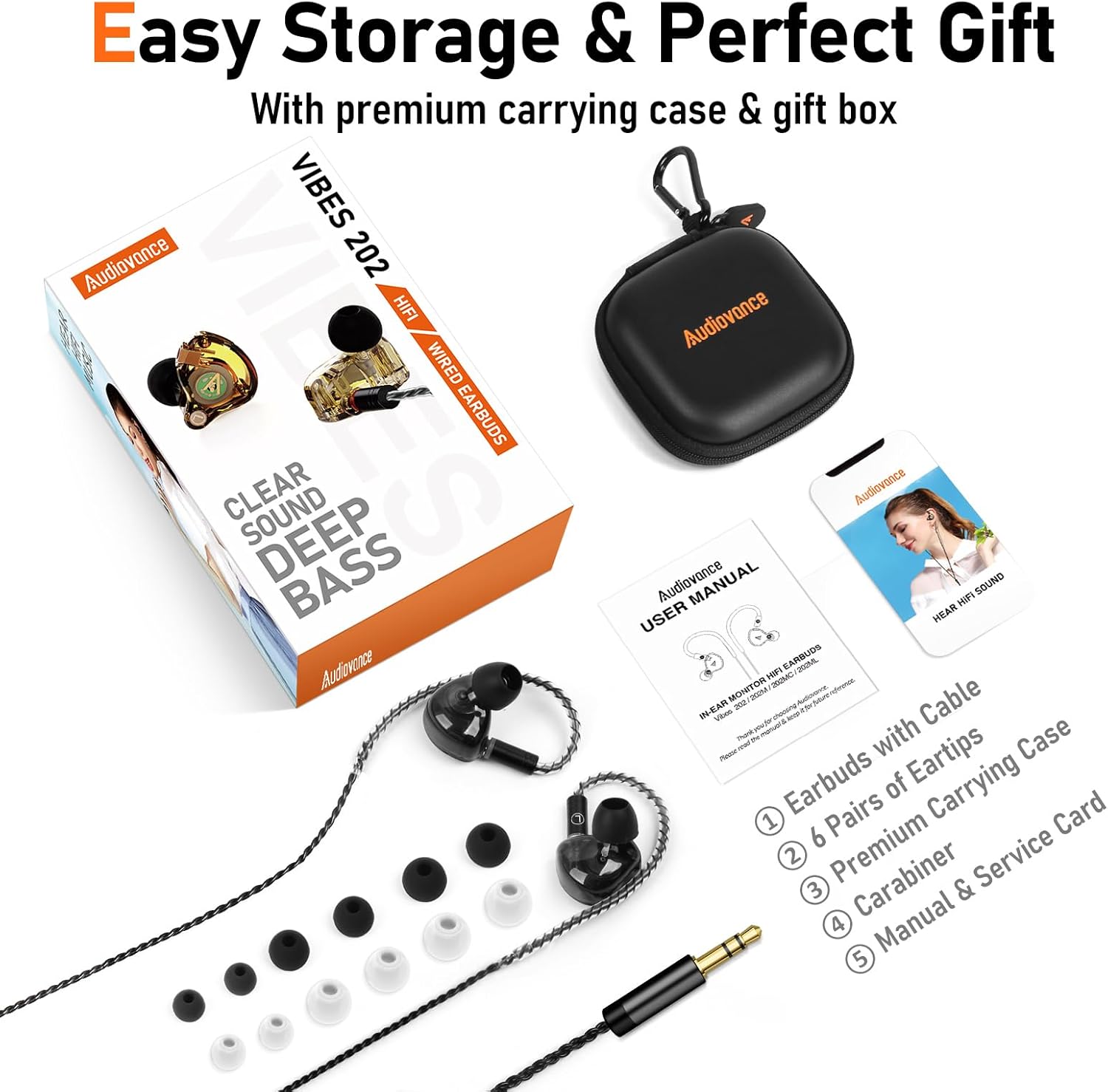
Image: The 360-degree rotatable MMCX connector for perfect fit and protection.
Setup
1. Choosing the Right Eartips
Select the eartips that provide the best seal and comfort for your ears. Experiment with the included small, medium, and large sizes to find your optimal fit. A proper seal is crucial for maximizing sound quality and noise isolation.
2. Connecting the Cable
The Vibes 202 earbuds feature detachable MMCX connectors. Identify the right (R) and left (L) earbuds. Align the MMCX connector on the cable with the corresponding port on the earbud. Push firmly until you hear a click, ensuring a secure connection. The connector allows for 360-degree rotation for optimal cable routing.
3. Wearing the Earbuds
Insert the earbuds snugly into your ear canal. The preformed over-ear earhooks should rest comfortably over your ears, keeping the cables secure and out of the way. Adjust the wire to fit securely, either in front of or behind you as needed.

Image: Instructions for achieving a secure and comfortable fit.
Operating Instructions
Connecting to Your Device
Plug the 3.5mm jack of the earbud cable into the audio output port of your compatible device (laptop, desktop PC, MP3 player, 3.5mm studio & audio equipment). No Bluetooth pairing or batteries are required for operation.

Image: Connecting the Vibes 202 to a laptop via the 3.5mm jack.
Audio Playback
Once connected, your device will recognize the earbuds as an audio output. Begin playing your desired audio content. Adjust the volume directly from your connected device. The in-line remote, if present on your specific cable variant, can be used for basic playback controls (e.g., play/pause, track skip) and call management.

Image: User immersed in HiFi sound with Vibes 202 earbuds.
Maintenance
Cleaning Your Earbuds
Regularly clean the eartips and earbud nozzles to prevent wax buildup and maintain optimal sound quality. Gently remove the eartips and wipe them with a soft, damp cloth. Use a small, dry brush or cotton swab to carefully clean any debris from the earbud nozzles. Ensure all parts are completely dry before reassembling.
Cable Care
While the Litz-braided cable is designed to be durable and tangle-resistant, avoid excessive pulling or sharp bends. When not in use, coil the cable neatly to prevent tangles and store it in the provided carrying case.
Storage
Always store your Vibes 202 earbuds and accessories in the premium carrying case when not in use. This protects them from dust, dirt, and physical damage, extending their lifespan and maintaining their performance.
Troubleshooting
| Problem | Possible Cause | Solution |
|---|---|---|
| No sound or low volume | Loose cable connection, incorrect eartip size, device volume too low, audio source issue. | Ensure MMCX connectors are fully seated. Check 3.5mm jack is fully inserted into device. Increase device volume. Try different eartips for a better seal. Test with another audio source/device. |
| Poor sound quality (muffled, distorted) | Eartips not sealed properly, debris in nozzle, damaged cable. | Adjust eartips for a snug fit. Clean earbud nozzles. Inspect cable for damage; if damaged, contact support for replacement options. |
| Earbuds fall out easily or are uncomfortable | Incorrect eartip size, improper wearing technique. | Try different sizes of eartips until a secure and comfortable fit is achieved. Ensure earhooks are properly positioned over your ears. |
| In-line remote not responding | Compatibility issue with device, cable not fully connected. | Ensure the 3.5mm jack is fully inserted. Some remote functions may not be universally compatible with all devices. |
Specifications
| Feature | Detail |
|---|---|
| Model Name | Vibes 202, Black |
| Connectivity Technology | Wired |
| Headphones Jack | 3.5 mm Jack |
| Noise Control | Passive Noise Cancellation |
| Frequency Range | 8~23k Hz |
| Impedance | 16 Ohm |
| Audio Driver Type | Dynamic Driver |
| Cable Feature | Detachable, Tangle Free, Silver-Plated, Litz-Braided |
| Control Type | In-line Remote |
| Material | Metal, PC, Resin, Silicone |
| Item Weight | 2.29 Ounces |
| Included Components | HiFi Earbuds, 55" Detachable Audio Cable, 6 Pair of Eartips, Carrying Case, Carabiner, User Manual & Service Card |
Warranty and Support
Your Audiovance Vibes 202 Wired Earbuds come with a standard manufacturer's warranty. Please refer to the included Service Card for detailed warranty terms and conditions. For technical support, troubleshooting assistance, or any inquiries regarding your product, please contact Audiovance customer support through the contact information provided on the service card or visit the official Audiovance website.
We are committed to providing you with the best possible audio experience and support.