
1. Introduction
Thank you for purchasing the Studebaker SB2003BT Bluetooth Retro Portable AM/FM Radio. This manual provides important safety instructions and operational guidelines to ensure proper use and longevity of your device. Please read it thoroughly before operating the unit and retain it for future reference.
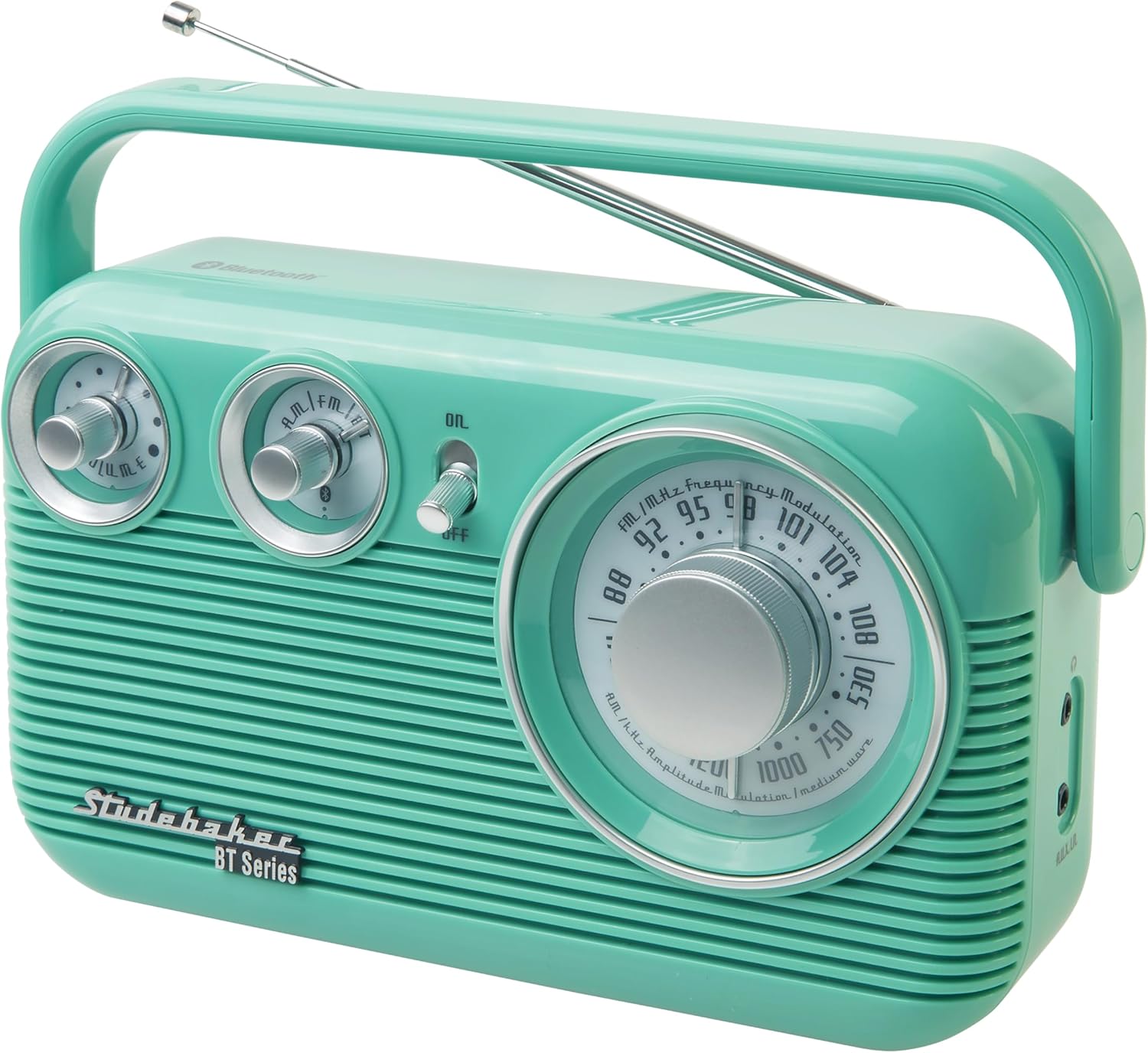
Figure 1: Front view of the Studebaker SB2003BT radio.
2. Important Safety Information
- Read these instructions.
- Keep these instructions.
- Heed all warnings.
- Follow all instructions.
- Do not use this apparatus near water.
- Clean only with a dry cloth.
- Do not block any ventilation openings. Install in accordance with the manufacturer's instructions.
- Do not install near any heat sources such as radiators, heat registers, stoves, or other apparatus (including amplifiers) that produce heat.
- Protect the power cord from being walked on or pinched, particularly at plugs, convenience receptacles, and the point where they exit from the apparatus.
- Only use attachments/accessories specified by the manufacturer.
- Unplug this apparatus during lightning storms or when unused for long periods of time.
- Refer all servicing to qualified service personnel. Servicing is required when the apparatus has been damaged in any way, such as power-supply cord or plug is damaged, liquid has been spilled or objects have fallen into the apparatus, the apparatus has been exposed to rain or moisture, does not operate normally, or has been dropped.
3. Product Overview and Components
Familiarize yourself with the main components of your Studebaker SB2003BT radio.

Figure 2: Top-down view of the radio, highlighting controls.
- Volume Control Knob: Adjusts the audio output level.
- Function Selector Knob: Switches between AM, FM, and Bluetooth modes.
- Power ON/OFF Switch: Turns the unit on or off.
- Tuning Knob: Selects radio frequencies.
- Frequency Display: Shows the current radio frequency.
- FM Swivel Telescopic Antenna: Extends for improved FM reception.
- Aux-in Jack: Connect external audio devices.
- 3.5mm Headphone Jack: For private listening.
- Portable Carry Handle: For easy transport.

Figure 3: Side view of the radio, showing the Aux-in and Headphone jacks.
4. Setup
4.1 Powering the Unit
The SB2003BT radio can be powered by either AC power or batteries.
AC Operation
- Locate the built-in AC power cord.
- Plug the AC cord into a standard wall outlet (AC 120V ~ 60Hz).
- The unit is now ready for use with AC power.
Battery Operation
- Ensure the unit is turned OFF and unplugged from AC power.
- Open the battery compartment cover located on the back of the unit.
- Insert 4 x 'C' (UM2) size batteries (not included) into the compartment, observing the correct polarity (+ and -) as indicated inside.
- Close the battery compartment cover securely.
- The unit is now ready for portable use with battery power.
4.2 Antenna Adjustment
For optimal FM reception, extend the telescopic antenna. For AM reception, the unit has a built-in antenna, and rotating the unit may improve reception.

Figure 4: Radio with the FM telescopic antenna extended.
5. Operating Instructions
5.1 Basic Operation
- Power ON/OFF: Slide the Power ON/OFF switch to the "ON" position to turn on the radio. Slide it to "OFF" to turn it off.
- Volume Adjustment: Rotate the Volume Control Knob to increase or decrease the sound level.
5.2 AM/FM Radio Operation
- Slide the Power ON/OFF switch to "ON".
- Rotate the Function Selector Knob to select "AM" or "FM" mode.
- For FM reception, extend the FM Swivel Telescopic Antenna. Adjust its position for best reception.
- Rotate the Tuning Knob to select your desired radio station. The frequency will be displayed on the Frequency Display.
- Adjust the Volume Control Knob to your preferred listening level.
5.3 Bluetooth Operation
- Slide the Power ON/OFF switch to "ON".
- Rotate the Function Selector Knob to select "BT" (Bluetooth) mode. The unit will emit an audible tone, indicating it is in pairing mode.
- On your Bluetooth-enabled device (e.g., smartphone, tablet), enable Bluetooth and search for available devices.
- Select "SB2003BT" from the list of found devices.
- Once paired, the unit will emit another audible tone. You can now stream audio from your device to the radio.
- Adjust the volume on both your Bluetooth device and the radio for optimal sound.
Note: Bluetooth connectivity is for receiving audio from a device to the radio. This radio cannot connect to external Bluetooth speakers or headphones.
5.4 Aux-in Operation
- Slide the Power ON/OFF switch to "ON".
- Connect one end of a 3.5mm audio cable (not included) to the Aux-in Jack on the side of the radio.
- Connect the other end of the audio cable to the headphone jack or line-out jack of your external audio device (e.g., MP3 player, laptop).
- Ensure your external device is playing audio.
- Adjust the volume on both your external device and the radio for optimal sound.
5.5 Headphone Usage
- Plug a 3.5mm stereo headphone (not included) into the Headphone Jack on the side of the radio.
- The main speaker will be muted, allowing for private listening.
- Adjust the volume using the Volume Control Knob.
- Caution: Prolonged listening at high volume levels can cause hearing damage.
6. Maintenance and Care
- Cleaning: Wipe the unit with a soft, dry cloth. Do not use abrasive cleaners or solvents.
- Storage: If storing the unit for an extended period, remove the batteries to prevent leakage. Store in a cool, dry place.
- Antenna Care: Handle the telescopic antenna gently to avoid bending or breaking.
- Water Exposure: Keep the unit away from water and moisture.
7. Troubleshooting
| Problem | Possible Cause | Solution |
|---|---|---|
| No power |
|
|
| Poor radio reception |
|
|
| Bluetooth not pairing |
|
|
| No sound from Aux-in |
|
|
8. Specifications

Figure 5: Dimensions of the Studebaker SB2003BT radio.
- Model: SB2003BT
- Power Source: AC 120V ~ 60Hz or 4 x 'C' (UM2) Batteries (not included)
- Radio Bands: AM/FM
- Speaker: 3-inch
- Connectivity: Bluetooth, Aux-in (3.5mm), Headphone Jack (3.5mm)
- Product Dimensions (L x W x H): 9.85" x 3.55" x 7"
- Weight: Approximately 1.94 lbs
- Material: Plastic
9. Warranty Information
This Studebaker SB2003BT radio comes with a 1 Year Warranty from the date of purchase. This warranty covers manufacturing defects in materials and workmanship under normal use. It does not cover damage caused by misuse, accident, unauthorized modification, or normal wear and tear. Please retain your proof of purchase for warranty claims.
10. Customer Support
For technical assistance, warranty service, or general inquiries regarding your Studebaker SB2003BT radio, please contact Studebaker customer support. Refer to the contact information provided with your product packaging or visit the official Studebaker website for the most up-to-date support details.
Manufacturer: Spectra Merchandising Intl.


