
1. Introduction
This manual provides detailed instructions for the installation, operation, and maintenance of your WenzhiIoT Zigbee 5.8GHz MmWave Radar Presence Sensor. This advanced sensor is designed to detect human presence, including static states, micro-movements, and general movement, within a specified area. It also features an illuminance monitor for enhanced smart home automation.
2. Safety Information
- Ensure the device is powered by a compatible USB power source (5V/1A recommended).
- Do not expose the sensor to water, moisture, or extreme temperatures.
- Avoid placing the sensor near strong electromagnetic fields, which may interfere with its operation.
- Do not attempt to disassemble or repair the device yourself. Contact customer support for assistance.
- Keep out of reach of children.
3. Package Contents
Verify that all items are present in your package:
- Presence Sensor (x1)
- Mounting Bracket (x1)
- Mounting Screws (x1 set)
- 2m USB Cable (x1)
- Reset Needle (x1)
- User Manual (x1)

Figure 3.1: Package Contents
4. Product Overview
The WenzhiIoT Zigbee 5.8GHz MmWave Radar Presence Sensor is a versatile smart home device designed for accurate human presence detection and environmental monitoring.
Key Features:
- Advanced Presence Detection: Utilizes 5.8GHz MmWave Radar technology to detect human presence, static states (like sleeping), micro-movements, and general movement.
- Illuminance Monitoring: Integrated light sensor allows for smart scene linkage, enabling automatic control of lighting based on ambient brightness.
- Magnetic Mounting: Features a magnetic attraction function for easy attachment to iron surfaces, complemented by a multi-angle magnetic bracket for flexible installation.
- Debug Mode: A dedicated mode to assist in finding the optimal detection distance and eliminating interference sources.
- Configurable Range Report Mode: Option to set reporting to 'report at trigger' to reduce network congestion, especially beneficial for Zigbee2mqtt users.
- Zigbee Compatibility: Requires a Tuya Zigbee gateway (hub) for full functionality and integration with Tuya Smart Life and Home Assistant platforms.

Figure 4.1: WenzhiIoT Presence Sensor
5. Setup and Installation
5.1 Powering the Device
Connect the provided 2m USB cable to the sensor's USB port and plug the other end into a compatible 5V/1A USB power adapter (not included).
5.2 Physical Installation
The sensor offers flexible mounting options:
- Direct Magnetic Attachment: The sensor has a magnetic base and can be directly attached to iron surfaces such as table corners, iron frames, or steel beams.
- Bracket Mounting: Attach the sensor magnetically to the included multi-angle bracket. Then, use the provided double-sided adhesive or screws to secure the bracket to a desired location, such as a wall or ceiling. The bracket allows for angle adjustment to optimize detection coverage.

Figure 5.1: Magnetic Mounting Options
5.3 Pairing with a Zigbee Hub
This sensor requires a Zigbee hub (gateway) to function within your smart home system. A Tuya Zigbee hub is highly recommended for broader compatibility with the Tuya Smart Life ecosystem.
- Power On: Ensure the sensor is powered on.
- Enter Pairing Mode: Use the provided reset needle to press and hold the reset button on the sensor for approximately 6 seconds until the indicator light blinks, indicating it's in pairing mode.
- Open Tuya Smart App: Launch the Tuya Smart or Smart Life app on your smartphone.
- Add Device: Navigate to your Zigbee gateway in the app and select 'Add sub-device' or 'Search for new devices'.
- Confirm Pairing: Follow the on-screen prompts to complete the pairing process. The sensor's indicator light will stop blinking once successfully paired.
For users integrating with Home Assistant via Zigbee2mqtt: As this is a new device, you may need specific JS files for direct integration. Please contact WenzhiIoT support for assistance if you encounter issues. It is recommended to use an older version of Zigbee2mqtt or wait for bug fixes in newer versions, as a known bug in version 1.3.9 may affect data distribution.

Figure 5.2: Sensor and Zigbee Hub Integration
6. Operation
Once installed and paired, the sensor provides various functionalities through the Tuya Smart Life app.
6.1 Understanding Detection Modes
The sensor can differentiate between various states of human presence:
- Human Presence: Detects the presence of a person in the area.
- Human Static: Identifies a person who is stationary, such as sleeping or sitting still.
- Human Micro-motion: Detects subtle movements like breathing.
- Human Movement: Detects active motion within the detection zone.
6.2 Illuminance Monitoring
The integrated illuminance sensor allows you to create smart scenes. For example, you can configure your house lights to turn ON/OFF automatically based on changes in ambient brightness, enhancing energy efficiency and convenience.

Figure 6.1: Illuminance Detection Function
6.3 Debug Mode
The debug mode is a crucial tool for optimizing the sensor's performance. Activate this mode in the app to visualize the detection distance in real-time. This helps you identify and eliminate potential sources of interference and fine-tune the sensor's placement for the most suitable detection range.
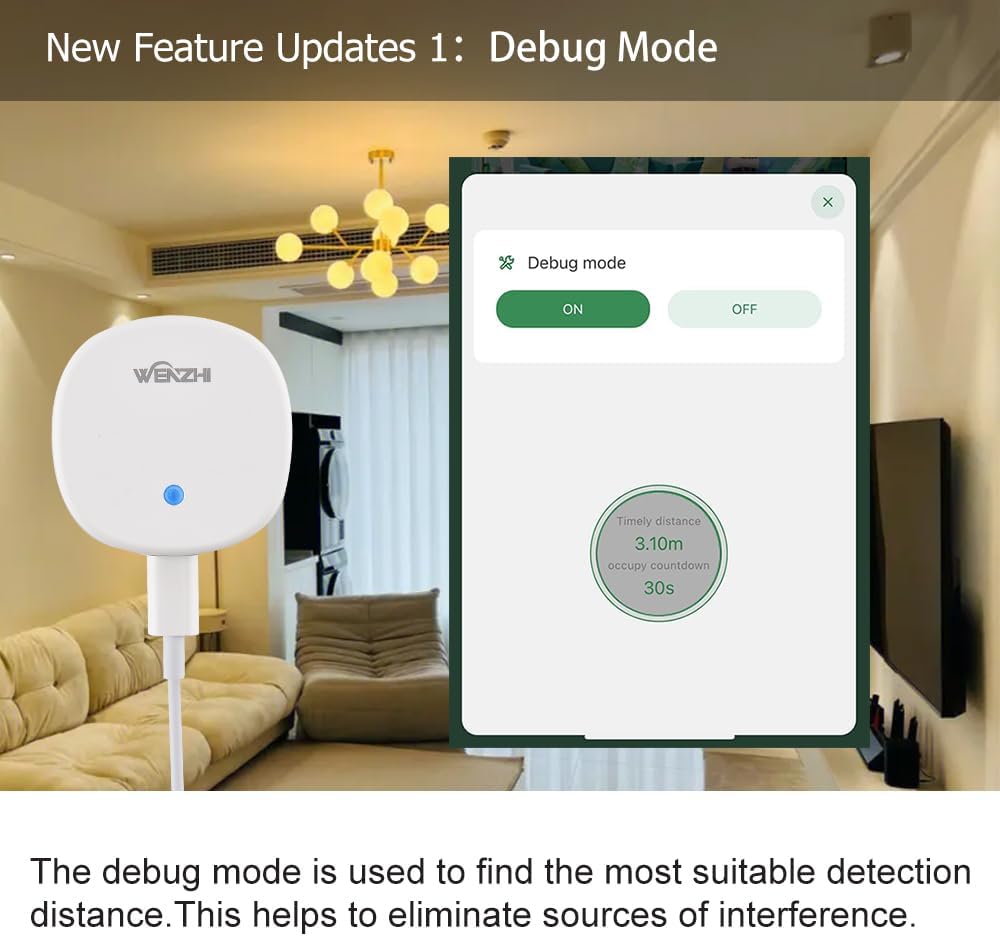
Figure 6.2: Debug Mode Interface
6.4 Range Report Mode Settings
To optimize network performance, especially for Zigbee2mqtt users, you can adjust the Range Report Mode. Setting it to "report at trigger" will reduce the frequency of reporting logs, preventing network congestion. This setting can be configured within the smart life app or Zigbee2mqtt interface.

Figure 6.3: Range Report Mode Settings
6.5 App Configuration Parameters
The Tuya Smart Life app provides extensive parameters for customizing the sensor's behavior:
- Detection Shield: Adjust the minimum distance for detection.
- Detection Range: Set the maximum detection distance.
- Trigger Distance: Configure the distance at which a trigger event occurs.
- Maintain Sensitivity: Adjust sensitivity for maintaining detection of static presence.
- Trigger Sensitivity: Adjust sensitivity for detecting initial movement.
- Departure Delay: Set the time before the sensor reports 'no presence' after a person leaves.
- Entry Filter Time: Configure a short delay to filter out brief, insignificant entries.
- Block Time: Set a period during which the sensor will not report new detections after an event.

Figure 6.4: App Parameter Settings
7. Maintenance
- Cleaning: Gently wipe the sensor's surface with a soft, dry cloth. Do not use liquid cleaners or abrasive materials.
- Firmware Updates: Periodically check the Tuya Smart Life app for available firmware updates to ensure optimal performance and access to new features.
- Power Cycle: If the sensor behaves unexpectedly, try disconnecting and reconnecting its power source.
8. Troubleshooting
- Sensor Not Connecting/Pairing:
- Ensure the sensor is powered on and within range of your Zigbee hub.
- Confirm your Zigbee hub is online and functioning correctly.
- Re-enter pairing mode by pressing the reset button for 6 seconds.
- Verify you are using a compatible Tuya Zigbee hub.
- Inaccurate Presence Detection:
- Use the Debug Mode in the app to fine-tune the detection range and identify interference.
- Adjust 'Detection Shield', 'Detection Range', 'Maintain Sensitivity', and 'Trigger Sensitivity' parameters in the app.
- Ensure the sensor is mounted correctly and has a clear line of sight to the detection area.
- Zigbee2mqtt Issues (Version 1.3.9):
- A known bug in Zigbee2mqtt version 1.3.9 may cause interface errors, though data distribution might still occur.
- After making parameter settings, power off and then power on the sensor to ensure settings are applied correctly.
- Consider using an older, stable version of Zigbee2mqtt or wait for official bug fixes.
- Contact WenzhiIoT support for specific JS files if direct integration issues persist.
- No Instructions Included (Initial Setup):
- If a physical manual was missing, refer to this digital manual.
- To enter pairing mode, press and hold the sensor's button for approximately 6 seconds.
9. Specifications
| Brand | WenzhiIoT |
| Model Number | MTD085-ZB-5.8G |
| Style | Zigbee 5.8GHz Radar |
| Color | White |
| Power Source | Corded Electric (USB 5V/1A) |
| Item Weight | 2.08 ounces (approx. 59g) |
| Maximum Range | 10 Meters |
| Mounting Type | Wall Mount (Magnetic / Adhesive / Screws) |
| Product Dimensions | 2.76"D x 1.97"W x 2.36"H (approx. 70mm D x 50mm W x 60mm H) |
| Operating Temperature | Up to 40 Degrees Celsius |
| Compatible Devices | Tuya ZigBee compatible devices, Tuya Smart Life, Home Assistant |

Figure 9.1: Product Dimensions
10. Warranty and Support
WenzhiIoT products are designed for reliability and performance. For warranty information, technical support, or any inquiries regarding your presence sensor, please refer to the official WenzhiIoT website or contact their customer service directly. Keep your purchase receipt for warranty claims.
For further assistance, visit the WenzhiIoT Store on Amazon.


