
TOLEBLID 1450ZTF
TOLEBLID 1450ZTF Biometric Gun Safe Instruction Manual
Model: 1450ZTF | Brand: TOLEBLID
Introduction
This manual provides comprehensive instructions for the safe and effective use of your TOLEBLID 1450ZTF Biometric Gun Safe. Please read this manual thoroughly before installation and operation to ensure proper functionality and security.
Important Safety Information
Always follow the installation instructions carefully. Do not install the cabinet in locations where it could be easily knocked over or where it might pose a hazard to people or property. Use appropriate safety gear when installing the cabinet.
- Keep all keys and access codes in a secure location, away from the safe and out of reach of unauthorized individuals.
- Ensure the safe is securely mounted to a floor or wall to prevent unauthorized removal.
- Do not store loaded firearms in the safe. Always follow local and national regulations regarding firearm storage.
- Regularly check the battery level of the electronic lock to ensure continuous operation.
Product Overview
The TOLEBLID 1450ZTF is a heavy-duty gun safe designed for securing rifles and pistols. It features multiple access methods, an alarm system, and a robust steel construction.

Figure 1: Front view of the TOLEBLID 1450ZTF Biometric Gun Safe in its closed state.
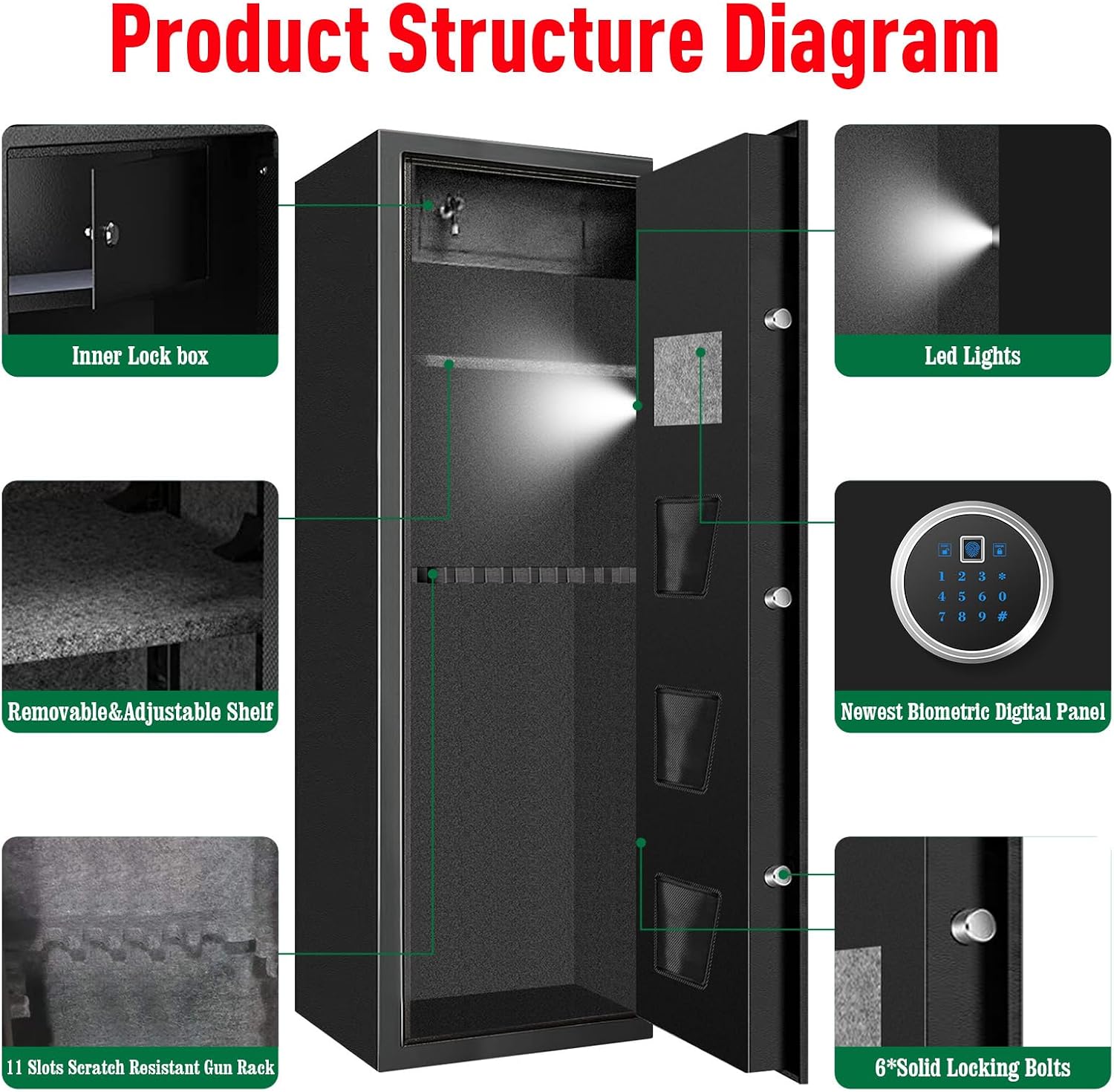
Figure 2: Diagram illustrating the internal structure and key components, including the inner lock box, LED lights, removable shelf, biometric digital panel, and solid locking bolts.
Setup
1. Unboxing and Initial Inspection
Carefully remove the safe from its packaging. Inspect the safe for any signs of damage that may have occurred during shipping. Report any damage to the retailer immediately.
2. Battery Installation
The electronic locking system requires batteries for operation. Locate the battery compartment, typically on the inside of the door panel. Insert the required batteries (usually AA, refer to the compartment for exact type and quantity) ensuring correct polarity. The safe also includes an external battery box for emergency power if internal batteries are depleted.
3. Mounting the Safe
For optimal security, the safe must be securely mounted to a floor or wall. Pre-drilled mounting holes are provided at the back and bottom of the safe. Use the included expansion bolts to secure the safe. Ensure the mounting surface is structurally sound.

Figure 3: Step-by-step guide for wall or floor mounting using expansion bolts.
Operating the Safe
Access Methods
The TOLEBLID 1450ZTF offers four primary methods for accessing the safe:
- Biometric Fingerprint: Quick access using a registered fingerprint.
- Keypad Password: Access using a programmed digital code.
- Emergency Key: Manual access using one of the provided physical keys.
- External Battery Box: Use in conjunction with the keypad if internal batteries are depleted.

Figure 4: Visual representation of the four access methods for the safe.

Figure 5: Detailed view of the digital lock panel, highlighting the advanced fingerprint reader, warning alarm system, spring knob, digital touch screen, and emergency key slot.
Programming Fingerprints
Refer to the specific instructions provided with your safe for detailed steps on programming fingerprints. The safe supports up to 100 unique fingerprints. Generally, this involves entering a programming mode, scanning your finger multiple times from different angles, and confirming the registration.
Setting a Passcode
To set or change your digital passcode, follow the instructions in the included quick start guide. This typically involves entering a master code or pressing a reset button, then inputting your desired numerical code and confirming it.
Silent Mode
The safe can be set to silent mode to disable audible feedback during operation. Consult your quick start guide for instructions on how to activate and deactivate silent mode.
Anti-Theft Alarm System
The safe is equipped with an anti-theft alarm system. If an incorrect password is entered 3 times or an incorrect fingerprint is scanned 5 times, the system will lock and sound an alarm for 1 minute. The alarm will also activate if the safe is moved while locked. Ensure the safe is properly secured to prevent false alarms from accidental movement.
Maintenance
Battery Replacement
Replace the batteries in the electronic lock when the low battery indicator appears or if the system becomes unresponsive. Use high-quality alkaline batteries for optimal performance. If the batteries are completely depleted, use the emergency key or external battery box for access.
Cleaning
Clean the exterior of the safe with a soft, damp cloth. Avoid using abrasive cleaners or solvents that could damage the finish. For the fingerprint sensor, use a clean, dry cloth to gently wipe away any residue.
Moisture Control
To protect contents from moisture, especially in humid environments, consider placing desiccant packets (e.g., silica gel) inside the safe. Regularly check and replace these packets as needed.
Troubleshooting
- Safe will not open with fingerprint: Ensure your finger is clean and dry. Try re-scanning your finger from different angles. If issues persist, re-register your fingerprint or use an alternative access method (passcode or key).
- Safe will not open with passcode: Double-check that you are entering the correct passcode. Ensure the batteries are not depleted. If necessary, use the emergency key or external battery box.
- Alarm sounds unexpectedly: Verify that the safe is securely mounted and not being accidentally moved. Check for any unauthorized attempts to open the safe. If the alarm continues without cause, contact customer support.
- Electronic lock is unresponsive: Replace the batteries. If the issue persists, use the emergency key and contact customer support.
Specifications
| Feature | Detail |
|---|---|
| Brand | TOLEBLID |
| Model Number | 1450ZTF |
| Product Dimensions (External) | 13"D x 13"W x 57"H (33cm D x 33cm W x 145cm H) |
| Interior Dimensions | 57.08" (H) x 13.38" (D) x 13.77" (W) (approximate, for rifle storage) |
| Material | Metal (Alloy Steel Door) |
| Lock Type | Biometric, Electronic Combination Lock, Key |
| Capacity | Up to 8 rifles (up to 57" long), 3 handguns (in door pockets) |
| Weight | Approximately 112 pounds |
| Special Features | Anti-Theft, Biometric Fingerprint, Fire Resistant, Removable Shelf, Sensor Light, Alarm System |
| Mounting Type | Floor Mount, Wall Mount |
| Water Resistance Level | Not Water Resistant |

Figure 6: External dimensions and typical rifle storage capacity.

Figure 7: Dimensions and weight of the heavy-duty gun safe.

Figure 8: Detail of the 35mm thickened alloy steel door, highlighting its solid construction and pry-resistant features.
Warranty and Support
For warranty information, technical support, or any questions regarding your TOLEBLID 1450ZTF Biometric Gun Safe, please contact TOLEBLID customer service. Refer to the product packaging or the retailer's website for contact details.
Ask a question about this manual
Ask about setup, troubleshooting, compatibility, parts, safety, or missing instructions. Manuals+ will review the question and use this page’s manual context to help answer it.