
1. Introduction
This manual provides detailed instructions for the proper use and maintenance of your Sunffice Wireless Bluetooth Earbuds Neckband. Please read this manual thoroughly before using the product to ensure optimal performance and longevity.
2. Product Overview
The Sunffice Wireless Bluetooth Earbuds Neckband features Bluetooth 5.3 connectivity, a TF card slot for local music playback, a power display, magnetic earbuds for secure storage, and ENC noise cancellation for clear calls. Its ergonomic design ensures comfortable wear for extended periods.

Image 2.1: Overview of the Sunffice Wireless Bluetooth Earbuds Neckband, showing the neckband, earbuds, control panel, and open TF card slot with a MicroSD card.
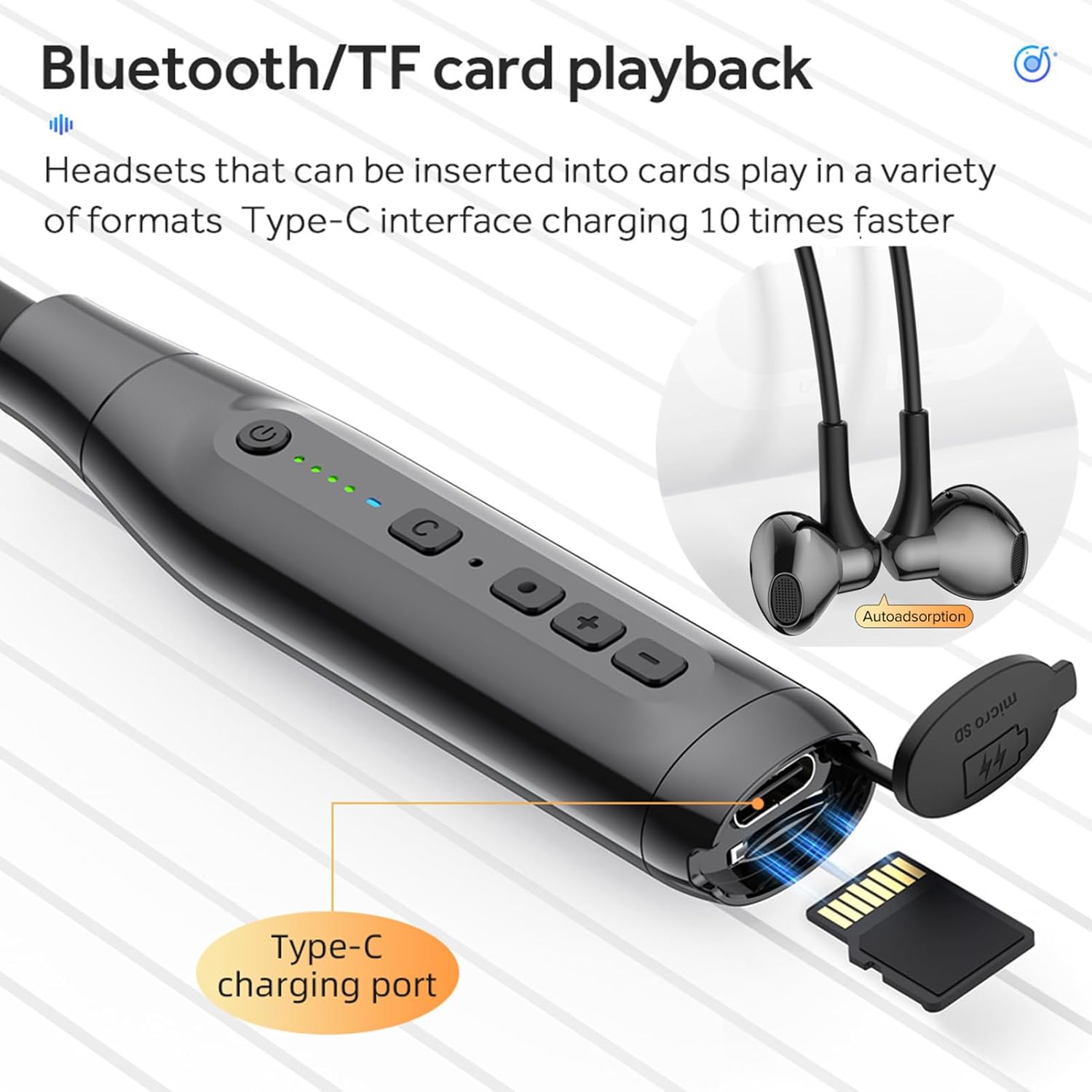
Image 2.2: Detailed view of the control panel, highlighting the power button, 'C' key, function key, volume buttons, Type-C charging port, and TF card slot.
3. Package Contents
- Sunffice Wireless Bluetooth Earbuds Neckband
- USB Type-C Charging Cable
- User Manual
4. Setup
4.1 Charging the Device
Before first use, fully charge the neckband headphones. Connect the provided USB Type-C charging cable to the charging port on the control panel and plug the other end into a compatible USB power source. The LED indicators on the control panel will show the charging status.
- Charging Time: Approximately 2 hours for a full charge.
- Battery Life: Up to 200 hours of music playback on a full charge.
- Standby Time: Up to 365 days.

Image 4.1: Visual representation of battery endurance, charging time, and standby time.
4.2 Power On/Off
- Power On: Press and hold the Power key (U) for 2 seconds.
- Power Off: Press and hold the Power key (U) for 3 seconds.
4.3 Bluetooth Pairing
To connect your neckband headphones to a Bluetooth-enabled device:
- Ensure the headphones are powered off.
- Press and hold the Power key (U) for approximately 5 seconds until the LED indicator flashes blue and red, indicating pairing mode.
- On your device (smartphone, tablet, laptop), enable Bluetooth and search for available devices.
- Select "Sunffice Neckband" (or similar name) from the list of found devices.
- Once connected, the LED indicator on the headphones will flash blue slowly, and a voice prompt will confirm the connection.

Image 4.2: Diagram illustrating Bluetooth 5.3 technology for faster, more stable, and lower power consumption connectivity.
4.4 TF Card Installation
The neckband headphones support MicroSD (TF) card playback. To install a TF card:
- Locate the TF card slot on the control panel.
- Gently open the protective cover.
- Insert the MicroSD card into the slot with the gold contacts facing down until it clicks into place.
- Close the protective cover.
5. Operating Instructions
5.1 Button Functions
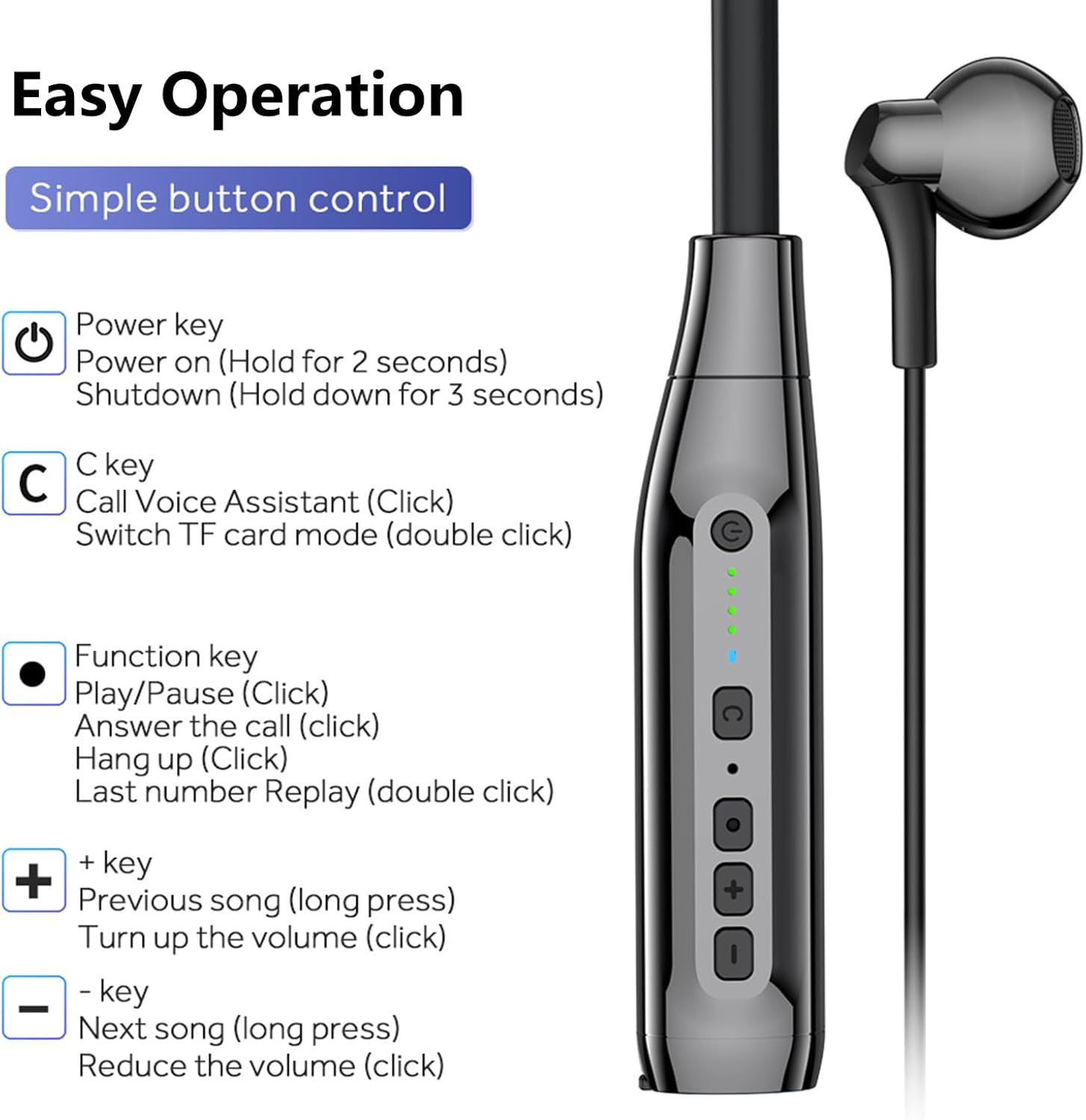
Image 5.1: Detailed guide to the functions of each button on the control panel.
- Power Key (U):
- Hold for 2 seconds: Power On
- Hold for 3 seconds: Power Off
- 'C' Key:
- Click: Call Voice Assistant
- Double Click: Switch to TF Card Mode (if card inserted)
- Triple Click (when not connected to Bluetooth): Switch Voice Prompt Language
- Function Key (●):
- Click: Play/Pause music; Answer/Hang up call
- Double Click: Last number Redial
- '+' Key:
- Click: Increase Volume
- Long Press: Previous Song
- '-' Key:
- Click: Decrease Volume
- Long Press: Next Song
5.2 Power Display
The control panel features four LED indicators that display the current battery level:
- 1 Bar: 25% battery
- 2 Bars: 50% battery
- 3 Bars: 75% battery
- 4 Bars: 100% battery

Image 5.2: Close-up of the LED power display, indicating battery charge levels.
5.3 ENC Noise Cancellation
The Environmental Noise Cancellation (ENC) feature helps reduce ambient noise during calls, ensuring clearer communication.

Image 5.3: Illustration of ENC noise cancellation technology in action, providing clear audio during calls.
5.4 Magnetic Earbuds
The earbuds feature built-in magnets, allowing them to attach to each other when not in use. This prevents tangling and provides a secure, necklace-like storage solution around your neck.

Image 5.4: Demonstrates the comfortable semi-in-ear design and the magnetic feature of the earbuds for secure wear and storage.
6. Maintenance
6.1 Cleaning
- Wipe the earbuds and neckband with a soft, dry cloth.
- Do not use abrasive cleaners or solvents.
- Ensure the charging port and TF card slot are free from dust and debris.
6.2 Storage
- Store the headphones in a cool, dry place away from direct sunlight and extreme temperatures.
- When not in use, allow the magnetic earbuds to connect to prevent tangling.
6.3 Water Resistance
The headphones are waterproof. However, avoid prolonged submersion in water and do not expose them to saltwater or other corrosive liquids.
7. Troubleshooting
- Headphones will not power on:
- Ensure the battery is charged. Connect to a power source and try again after a few minutes.
- Cannot pair with device:
- Ensure the headphones are in pairing mode (LED flashing blue and red).
- Make sure Bluetooth is enabled on your device and it is within range (up to 10 meters).
- Try restarting both the headphones and your device.
- No sound or low volume:
- Adjust the volume on both the headphones and your connected device.
- Ensure the headphones are properly connected to your device.
- Voice prompts are in an unfamiliar language (e.g., Chinese):
- To switch the voice prompt language, ensure the headset is not connected to any Bluetooth device.
- With the headset powered on and disconnected, press the 'C' key three times. Listen for the voice prompt confirming the language change (e.g., "English Mode").
- TF card not playing or looping:
- Ensure the MicroSD card is inserted correctly and fully.
- Verify that the audio files on the card are in a supported format (e.g., MP3).
- Try reformatting the TF card to FAT32 on a computer and reloading audio files.
- Double-click the 'C' key to ensure you are in TF card playback mode.
8. Specifications
| Feature | Detail |
|---|---|
| Model Name | Wireless Bluetooth Earbuds Neckband |
| Bluetooth Version | 5.3 |
| Bluetooth Range | Up to 10 meters |
| Battery Life (Music Playback) | Up to 200 hours |
| Standby Time | Up to 365 days |
| Charging Time | Approximately 2 hours |
| Charging Port | USB Type-C |
| Water Resistance Level | Waterproof |
| Noise Control | Active Noise Cancellation (ENC for calls) |
| Material | Plastic, Silicone |
| Item Weight | 6.4 ounces (0.18 Kilograms) |
| Frequency Range | 20Hz - 20,000Hz |
9. Safety Information
- Do not disassemble, repair, or modify the product.
- Keep the product away from extreme temperatures, humidity, and corrosive substances.
- Avoid listening at high volume levels for extended periods to prevent hearing damage.
- Dispose of the product and its battery responsibly according to local regulations.
10. Warranty and Support
Sunffice products are designed for reliability and performance. For warranty information or technical support, please refer to the contact details provided with your purchase or visit the official Sunffice website. Please retain your proof of purchase for warranty claims.