
1. Product Overview
The SUNREI C600 is a versatile, compact, and rechargeable multi-function light designed for various applications, including outdoor activities, emergency lighting, and car repair. It features stepless dimming, adjustable color temperature, and multiple attachment options for flexible use.

Image 1.1: The SUNREI C600 Multi-Function Mini Rechargeable Night Light, showcasing its compact design.
2. Package Contents
Please verify that all items listed below are included in your package:
- 1 x SUNREI C600 Portable Work Light
- 1 x Type-C Charging Cable
- 1 x Instruction Manual (this document)
- 1 x Back Clip
- 1 x Headband
- 1 x Storage Bag
3. Component Identification

Image 3.1: Dimensions of the SUNREI C600 light compared to a common earbud case.
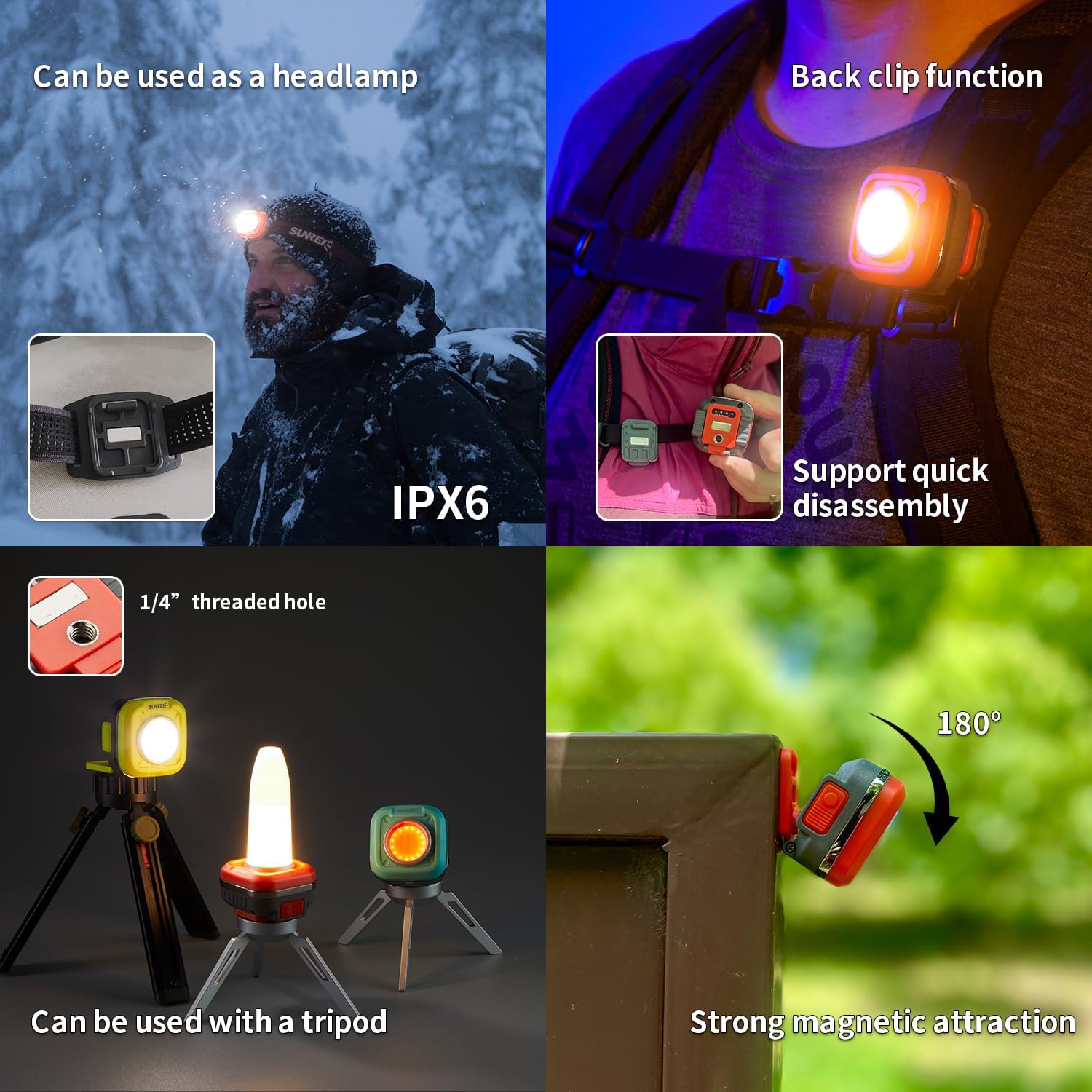
Image 3.2: Detailed view of the SUNREI C600, highlighting key components such as the three-color LED beads, night light, charging port, magnets, color temperature switch, lighting switch, power indicator, and universal threaded hole.
The SUNREI C600 features:
- Three-color LED beads: For various lighting modes.
- Night light: A dedicated low-intensity light mode.
- Charging port: USB Type-C for convenient charging.
- Magnets: Integrated for attachment to metallic surfaces.
- Color temperature switch: To adjust light warmth.
- Lighting switch: To control power and brightness.
- Power indicator: Displays battery status.
- Universal threaded hole (1/4"): For mounting on tripods or other accessories.
4. Setup and Charging
4.1 Initial Charge
Before first use, fully charge the device. Connect the provided Type-C charging cable to the charging port on the light and to a standard USB power adapter (not included). The power indicator will show charging status and turn off when fully charged. A full charge typically takes approximately 2 hours.
4.2 Attaching Accessories
The SUNREI C600 offers multiple attachment options:
- Back Clip: Attach the back clip to the designated slot on the light. This allows the light to be clipped onto clothing, backpacks, or other suitable surfaces. The back clip supports quick disassembly.
- Headband: Insert the light into the headband mount to use it as a headlamp. This is ideal for hands-free operation during outdoor activities or repairs.
- Magnetic Base: The integrated strong magnets allow the light to be securely attached to any ferrous metal surface.
- 1/4" Threaded Hole: Use the universal 1/4" threaded hole to mount the light on tripods, stands, or other compatible brackets for stable positioning.

Image 4.1: Examples of the SUNREI C600 being used as a headlamp, with a back clip, mounted on a tripod, and utilizing its magnetic attraction.
5. Operating Instructions
5.1 Power On/Off and Brightness Adjustment
Press the Lighting Switch to turn the light on. Subsequent short presses will cycle through different light levels (if applicable, or activate the memory function). To adjust brightness, press and hold the Lighting Switch for stepless dimming from 30 to 600 lumens. Release the button at your desired brightness level.
5.2 Color Temperature Adjustment
Press the Color Temperature Switch to adjust the light's warmth. The color temperature is adjustable from 2700K (warm yellow) to 6500K (cool white). Press and hold the switch for stepless adjustment. Release the button at your desired color temperature.

Image 5.1: Illustration of stepless dimming for both brightness (30-600 lumens) and color temperature (2700K-6500K).
5.3 Red Light Mode
To activate the red light mode, long press the Color Temperature Switch. Lightly press the switch again to cycle through different red light levels or modes (e.g., steady red, flashing red).
5.4 Memory Function
The SUNREI C600 features a memory function that recalls the last used brightness and color temperature settings when the light is turned on again.
6. Maintenance
6.1 Cleaning
Wipe the light with a soft, damp cloth. Do not use abrasive cleaners or solvents, as these may damage the surface or internal components.
6.2 Battery Care
The built-in 1200 mAh lithium battery is designed for long-term use. To prolong battery life:
- Avoid fully discharging the battery frequently.
- Charge the device regularly, even if not in use, to maintain battery health.
- Store the device in a cool, dry place when not in use for extended periods, ideally with a partial charge (around 50%).
6.3 Storage
Store the light and its accessories in the provided storage bag to protect them from dust and damage.
7. Troubleshooting
| Problem | Possible Cause | Solution |
|---|---|---|
| Light does not turn on. | Battery is depleted. | Charge the device using the Type-C cable. |
| Light is dim or flickers. | Low battery level. | Recharge the battery. |
| Buttons are unresponsive. | Temporary software glitch or low battery. | Ensure the device is charged. If the issue persists, contact customer support. |
8. Specifications
| Feature | Specification |
|---|---|
| Model Number | C600 |
| Light Source Type | COB LED |
| Maximum Brightness | 600 Lumens |
| Brightness Adjustment | Stepless Dimming (30-600 Lumens) |
| Color Temperature | Stepless Adjustment (2700K-6500K) |
| Battery Type | Built-in 1200 mAh Lithium-Ion |
| Charging Time | Approx. 2 hours |
| Maximum Runtime | Up to 36 hours (at lowest setting) |
| Material | ABS, Iron |
| Weight | Approx. 77g (0.17 lbs) |
| Water Resistance | IPX5 (Water Resistant) |
| Special Features | Magnetic base, 1/4" threaded hole, Back clip, Headband compatibility, Red light mode, Memory function |
9. Warranty and Support
9.1 Limited Warranty
SUNREI warrants this product against defects in materials and workmanship for a period of one (1) year from the original date of purchase. This warranty does not cover damage caused by accident, abuse, misuse, modification, or normal wear and tear. Proof of purchase is required for warranty claims.
9.2 Customer Support
For technical assistance, warranty claims, or product inquiries, please contact SUNREI customer support through the retailer where the product was purchased or visit the official SUNREI website for contact information.