
1. Product Overview
The Peakeep MHP6060 Digital Alarm Clock features a large, easy-to-read display, showing time, date, and day of the week. It includes adjustable brightness, multiple alarm volume settings, automatic Daylight Saving Time (DST) adjustment, a USB charging port, and battery backup for power outages.

Image 1.1: Front view of the Peakeep MHP6060 Digital Alarm Clock, displaying time, day, and date.
2. Package Contents
- Peakeep MHP6060 Digital Alarm Clock
- Type-C Power Adapter (included)
- User Manual
Video 2.1: Unboxing the Peakeep Digital Alarm Clock, showing the clock, user manual, and power adapter.
3. Setup
3.1 Powering the Clock
The clock operates via a corded electric connection using the included Type-C adapter. For continuous operation and to retain settings during power outages, install 4 AAA batteries (not included) as a backup.
- Connect the Type-C power adapter to the 'Type C 5V IN' port on the back of the clock.
- Plug the adapter into a standard 120V AC power outlet.
- Open the battery compartment on the back and insert 4 AAA batteries (not included), observing polarity. These batteries will save your settings and trigger the alarm during a power interruption.

Image 3.1: Illustration of connecting the Type-C power adapter and the battery backup feature.
3.2 Initial Time and Date Setting
Upon first power-up or after a full power loss without battery backup, you may need to set the time and date.
- Set Hour: Hold the 'TIME SET' button for 2 seconds until the hour digits blink. Release the button, then use the '+' or '-' buttons to adjust the hour.
- Set Minute: Press 'TIME SET' again. The minute digits will blink. Use the '+' or '-' buttons to adjust the minutes.
- Set Year: Press 'TIME SET' again. The year digits will blink. Use the '+' or '-' buttons to set the current year (e.g., 2025).
- Set Month: Press 'TIME SET' again. The month digits will blink. Use the '+' or '-' buttons to set the current month.
- Set Day: Press 'TIME SET' again. The day digits will blink. Use the '+' or '-' buttons to set the current day.
- Press 'TIME SET' one last time to confirm all settings and exit time setting mode. The day of the week will synchronize automatically once the year, month, and day are set.
Video 3.2: Demonstrates setting the time, year, month, and day on the Peakeep Digital Alarm Clock.
4. Operating Instructions
4.1 Display Modes (Day/Temperature)
The clock can display either the day of the week or the indoor temperature. Press the 'DAY/TEMP' button on the back to toggle between these two display modes.
4.2 Brightness Adjustment
The display brightness can be adjusted to 5 levels or turned completely off. Press the 'DIMMER' button on the back repeatedly to cycle through the brightness levels (L5 to L1) and off.

Image 4.1: Visual representation of the 6 customizable brightness settings for the clock display.
4.3 Alarm Setting and Volume
The alarm features 5 adjustable volume levels and a 9-minute snooze function.
- Set Alarm Time: Hold the 'ALARM SET' button for 2 seconds until the alarm hour digits blink. Use the '+' or '-' buttons to set the desired alarm hour. Press 'ALARM SET' again to set the minutes.
- Adjust Alarm Volume: While in alarm setting mode, or when the alarm is sounding, press the 'VOLUME' button to cycle through 5 volume levels (U01 to U05).
- Turn Alarm On/Off: Press the 'ON/OFF' button to activate or deactivate the alarm. An alarm icon will appear on the display when active.
- Snooze Function: When the alarm sounds, press the 'SNOOZE/LIGHT' button on top to activate a 9-minute snooze.
- Stop Alarm: To stop the alarm for the day, press any button on the back of the clock. The alarm will reset for the next day.

Image 4.2: Depicts the 5 adjustable volume levels for the alarm, catering to different sleep preferences.
4.4 Automatic Daylight Saving Time (DST)
The clock features an automatic DST function, eliminating the need for manual adjustments.
- Press the 'DST ON/OFF' button on the back to toggle the automatic DST feature. When active, 'AUTO DST' will be displayed.
- When 'AUTO DST' is enabled, the clock will automatically adjust for Spring Forward and Fall Back time changes.
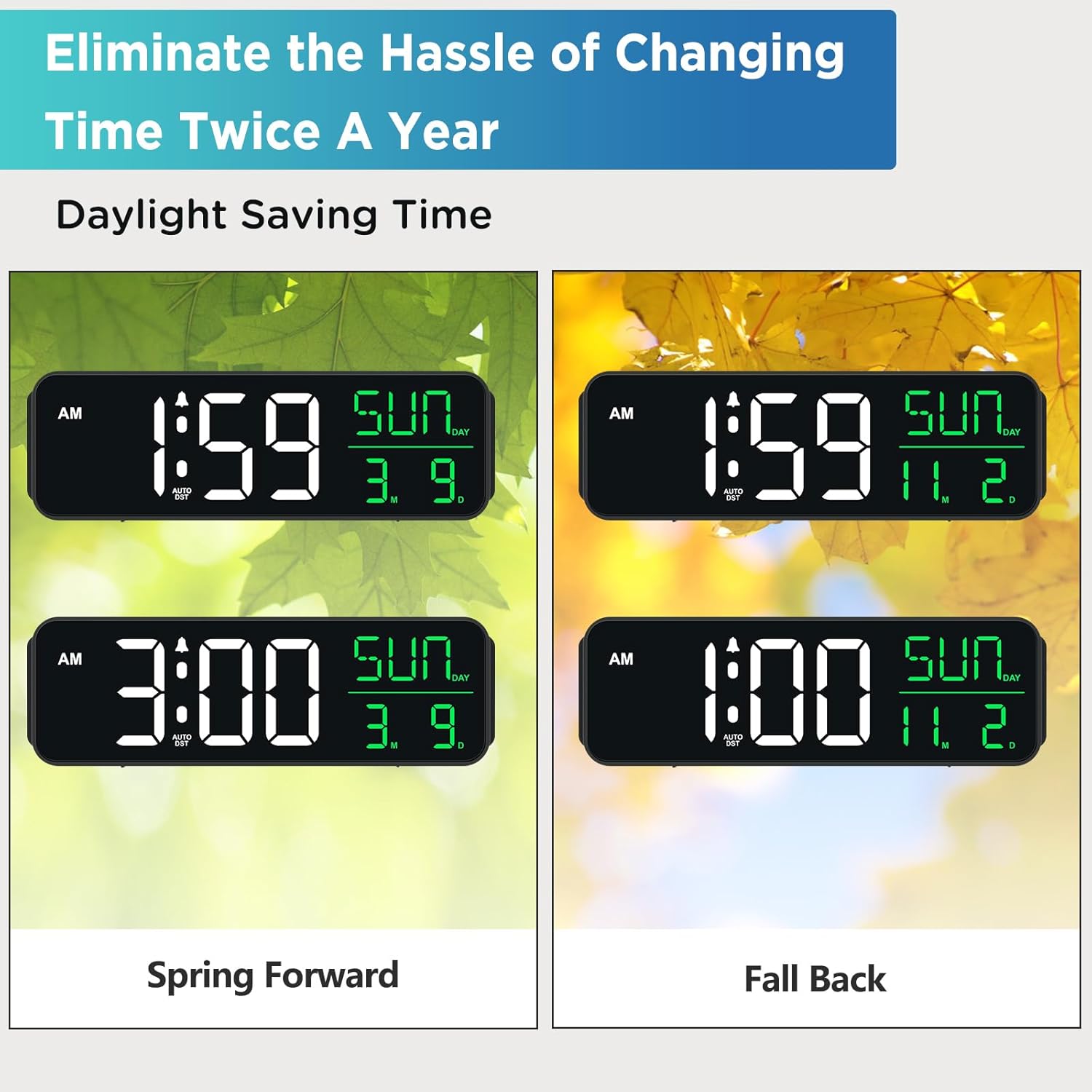
Image 4.3: Shows how the clock automatically adjusts for Daylight Saving Time changes.
4.5 USB Charging Port
A USB-A output port is located on the back of the clock, allowing you to charge small electronic devices like smartphones or smartwatches.
- Connect your device's USB charging cable to the 'USB OUT' port on the back of the clock.
- Ensure the clock is powered via the Type-C adapter for the USB charging port to function.
5. Maintenance
- Clean the clock with a soft, dry cloth. Avoid abrasive cleaners or solvents.
- Keep the clock away from direct sunlight, extreme temperatures, and high humidity.
- Ensure proper ventilation around the clock to prevent overheating.
6. Troubleshooting
| Problem | Possible Cause | Solution |
|---|---|---|
| Clock display is blank or dim. | No power, power outage, or brightness set to OFF. | Check power connection. Ensure batteries are installed for backup. Press 'DIMMER' button to adjust brightness. |
| Alarm does not sound. | Alarm is not activated or volume is too low. | Press 'ON/OFF' to activate alarm. Adjust 'VOLUME' to a higher setting. |
| Clock does not adjust for DST automatically. | Auto DST feature is turned off. | Press 'DST ON/OFF' to enable the automatic DST feature. Ensure the year, month, and day are correctly set. |
| USB charging port not working. | Clock is not powered by the Type-C adapter. | Ensure the clock is properly connected to the power outlet via the Type-C adapter. |
7. Specifications
- Brand: Peakeep
- Model Number: MHP6060
- Display Type: Digital LED
- Power Source: Corded Electric (Type-C adapter included)
- Battery Backup: 4 AAA batteries (not included)
- Product Dimensions: 9"W x 2.6"H
- Special Features: Large Display with Date Day of Week, Auto DST, 6 Dimmer levels (including OFF), 5 Alarm Volume levels, 1 USB-A Charging Port
- Material: Plastic
- Input Voltage: 120 Volts (AC)
8. Warranty and Support
For product support or warranty inquiries, please contact Peakeep customer service at: sales@us-myhome.com.


