
DOOGEE DK10
DOOGEE DK10 Rugged Smartphone User Manual
Model: DK10
1. Introduction
Welcome to the user manual for your new DOOGEE DK10 Rugged Smartphone. This guide provides essential information on setting up, operating, maintaining, and troubleshooting your device. The DOOGEE DK10 is designed for durability and high performance, featuring advanced camera capabilities, robust protection, and efficient charging.
2. Product Overview
The DOOGEE DK10 is a 5G rugged smartphone built to withstand challenging environments while offering flagship-level performance. Key features include:
- Morpho Quad Camera System: Featuring 50MP main, 64MP night vision, 50MP ultra-wide & macro, and 16MP long-focus cameras.
- Powerful Performance: Equipped with an MTK Dimensity 8020 Octa-Core processor, 32GB RAM (12GB + 20GB adjustable), and 512GB ROM (expandable up to 2TB).
- Rapid Charging: Supports 120W fast charging and 50W wireless charging.
- Vibrant Display: 6.67-inch 120Hz 2.5K AMOLED display with Corning Gorilla Glass.
- Extreme Durability: IP68/IP69K and MIL-STD-810H certified for waterproof, shockproof, and dustproof protection.
- Dual SIM 5G Connectivity: Supports a wide range of global frequency bands.

Figure 2.1: Front and rear view of the DOOGEE DK10 Rugged Smartphone, highlighting its robust design and advanced camera module.
3. Setup
3.1. Inserting SIM Cards and TF Card
The DOOGEE DK10 supports dual Nano-SIM cards or one Nano-SIM and one TF (microSD) card for expandable storage.
- Locate the SIM card tray on the side of the device.
- Use the provided SIM ejector tool to open the tray.
- Carefully place your Nano-SIM card(s) and/or TF card into the designated slots on the tray. Ensure the gold contacts are facing down.
- Gently push the tray back into the slot until it is flush with the device body.

Figure 3.1: Illustration of the SIM card tray and other crucial features like NFC, fingerprint sensor, and waterproof speaker.
3.2. Initial Power On
Press and hold the Power button (located on the side of the device) until the DOOGEE logo appears. Follow the on-screen prompts to complete the initial setup, including language selection, Wi-Fi connection, and Google account setup.
4. Operating Instructions
The DOOGEE DK10 runs on Android 13.0, offering a user-friendly interface and access to a vast ecosystem of applications.
4.1. Basic Navigation
- Home Screen: Swipe left or right to access different home screens.
- App Drawer: Swipe up from the bottom of the screen to access all installed applications.
- Notifications & Quick Settings: Swipe down from the top of the screen to view notifications and access quick settings toggles.
- Recent Apps: Swipe up and hold from the bottom of the screen (or tap the square navigation button) to view recently used applications.
4.2. Fingerprint Recognition
The device features a side-mounted fingerprint sensor for secure and quick unlocking.
- Go to Settings > Security & privacy > Device unlock > Fingerprint.
- Follow the on-screen instructions to register your fingerprint. You may need to set up a backup screen lock method (PIN, pattern, or password).
- Place your finger on the side-mounted sensor until it vibrates, then lift and repeat, adjusting the position slightly each time until registration is complete.
4.3. NFC for Payments and Connectivity
The DOOGEE DK10 supports NFC (Near Field Communication) for contactless payments via Google Pay and quick pairing with compatible devices.
- To enable NFC, go to Settings > Connected devices > Connection preferences > NFC and toggle it on.
- For mobile payments, ensure Google Pay is set up and your card details are added.
5. Camera Features
The DOOGEE DK10 boasts a versatile Morpho Quad Camera system designed for various photographic needs.

Figure 5.1: Overview of the Morpho AI Quad Camera system, detailing its 50MP main, 64MP night vision, 50MP wide-angle & macro, and 16MP long-focus lenses.
5.1. Morpho Super Night Mode
Capture brighter and clearer photos in low-light conditions. This mode enhances details and reduces noise in dark environments.

Figure 5.2: Visual comparison demonstrating the enhanced clarity and brightness of images captured using the 64MP Night Vision Camera on the DOOGEE DK10 compared to other phones in low light.
5.2. Morpho EIS Anti-Shake Video Stabilization
Record smooth and stable videos even when moving or in vibrating environments. Electronic Image Stabilization (EIS) minimizes camera shake.

Figure 5.3: A visual representation of the EIS Anti-Shake feature, showing how it stabilizes video footage for smoother results.
5.3. Morpho UltraZoom
The 16MP long-focus camera allows for clear capture of distant objects with up to 80x digital zoom.
5.4. Morpho Panorama GP
Create stunning panoramic shots by seamlessly stitching multiple images together.
5.5. Underwater Camera
Utilize the phone's waterproof capabilities to capture photos and videos underwater. Ensure all ports are securely sealed before submerging the device.

Figure 5.4: The DOOGEE DK10 being used to capture an image underwater, demonstrating its waterproof camera capability.
5.6. Official Product Video: Cinematic Main Camera Features
Video 5.1: This video showcases the DOOGEE DK10's 1/1.31" Ultra-Sensitive Cinematic Main Camera, demonstrating its capabilities in various scenarios including low-light photography with Morpho Super Night Mode, video stabilization with Morpho EIS Anti-Shake, and advanced zoom features.
6. Charging
The DOOGEE DK10 supports both ultra-fast wired charging and convenient wireless charging.
6.1. 120W Fast Charging
The device can be charged from 0% to 50% in approximately 5 minutes, and fully charged from 0% to 100% in about 16 minutes using the compatible 120W fast charger.

Figure 6.1: Diagram illustrating the rapid charging speed of the 5150mAh battery with 120W fast charging, showing 50% charge in 5 minutes and 100% in 16 minutes.
6.2. 50W Wireless Charging
For added convenience, the DOOGEE DK10 supports 50W wireless charging, allowing the battery to reach 50% charge in approximately 25 minutes.

Figure 6.2: Visual representation of the DOOGEE DK10 utilizing 50W wireless charging, highlighting its convenience and efficiency.
7. Durability and Protection
The DOOGEE DK10 is engineered for extreme durability, providing 360° protection against various elements.
- IP68 Rating: Water-resistant up to 1.5 meters for 30 minutes.
- IP69K Rating: Resistant to high-pressure, high-temperature water jets.
- MIL-STD-810H Certification: Military-grade standard for shock resistance, capable of withstanding drops from up to 1.5 meters.
- Dustproof: Fully protected against dust ingress.
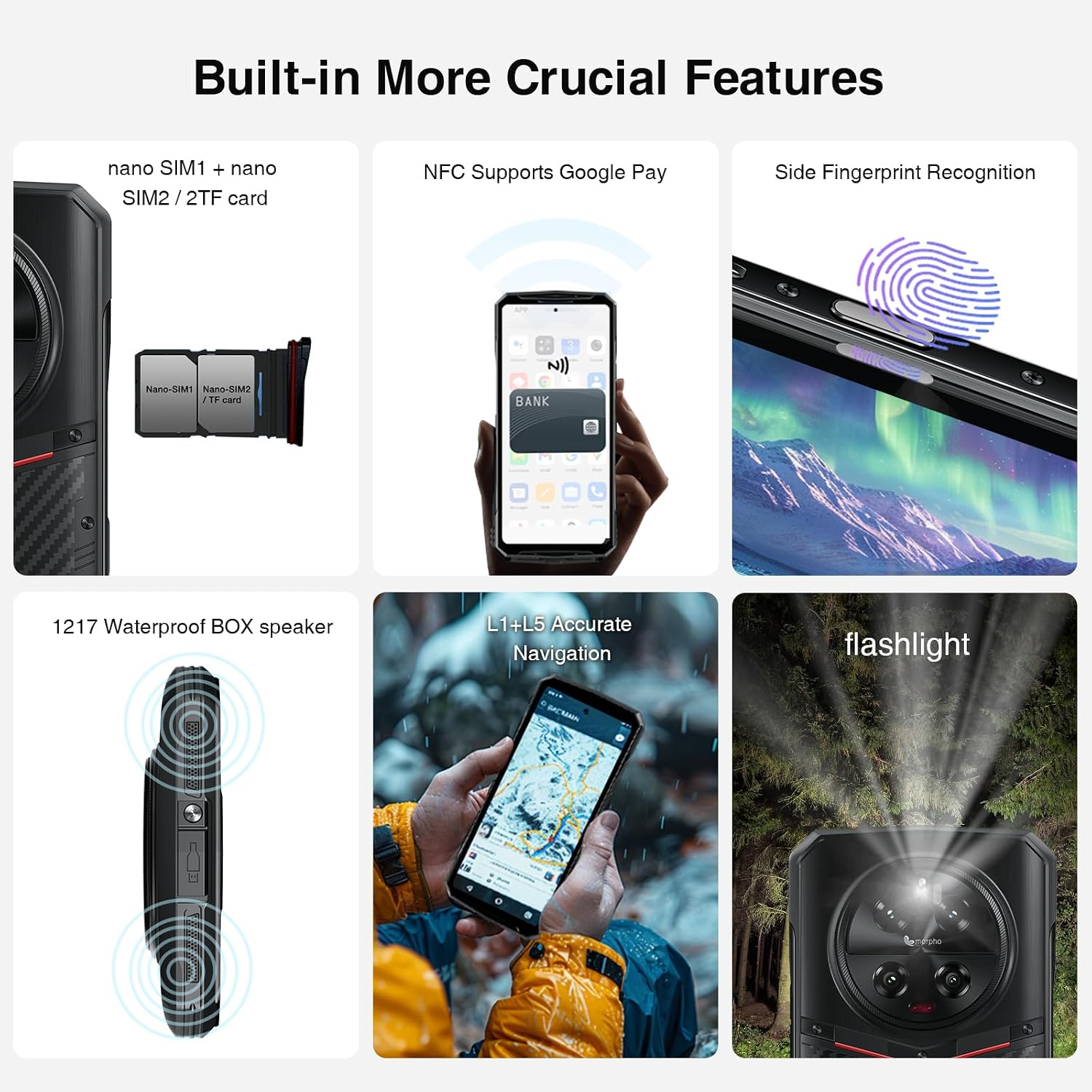
Figure 7.1: Visual demonstration of the DOOGEE DK10's military-grade safeguards, including dustproof, waterproof, and fall protection capabilities.
8. Connectivity
The DOOGEE DK10 offers comprehensive connectivity options:
- Dual SIM 5G: Supports two Nano-SIM cards for 5G connectivity across various bands.
- Wi-Fi: Supports Wi-Fi for internet access.
- Bluetooth: BT5.0 for wireless accessory connection.
- NFC: For contactless payments and quick pairing.
- GPS: Integrated GPS, Glonass, Galileo, and Beidou for accurate navigation.
- OTG: On-The-Go support for connecting USB devices.
9. Specifications
| Feature | Detail |
|---|---|
| Model Name | DK10 |
| Operating System | Android 13.0 |
| Processor | MTK Dimensity 8020 Octa Core 2.6GHz 6nm |
| RAM Memory Installed Size | 32 GB (12GB RAM + 20GB adjustable RAM) |
| Memory Storage Capacity | 512 GB (expandable up to 2 TB via SD Card) |
| Screen Size | 6.67 Inches |
| Display Resolution | 2560 x 1080 (2.5K AMOLED) |
| Refresh Rate | 120 Hz |
| Main Camera | 50MP AI Quad Camera |
| Night Vision Camera | 64MP |
| Ultra Wide Angle & Macro Camera | 50MP |
| Front Camera | 16MP |
| Battery Capacity | 5150 Milliamp Hours |
| Fast Charging | 120W |
| Wireless Charging | 50W |
| Protection Rating | IP68 / IP69K / MIL-STD-810G |
| Dimensions | 0.5 x 3.27 x 7.15 inches |
| Item Weight | 10.8 ounces (305 Grams) |
| Audio Jack | 3.5 mm |
| Wireless Carrier | Unlocked for All Carriers (GSM T-mobile compatible, not AT&T, new Cricket, Verizon) |
10. Maintenance
To ensure the longevity and optimal performance of your DOOGEE DK10, follow these maintenance guidelines:
- Cleaning: Wipe the device with a soft, damp cloth. Avoid harsh chemicals or abrasive materials.
- Port Protection: Always ensure the USB-C port cover is securely closed when not charging, especially in wet or dusty environments.
- Software Updates: Regularly check for and install system updates to ensure your device has the latest features and security patches.
- Battery Care: Avoid extreme temperatures. For optimal battery health, try to keep the charge level between 20% and 80% when possible.
11. Troubleshooting
If you encounter issues with your DOOGEE DK10, try the following common troubleshooting steps:
- Device Unresponsive: Press and hold the Power button for about 10-15 seconds to force a restart.
- Charging Issues: Ensure the charging cable and adapter are securely connected and undamaged. Try a different charger if available. Clean the charging port gently.
- Network Connectivity Problems: Check if Airplane Mode is off. Restart the device. Go to Settings > Network & internet > SIMs and ensure your SIM is enabled. Reset network settings if necessary.
- App Crashing/Freezing: Clear the app's cache and data (Settings > Apps > [App Name] > Storage & cache). If the issue persists, uninstall and reinstall the app.
- Microphone Issues: Ensure no debris is blocking the microphone. Test with different apps or during a call. If the issue persists, contact customer support.
12. Warranty and Support
DOOGEE is committed to providing excellent customer service and product support.
- Two-Year Quality Guarantee: The DOOGEE DK10 comes with a two-year quality guarantee.
- 30-Day Money Back Guarantee: If you are not satisfied with your purchase, you may be eligible for a 30-day money-back guarantee.
- 2-Year Limited Warranty: Your device is covered by a 2-year limited warranty.
- 24/7 Online Support: Access one-on-one online support for any queries or issues.

Figure 12.1: Details on DOOGEE's customer service, including money-back guarantee, limited warranty, and online support.
For further assistance, please visit the DOOGEE Store on Amazon or contact their official support channels.
Related documentsDK10


Ask a question about this manual
Ask about setup, troubleshooting, compatibility, parts, safety, or missing instructions. Manuals+ will review the question and use this page’s manual context to help answer it.