
1. Welcome
Thank you for choosing the XLeader SoundAngel Mate IPX7 Waterproof Bluetooth Shower Speaker. This manual provides essential information for the safe and efficient use of your new device. Please read it thoroughly before operation and retain it for future reference.
2. Product Overview
2.1 Package Contents
- 1pc XLeader SoundAngel Mate Shower Speaker
- 1pc Suction cup
- 1pc Type-C charging cable
- 1pc Multilingual instruction manual
- 1pc warranty card
2.2 Key Features
- Certified IPX7 Waterproof: Designed to resist water, rain, and splashes. Can be fully immersed up to 1 meter for 30 minutes.
- Bluetooth 5.3 Connectivity: Ensures fast and stable connection up to 66 feet (20 meters).
- Crystal Sound & Bass: 5 Watts of power with a precision neodymium driver and proprietary bass radiator for distortion-free stereo sound.
- RGB Light Show: Multiple LED light modes to enhance your listening experience.
- Long Playtime: Built-in 1200mAh polymer battery provides 8-12 hours of playtime at 50-80% volume.
- Built-in Microphone: For hands-free calling.
- Powerful Suction Cup: Allows secure attachment to smooth surfaces like glass or tiles.
- True Wireless Stereo (TWS): Supports connecting two speakers for synchronous music playback.
2.3 Product Diagram
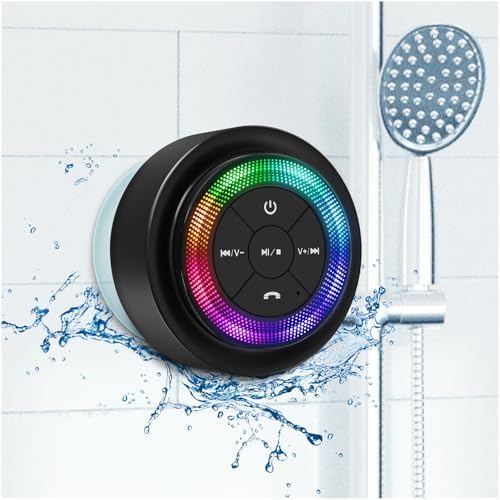
Figure 1: Front view of the XLeader SoundAngel Mate speaker, showing control buttons and LED light ring.
3. Setup
3.1 Charging the Speaker
Before first use, fully charge the speaker. Connect the provided Type-C charging cable to the speaker's charging port and a USB power source (e.g., wall adapter, computer USB port). The LED indicator will show red during charging and turn off when fully charged.

Figure 2: The speaker connected to its Type-C charging cable, indicating the charging port location.
3.2 Powering On/Off
- To Power On: Press and hold the power button (U) for 3 seconds. You will hear an audible prompt, and the LED lights will activate.
- To Power Off: Press and hold the power button (U) for 3 seconds. You will hear an audible prompt, and the LED lights will turn off.
3.3 Bluetooth Pairing
- Ensure the speaker is powered on and in pairing mode (LED lights will flash).
- On your device (smartphone, tablet, laptop), enable Bluetooth and search for available devices.
- Select "SoundAngel Mate" from the list.
- Once connected, you will hear a confirmation tone, and the LED lights will indicate a successful connection. The speaker will automatically reconnect to the last paired device when powered on.

Figure 3: The speaker highlighting its Bluetooth 5.3 connectivity and 66ft range for easy one-step pairing.
4. Operating Instructions
4.1 Basic Controls
| Button | Function |
|---|---|
| Power Button (U) | Press and hold for 3s to Power On/Off. Short press to Play/Pause music. |
| Volume Down / Previous Track (K/V-) | Short press for Previous Track. Press and hold for Volume Down. |
| Volume Up / Next Track (V+/K) | Short press for Next Track. Press and hold for Volume Up. |
| Light Mode Button (☀) | Short press to cycle through LED light modes. Press and hold to turn lights On/Off. |
| Call Button (📞) | Short press to Answer/End a call. Press and hold to Reject a call. Double press to Redial last number. |
4.2 LED Light Modes
The speaker features multiple RGB light modes. Short press the Light Mode button (☀) to cycle through different color patterns. Press and hold the button to turn the lights on or off.
Video 1: Demonstration of the XLeader SoundAngel Mate speaker's various RGB light modes.
4.3 Hands-Free Calling
With the built-in microphone, you can answer calls directly through the speaker. When a call comes in, the music will pause. Short press the Call button (📞) to answer, and short press again to end the call. Press and hold to reject an incoming call. Double press to redial the last number.

Figure 4: A user making a hands-free call using the speaker in a kitchen setting, illustrating the microphone function.
5. Installation and Placement
5.1 Using the Suction Cup
The speaker comes with a powerful suction cup for easy attachment to smooth, non-porous surfaces. Ensure the surface is clean and dry before applying the suction cup. Press the speaker firmly against the surface to create a strong seal.

Figure 5: The XLeader SoundAngel Mate speaker securely attached to a shower wall using its suction cup, with water splashing around it.
5.2 Versatile Use
Thanks to its IPX7 waterproof rating and robust design, the SoundAngel Mate speaker is suitable for various environments:
- Bathroom/Shower: Enjoy music or podcasts without worrying about water damage.
- Pool/Bathtub: The speaker can float and withstand immersion, making it ideal for poolside entertainment.
- Outdoor Activities: Perfect for kayaking, boating, or other water-related adventures.
- Kitchen/Car: Easily attach it to smooth surfaces for hands-free audio anywhere.

Figure 6: A collage illustrating the speaker's versatile use, shown attached to a car dashboard and on a kayak.
6. Maintenance
6.1 Cleaning
To clean the speaker, wipe it with a soft, damp cloth. Do not use harsh chemicals or abrasive cleaners, as these may damage the surface or compromise its waterproof seal. Ensure the charging port cover is securely closed before cleaning or exposing to water.
6.2 Storage
Store the speaker in a cool, dry place away from direct sunlight and extreme temperatures. If storing for an extended period, charge the battery periodically to maintain its lifespan.
6.3 Battery Care
To maximize battery life, avoid fully discharging the speaker frequently. Charge the speaker when the battery is low, and avoid leaving it uncharged for long periods.
7. Troubleshooting
7.1 Common Issues and Solutions
- Speaker does not power on: Ensure the battery is charged. Connect the speaker to a power source using the Type-C cable.
- Cannot pair with Bluetooth device:
- Ensure the speaker is in pairing mode (LEDs flashing).
- Make sure Bluetooth is enabled on your device.
- Move the speaker closer to your device (within 66 feet).
- Turn off and on both the speaker and your device's Bluetooth.
- Forget "SoundAngel Mate" from your device's Bluetooth list and try pairing again.
- No sound or low volume:
- Increase the volume on both the speaker and your connected device.
- Ensure the speaker is properly paired.
- Check if the music source is playing.
- LED lights not working: Short press the Light Mode button (☀) to activate or change modes. Press and hold to turn them on if they are off.
8. Technical Specifications
| Feature | Specification |
|---|---|
| Model Name | SoundAngel Mate |
| Item Model Number | USMateL |
| Brand | XLEADER |
| Connectivity Technology | Bluetooth 5.3 |
| Wireless Range | Up to 66 Feet (20 meters) |
| Water Resistance Level | IPX7 (Waterproof) |
| Speaker Maximum Output Power | 5 Watts |
| Battery Capacity | 1200mAh Lithium Polymer |
| Playtime | 8-12 hours (at 50-80% volume) |
| Charging Time | Approximately 3 Hours |
| Charging Port | Type-C |
| Special Features | Built-in Microphone, LED Light, Suction Cup |
| Product Dimensions | 3.15"D x 3.15"W x 2.76"H |
| Item Weight | 4.9 ounces (138 Grams) |
| Material | Acrylonitrile Butadiene Styrene (ABS), Silicone |
9. Warranty and Support
9.1 Warranty Information
The XLeader SoundAngel Mate speaker comes with a standard warranty. You can activate a Free 2-Year Extended Warranty by visiting the XLeader website and registering your product within 14 days of purchase. Please refer to the included warranty card for detailed terms and conditions.
9.2 Customer Support
For any questions, technical assistance, or warranty claims, please contact XLeader customer support through their official website or the contact information provided on your warranty card. Our team is dedicated to providing prompt and helpful service.