
Introduction
This manual provides comprehensive instructions for the installation, operation, and maintenance of your Varstrom P860ML Display. The P860ML is designed for use with BAFANG BBS02B, BBS-HD, BBS01B, and compatible hub motors. It features a 3.5-inch IPS color screen, an ergonomic external button, and offers a clear display of essential riding data. Please read this manual thoroughly before use to ensure proper function and safety.
Safety Information
- Always ensure the display is securely mounted before riding.
- Do not attempt to disassemble or modify the display, as this may void the warranty and cause damage.
- Keep the display away from extreme temperatures and direct sunlight for prolonged periods.
- Ensure all connections are dry and properly sealed before operation, especially in wet conditions.
- Pay attention to your surroundings while riding; do not become overly distracted by the display.
Package Contents
Verify that all items are present in your package:
- Varstrom P860ML Display Unit
- External Control Button
- Mounting Bracket (compatible with 22.2mm, 25.4mm, and 31.8mm handlebars)
- USB Charging Port (integrated)
- Connection Cable (5-pin female connector, UART protocol)
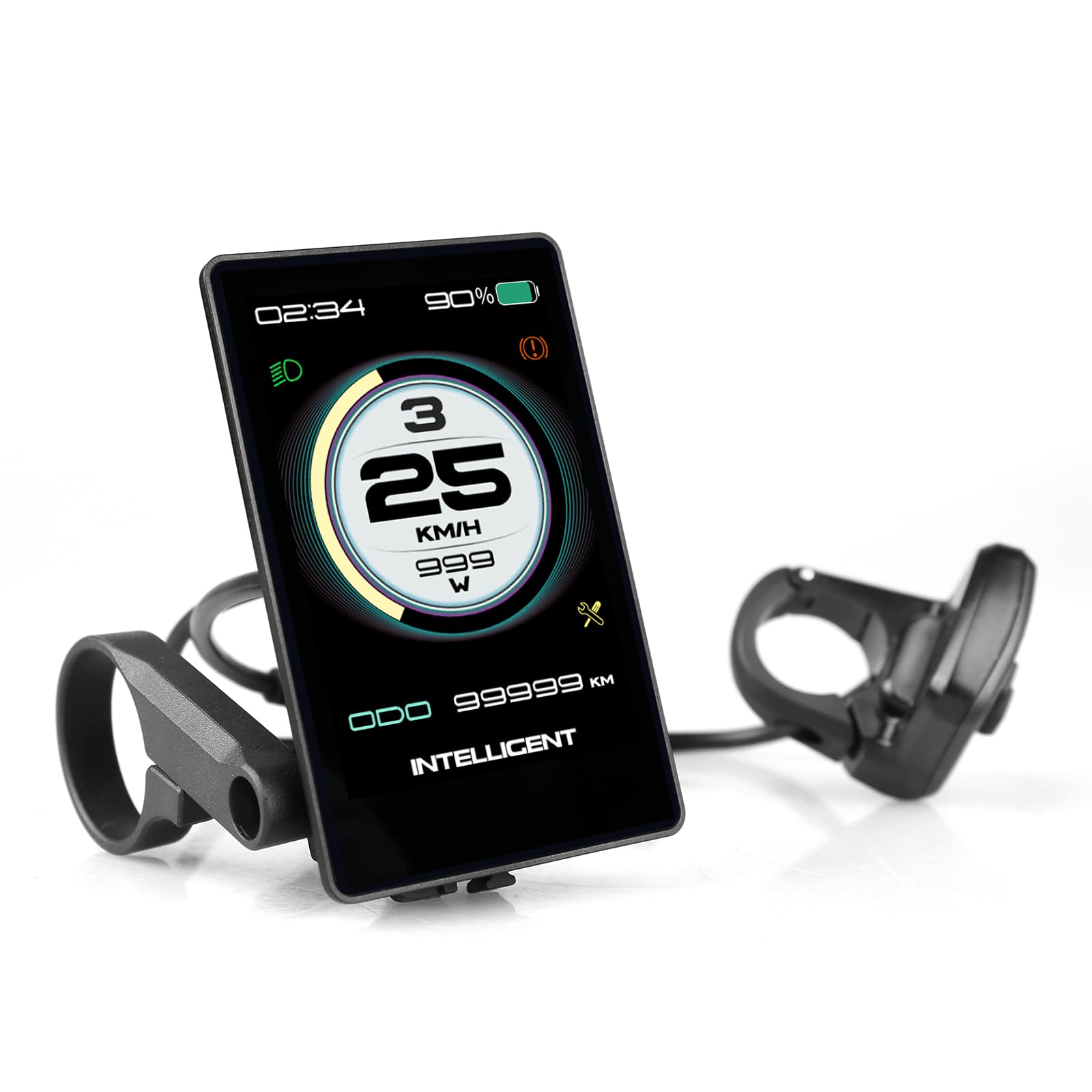
Image: The Varstrom P860ML display unit with its external control button and connecting cable.
Setup and Installation
- Compatibility Check: Ensure your BAFANG motor (BBS02B, BBS-HD, BBS01B, or hub motor) uses UART communication versions 5.0-5.8. The display uses a 5-pin female connector.
- Mounting the Display: Attach the mounting bracket to your bicycle's handlebar. The bracket is compatible with handlebar diameters of 22.2mm, 25.4mm, and 31.8mm. Secure the P860ML display unit onto the bracket.
- Connecting the Cable: Connect the display's 5-pin male connector to the corresponding 5-pin female connector on your BAFANG motor system. Ensure a firm and secure connection.
- External Control Button: Mount the external control button in an easily accessible position on your handlebar. Connect its cable to the display unit.

Image: The P860ML display shown with its mounting bracket, ready for handlebar installation.

Image: Close-up of the P860ML display's 5-pin connector for connecting to the BAFANG motor kit.
Operating Instructions
Power On/Off
Press and hold the power button on the external control unit to turn the display on or off.
Display Information
The 3.5-inch IPS color screen provides a comprehensive view of your riding data, including:
- Current Speed (SPEED)
- Average Speed (AVG SPD)
- Maximum Speed (MAX SPD)
- Odometer (ODO)
- Trip Distance (TRIP)
- Remaining Range
- Riding Time
- Battery Status Indicator
- PAS (Pedal Assist System) Level
- Error Codes
- Maintenance Reminders

Image: The P860ML display cycling through different data screens, showing speed, battery, and assist levels.
Adjusting Assist Levels
Use the '+' and '-' buttons on the external control unit to cycle through the available pedal assist levels. The display supports 3, 5, or 9 assist levels, as well as UBE mode, depending on your motor's configuration.
Backlight and Brightness
The display features automatic light sensing and 5 levels of backlight brightness. You can adjust the brightness manually through the settings menu to suit your preferences and riding conditions.
Language Settings
The P860ML display supports multiple languages including German, French, English, Italian, Spanish, and Czech. The default language is English. To change the language, navigate to the settings menu and select your desired language. You can often switch back to English with a single 'Back' button press.

Image: The P860ML display showing the language selection interface, with multiple language options visible.
USB Charging Port
The display includes a 5V/500mA USB charging port for emergency charging of smartphones or other small devices. This port is located on the display unit.
Maintenance
- Regularly clean the display screen with a soft, damp cloth. Avoid abrasive cleaners.
- Check all cable connections periodically to ensure they are secure and free from damage.
- Inspect the mounting bracket for any signs of wear or loosening.
- The display has an IP65 water resistance rating, meaning it is protected against dust and low-pressure water jets. Avoid submerging the unit in water.
Troubleshooting
The P860ML display can show error codes to indicate issues with your e-bike system. Refer to your BAFANG motor manual for a complete list of error codes and their meanings. Common troubleshooting steps include:
- No Power: Check all cable connections, especially the main power cable from the battery to the motor and the display cable. Ensure the battery is charged.
- Incorrect Speed/Distance: Verify that the wheel circumference setting in the display's menu is correct for your bicycle.
- PAS Not Working: Check the PAS sensor connection and ensure it is properly installed and aligned.
- Display Malfunction: If the display behaves erratically, try turning the system off and on again. If the issue persists, contact customer support.
Specifications
| Feature | Specification |
|---|---|
| Model Number | P860ML |
| Screen Type | 3.5-inch IPS Color TFT |
| Compatibility | BAFANG BBS02B, BBS-HD, BBS01B, Hub Motors (UART 5.0-5.8) |
| Connector Type | 5-Pin Female |
| Water Resistance | IP65 |
| Operating Temperature | Max -20 ℃ |
| Assist Levels | 3, 5, 9 levels, UBE (optional) |
| USB Charging Port | 5V/500mA |
| Material | ABS + PC Shell |
| Included Components | USB Charging Port |
Warranty and Support
Varstrom products are designed for reliability and performance. For warranty information, please refer to the documentation provided with your purchase or visit the official Varstrom website. If you encounter any issues or require technical assistance, please contact Varstrom customer support through their official channels. Provide your product model number (P860ML) and a detailed description of the issue for efficient service.
Contact Information:
- Visit the Varstrom Store on Amazon for more information and support.


