
1. Product Overview
The NBCP WOLF-V8 is a versatile wireless game controller designed for an enhanced gaming experience across multiple platforms, including Nintendo Switch, Switch Lite, Switch OLED, Android, iOS, and PC. It features advanced functionalities such as NFC support, customizable macro buttons, a turbo function, and a 6-axis gyroscope for precise control.

Figure 1: NBCP WOLF-V8 Controller with NFC sensing capability.
2. Package Contents
- NBCP WOLF-V8 Wireless Controller
- USB Charging Cable
- Japanese Instruction Manual
- 1020mAh Removable Battery (pre-installed or separate)
3. Setup and Connection
3.1 Wired Connection to PC
To connect the controller to a PC via a wired connection:
- Connect the USB charging cable to the controller and your PC.
- Press and hold the '+' key and the 'Back' key simultaneously on the controller.
- The controller will vibrate, indicating successful setup and connection.
3.2 Wireless Connection (Bluetooth)
The WOLF-V8 controller supports wireless connection via Bluetooth for various devices.
3.2.1 Connecting to iOS Devices (iPhone/iPad)
For Apple iOS devices, use the KeyLinker app for connection and updates:
- Access the App Store on your iOS device.
- Search for and download the "KeyLinker" application.
- Open the KeyLinker app.
- Press and hold the Wolf Head button on the controller to activate Bluetooth pairing mode.
- In the KeyLinker app, select "Controller change key" to connect.
- The app will display the current and latest versions, indicating successful connection and readiness for use.
3.2.2 Wireless USB Receiver (Sold Separately)
For PC users who prefer a dedicated wireless connection, a USB receiver is available for purchase separately. This receiver allows for seamless wireless pairing with your computer.

Figure 2: PC dedicated USB wireless receiver (sold separately).
4. Operating Instructions and Features
4.1 Macro Buttons (ML/MR)
The WOLF-V8 controller features two customizable macro buttons (ML and MR) on the back. These buttons allow you to program complex sequences of up to 16 command inputs, simplifying intricate in-game actions and combos.

Figure 3: Location of the ML and MR macro programming buttons on the back of the controller.
4.2 Turbo Function (Rapid Fire)
Activate the Turbo function for rapid, repeated button presses. This feature supports 3 adjustable speeds: 5, 12, or 20 presses per second, providing a competitive edge in fast-paced games.

Figure 4: Automatic rapid fire function with 3-stage adjustable speed.
4.3 6-Axis Gyroscope and HD Vibration
The built-in 6-axis gyroscope offers precise motion control and stable directional sensing, enhancing accuracy in games. High-definition vibration feedback provides an immersive experience, with 5 adjustable intensity levels (0%, 25%, 50%, 75%, 100%) that can be adjusted in real-time based on game scenes.

Figure 5: 6-Axis Gyro Sensor and HD Vibration maximize game immersion.

Figure 6: Supports 5 levels of vibration intensity adjustment (0%-25%-50%-75%-100%).
4.4 NFC Functionality
The controller is equipped with a unique NFC sensing function that supports AMIIBO cards, allowing for in-game interactions and unlocking content.

Figure 7: Unique NFC sensing function supports AMIIBO cards.
4.5 RGB Lighting
The controller features vivid RGB lights with three selectable modes: Breathing, Colorful, and Off. Customize the lighting to match your preference or gaming setup.
4.6 Ergonomic Design and Buttons
The WOLF-V8 features an improved grip design for comfortable use with both four and six-finger styles. The buttons are dual crystal anti-scratch, offering an enhanced tactile feel compared to standard plastic buttons. The controller's surface has a sweat-resistant scrub texture and granular/laser anti-slip features for secure handling.

Figure 8: Ergonomic grip design for comfortable 4-finger and 6-finger use, with anti-slip texture.
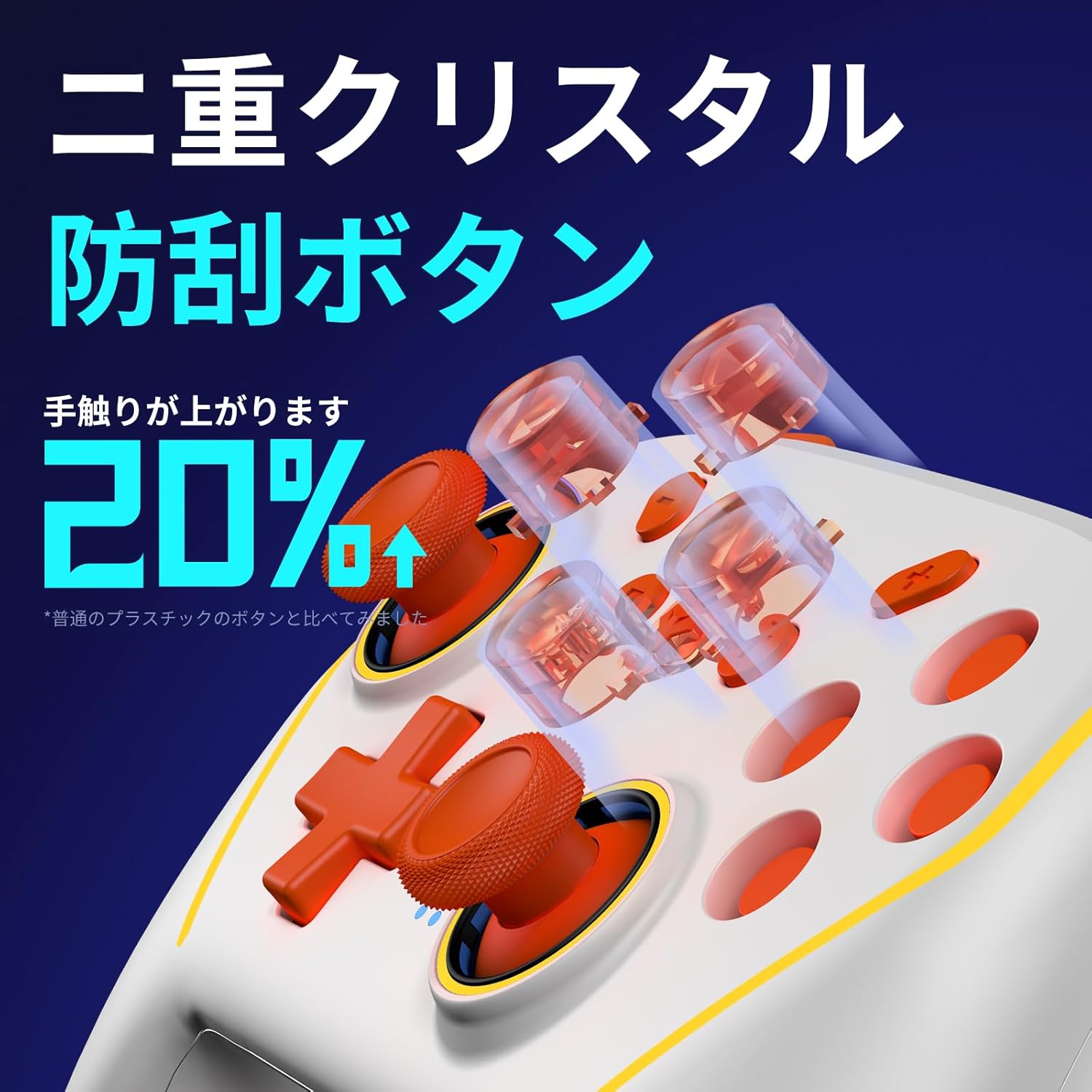
Figure 9: Dual Crystal Anti-Scratch Buttons for improved tactile feel.
5. Maintenance
5.1 Battery Information
The WOLF-V8 controller features a removable 1020mAh battery, designed for easy replacement and extended product life. A full charge takes approximately 4.0 hours and provides up to 20 hours of continuous usage.

Figure 10: Removable battery design with 1020mAh capacity, 4.0 hours charging time, and 20 hours usage time.
6. Troubleshooting
- Connection Issues: If the controller fails to connect, ensure it is fully charged. For wired connections, verify the cable is securely plugged into both the controller and the device. For wireless connections, ensure Bluetooth is enabled on your device and the controller is in pairing mode (long-press Wolf Head button).
- Unresponsive Buttons: If buttons are unresponsive, try resetting the controller by pressing the small reset button (usually located on the back or bottom, may require a pin). Reconnect the controller after resetting.
- D-Pad Sensitivity: Some users have reported issues with D-pad response, where pressing 'Up' might register as 'Left'. Ensure the controller firmware is up to date via the KeyLinker app (for iOS) or check the manufacturer's website for PC updates.
- Vibration Not Working: Check the vibration intensity settings. Ensure it's not set to 0% via the KeyLinker app or in-game settings.
7. Specifications
| Feature | Specification |
|---|---|
| Model | WOLF-V8 |
| Battery Type | 1 CR5 type battery (included) |
| Battery Capacity | 1020mAh |
| Charging Time | Approx. 4.0 hours |
| Usage Time | Up to 20 hours |
| Connectivity | Bluetooth, Wired (USB) |
| Compatibility | Nintendo Switch/Lite/OLED, Android, iOS, PC |
| Special Features | NFC, Macro Buttons, Turbo Function, 6-Axis Gyro, HD Vibration, RGB Lighting |
| Dimensions | 18.4 x 16.9 x 8.2 cm |
| Weight | 330 g |
| ASIN | B0D978PBVX |
| Release Date | 2024/11/07 |
8. Warranty and Support
This product has obtained technical standard conformity certification in Japan, ensuring its quality and safety. If you encounter any issues with after-sales service or require support, please contact NBCP customer service. For additional resources, you can search for "NBCP" on YouTube to find official video explanations and operating instructions.

Figure 11: Technical Conformity Mark and contact information for support.