
Introduction
This manual provides instructions for the safe and efficient operation of your LIMETA R16 Smart Rechargeable Battery Charger. This charger is designed for various rechargeable battery types, offering independent charging slots and multiple maintenance modes. Please read this manual thoroughly before use and retain it for future reference.
Safety Precautions
To ensure safe operation and prolong the life of your charger and batteries, observe the following safety guidelines:
- Do not attempt to charge non-rechargeable batteries.
- Ensure correct battery polarity when inserting batteries into the slots.
- Avoid short-circuiting the battery terminals.
- Do not expose the charger to water or extreme temperatures.
- Keep the charger away from children and pets.
- Unplug the charger from the power source when not in use or during cleaning.
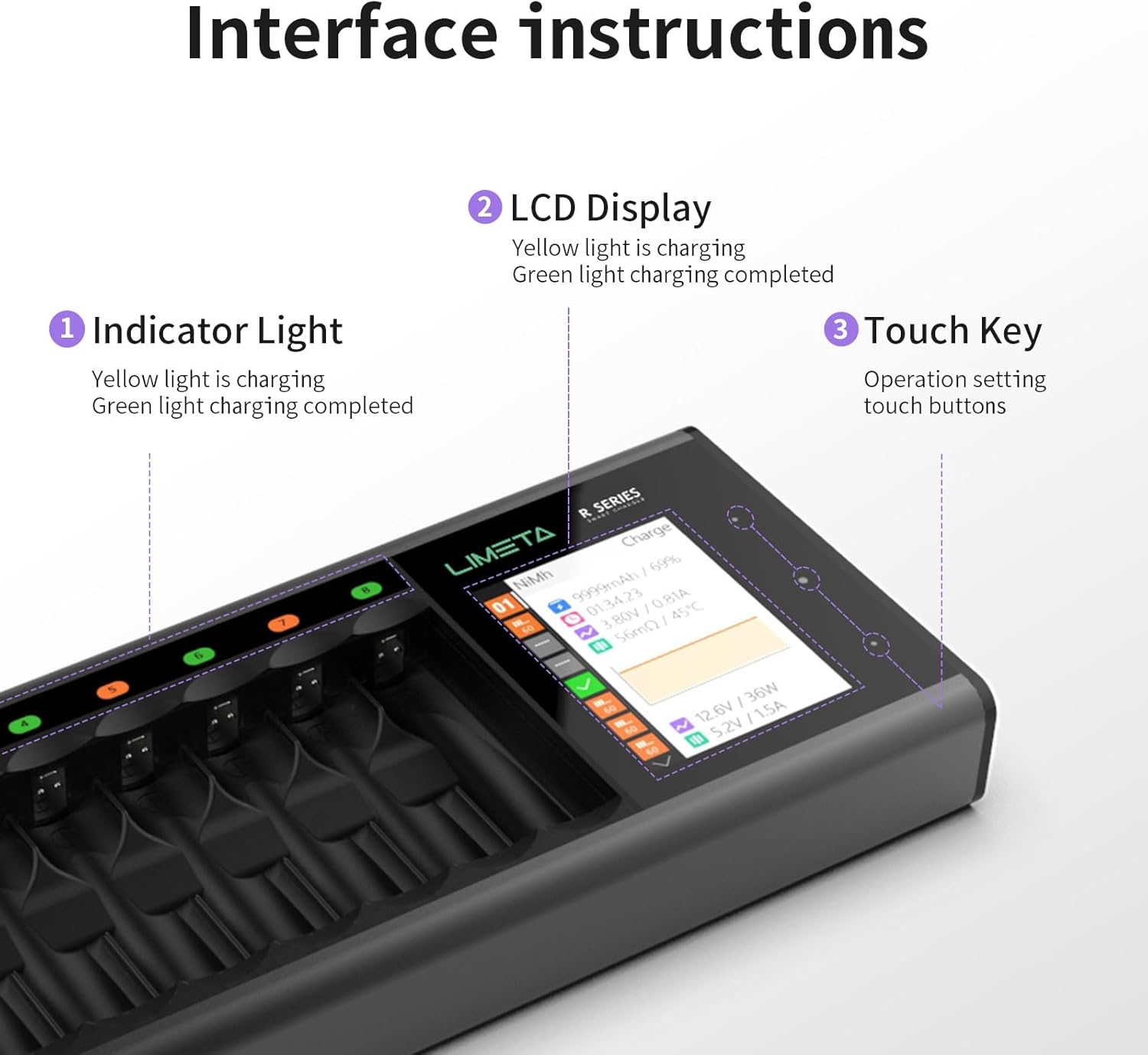
Figure 1: The LIMETA R16 charger features multiple safety protections including short circuit, overheat, overcurrent, overcharge, and reverse polarity protection.
Product Overview
Key Features
- Smart Fast Charging: Up to 1500mA per slot, automatically adjusting current and voltage for optimal performance.
- Universal Compatibility: Supports NiMH AA/AAA, NiCd, Li-ion, LiHV, LiFePO4, and NiZn batteries.
- Independent Charging Slots: Each slot operates independently, allowing simultaneous charging of different battery types and capacities.
- Professional Battery Maintenance Modes: Includes Charge, Cycle, Activation, and Discharge modes to extend battery lifespan.
- Large LCD Display: Provides real-time monitoring of charging current, battery voltage, capacity, and charging status.
Interface Instructions

Figure 2: Overview of the charger's interface elements.
- Indicator Light: Yellow light indicates charging in progress; green light indicates charging is complete.
- LCD Display: Shows detailed information such as charging current, battery voltage, capacity, and charging status.
- Touch Key: Used for operation settings and navigation through menus.
Setup
Power Connection
Connect the provided DC power adapter to the charger's DC input port and then plug the adapter into a standard wall outlet. The charger's LCD display will illuminate.
Battery Insertion
Carefully insert AA or AAA rechargeable batteries into the charging slots. Ensure that the positive (+) and negative (-) terminals of the batteries align correctly with the markings in the slots. The charger will automatically detect the battery type and begin charging for most common batteries.
Operating Instructions
Automatic Battery Detection
The LIMETA R16 charger is designed to automatically identify most common battery types (NiMH, NiCd, Li-ion, LiFePO4) upon insertion. The LCD display will show the detected battery type and begin the charging process.

Figure 3: The charger automatically identifies compatible battery types. Manual selection is required for LiHV and NiZn batteries.
Manual Battery Type Selection
For LiHV and NiZn batteries, manual selection of the battery type is required. Follow these steps:

Figure 4: Manual selection of battery type via the charger's settings menu.
- Insert the battery into the slot.
- Long press the touch key to enter the settings menu.
- Navigate to 'Battery Type' and select the appropriate type (e.g., LiHV or NiZn) using the up/down arrows.
- Confirm your selection to begin charging.
Note: NiZn and LiHv batteries require manual battery type selection and cannot be charged simultaneously with other battery types in hybrid mode.
Charging Modes
The charger offers multiple working modes to optimize battery performance and lifespan:

Figure 5: The charger supports multiple working modes for battery maintenance.
- Charge Mode: Standard fast and safe charging.
- Discharge Mode: Discharges batteries to a safe voltage level, useful for maintaining battery health.
- Cycle Mode: Charges and discharges batteries multiple times to improve performance and capacity.
- Activation Mode: Attempts to revive over-discharged batteries.
To select a mode, navigate to the 'Task' option in the settings menu and choose the desired function.
Monitoring Charging Progress
The high-resolution LCD screen provides real-time data for each individual slot. You can monitor:
- Charging current (mA)
- Battery voltage (V)
- Charged capacity (mAh)
- Charging status (percentage)
Maintenance
Cleaning
Ensure the charger is unplugged before cleaning. Use a soft, dry cloth to wipe the exterior of the charger. Do not use liquid cleaners or solvents.
Firmware Update
To ensure optimal performance and access to the latest features, it is recommended to periodically check for and install firmware updates.
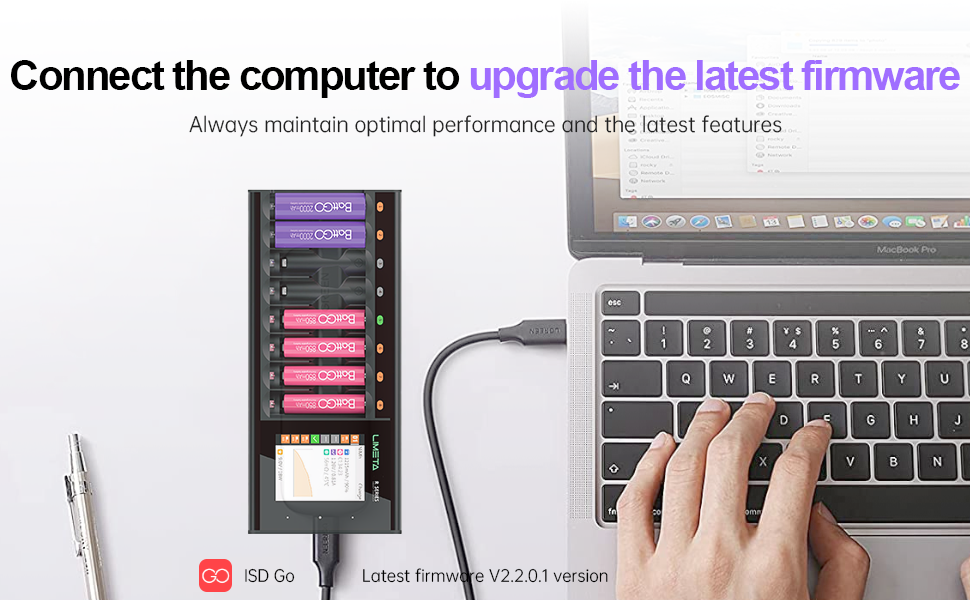
Figure 6: Connect the charger to a computer to upgrade the firmware using the iSD Go software.
Connect the charger to a computer using a compatible USB cable. Download the latest firmware and the iSD Go software from the official LIMETA or iSDT website. Follow the on-screen instructions in the software to complete the update process.
Troubleshooting
This section addresses common issues you might encounter with your LIMETA R16 charger.
Q: What types of batteries does the charger support?
A: The R Series Charger supports Li-Ion, LiHV, LiFe, NiMH, NiCd, and NiZn AA/AAA batteries. ATTENTION: The R series chargers cannot charge 1.5V lithium-ion batteries.
Q: What should I do if the battery gets hot when the charger is charging?
A: As the charger supports fast charging with a high current of 1.5A per battery, it is normal for the battery to heat up during the charging process. To address this issue, you can lower the charging current through the charger settings.
Q: Why is the measured contact resistance value high and inconsistent?
A: This product uses a contact plate charging design. The contact resistance may vary depending on the battery's placement angle and contact position. Oxidation or rust on the battery's positive or negative terminals can also lead to poor contact and increased resistance. Ensure batteries are clean and properly seated.
Q: What is independent operation of each channel?
A: Independent channel operation means that each slot can charge a battery independently. However, for the R series, it does not mean that multiple operating modes (e.g., charging and analysis) are supported simultaneously across different slots. If you need to use multiple functions simultaneously, consider a different model like the C4 Evo.
Q: What should I do if the battery is difficult to remove?
A: The product is designed with dedicated grooves for removing batteries. The correct method is to pry out the batteries in order (e.g., from left to right or from right to left).
Q: Why do some batteries catch fire?
A: Fast charging requires extremely high battery consistency. Batteries with low internal resistance and good consistency ensure stable charging and discharging. Some batteries have high internal resistance and poor consistency, which can easily cause overheating risks during fast charging. It is strongly recommended to prioritize well-known brand batteries. If you are unsure whether the battery has good consistency, please reduce the charging current to below 500mAh.
Q: Why does the battery sometimes show as fully charged but actually have insufficient capacity?
A: This is related to the battery itself. Some batteries have exaggerated capacity ratings or the battery has aged. It is recommended to charge batteries from reputable brands. After the display shows fully charged, continue trickle charging for a period of time (e.g., 15-30 minutes) to supplement the capacity. Use the product's analysis function to check the actual capacity before charging. Some malfunction issues may appear to be caused by the charger but are actually due to the battery.
Q: What should I do if the product emits a beeping sound?
A: A beeping sound may indicate a battery malfunction. Try replacing the battery. If the issue persists, it could be a charger malfunction; please power off or try a different slot for testing. Incorrect parameter settings can also cause this; carefully consult the manual and check and reset the charging parameters.
Specifications

Figure 7: Detailed product specifications for the LIMETA R-Series chargers.
| Feature | Specification (R16 Model) |
|---|---|
| Product Dimensions | 12.14 x 3.11 x 1.1 inches (308.4 x 79 x 28 mm) |
| Item Weight | 12 ounces (450g) |
| Item Model Number | R16 |
| Brand | LIMETA |
| Color | Black |
| Manufacturer | SHENZHEN ISD TECHNOLOGY CO.,LTD |
| Output Voltage | 3.7 Volts (DC) |
| Power Input | Ø 6.5 DC |
| Input Voltage | 5-12V |
| Input Power | 36W |
| Charge Cells | 1-16 AA/AAA cells |
| Battery Type Support | Li-Ion, LiHV, NiMH, NiCd, LiFePO4, Eneloop |
| Charge Current | 0.1A-1.5A/slot |
| Discharge Current | 0.1A-1.0A/slot |
| Display | 240*320 IPS LCD |
| Operating Temperature | 0°C-40°C |
Warranty and Support
LIMETA products are designed for reliability and performance. For any product-related inquiries, technical support, or warranty claims, please contact the seller or manufacturer directly. Please refer to your purchase documentation for specific warranty terms and conditions.
This product is typically covered by a 30-day return policy from the date of purchase. Extended protection plans may be available for purchase separately.


